在 Python 中,可以使用 json 模块将 JSON 字符串转换为 Python 列表(list),以下是详细步骤和示例:
(图片来源网络,侵删)
基本方法:json.loads()
json.loads() 用于将 JSON 字符串解析为 Python 对象(如 list 或 dict)。
示例代码
import json
# JSON 字符串(表示一个列表)
json_str = '[1, 2, "apple", {"key": "value"}]'
# 转换为 Python 列表
python_list = json.loads(json_str)
print(python_list)
# 输出: [1, 2, 'apple', {'key': 'value'}]
print(type(python_list))
# 输出: <class 'list'>
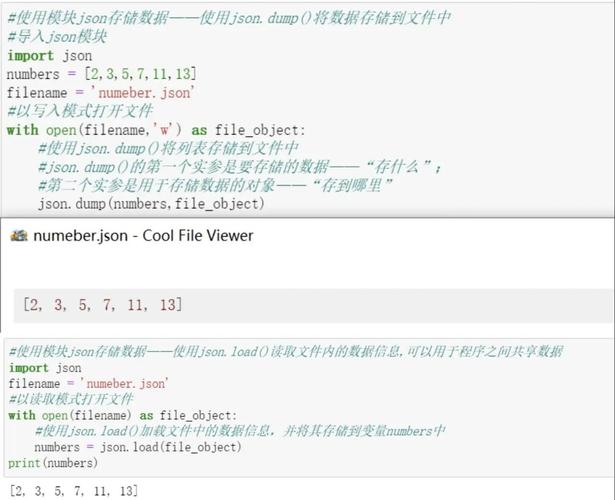
处理 JSON 文件:json.load()
JSON 数据存储在文件中,可以使用 json.load() 直接从文件读取并转换为列表。
示例代码
假设有一个文件 data.json如下:
["apple", "banana", "cherry"]
读取文件并转换为列表:
(图片来源网络,侵删)
import json
with open('data.json', 'r', encoding='utf-8') as file:
    python_list = json.load(file)
print(python_list)
# 输出: ['apple', 'banana', 'cherry']
常见问题与解决
(1) JSON 字符串包含单引号
JSON 标准要求使用双引号 (),如果输入是单引号 (),会抛出 json.JSONDecodeError。
错误示例:
json_str = "['apple', 'banana']"  # 单引号,会报错
json.loads(json_str)  # 抛出异常
解决方法:将单引号替换为双引号:
import json
json_str = "['apple', 'banana']"
fixed_json_str = json_str.replace("'", '"')  # 替换单引号为双引号
python_list = json.loads(fixed_json_str)
print(python_list)
# 输出: ['apple', 'banana']
(2) 处理非标准 JSON(如 None 或 NaN)
Python 的 json 模块默认不支持 None、NaN 或 Infinity,但可以通过 parse_constant 参数自定义处理。
示例:
import json
json_str = '[1, null, NaN, Infinity]'
python_list = json.loads(
    json_str,
    parse_constant=lambda x: None if x.lower() == 'null' else float(x)
)
print(python_list)
# 输出: [1, None, nan, inf]
完整示例
import json
# 示例 JSON 字符串(包含嵌套对象和数组)
json_str = '''
[
    {"name": "Alice", "age": 30, "hobbies": ["reading", "swimming"]},
    {"name": "Bob", "age": 25, "hobbies": ["gaming", "coding"]}
]
'''
# 转换为 Python 列表
data = json.loads(json_str)
# 访问数据
print(data[0]["name"])          # 输出: Alice
print(data[1]["hobbies"][0])    # 输出: gaming
| 方法 | 用途 |
|---|---|
json.loads() |
将 JSON 字符串转换为 Python 列表 |
json.load() |
从文件读取 JSON 并转换为列表 |
json.dumps() |
将 Python 列表转换为 JSON 字符串(反向操作) |
通过 json 模块,可以轻松实现 JSON 和 Python 列表之间的转换。