Of course! Let's dive into creating a Python web service. This is a fundamental skill for modern software development.
We'll cover:
- What is a Web Service? (A quick definition)
- Choosing a Framework: The most popular options for Python.
- Building a Simple REST API with Flask: A step-by-step, beginner-friendly tutorial.
- Building a Simple REST API with FastAPI: A modern, high-performance alternative.
- Key Concepts: (Endpoints, Requests, Responses, Data Formats)
- Deployment: How to make your service available to the world.
What is a Web Service?
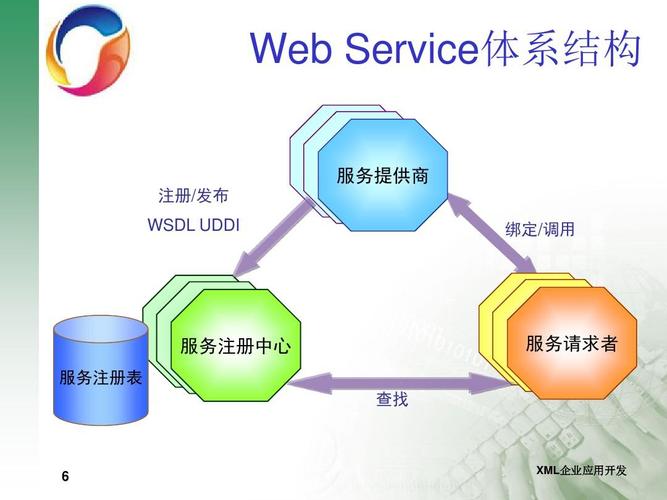
In simple terms, a web service is an application that provides a way for two different machines (usually a client and a server) to communicate over a network, typically the internet.
- Client: A program that requests data (e.g., your web browser, a mobile app, another server).
- Server: A program that responds to those requests (the web service you build).
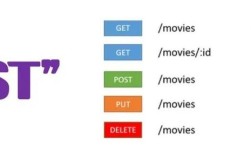
The most common type of web service today is a REST API (Representational State Transfer Application Programming Interface). It uses standard HTTP methods to perform actions on data.
Choosing a Python Framework
You don't need to build a web service from scratch. Python has excellent frameworks that handle the low-level details (like listening for connections, parsing HTTP requests) so you can focus on your application's logic.
Here are the top choices:
| Framework | Best For | Key Characteristics |
|---|---|---|
| Flask | Beginners, small projects, APIs | - "Micro-framework": lightweight and flexible. - Easy to learn and get started. - Great for simple REST APIs. |
| FastAPI | Performance, modern APIs, production | - Blazing fast (based on Starlette and Pydantic). - Automatic interactive API documentation (Swagger UI). - Excellent for data validation and type hinting. |
| Django | Full-stack web applications | - "Batteries-included": includes an ORM, admin panel, authentication, etc. - More opinionated and structured. - Can be overkill for a simple API. |
Recommendation: For learning and most API projects, start with Flask. For building modern, high-performance APIs, FastAPI is an outstanding choice.
Building a REST API with Flask (Beginner Tutorial)
Flask is perfect for understanding the core concepts. We'll build a simple API to manage a list of "tasks".
Step 1: Install Flask
First, make sure you have Python installed. Then, open your terminal or command prompt and install Flask using pip.
pip install Flask
Step 2: Create the Project File
Create a new file named app.py.
Step 3: Write the Code
Paste the following code into app.py. We'll break it down line by line.
# 1. Import the Flask class
from flask import Flask, jsonify, request
# 2. Create an instance of the Flask class
#    __name__ is a special Python variable that gets the name of the current module.
#    Flask uses this to know where to look for resources like templates and static files.
app = Flask(__name__)
# 3. In-memory "database" for our tasks
#    In a real application, you would use a database like PostgreSQL or MongoDB.
tasks = [
    {"id": 1, "title": "Learn Python", "done": True},
    {"id": 2, "title": "Build a Web Service", "done": False},
]
next_task_id = 3
# 4. Define a route and a view function
#    @app.route() is a decorator that tells Flask which URL should trigger our function.
#    The '/' is the root URL.
@app.route('/')
def hello_world():
    return 'Hello, World! This is a simple Flask web service.'
# 5. Define an endpoint to get all tasks (GET request)
@app.route('/tasks', methods=['GET'])
def get_tasks():
    # jsonify converts a Python dictionary/list into a JSON response
    return jsonify(tasks)
# 6. Define an endpoint to get a single task by its ID (GET request)
@app.route('/tasks/<int:task_id>', methods=['GET'])
def get_task(task_id):
    task = next((t for t in tasks if t['id'] == task_id), None)
    if task is None:
        # Return a 404 Not Found error if the task doesn't exist
        return jsonify({"error": "Task not found"}), 404
    return jsonify(task)
# 7. Define an endpoint to create a new task (POST request)
@app.route('/tasks', methods=['POST'])
def create_task():
    # Get the JSON data from the request body
    if not request.json or 'title' not in request.json:
        return jsonify({"error": "The task must have a title"}), 400
    new_task = {
        "id": next_task_id,
        "title": request.json['title'],
        "done": False
    }
    tasks.append(new_task)
    next_task_id += 1
    # Return the newly created task with a 201 Created status code
    return jsonify(new_task), 201
# 8. Run the application
#    if __name__ == '__main__': ensures this code only runs when the script is executed directly.
#    debug=True enables the debugger and the reloader, which is useful for development.
if __name__ == '__main__':
    app.run(debug=True)
Step 4: Run the Web Service
Save the file and run it from your terminal:
python app.py
You should see output like this:
 * Serving Flask app 'app'
 * Running on http://127.0.0.1:5000
Press CTRL+C to quit
 * Restarting with stat
 * Debugger is active!
 * Debugger PIN: ...
Your web service is now running! It's listening for requests on http://127.0.0.1:5000.
Step 5: Test Your API
Open a new terminal window (don't close the one running the server). We'll use the curl command to test our endpoints.
-
Get all tasks:
curl http://127.0.0.1:5000/tasks
Output:
[ {"done": true, "id": 1, "title": "Learn Python"}, {"done": false, "id": 2, "title": "Build a Web Service"} ] -
Create a new task:
curl -X POST -H "Content-Type: application/json" -d '{"title": "Master Flask"}' http://127.0.0.1:5000/tasksOutput:
{"done": false, "id": 3, "title": "Master Flask"} -
Get all tasks again (to see the new one):
curl http://127.0.0.1:5000/tasks
Output:
[ {"done": true, "id": 1, "title": "Learn Python"}, {"done": false, "id": 2, "title": "Build a Web Service"}, {"done": false, "id": 3, "title": "Master Flask"} ] -
Get a single task by ID:
curl http://127.0.0.1:5000/tasks/2
Output:
{"done": false, "id": 2, "title": "Build a Web Service"}
Building a REST API with FastAPI (Modern & Fast)
FastAPI is a fantastic modern alternative. Its biggest selling point is automatic API documentation.
Step 1: Install FastAPI and Uvicorn
Uvicorn is an ASGI server, which is what FastAPI requires to run.
pip install "fastapi[all]"
# The [all] installs fastapi, uvicorn, and other useful dependencies
Step 2: Create the Project File
Create a new file named main.py.
Step 3: Write the Code
FastAPI uses type hints and Pydantic models for data validation, which makes your code cleaner and more robust.
# 1. Import FastAPI and other necessary components
from fastapi import FastAPI, HTTPException
from pydantic import BaseModel
# 2. Create an instance of the FastAPI class
app = FastAPI()
# 3. Define a Pydantic model for the data structure
#    This provides automatic data validation and serialization.
class Task(BaseModel):
    id: int | None = None # ID is optional on creation str
    done: bool = False
# In-memory database
tasks_db = [
    {"id": 1, "title": "Learn Python", "done": True},
    {"id": 2, "title": "Build a Web Service", "done": False},
]
next_task_id = 3
# 4. Define an endpoint
#    FastAPI automatically detects the HTTP method from the decorator.
@app.get("/")
def read_root():
    return {"message": "Hello, World! This is a FastAPI web service."}
# 5. Get all tasks
@app.get("/tasks", response_model=list[Task])
def get_all_tasks():
    return tasks_db
# 6. Get a single task by ID
@app.get("/tasks/{task_id}", response_model=Task)
def get_task(task_id: int):
    task = next((t for t in tasks_db if t['id'] == task_id), None)
    if task is None:
        raise HTTPException(status_code=404, detail="Task not found")
    return task
# 7. Create a new task
@app.post("/tasks", response_model=Task, status_code=201)
def create_task(task: Task):
    # The 'task' object is automatically validated by Pydantic
    new_task_data = task.model_dump(exclude_unset=True)
    new_task_data["id"] = next_task_id
    tasks_db.append(new_task_data)
    next_task_id += 1
    return new_task_data
# To run this app:
# uvicorn main:app --reload
Step 4: Run the Web Service
Save the file and run it from your terminal:
uvicorn main:app --reload
main: The file namemain.py.app: The objectapp = FastAPI()inside the file.--reload: Enables auto-reloading for development.
Step 5: Test Your API and Explore the Docs
Open your browser and go to two URLs:
-
Interactive API Documentation:
http://127.0.0.1:8000/docsThis is the Swagger UI. You can click on the endpoints, try them out directly from your browser, and see the expected request/response formats. It's incredibly useful!
-
Alternative API Documentation:
http://127.0.0.1:8000/redocThis is ReDoc, another clean way to view your API documentation.
You can also use curl in a new terminal just like with Flask to test the endpoints.
Deployment
Running a service on your local machine (0.0.1) is only for development. To make it public, you need to deploy it to a server.
-
PaaS (Platform as a Service): The easiest way for beginners.
- Heroku: Very popular for Python apps. You just need to add a
Procfileand it handles the rest. - Render: Great for both web apps and background workers. Offers a generous free tier.
- PythonAnywhere: A fantastic platform specifically for Python hosting.
- Heroku: Very popular for Python apps. You just need to add a
-
VPS (Virtual Private Server): More control, more responsibility.
- DigitalOcean, Linode, AWS EC2: You get a virtual machine. You install your own OS, Python, and a production-grade web server like Gunicorn or Uvicorn. Then, you use a reverse proxy like Nginx to handle incoming traffic and forward it to your application.
-
Serverless:
- AWS Lambda, Google Cloud Functions: You only pay for the exact execution time of your code. It's great for event-driven tasks and scales automatically.
Summary
| Concept | Description |
|---|---|
| Web Service | A software system designed to support interoperable machine-to-machine interaction over a network. |
| REST API | A set of rules for how an application should request data from a server. Uses standard HTTP methods (GET, POST, PUT, DELETE). |
| Flask | A lightweight, flexible micro-framework perfect for beginners and small APIs. |
| FastAPI | A modern, high-performance framework that is great for production APIs and provides automatic documentation. |
| Endpoint | A specific URL (e.g., /tasks) that corresponds to a function in your code. |
| Request/Response | The client sends a request (e.g., GET /tasks), and the server sends back a response (e.g., a JSON list of tasks). |
| Deployment | The process of making your web service accessible on the internet, using services like Heroku, Render, or a VPS. |
Start with Flask to understand the fundamentals, then move to FastAPI for more powerful and modern applications. Happy coding