
Of course! Let's dive deep into Python's re.finditer() function. It's an incredibly useful tool for anyone working with text processing, data extraction, or log analysis.
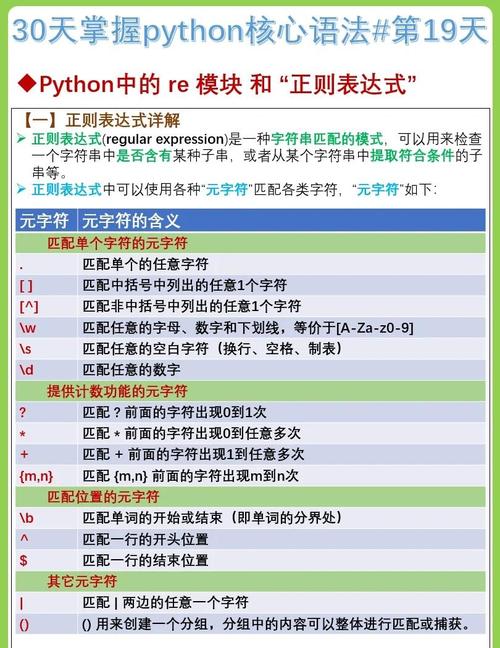
What is re.finditer()?
In simple terms, re.finditer() is a function from Python's built-in re (regular expression) module. It scans through a string, looking for all matches of a specified pattern. Instead of returning a list of all matches at once (like re.findall()), it returns an iterator that yields match objects one by one.
This "lazy" approach is very memory-efficient, especially when dealing with large files or strings where there might be thousands or millions of matches.
The Signature
re.finditer(pattern, string, flags=0)
pattern: A regular expression string that you want to search for.string: The string to search within.flags(optional): Modifiers that allow for special search behavior (e.g., ignoring case, making match newlines). Examples:re.IGNORECASE,re.MULTILINE.
The Key Difference: finditer() vs. findall() vs. match()/search()
This is the most important concept to grasp. Let's compare them with a simple example.
import re
text = "The email addresses are contact@company.com and support@company.org. Call 123-456-7890."
# 1. re.findall()
# Returns a list of all matching strings.
emails_findall = re.findall(r'[\w\.-]+@[\w\.-]+\.\w+', text)
print(f"findall() result: {emails_findall}")
# Output: ['contact@company.com', 'support@company.org']
# 2. re.finditer()
# Returns an iterator that yields match objects for each match.
emails_iter = re.finditer(r'[\w\.-]+@[\w\.-]+\.\w+', text)
print("\nfinditer() results:")
for match in emails_iter:
    print(match)
    # Each 'match' is a match object, not a string.
    # We can get the string with .group()
    print(f"  - Matched string: {match.group()}")
    # We can get the start and end positions with .span()
    print(f"  - Span: {match.span()}")
    print(f"  - Start index: {match.start()}")
    print(f"  - End index: {match.end()}")
    print("-" * 20)
# 3. re.search()
# Returns only the FIRST match object found, or None.
first_email_search = re.search(r'[\w\.-]+@[\w\.-]+\.\w+', text)
print(f"\nsearch() result: {first_email_search}")
# To get the string, you must use .group()
if first_email_search:
    print(f"  - First email found: {first_email_search.group()}")
Summary of Differences:
| Function | What it Returns | When to Use |
|---|---|---|
re.findall() |
A list of strings of all matches. | When you only need the text of the matches and don't care about their position or other metadata. |
re.finditer() |
An iterator of match objects for all matches. | The preferred method. Use when you need access to the match's position (.start(), .end(), .span()) or other groups, or for memory efficiency with large results. |
re.search() |
A single match object for the first match, or None. |
When you only care if a pattern exists anywhere in the string and you need the first occurrence. |
re.match() |
A single match object for a match only at the beginning of the string, or None. |
When you need to validate that a string starts with a specific pattern. |
Why Use finditer()? The Power of the Match Object
The main advantage of finditer() is the match object it provides. This object contains a wealth of information about the match.
Let's explore this with a more complex example involving capturing groups.
import re
log_line = "2025-10-27 10:00:01 INFO User 'alice' logged in from 192.168.1.10"
# Pattern to capture: Timestamp, Log Level, Username, IP Address
pattern = r"(\d{4}-\d{2}-\d{2}) (\d{2}:\d{2}:\d{2}) (\w+) '(\w+)' logged in from (\d{1,3}\.\d{1,3}\.\d{1,3}\.\d{1,3})"
matches = re.finditer(pattern, log_line)
print("Parsing log entries:")
for match in matches:
    # .group(0) is always the entire matched string
    print(f"\n--- Full Match ---\n{match.group(0)}")
    # .group(1), .group(2), etc., access the captured groups
    print(f"Timestamp: {match.group(1)}")
    print(f"Log Level: {match.group(2)}")
    print(f"Username:  {match.group(3)}")
    print(f"IP Address: {match.group(4)}")
    # .groups() returns a tuple of all captured groups
    all_groups = match.groups()
    print(f"All groups as a tuple: {all_groups}")
    # .groupdict() returns a dictionary of named groups (if we had any)
    # We didn't use named groups here, so it would be empty.
    # Example with named groups: r"(?P<date>\d{4}-\d{2}-\d{2})"
Key Match Object Methods:
match.group([group1, ...]): Returns the string(s) matched by the group(s).group(0)is the whole match.group(1)is the first captured group, and so on.match.groups(): Returns a tuple containing all the captured groups.match.groupdict(): Returns a dictionary of named groups (if your pattern uses?P<name>syntax).match.start([group]): Returns the starting index of the match or a specific group.match.end([group]): Returns the ending index of the match or a specific group.match.span([group]): Returns a tuple(start, end)of the match or a specific group.
Practical Example: Extracting All Links from an HTML String
This is a perfect use case for finditer(). We want to find all <a> tags and extract their href attribute, but we also want to know where they were in the original text.
import re
html_content = """
<html>
  <body>
    <h1>Welcome</h1>
    <p>Check out our <a href="https://www.python.org">Python</a> website.</p>
    <p>For more info, visit <a href="/about">About Us</a>.</p>
    <p>This is a broken link: <a href="#">Click Here</a></p>
  </body>
</html>
"""
# Regex to find href attributes in <a> tags
# It looks for 'href="' followed by any characters (non-greedy) until '"'
# It captures the URL part into a group
link_pattern = r'<a\s+[^>]*?href="([^"]*)"'
links = re.finditer(link_pattern, html_content)
print("Found links in the HTML:")
for link in links:
    url = link.group(1)  # The first (and only) captured group is the URL
    start_pos = link.start(1)
    end_pos = link.end(1)
    print(f"  - URL: '{url}'")
    print(f"    Found at character positions: {start_pos} to {end_pos}")
    # You could use these positions to slice the original string if needed
    # original_url_text = html_content[start_pos:end_pos]
    # print(f"    Original text: '{original_url_text}'")
Best Practices and Tips
-
Pre-compile Regular Expressions: If you are using the same pattern multiple times in a loop or a function, it's more efficient to pre-compile it using
re.compile(). The compiled object has its ownfinditer()method.import re # Compile once email_regex = re.compile(r'[\w\.-]+@[\w\.-]+\.\w+') # Use it multiple times text1 = "Email me at user@example.com" text2 = "My other email is test@test.org" # The syntax is slightly different: compiled_pattern.finditer(string) for match in email_regex.finditer(text1): print(match.group()) for match in email_regex.finditer(text2): print(match.group()) -
Be Specific: Make your regex as specific as possible to avoid unintended matches. Instead of
r".*"(which matches everything), be precise liker"[\w\.-]+@[\w\.-]+\.\w+". (图片来源网络,侵删)
 -
Use Raw Strings: Always use raw strings for your regex patterns (e.g.,
r"..."). This prevents Python from interpreting backslashes as escape sequences (e.g.,\nbecomes a literal backslash followed by an 'n'), which is essential for regex special characters like\d,\s,\w, etc.











