Of course! Let's break down the concept of the "ASCII codec" in Python. This is a fundamental topic for understanding how text and bytes interact.
What is a Codec?
First, a quick definition. In Python, a codec (COder/DECoder) is a program that can encode data (convert it to a specific format) and decode data (convert it back from that format).
When you're dealing with text and bytes, the codec is the set of rules that maps characters (like 'A', 'B', 'ç') to byte sequences (like b'\x41', b'\x42', b'\xe7').
Python has many built-in codecs for different encodings, such as:
utf-8: The most common encoding today. It can represent every character in the Unicode standard.latin-1(or `iso-8859-1``: A legacy encoding that covers most Western European languages.ascii: A very limited encoding covering only 128 characters.
The ASCII Codec Specifically
The ASCII codec in Python implements the American Standard Code for Information Interchange standard.
Key Characteristics of ASCII:
- Limited Character Set: It only defines 128 characters.
- Standard English: Numbers (0-9), uppercase letters (A-Z), lowercase letters (a-z).
- Control Characters: Things like newline (
\n), tab (\t), carriage return (\r). - Punctuation: , , , , etc.
- 1 Byte per Character: Each character is represented by a single byte, which is an integer from 0 to 127.
- Strict: It has no way to represent characters outside of its defined set, like , , , , , or Chinese characters.
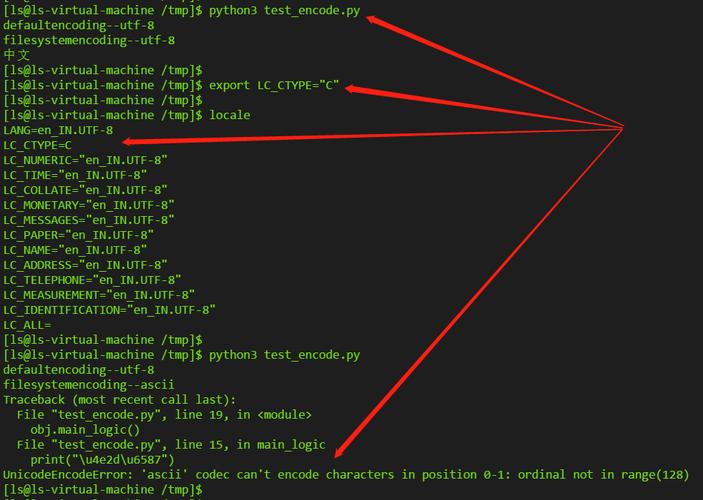
Because of its strictness, using the ASCII codec is a common source of errors in Python 3, especially when dealing with text that contains non-ASCII characters.
How to Use the ASCII Codec in Python
You use the ASCII codec when you convert between a str (a string of text) and a bytes object (a sequence of bytes).
A. Encoding: str -> bytes
You use the .encode() method on a string. You specify ascii as the encoding.
# A simple string with only ASCII characters
my_string = "Hello, World!"
# Encode the string into bytes using the ASCII codec
my_bytes = my_string.encode('ascii')
print(f"Original string: {my_string}")
print(f"Type: {type(my_string)}")
print(f"Encoded bytes: {my_bytes}")
print(f"Type: {type(my_bytes)}")
# You can see the integer value of each byte
print(f"Byte values: {[b for b in my_bytes]}")
Output:
Original string: Hello, World!
Type: <class 'str'>
Encoded bytes: b'Hello, World!'
Type: <class 'bytes'>
Byte values: [72, 101, 108, 108, 111, 44, 32, 87, 111, 114, 108, 100, 33]
As you can see, 'H' became 72, 'e' became 101, and so on. This is a direct mapping.
B. Decoding: bytes -> str
You use the .decode() method on a bytes object. Again, you specify ascii.
# A bytes object that was encoded from ASCII text
my_bytes = b'Hello, World!'
# Decode the bytes back into a string using the ASCII codec
my_string = my_bytes.decode('ascii')
print(f"Original bytes: {my_bytes}")
print(f"Type: {type(my_bytes)}")
print(f"Decoded string: {my_string}")
print(f"Type: {type(my_string)}")
Output:
Original bytes: b'Hello, World!'
Type: <class 'bytes'>
Decoded string: Hello, World!
Type: <class 'str'>
This works perfectly because the byte sequence b'Hello, World!' is a valid ASCII encoding.
The Common Pitfall: UnicodeEncodeError
This is the most important thing to understand about the ASCII codec. What happens if you try to encode a character that is not in the ASCII set?
# A string with a non-ASCII character: the Euro sign '€'
my_string = "The price is €10"
try:
    # This will FAIL because '€' is not in the ASCII table
    my_bytes = my_string.encode('ascii')
except UnicodeEncodeError as e:
    print(f"An error occurred: {e}")
    print(f"Error type: {type(e).__name__}")
Output:
An error occurred: 'ascii' codec can't encode character '\u20ac' in position 11: ordinal not in range(128)
Error type: UnicodeEncodeError
Python raises a UnicodeEncodeError because it has no rule for how to convert the character into a single byte using the ASCII codec.
How to Handle This Error
You have two main options:
Use a Better Codec (Recommended) If you are working with international text, you should almost always use UTF-8. It's the modern standard and can handle any character.
my_string = "The price is €10"
# Use UTF-8 instead of ASCII
my_bytes_utf8 = my_string.encode('utf-8')
print(f"Encoded with UTF-8: {my_bytes_utf8}")
print(f"Type: {type(my_bytes_utf8)}")
Output:
Encoded with UTF-8: b'The price is \xe2\x82\xac10'
Type: <class 'bytes'>
Notice that the sign is now represented by three bytes (\xe2\x82\xac). This is how UTF-8 handles characters beyond the basic ASCII set.
Use an Error Handler If you absolutely must use the ASCII codec and want to avoid crashing, you can tell Python how to handle the problematic characters.
'ignore': Simply drops the character.'replace': Replaces the character with a placeholder, usually .
my_string = "The price is €10"
# Use the 'ignore' error handler
ignored_bytes = my_string.encode('ascii', errors='ignore')
print(f"Ignored non-ASCII: {ignored_bytes.decode('ascii')}")
# Use the 'replace' error handler
replaced_bytes = my_string.encode('ascii', errors='replace')
print(f"Replaced non-ASCII: {replaced_bytes.decode('ascii')}")
Output:
Ignored non-ASCII: The price is 10
Replaced non-ASCII: The price is ?10
Summary: ASCII vs. UTF-8
| Feature | ASCII Codec | UTF-8 Codec |
|---|---|---|
| Character Set | Very small (128 chars). English letters, numbers, basic symbols. | Very large (over 1M chars). All of Unicode. |
| Bytes per Char | Always 1 byte. | 1 to 4 bytes. |
| Compatibility | The first 128 characters of UTF-8 are identical to ASCII. | ASCII text is also valid UTF-8 text. |
| Use Case | Legacy systems or data that you are certain contains only ASCII. | The default and recommended choice for almost all modern applications. |
Final Rule of Thumb: If you are writing new Python code and need to encode/decode text, default to 'utf-8'. Only use 'ascii' if you have a specific, constrained requirement and are sure your data will never contain non-ASCII characters.