Of course! Let's break down everything you need to know about using MySQL with Python, including the history of libraries and how to get started with the current best practices.
The Short Answer: Which Library to Use?
There are two main libraries you'll encounter. For any new project, you should use mysql-connector-python.
-
mysql-connector-python(Recommended)- What it is: The official MySQL driver from Oracle. It's actively maintained, reliable, and has excellent performance.
- Installation:
pip install mysql-connector-python - Why use it? It's the "official" choice and generally the easiest to get working with modern Python and MySQL setups.
-
MySQLdb(Legacy / Not Recommended for New Projects)- What it is: The original, classic MySQL interface for Python. It's a C wrapper around the MySQL C client library.
- Installation:
pip install MySQLdb(This often fails on Windows or macOS without special tools). - Why is it problematic? It's not actively maintained for Python 3. It can be difficult to install on non-Linux systems and often requires you to have MySQL development libraries (
libmysqlclient-devon Debian/Ubuntu) installed on your system.
Step-by-Step Guide: Using mysql-connector-python
This is the modern, recommended approach.
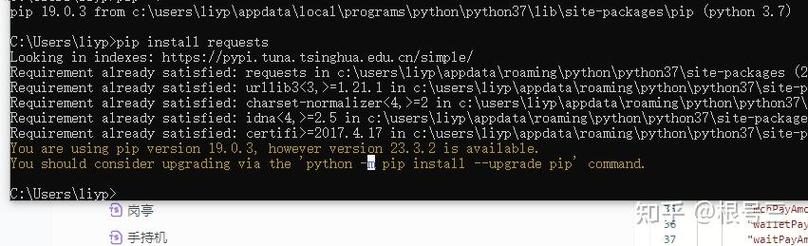
Step 1: Install the Library
Open your terminal or command prompt and run the following command:
pip install mysql-connector-python
Step 2: Connect to Your MySQL Database
Here’s a basic Python script to connect to a MySQL database.
import mysql.connector
from mysql.connector import Error
def create_connection(host_name, user_name, user_password, db_name=None):
    """Create a database connection to a MySQL server."""
    connection = None
    try:
        # If db_name is None, connect to the server without specifying a database
        if db_name:
            connection = mysql.connector.connect(
                host=host_name,
                user=user_name,
                passwd=user_password,
                database=db_name
            )
        else:
            connection = mysql.connector.connect(
                host=host_name,
                user=user_name,
                passwd=user_password
            )
        print("Connection to MySQL successful" if db_name else "Connection to MySQL server successful")
    except Error as e:
        print(f"The error '{e}' occurred")
    return connection
# --- Example Usage ---
# Replace with your actual MySQL credentials
# For security, it's better to use environment variables for credentials.
HOST = "localhost"
USER = "your_username"
PASSWORD = "your_password"
DATABASE = "your_database_name" # Optional for initial connection
# Connect to the server
conn = create_connection(HOST, USER, PASSWORD)
# If you connected to the server, you can now create a database
if conn and not conn.is_connected():
    print("Could not connect to the server.")
    exit()
# To use a specific database, you can either:
# 1. Connect to it directly in the create_connection function call
db_connection = create_connection(HOST, USER, PASSWORD, DATABASE)
# 2. Or, use the existing connection and execute a 'USE' statement
# with conn.cursor() as cursor:
#     cursor.execute(f"USE {DATABASE}")
Step 3: Execute a Query (with Security)
Crucial Security Note: Never use Python string formatting (f"SELECT * FROM users WHERE name = '{user_name}'") to insert variables into a query. This makes you vulnerable to SQL Injection attacks.
Always use parameterized queries (placeholders).

Here’s how to safely fetch data:
def execute_read_query(connection, query, params=None):
    """Execute a read query and return the results."""
    cursor = connection.cursor(dictionary=True) # dictionary=True gives results as dicts
    result = None
    try:
        cursor.execute(query, params or ())
        result = cursor.fetchall()
        return result
    except Error as e:
        print(f"The error '{e}' occurred")
    finally:
        cursor.close()
# --- Example Usage ---
if db_connection and db_connection.is_connected():
    # Safe query with a placeholder (%s)
    select_users_query = "SELECT * FROM users WHERE age > %s"
    age_limit = 25
    users = execute_read_query(db_connection, select_users_query, (age_limit,))
    for user in users:
        print(user)
Step 4: Execute a Write Query (INSERT, UPDATE, DELETE)
For write operations, you need to commit the transaction.
def execute_write_query(connection, query, params=None):
    """Execute a write query (INSERT, UPDATE, DELETE) and commit."""
    cursor = connection.cursor()
    try:
        cursor.execute(query, params or ())
        connection.commit() # IMPORTANT: Commit the transaction
        print("Query executed successfully")
        return cursor.lastrowid # Returns the ID of the last inserted row
    except Error as e:
        connection.rollback() # Rollback in case of error
        print(f"The error '{e}' occurred")
    finally:
        cursor.close()
# --- Example Usage ---
if db_connection and db_connection.is_connected():
    insert_user_query = "INSERT INTO users (name, age, email) VALUES (%s, %s, %s)"
    new_user_data = ("Alice", 30, "alice@example.com")
    new_user_id = execute_write_query(db_connection, insert_user_query, new_user_data)
    print(f"New user created with ID: {new_user_id}")
Step 5: Closing the Connection
Always close your connection when you're done to free up resources.
if db_connection and db_connection.is_connected():
    db_connection.close()
    print("MySQL connection is closed")
if conn and conn.is_connected():
    conn.close()
    print("MySQL server connection is closed")
The "Old Way" with MySQLdb (For Context)
If you are working on an old project that requires MySQLdb, here's what you need to know.
Installation
This is the hard part. pip install MySQLdb will likely fail.
- On Linux (Debian/Ubuntu): You need to install system dependencies first.
sudo apt-get update
sudo apt-get install python3-dev libmysqlclient-dev default-libmysqlclient-dev
pip install MySQLdb
- On macOS: You can use Homebrew.
brew install mysql
pip install MySQLdb
- On Windows: It's very difficult. The recommended approach is to use the pre-compiled wheel from Christoph Gohlke's Unofficial Windows Binaries for Python Extension Packages. You must download the correct
.whlfile for your Python version and architecture (e.g.,MySQL‑3.1.0‑cp311‑cp311‑win_amd64.whlfor Python 3.11 on 64-bit Windows) and install it usingpip.
Usage
The usage is very similar to mysql-connector-python, but the connection syntax is slightly different.
import MySQLdb
# Connection syntax is different
# db = MySQLdb.connect(host="localhost", user="user", passwd="password", db="database")
# cursor = db.cursor()
# The rest of the CRUD operations are very similar
# cursor.execute("SELECT * FROM my_table")
# results = cursor.fetchall()
# for row in results:
#     print(row)
# db.close()
Best Practices & Alternatives
-
Connection Pooling: For applications that connect to the database frequently (like web servers), creating a new connection for every request is slow. Use a connection pool.
mysql-connector-pythonhas a built-in pooling mechanism.from mysql.connector import pooling connection_pool = pooling.MySQLConnectionPool( pool_name="mypool", pool_size=5, host="localhost", user="user", password="password", database="database" ) # Get a connection from the pool connection = connection_pool.get_connection() # ... do work ... connection.close() # Returns the connection to the pool -
ORMs (Object-Relational Mappers): For larger applications, an ORM can simplify database interactions by letting you work with Python objects instead of writing raw SQL.
- SQLAlchemy: The most popular ORM for Python. It's powerful and database-agnostic.
- Django ORM: If you're using the Django framework, it has a fantastic built-in ORM.
-
Environment Variables: Never hardcode your database credentials in your code. Use a
.envfile and a library likepython-dotenvto load them as environment variables..env file:
DB_HOST=localhost
DB_USER=your_username
DB_PASSWORD=your_password
DB_NAME=your_database
Python code:
import os
from dotenv import load_dotenv
load_dotenv() # Load variables from .env file
HOST = os.getenv("DB_HOST")
USER = os.getenv("DB_USER")
PASSWORD = os.getenv("DB_PASSWORD")
DATABASE = os.getenv("DB_NAME")