Of course! The term "Java Web Office" can refer to two main, but related, concepts in the world of software development:
- Building Office-like Applications on the Web using Java: This means creating a web application (e.g., a document editor, spreadsheet, or presentation tool) using Java-based technologies. The user interacts with it through a browser, and the backend logic is written in Java.
- Integrating with Microsoft Office or Other Desktop Office Suites from a Java Web Application: This means a standard web application (built with Spring, Jakarta EE, etc.) that needs to programmatically interact with files from Microsoft Office (
.docx,.xlsx,.pptx) to perform tasks like generation, conversion, or data extraction.
Let's break down both concepts in detail.
Concept 1: Building a Web-Based Office Application (like Google Docs)
This involves creating a collaborative, real-time document editor that runs entirely in the browser, with a Java backend for persistence, user management, and business logic.
Core Architecture
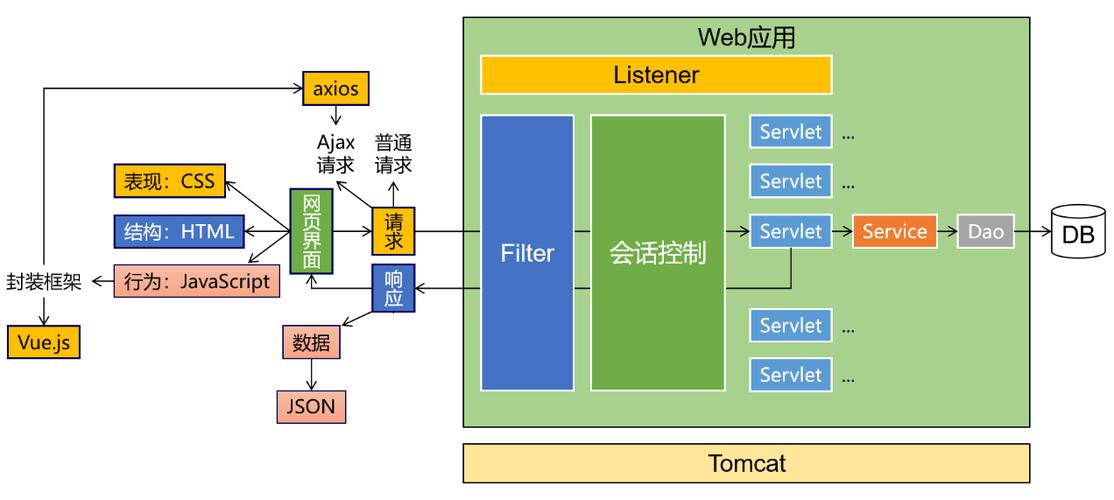
A typical "Java Web Office" application would have a stack like this:
-
Frontend (The "Office" UI):
 (图片来源网络,侵删)
- Rich Text Editor Component: This is the heart of the application. You don't build this from scratch. You use a mature JavaScript library.
- Quill.js: A popular, open-source rich text editor with a flexible API.
- Tiptap: A headless, extendable rich text editor built on Prosemirror. Very powerful and customizable.
- CKEditor 5: A full-featured WYSIWYG editor with excellent collaboration features.
- Real-Time Collaboration: To enable multiple users to edit the same document simultaneously.
- Operational Transformation (OT): The algorithm used by Google Docs. Libraries like ShareJS or ShareDB can be integrated.
- Conflict-Free Replicated Data Types (CRDTs): A newer, often simpler alternative to OT. Libraries like Y.js are excellent for this.
- Framework: React, Vue, or Angular to manage the UI state and component structure.
- Rich Text Editor Component: This is the heart of the application. You don't build this from scratch. You use a mature JavaScript library.
-
Backend (The "Java" Part):
- Framework: Spring Boot is the de-facto standard for modern Java web applications. It simplifies development with embedded servers, auto-configuration, and a massive ecosystem.
- API Layer: A RESTful API or a WebSocket endpoint to handle communication between the frontend and backend.
- REST API: For standard operations like creating a document, saving a draft, or getting user info.
- WebSockets: For pushing real-time updates (e.g., "User A is typing," "User B changed a paragraph") to all connected clients.
- Database: To store the document content and metadata.
- Content: The raw document content (e.g., the Delta operations from Quill) can be stored as a
TEXTorJSONBfield in a PostgreSQL or MySQL database. - Metadata: User info, document titles, creation/modification dates, etc.
- Content: The raw document content (e.g., the Delta operations from Quill) can be stored as a
- Authentication & Authorization: Spring Security to manage user login and permissions (who can view/edit which documents).
Simple Workflow Example
- User A opens a document in the browser. The frontend requests the document content via a REST API (
/api/documents/123). - The Spring Boot backend fetches the content from the database and sends it to the frontend.
- User A types a character. The Quill editor on the frontend captures this as an "insert" operation.
- The frontend sends this operation to the backend via a WebSocket.
- The Spring Boot backend receives the operation, applies it to the document's state in memory, and then broadcasts the operation to all other connected clients (e.g., User B).
- User B's frontend receives the operation via the WebSocket and applies it to its local Quill editor, so the text appears to User B in real-time.
Concept 2: Integrating with Microsoft Office Files from a Java Web App
This is a very common enterprise requirement. A Java web application needs to work with Office documents for tasks like:
- Generating reports from database data.
- Uploading a
.docxtemplate and populating it with user data. - Converting a
.docxfile to a PDF for download. - Extracting data from an uploaded
.xlsxspreadsheet.
Key Technologies and Libraries
The most robust and feature-rich library for this is Apache POI.
Apache POI (Poor Obfuscation Implementation) is the leading Java library for manipulating Microsoft Office file formats. It supports everything from legacy .xls and .doc to modern .xlsx, .docx, and .pptx.
Use Cases with Apache POI:
-
Reading Data from an Excel Sheet (
.xlsx)- A user uploads a monthly sales report.
- Your Java web app (e.g., a Spring MVC controller) reads the file using POI.
- It parses the sheet, extracts the sales figures, and saves them to the database.
// Example using Apache POI in a Spring Controller @PostMapping("/upload") public ResponseEntity<String> uploadFile(@RequestParam("file") MultipartFile file) { try (XSSFWorkbook workbook = new XSSFWorkbook(file.getInputStream())) { XSSFSheet sheet = workbook.getSheetAt(0); for (Row row : sheet) { // Process each row, e.g., get cell values and save to DB String productName = row.getCell(0).getStringCellValue(); double sales = row.getCell(1).getNumericCellValue(); // ... save to database } return ResponseEntity.ok("File processed successfully!"); } catch (IOException e) { return ResponseEntity.status(HttpStatus.INTERNAL_SERVER_ERROR).body("Failed to process file."); } } -
Generating a Word Document (
.docx) from a Template- You have a template file
contract_template.docxwith placeholders like${clientName}and${projectFee}. - Your Java app uses POI to open the template.
- It finds the placeholders and replaces them with actual data from your database or user input.
- It then streams the generated document back to the user's browser for download.
- You have a template file
-
Converting Office to PDF
- POI itself does not convert to PDF. For this, you typically combine POI with another library.
- iText: A powerful library for creating and manipulating PDFs. You can use POI to read the
.docxcontent and then use iText to lay it out in a PDF. - Aspose.Words: A commercial (but very powerful) library that can directly convert
.docxto PDF with high fidelity, often with better results than the POI+iText combination.
Summary: Which Concept Do You Need?
| Feature | Building a Web Office App (Concept 1) | Integrating with Office Files (Concept 2) |
|---|---|---|
| Goal | Create a browser-based Docs/Sheets alternative. | Process existing Office files (read, write, convert). |
| Frontend | Complex: Requires JS editor (Quill), real-time libs (Y.js), and a framework (React). | Standard: Any web UI (HTML, JS) that can handle file uploads/downloads. |
| Backend | Complex: Needs WebSockets, real-time logic, and a database for collaborative state. | Standard: REST API to handle file I/O and business logic. |
| Key Tech | Spring Boot, WebSockets, Quill/Y.js, Database. | Apache POI, iText, Aspose.Words. |
| Typical Use Case | Internal company collaboration tool, custom CMS. | Financial report generation, document automation, data import/export. |
For most developers asking about "Java Web Office," Concept 2 is the more immediate and common requirement. However, if you're tasked with building a Google Docs competitor, then Concept 1 is your path.