Of course! Let's break down the case and break statements in Java, which are fundamental to the switch statement.
The Big Picture: The switch Statement
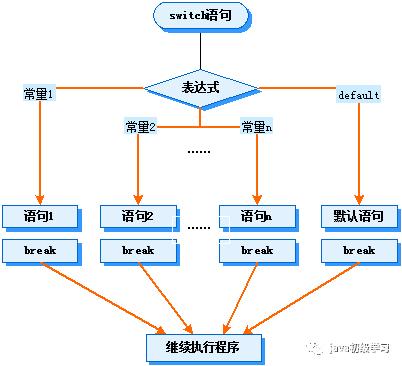
In Java, a switch statement is a control flow statement that allows a variable to be tested for equality against a list of values. Each value is called a case.
Think of it like a multi-way traffic intersection. The switch expression is like the car, and each case is a different road it can take.
The case Keyword
The case keyword is used to label a specific block of code within a switch statement. It represents a possible value for the switch expression.
Syntax:
case value:
    // Code to execute if the switch expression matches this value
Key Points:
- The
valuemust be a constant expression (like1,"hello", orMY_CONSTANT). - It must be of the same type as the
switchexpression (or a compatible type that can be implicitly cast). - The
valuemust be unique within the sameswitchblock.
The break Keyword
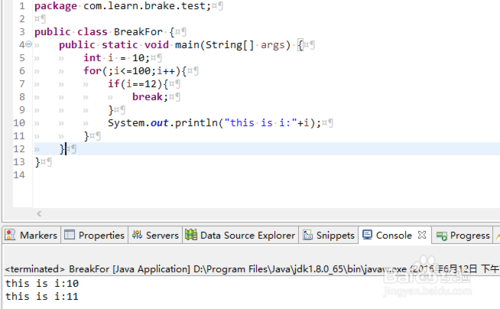
The break keyword does exactly what its name implies: it breaks out of the switch statement. When the program's execution flow encounters a break, it immediately jumps to the line of code right after the closing curly brace of the switch block.
Why is break so important?
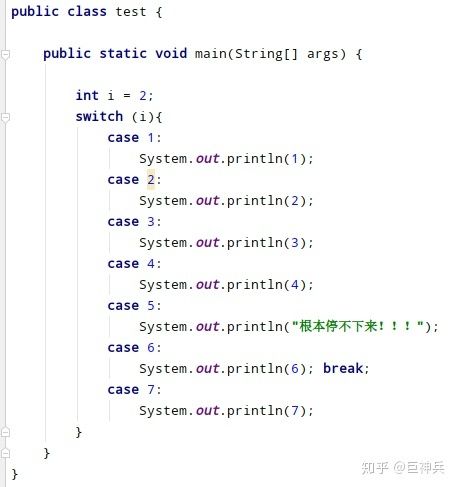
Without a break, the program will "fall through" to the next case and execute its code as well, until it either hits a break or the end of the switch statement. This behavior is often a source of bugs for beginners.
Example 1: The Classic switch with break
This is the most common and intended use of case and break. We evaluate a variable and execute code for only one matching case.
public class SwitchExample {
    public static void main(String[] args) {
        int day = 3;
        String dayName;
        switch (day) {
            case 1:
                dayName = "Monday";
                break; // Breaks out of the switch block
            case 2:
                dayName = "Tuesday";
                break; // Breaks out of the switch block
            case 3:
                dayName = "Wednesday";
                break; // Breaks out of the switch block
            case 4:
                dayName = "Thursday";
                break;
            case 5:
                dayName = "Friday";
                break;
            case 6:
                dayName = "Saturday";
                break;
            case 7:
                dayName = "Sunday";
                break;
            default: // A special case for when no other case matches
                dayName = "Invalid day";
                break; // Good practice to have a break here too
        }
        System.out.println("The day is: " + dayName);
    }
}
Output:
The day is: WednesdayHow it works:
dayis3.- The
switchstatement comparesdaywith the value of eachcase. - It finds a match at
case 3:. - It executes the code inside that block:
dayName = "Wednesday";. - It encounters the
break;statement. - It immediately exits the
switchblock and continues withSystem.out.println(...).
Example 2: "Fall-Through" Behavior (Intentional)
Sometimes, you might want the same block of code to execute for multiple cases. This is where you intentionally omit the break statement to allow fall-through.
Let's say a discount is applied for items with a certain category ID, and all categories from 5 to 9 get the same discount.
public class FallThroughExample {
    public static void main(String[] args) {
        int categoryId = 7;
        String discountMessage;
        switch (categoryId) {
            case 1:
                discountMessage = "No discount available.";
                break;
            case 2:
            case 3:
            case 4:
                discountMessage = "You get a 10% discount!";
                break;
            // Intentional fall-through
            case 5:
            case 6:
            case 7:
            case 8:
            case 9:
                discountMessage = "You get a 20% discount!";
                System.out.println("Special promotion applied!"); // This line runs for all cases 5-9
                break; // The break here stops the fall-through
            default:
                discountMessage = "Invalid category ID.";
                break;
        }
        System.out.println(discountMessage);
    }
}
Output:
Special promotion applied!
You get a 20% discount!
How it works:
categoryIdis7.- It matches
case 7:. - Since there's no
break, it "falls through" and executes the code forcase 8:andcase 9:as well. - It executes
discountMessage = "You get a 20% discount!";andSystem.out.println(...). - It finally hits the
break;statement at the end of thecase 9:block and exits theswitch.
Modern Java (Java 14+): switch Expressions
Java introduced switch expressions, which are more concise and less error-prone. They return a value, so you don't need break statements. Instead, you use -> (arrow) labels.
Key differences:
- No
breakneeded. - Each
casemust have a value or athrowstatement. - The entire
switchis an expression and can be assigned to a variable.
public class SwitchExpressionExample {
    public static void main(String[] args) {
        int day = 3;
        String dayName = switch (day) {
            case 1  -> "Monday";
            case 2  -> "Tuesday";
            case 3  -> "Wednesday";
            case 4  -> "Thursday";
            case 5  -> "Friday";
            case 6  -> "Saturday";
            case 7  -> "Sunday";
            default -> "Invalid day";
        };
        System.out.println("The day is: " + dayName);
    }
}
This achieves the same result as the first example but is cleaner and prevents accidental fall-through bugs.
Summary Table
| Feature | Classic switch Statement |
switch Expression (Java 14+) |
|---|---|---|
| Purpose | Control flow, execute a block of code. | Expression, returns a value. |
break |
Required to prevent fall-through. | Not used. The arrow -> handles it. |
| Syntax | switch (expr) { case val: ... break; } |
String result = switch (expr) { case val -> ...; }; |
| Fall-through | Possible and sometimes intentional. | Not possible. Compiler enforces that all cases are handled. |
| Default | default: |
default -> |