Of course! Here is a comprehensive guide to creating a Java UDP server, including a full code example, a detailed explanation, and a corresponding client to test it.
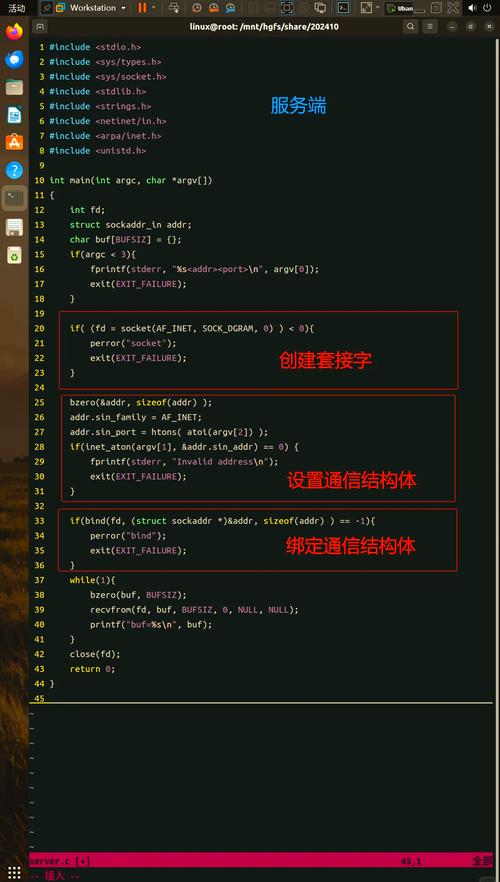
What is UDP?
UDP (User Datagram Protocol) is a connectionless, unreliable, but very fast network protocol. Unlike TCP, it doesn't establish a persistent connection or guarantee that packets will arrive in order, or even at all.
Key Characteristics:
- Connectionless: No handshake is required before sending data.
- Unreliable: No guarantees on delivery, order, or duplicate packets.
- Fast: Lower overhead than TCP because there's no connection setup or error-checking overhead.
- Datagram-based: Data is sent in discrete units called datagrams.
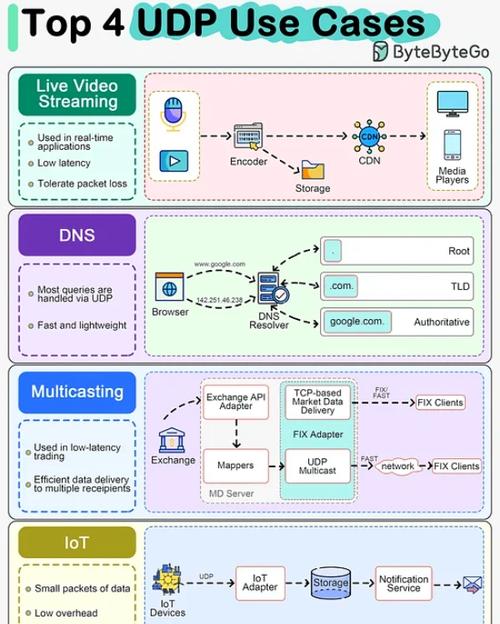
Use Cases: UDP is ideal for applications where speed is more critical than perfect reliability, such as:
- Online gaming
- Video conferencing / live streaming
- DNS lookups
- IoT sensor data
The Java UDP Server Code
This server will listen for incoming datagrams on a specific port. When it receives a message, it will print the sender's information and the message itself, then send a response back.
// UDPServer.java
import java.io.IOException;
import java.net.DatagramPacket;
import java.net.DatagramSocket;
import java.net.InetAddress;
import java.net.SocketException;
public class UDPServer {
    // The port the server will listen on
    private static final int PORT = 9876;
    public static void main(String[] args) {
        // The try-with-resources statement ensures the socket is closed automatically
        try (DatagramSocket socket = new DatagramSocket(PORT)) {
            System.out.println("UDP Server is running and listening on port " + PORT);
            // Create a byte buffer to hold the incoming data
            byte[] receiveBuffer = new byte[1024];
            while (true) {
                // 1. Create a DatagramPacket to receive data
                DatagramPacket receivePacket = new DatagramPacket(receiveBuffer, receiveBuffer.length);
                // 2. Receive data from the client (this is a blocking call)
                socket.receive(receivePacket);
                // 3. Process the received data
                String receivedMessage = new String(receivePacket.getData(), 0, receivePacket.getLength());
                System.out.println("Received message from " + receivePacket.getAddress() + ":" + receivePacket.getPort() + " -> " + receivedMessage);
                // 4. Prepare and send a response back to the client
                String responseMessage = "Server: Message received -> " + receivedMessage;
                byte[] sendData = responseMessage.getBytes();
                // Get the client's address and port from the received packet
                InetAddress clientAddress = receivePacket.getAddress();
                int clientPort = receivePacket.getPort();
                // Create a new DatagramPacket for the response
                DatagramPacket sendPacket = new DatagramPacket(sendData, sendData.length, clientAddress, clientPort);
                // Send the response
                socket.send(sendPacket);
                System.out.println("Sent response to " + clientAddress + ":" + clientPort);
            }
        } catch (SocketException e) {
            System.err.println("Socket Error: " + e.getMessage());
            e.printStackTrace();
        } catch (IOException e) {
            System.err.println("I/O Error: " + e.getMessage());
            e.printStackTrace();
        }
    }
}
Code Breakdown
- *`import java.net.`**: This package contains all the necessary classes for networking in Java.
DatagramSocket socket = new DatagramSocket(PORT): This creates a socket that is bound to a specific port (9876). The server will listen for incoming datagrams on this port. We wrap it in atry-with-resourcesblock to guarantee it's closed, even if errors occur.byte[] receiveBuffer = new byte[1024]: UDP sends data in packets. We need a byte array (a buffer) to store the incoming data.1024is a common size, but it can be adjusted.DatagramPacket receivePacket = new DatagramPacket(receiveBuffer, receiveBuffer.length): This creates an empty "packet." We'll use this object to receive data from the network. It needs to know which buffer to store the data in and its maximum size.socket.receive(receivePacket): This is the core of the server's operation. It's a blocking method, meaning the program will pause here and wait until a datagram arrives. When a packet is received, it's populated into ourreceivePacketobject.String receivedMessage = new String(...): The data in the packet is raw bytes. We convert it to aStringto make it readable. We usereceivePacket.getLength()to get only the number of bytes that were actually sent, avoiding null characters at the end of the buffer.receivePacket.getAddress()&receivePacket.getPort(): These methods are crucial. They tell us the IP address and port number of the client who sent the message. We need this information to send a response back to the correct client.DatagramPacket sendPacket = new DatagramPacket(...): To send a response, we create a newDatagramPacket. This time, we provide it with:- The data to send (
sendData). - The length of the data.
- The destination's
InetAddressandport.
- The data to send (
socket.send(sendPacket): This method transmits the packet over the network to the specified client.
How to Compile and Run
- Save the code above as
UDPServer.java. - Open a terminal or command prompt.
- Navigate to the directory where you saved the file.
- Compile the code:
javac UDPServer.java
- Run the server:
java UDPServer
You should see the output:
UDP Server is running and listening on port 9876
The server is now active and waiting for messages. It will not exit until you stop it (e.g., by pressing Ctrl+C).
The Java UDP Client (for testing)
A server is useless without a client. Here is a simple UDP client that sends a message to the server and prints the response.
// UDPClient.java
import java.io.IOException;
import java.net.DatagramPacket;
import java.net.DatagramSocket;
import java.net.InetAddress;
import java.net.UnknownHostException;
import java.util.Scanner;
public class UDPClient {
    // The server's address and port
    private static final String SERVER_HOST = "localhost"; // Use "127.0.0.1" for local testing
    private static final int SERVER_PORT = 9876;
    public static void main(String[] args) {
        // The server's address
        InetAddress serverAddress;
        try {
            serverAddress = InetAddress.getByName(SERVER_HOST);
        } catch (UnknownHostException e) {
            System.err.println("Could not find host: " + SERVER_HOST);
            return;
        }
        // Use try-with-resources for the socket and scanner
        try (DatagramSocket socket = new DatagramSocket();
             Scanner scanner = new Scanner(System.in)) {
            System.out.println("UDP Client is running. Type 'exit' to quit.");
            System.out.print("Enter message to send: ");
            while (scanner.hasNextLine()) {
                String messageToSend = scanner.nextLine();
                if ("exit".equalsIgnoreCase(messageToSend)) {
                    break;
                }
                // 1. Prepare the data to send
                byte[] sendData = messageToSend.getBytes();
                // 2. Create a DatagramPacket to send
                DatagramPacket sendPacket = new DatagramPacket(sendData, sendData.length, serverAddress, SERVER_PORT);
                // 3. Send the packet to the server
                socket.send(sendPacket);
                System.out.println("Sent message to server: " + messageToSend);
                // 4. Create a buffer to receive the server's response
                byte[] receiveBuffer = new byte[1024];
                DatagramPacket receivePacket = new DatagramPacket(receiveBuffer, receiveBuffer.length);
                // 5. Receive the response (blocking call)
                socket.receive(receivePacket);
                // 6. Process the response
                String responseMessage = new String(receivePacket.getData(), 0, receivePacket.getLength());
                System.out.println("Received response from server: " + responseMessage);
                System.out.print("\nEnter message to send: ");
            }
        } catch (IOException e) {
            System.err.println("I/O Error: " + e.getMessage());
            e.printStackTrace();
        }
        System.out.println("Client shutting down.");
    }
}
How to Test the Client-Server Interaction
-
Open two separate terminal windows.
 (图片来源网络,侵删)
 -
In the first terminal, compile and run the server:
javac UDPServer.java
java UDPServer
(Output:
UDP Server is running and listening on port 9876) -
In the second terminal, compile and run the client:
javac UDPClient.java
java UDPClient
(Output:
UDP Client is running. Type 'exit' to quit.followed byEnter message to send:) -
In the client terminal, type a message and press Enter. For example:
Hello Server! -
Observe the output in both terminals:
Client Terminal:
Enter message to send: Hello Server!
Sent message to server: Hello Server!
Received response from server: Server: Message received -> Hello Server!
Enter message to send:
Server Terminal:
UDP Server is running and listening on port 9876 Received message from /127.0.0.1:54321 -> Hello Server! Sent response to /127.0.0.1:54321 -
You can continue sending messages. Type
exitin the client terminal to close it. The server will keep running.