Of course! Let's break down lambda functions in Python, from the basic concept to practical examples and important caveats.

What is a Lambda Function?
A lambda function is a small, anonymous (unnamed) function defined using the lambda keyword.
The key characteristics are:
- Anonymous: It doesn't have a name. You can't define it with
def my_function(): ...and call it later by that name. It's typically used where it's defined. - Single Expression: It can only contain a single expression. This is the most important rule. A lambda function cannot have statements, multiple expressions, or complex logic like loops or
if/elseblocks (though it can use conditional expressions). - Concise: It's a shorthand way to write a simple function.
The Syntax
The syntax is very compact:
lambda arguments: expression
Let's break that down:
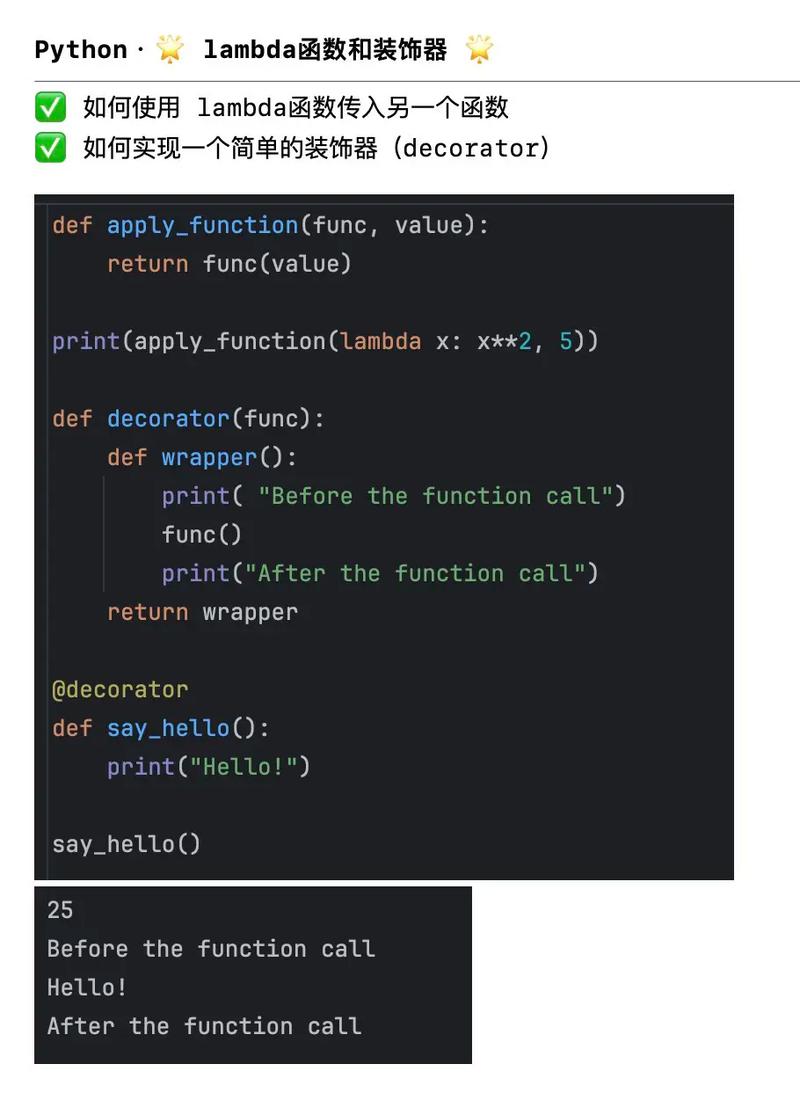
lambda: The keyword that tells Python you're defining an anonymous function.arguments: A comma-separated list of input parameters, just like a regular function.- A colon to separate the arguments from the expression.
expression: A single expression that is evaluated and its result is returned. The expression is implicitly thereturnvalue.
How it Compares to a Regular def Function
This is the best way to understand lambda. Let's compare a regular function to a lambda function that does the exact same thing: adds 10 to a number.
Using def (The Regular Way)
def add_ten_regular(x):
    """This is a regular function that adds 10 to its input."""
    result = x + 10
    return result
# Using the regular function
output_regular = add_ten_regular(5)
print(f"Using def: {output_regular}")
Using lambda (The Anonymous Way)
# This is a lambda function. It doesn't have a name.
# We assign it to a variable 'add_ten_lambda' so we can use it.
add_ten_lambda = lambda x: x + 10
# Using the lambda function via the variable
output_lambda = add_ten_lambda(5)
print(f"Using lambda: {output_lambda}")
Comparison:
| Feature | def function |
lambda function |
|---|---|---|
| Name | Has a name (add_ten_regular) |
Anonymous (no name) |
| Body | Can have multiple statements and a return keyword. |
Limited to a single expression. The return is implicit. |
| Purpose | Define reusable, named functions. | Create short, throwaway functions for specific, one-time use. |
Why Use Lambda Functions? (The Power)
You might be thinking, "Why would I use this weird syntax?" The real power of lambda shines when you need a simple function for a short period and don't want to formally define it with def. This is very common when working with functions that take other functions as arguments.
Common Use Case 1: sorted() with a custom key
Imagine you have a list of tuples and you want to sort them based on the second element of each tuple.
points = [(1, 9), (4, 3), (2, 8), (3, 5)]
# Sort by the second item (index 1) of each tuple
# The `key` argument expects a function that takes one item and returns a value to sort by.
sorted_points = sorted(points, key=lambda item: item[1])
print(sorted_points)
# Output: [(4, 3), (3, 5), (2, 8), (1, 9)]
Here, lambda item: item[1] is a perfect, concise way to say "for each item in the list, use its element at index 1 for sorting."
Common Use Case 2: map()
The map() function applies a given function to every item of an iterable (like a list).
numbers = [1, 2, 3, 4, 5]
# Use map() with a lambda to square each number
squared_numbers = map(lambda x: x**2, numbers)
# map() returns a map object, so we convert it to a list
print(list(squared_numbers))
# Output: [1, 4, 9, 16, 25]
Common Use Case 3: filter()
The filter() function constructs an iterator from elements of an iterable for which a function returns True.
numbers = [1, 2, 3, 4, 5, 6, 7, 8, 9, 10]
# Use filter() with a lambda to get only the even numbers
even_numbers = filter(lambda x: x % 2 == 0, numbers)
print(list(even_numbers))
# Output: [2, 4, 6, 8, 10]
When NOT to Use Lambda Functions
A common mistake among beginners is overusing lambda. Remember the rule: one expression only.
Bad Example (Complex Logic):
This code will fail because a lambda cannot contain statements like an if/else block.
# This will raise a SyntaxError
# bad_lambda = lambda x: if x > 10: return "big" else: return "small"
The Correct Way (Using a Regular def Function):
If your logic is more complex than a single expression, use a regular def function. It's more readable and maintainable.
def check_size(x):
    if x > 10:
        return "big"
    else:
        return "small"
# You can still use this def function with map, filter, etc.
sizes = map(check_size, [5, 15, 2, 20])
print(list(sizes))
# Output: ['small', 'big', 'small', 'big']
Advanced: Multiple Arguments
Lambdas can take multiple arguments, separated by commas.
# A lambda that takes two arguments and returns their product
multiply = lambda a, b: a * b
print(multiply(6, 7))  # Output: 42
This is often used with functions like reduce from the functools module.
from functools import reduce
data = [1, 2, 3, 4, 5]
# Use reduce with a lambda to calculate the product of all numbers
# The lambda takes two arguments (x and y) and returns their product
product = reduce(lambda x, y: x * y, data)
print(product) # Output: 120 (1*2*3*4*5)
Summary
| Feature | Description |
|---|---|
| Name | Anonymous (no name) |
| Syntax | lambda args: expression |
| Body | A single expression only. No statements, no return keyword. |
| Use Case | Perfect for short, simple operations, especially as arguments to higher-order functions like sorted(), map(), filter(). |
| Avoid | For complex logic that requires multiple lines or statements. Use a regular def function instead for clarity and maintainability. |