使用 Python 进行数学计算(核心内容)
这是最常见的理解,Python 本身就是一门强大的编程语言,内置了数学运算功能,并且通过第三方库可以胜任从简单算术到科学计算、数据分析和人工智能的各种任务。
(图片来源网络,侵删)
A. 基础算术和数学函数
Python 内置的 math 模块提供了许多常用的数学函数。
# 基础算术
a = 10
b = 3
print(f"加法: {a + b}")       # 13
print(f"减法: {a - b}")       # 7
print(f"乘法: {a * b}")       # 30
print(f"除法: {a / b}")       # 3.333... (浮点数)
print(f"整除: {a // b}")      # 3 (向下取整)
print(f"取余: {a % b}")       # 1
print(f"幂运算: {a ** b}")    # 10 的 3 次方 = 1000
# 导入 math 模块
import math
# 常用数学函数
print(f"圆周率: {math.pi}")
print(f"自然常数 e: {math.e}")
print(f"绝对值: {math.abs(-10)}") # 注意:Python 3 中 abs() 是内置函数,math.abs() 已被移除
print(f"绝对值 (内置): {abs(-10)}")
print(f"平方根: {math.sqrt(16)}") # 4.0
print(f"向上取整: {math.ceil(3.2)}") # 4
print(f"向下取整: {math.floor(3.8)}") # 3
print(f"四舍五入: {round(3.5)}") # 4 (内置函数)
print(f"正弦: {math.sin(math.pi / 2)}") # 1.0
print(f"对数 (e为底): {math.log(10)}")
print(f"对数 (10为底): {math.log10(100)}")
B. 科学计算库:NumPy
当您需要进行大规模的数值运算,特别是处理多维数组(矩阵)时,NumPy 是必不可少的库,它比 Python 原生的列表快几个数量级。
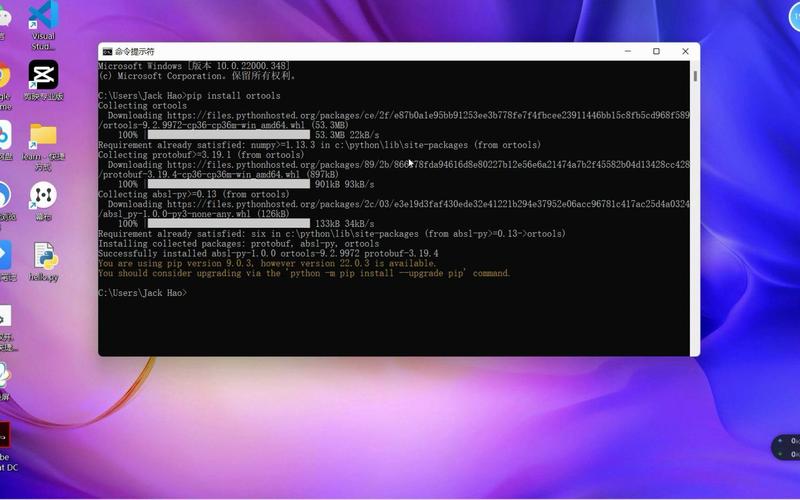
安装 NumPy: 打开命令提示符或 PowerShell,运行:
pip install numpy
使用 NumPy:
(图片来源网络,侵删)
import numpy as np
# 创建数组 (类似列表,但更强大)
arr1 = np.array([1, 2, 3, 4, 5])
arr2 = np.array([10, 20, 30, 40, 50])
# 元素级运算 (非常高效)
print(f"数组加法: {arr1 + arr2}")       # [11 22 33 44 55]
print(f"数组乘法: {arr1 * 2}")         # [ 2  4  6  8 10]
print(f"点积: {np.dot(arr1, arr2)}")   # 1*10 + 2*20 + ... + 5*50 = 550
# 创建二维数组 (矩阵)
matrix_a = np.array([[1, 2], [3, 4]])
matrix_b = np.array([[5, 6], [7, 8]])
print(f"\n矩阵 A:\n{matrix_a}")
print(f"\n矩阵 B:\n{matrix_b}")
print(f"\n矩阵乘法:\n{np.dot(matrix_a, matrix_b)}")
# 结果: [[19 22]
#        [43 50]]
C. 符号计算库:SymPy
如果您需要进行代数运算,比如解方程、化简表达式、求导、积分等,SymPy 是最佳选择。
安装 SymPy:
pip install sympy
使用 SymPy:
from sympy import symbols, Eq, solve, diff, integrate
# 定义符号变量
x, y = symbols('x y')
# 1. 解方程
# 解方程 x^2 - 4 = 0
equation = Eq(x**2 - 4, 0)
solutions = solve(equation, x)
print(f"方程 x^2 - 4 = 0 的解是: {solutions}") # [-2, 2]
# 2. 化简表达式
expr = (x**2 + 2*x + 1) / (x + 1)
simplified_expr = simplify(expr)
print(f"表达式化简: {simplified_expr}") # x + 1
# 3. 求导
# 求 x^3 + 2*x^2 + x 的导数
derivative = diff(x**3 + 2*x**2 + x, x)
print(f"x^3 + 2*x^2 + x 的导数是: {derivative}") # 3*x**2 + 4*x + 1
# 4. 积分
# 求 sin(x) 的不定积分
integral = integrate(sin(x), x)
print(f"sin(x) 的不定积分是: {integral}") # -cos(x)
D. 数据分析和可视化库:Pandas & Matplotlib
对于统计分析、数据处理和图表绘制,Pandas 和 Matplotlib 是黄金搭档。
(图片来源网络,侵删)
安装:
pip install pandas matplotlib
使用示例:
import pandas as pd
import matplotlib.pyplot as plt
# 创建一个简单的数据集
data = {'姓名': ['张三', '李四', '王五'],
        '年龄': [25, 30, 28],
        '分数': [85, 92, 88]}
df = pd.DataFrame(data)
print("数据表:")
print(df)
# 基本计算
print(f"\n平均年龄: {df['年龄'].mean()}")
print(f"最高分数: {df['分数'].max()}")
# 可视化:绘制分数条形图
df.plot(x='姓名', y='分数', kind='bar', legend=None, color='skyblue')'学生分数')
plt.xlabel('姓名')
plt.ylabel('分数')
plt.grid(axis='y', linestyle='--', alpha=0.7)
plt.show()
在 Windows 系统上安装和运行 Python
如果您是初学者,需要先搭建环境。
步骤 1: 下载 Python
- 访问官方网站:https://www.python.org/downloads/windows/
- 下载最新的稳定版 Python 安装程序(Python 3.12.x)。
步骤 2: 安装 Python (关键步骤)
- 运行下载的
.exe文件。 - 务必勾选 "Add Python to PATH" (将 Python 添加到环境变量),这是最关键的一步,否则你将无法在命令行中直接使用
python命令。 - 点击 "Install Now" 进行标准安装,或者 "Customize installation" 进行自定义安装。
- 等待安装完成。
步骤 3: 验证安装
- 打开 命令提示符 或 PowerShell (按
Win + R,输入cmd或powershell,回车)。 - 输入以下命令检查 Python 版本:
python --version
如果看到版本号(如
Python 3.12.0),说明安装成功。
步骤 4: 运行 Python 代码
你有两种主要方式:
交互式环境
在命令提示符中输入 python,然后直接输入代码,按回车即可看到结果。
C:\Users\YourUser> python
Python 3.12.0 (tags/v3.12.0:0fb18b0, Oct  2 2025, 13:09:24) [MSC v.1935 64 bit (AMD64)] on win32
Type "help", "copyright", "credits" or "license" for more information.
>>> 2 + 2
4
>>> print("Hello, Windows!")
Hello, Windows!
>>> exit()
脚本文件
-
使用记事本、VS Code 等文本编辑器,创建一个文件,
calculate.py。 -
写入你的代码:
# calculate.py import math radius = 5 area = math.pi * (radius ** 2) print(f"半径为 {radius} 的圆的面积是: {area:.2f}") -
保存文件。
-
在命令提示符中,使用
cd命令切换到文件所在的目录,然后运行:C:\Users\YourUser> cd Desktop C:\Users\YourUser\Desktop> python calculate.py 半径为 5 的圆的面积是: 78.54
使用 Python 进行 Windows 系统级计算
这个角度是指利用 Python 来获取和计算 Windows 系统本身的性能、资源等信息。
A. 使用 psutil 库计算系统资源
psutil (Process and System Utilities) 是一个跨平台的库,用于获取系统运行信息。
安装:
pip install psutil
使用示例:
import psutil
import datetime
# 1. CPU 计算
print("--- CPU 信息 ---")
cpu_percent = psutil.cpu_percent(interval=1) # 获取1秒内的CPU使用率
cpu_count_logical = psutil.cpu_count(logical=True) # 逻辑核心数
cpu_count_physical = psutil.cpu_count(logical=False) # 物理核心数
print(f"CPU 使用率: {cpu_percent}%")
print(f"CPU 逻辑核心数: {cpu_count_logical}")
print(f"CPU 物理核心数: {cpu_count_physical}")
# 2. 内存计算
print("\n--- 内存 信息 ---")
mem = psutil.virtual_memory()
# total, available, percent, used, free
print(f"总内存: {mem.total / (1024**3):.2f} GB")
print(f"可用内存: {mem.available / (1024**3):.2f} GB")
print(f"内存使用率: {mem.percent}%")
# 3. 磁盘计算
print("\n--- 磁盘 信息 ---")
disk = psutil.disk_usage('C:\\')
print(f"C: 盘总空间: {disk.total / (1024**3):.2f} GB")
print(f"C: 盘已用空间: {disk.used / (1024**3):.2f} GB")
print(f"C: 盘剩余空间: {disk.free / (1024**3):.2f} GB")
print(f"C: 盘使用率: {disk.percent}%")
# 4. 网络计算 (获取网络IO统计)
print("\n--- 网络 信息 ---")
net_io = psutil.net_io_counters()
bytes_sent = net_io.bytes_sent
bytes_recv = net_io.bytes_recv
print(f"发送字节数: {bytes_sent / (1024**2):.2f} MB")
print(f"接收字节数: {bytes_recv / (1024**2):.2f} MB")
B. 使用 wmi 库获取更详细的硬件信息
WMI (Windows Management Instrumentation) 提供了更底层的系统信息。
安装:
pip install WMI
使用示例:
import wmi
c = wmi.WMI()
# 获取CPU信息
print("--- CPU 详细信息 ---")
for processor in c.Win32_Processor():
    print(f"名称: {processor.Name}")
    print(f"核心数: {processor.NumberOfCores}")
    print(f"逻辑处理器数: {processor.NumberOfLogicalProcessors}")
# 获取主板和BIOS信息
print("\n--- 主板信息 ---")
for board in c.Win32_BaseBoard():
    print(f"制造商: {board.Manufacturer}")
    print(f"产品: {board.Product}")
print("\n--- BIOS信息 ---")
for bios in c.Win32_BIOS():
    print(f"版本: {bios.Version}")
    print(f"序列号: {bios.SerialNumber}")
| 计算类型 | 推荐库 | 主要用途 | 安装命令 |
|---|---|---|---|
| 基础数学 | math (内置) |
三角函数、对数、常数等基础运算 | 无需安装 |
| 数值计算 | numpy |
大型数组/矩阵运算,科学计算 | pip install numpy |
| 符号计算 | sympy |
代数运算、解方程、微积分 | pip install sympy |
| 数据分析 | pandas, matplotlib |
统计分析、数据处理、图表绘制 | pip install pandas matplotlib |
| 系统资源计算 | psutil, wmi |
获取CPU、内存、磁盘、网络等系统状态 | pip install psutil wmi |
希望这份详细的指南能帮助您在 Windows 上使用 Python 进行各种计算!如果您有更具体的需求,可以进一步提问。