Of course! The phrase "python mysql none" typically points to a common issue developers face when working with Python and MySQL. Let's break down what it means, why it happens, and how to fix it.
The Core Meaning: None as a Return Value
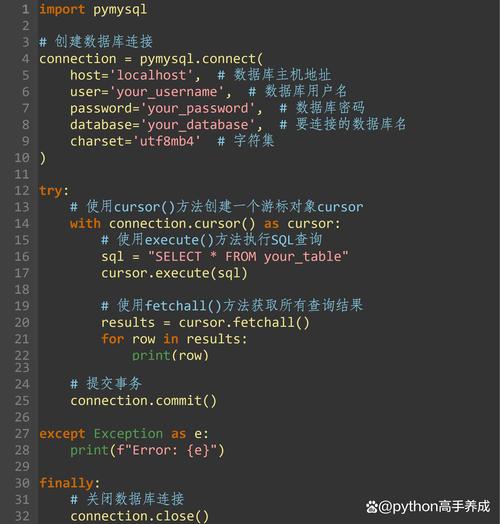
In short, when you see None after executing a MySQL query in Python, it means the function you called did not return a value. Instead, it returned None, which is Python's way of representing the absence of a value.
This usually happens with one specific type of operation:
cursor.execute(): This function is for executing a command that doesn't return data, like anINSERT,UPDATE,DELETE, orCREATEstatement. It returnsNoneto signal that the command was sent to the database successfully.
The confusion arises because developers often expect execute() to return the results of their query, but it doesn't. To retrieve the results, you need to use a different function.
The Two Most Common Scenarios
Let's look at the two main types of SQL queries and how to handle them correctly.
Scenario 1: Data Manipulation (INSERT, UPDATE, DELETE) - None is Expected
When you run a query that changes data but doesn't return rows, cursor.execute() is the correct function to use, and getting None back is normal.
Example: Inserting a new user
import mysql.connector
from mysql.connector import Error
try:
    # --- Connection Details ---
    connection = mysql.connector.connect(
        host='localhost',
        database='your_database',
        user='your_username',
        password='your_password'
    )
    if connection.is_connected():
        cursor = connection.cursor()
        # The SQL query to insert data
        sql_insert_query = "INSERT INTO employees (name, position) VALUES (%s, %s)"
        employee_data = ("John Doe", "Software Engineer")
        # --- KEY POINT ---
        # cursor.execute() runs the command and returns None
        result = cursor.execute(sql_insert_query, employee_data)
        print(f"cursor.execute() returned: {result}") # This will print: None
        # You must commit the transaction to save the changes to the database
        connection.commit()
        print(f"{cursor.rowcount} record inserted successfully into employees table")
except Error as e:
    print(f"Error while connecting to MySQL or executing query: {e}")
    if connection.is_connected():
        connection.rollback() # Rollback in case of error
finally:
    # Closing database connection.
    if connection.is_connected():
        cursor.close()
        connection.close()
        print("MySQL connection is closed")
In this case:
cursor.execute()does its job: it sends theINSERTstatement to the MySQL server.- It returns
None, which we store in theresultvariable. - The crucial next step is
connection.commit()to make the change permanent.
Scenario 2: Data Retrieval (SELECT) - None is a Mistake
When you run a SELECT query to get data, you must first execute the query and then fetch the results. Forgetting the "fetch" step is the most common reason for confusion.
Incorrect Code (What you might be doing):
# ... (connection setup) ...
cursor = connection.cursor()
sql_select_query = "SELECT * FROM employees WHERE name = %s"
name_to_find = "John Doe"
# You execute the query, but don't fetch the results
cursor.execute(sql_select_query, (name_to_find,))
# You try to use the cursor, but it doesn't hold the data yet
# This will likely lead to an error or just not work as expected
# print(cursor.fetchone()) # This might not work immediately or return None
# ... (connection close) ...
Correct Code (The two-step process):
import mysql.connector
from mysql.connector import Error
try:
    connection = mysql.connector.connect(
        host='localhost',
        database='your_database',
        user='your_username',
        password='your_password'
    )
    if connection.is_connected():
        cursor = connection.cursor(dictionary=True) # dictionary=True is useful!
        sql_select_query = "SELECT * FROM employees WHERE name = %s"
        name_to_find = "John Doe"
        # STEP 1: EXECUTE the query
        # cursor.execute() still returns None, but it prepares the results
        cursor.execute(sql_select_query, (name_to_find,))
        # STEP 2: FETCH the results
        # Now, you get the actual data from the database
        employee_record = cursor.fetchone() # Gets one row
        if employee_record:
            print("Employee Found:")
            print(employee_record)
            # With dictionary=True, you can access by column name:
            # print(employee_record['position'])
        else:
            print(f"No employee found with the name: {name_to_find}")
except Error as e:
    print(f"Error while connecting to MySQL or executing query: {e}")
finally:
    if connection.is_connected():
        cursor.close()
        connection.close()
        print("MySQL connection is closed")
In this case:
cursor.execute(sql, ...)prepares theSELECTstatement and sends it. It returnsNone.- The results are now held in a "buffer" on the cursor object, waiting for you to ask for them.
cursor.fetchone()(orcursor.fetchall()) retrieves the data from that buffer and returns it as a list of tuples (or dictionaries if you useddictionary=True).
Summary Table
| Query Type | Correct Method | Purpose | Return Value of execute() |
What to Do Next |
|---|---|---|---|---|
| INSERT, UPDATE, DELETE | cursor.execute() |
Change data in the database. | None |
Commit: connection.commit() |
| SELECT | cursor.execute() |
Prepare a query to get data. | None |
Fetch: cursor.fetchone() or cursor.fetchall() |
Key Takeaway
If your Python code involving MySQL is returning None and you didn't expect it, ask yourself:
"What kind of SQL command did I just run?"
- If it was an
INSERT/UPDATE/DELETE,Noneis normal. Just remember to commit. - If it was a
SELECT, you likely forgot to fetch the results after executing the query. Always usefetchone(),fetchall(), orfetchmany()after aSELECTquery.