Of course! Copying arrays in Java is a fundamental task, but it's important to choose the right method for your specific needs. Here’s a comprehensive guide covering all the main ways to copy an array in Java, from the most basic to the most modern.
Quick Summary: Which Method to Use?
| Method | Copies Primitive Types? | Copies Objects? | Shallow or Deep Copy? | Best For... |
|---|---|---|---|---|
System.arraycopy() |
Yes | Yes | Shallow | Performance. The fastest, standard way. |
Arrays.copyOf() |
Yes | Yes | Shallow | Convenience. The modern, recommended way. |
clone() |
Yes | Yes | Shallow | Quick, simple copies. Has quirks. |
| Manual Loop | Yes | Yes | Shallow or Deep | Learning or when you need custom logic. |
| Copy Constructor | N/A | Yes | Deep | Creating deep copies of object arrays. |
| Serialization | N/A | Yes | Deep | Guaranteed deep copy of any object. |
System.arraycopy() (The Classic, Fastest Way)
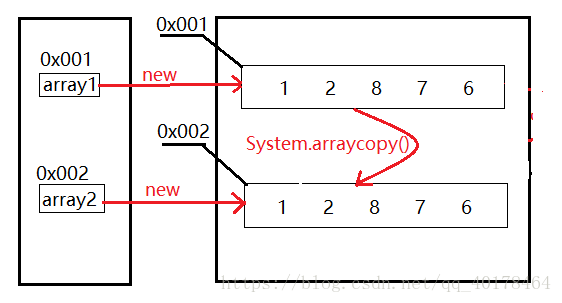
This is a native method (implemented in C, not Java), making it the fastest way to copy arrays in Java. It's highly flexible and is used internally by many other Java classes.
Syntax:
public static void arraycopy(Object src, int srcPos, Object dest, int destPos, int length);
src: The source array.srcPos: Starting position in the source array.dest: The destination array.destPos: Starting position in the destination array.length: The number of elements to copy.
Example:
int[] source = {1, 2, 3, 4, 5};
int[] destination = new int[5];
// Copy the entire source array to the destination array
System.arraycopy(source, 0, destination, 0, source.length);
// destination is now [1, 2, 3, 4, 5]
// Copy a portion of the source array
int[] partialCopy = new int[3];
System.arraycopy(source, 1, partialCopy, 0, 3);
// partialCopy is now [2, 3, 4]
Key Points:
- Fastest: This is the performance champion.
- Flexible: You can copy a portion of an array to a specific position in another array.
- No New Array: You must pre-allocate the destination array.
- Throws
ArrayStoreException: If the destination array is of a different type and cannot hold the elements from the source. - Throws
IndexOutOfBoundsException: If the copy operation would run off the end of either array.
Arrays.copyOf() (The Modern, Recommended Way)
This is the most common and convenient method for copying an entire array. It's part of the java.util.Arrays utility class.
Syntax:
public static <T> T[] copyOf(T[] original, int newLength);
// Overloaded versions for all primitive types exist, e.g.
public static int[] copyOf(int[] original, int newLength);
original: The array to be copied.newLength: The length of the copy. The new array will have this length.
Example:
String[] original = {"apple", "banana", "cherry"};
// Copy the entire array
String[] copy1 = Arrays.copyOf(original, original.length);
// copy1 is ["apple", "banana", "cherry"]
// Copy the array but make it shorter
String[] copy2 = Arrays.copyOf(original, 2);
// copy2 is ["apple", "banana"]
// Copy the array but make it longer (extra elements are filled with default values)
String[] copy3 = Arrays.copyOf(original, 5);
// copy3 is ["apple", "banana", "cherry", null, null]
Key Points:
- Convenient: You don't need to create the destination array yourself.
- Handles Length: Automatically creates a new array of the specified size.
- Fills with Defaults: If the new array is larger, it fills the extra slots with default values (
0for primitives,nullfor objects). - Shallow Copy: Like
arraycopy, it performs a shallow copy.
clone() (The Simple but Flawed Way)
Every array in Java has a clone() method that creates a shallow copy of the array.
Syntax:
int[] original = {1, 2, 3};
int[] copy = original.clone();
Example:
int[] original = {1, 2, 3};
int[] copy = original.clone();
// The arrays are different objects
System.out.println(original == copy); // false
// But they contain the same primitive values
System.out.println(Arrays.equals(original, copy)); // true
Key Points:
-
Simple Syntax: Very easy to use.
-
Shallow Copy: It creates a new array object, but the elements themselves are not copied. For primitives, this is fine. For objects, both arrays will point to the same object references.
-
The Biggest Problem:
clone()is not well-liked by the Java language designers. It's considered a "flawed" feature. For example, you cannot cast the result to a subtype easily:class A {} class B extends A[] {} B b = new B[10]; // A a = b.clone(); // COMPILE ERROR! Incompatible types.Because of these issues, it's generally better to avoid
clone()for arrays and useArrays.copyOf()instead.
Manual Loop (For Learning or Custom Logic)
This is the most fundamental way to copy an array. It's not recommended for production code due to being verbose and error-prone, but it's essential for understanding what's happening under the hood.
Example:
int[] source = {10, 20, 30, 40};
int[] destination = new int[source.length];
for (int i = 0; i < source.length; i++) {
    destination[i] = source[i];
}
Key Points:
- Full Control: You can add custom logic inside the loop (e.g., modify elements while copying).
- Verbose: More code to write.
- Error-Prone: You must ensure the loop bounds are correct to avoid
ArrayIndexOutOfBoundsException.
The Critical Difference: Shallow vs. Deep Copy
This is the most important concept to understand when working with object arrays.
Shallow Copy (The Default)
A shallow copy creates a new array object, but it copies the references to the original objects into the new array. Both arrays point to the same objects in memory.
Example:
class Person {
    String name;
    Person(String name) { this.name = name; }
}
Person[] people = { new Person("Alice"), new Person("Bob") };
// Shallow copy using Arrays.copyOf()
Person[] peopleCopy = Arrays.copyOf(people, people.length);
// Modify an object through the original array
people[0].name = "Alicia";
// The change is visible in the copied array too!
System.out.println(peopleCopy[0].name); // Output: Alicia
In this case, people and peopleCopy are two different arrays, but people[0] and peopleCopy[0] are the exact same Person object.
Deep Copy (When You Need Independent Copies)
A deep copy creates a new array object and also new copies of all the objects inside it. The copied array is completely independent of the original.
How to Create a Deep Copy:
Copy Constructor (Best for Simple Objects) Create a new object in the constructor by copying the fields of an existing one.
class Person {
    String name;
    Person(String name) { this.name = name; }
    // Copy constructor
    Person(Person other) {
        this.name = other.name; // Creates a new String reference
    }
}
// ...
Person[] people = { new Person("Alice"), new Person("Bob") };
Person[] deepCopy = new Person[people.length];
for (int i = 0; i < people.length; i++) {
    deepCopy[i] = new Person(people[i]); // Use the copy constructor
}
// Modify the original
people[0].name = "Alicia";
// The deep copy is unaffected
System.out.println(deepCopy[0].name); // Output: Alice
Serialization (The Universal, but Slow, Method)
This works for any Serializable object. It converts the object to a byte stream and then reads it back to create a brand new instance.
import java.io.*;
public class DeepCopyUtil {
    @SuppressWarnings("unchecked")
    public static <T extends Serializable> T deepCopy(T object) {
        try {
            ByteArrayOutputStream bos = new ByteArrayOutputStream();
            ObjectOutputStream oos = new ObjectOutputStream(bos);
            oos.writeObject(object);
            oos.flush();
            ByteArrayInputStream bis = new ByteArrayInputStream(bos.toByteArray());
            ObjectInputStream ois = new ObjectInputStream(bis);
            return (T) ois.readObject();
        } catch (IOException | ClassNotFoundException e) {
            throw new RuntimeException("Failed to deep copy object", e);
        }
    }
}
// Usage:
// Person[] deepCopy = DeepCopyUtil.deepCopy(people);
This method is very powerful but significantly slower than other methods due to the I/O overhead. Use it only when necessary.