Of course! Let's dive into the world of Java Web Servers. This is a fundamental topic in Java development, especially for building enterprise-grade applications.
I'll structure this answer into the following parts:
- What is a Java Web Server? (The core concept)
- How It Works: The Servlet Container (The magic behind the scenes)
- Types of Java Web Servers (Embedded vs. Standalone)
- Popular Java Web Servers (A comparison of the main options)
- A Simple "Hello World" Example (Code to see it in action)
- Choosing the Right Server (When to use which one)
What is a Java Web Server?
At its heart, a Java Web Server is a server application that uses the Java programming language to handle incoming web requests (usually HTTP/HTTPS) and send back responses.
However, the term "Java Web Server" often refers more specifically to a Servlet Container or Web Container. This is the crucial part.
Think of it this way:
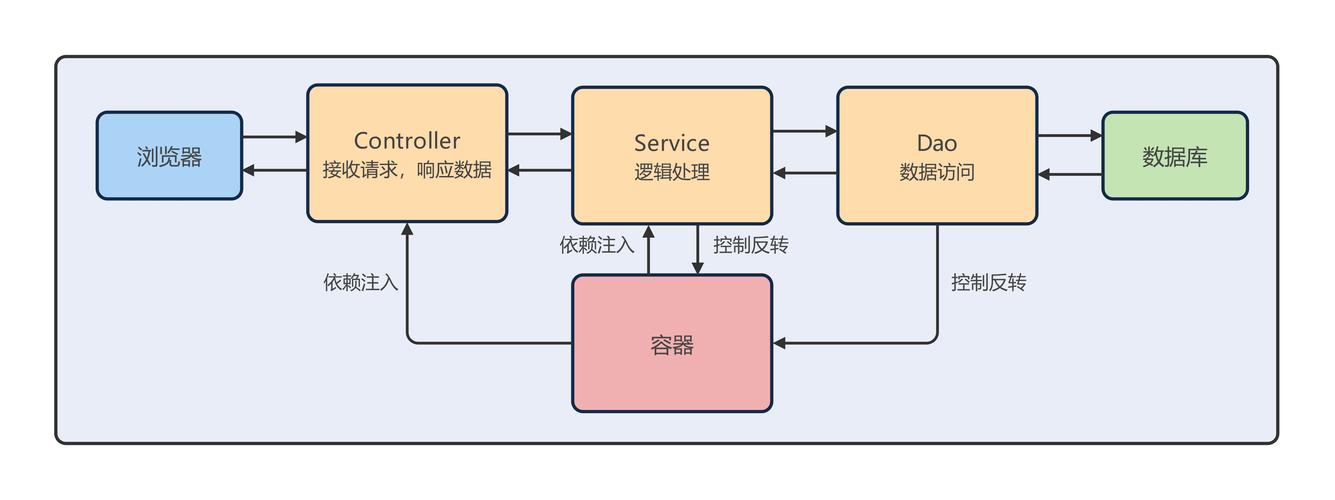
- A Generic Web Server (like Apache HTTP Server or Nginx) is great at serving static files (HTML, CSS, images). It can be extended with modules (like
mod_proxy) to forward dynamic requests to other applications. - A Java Web Server (Servlet Container) is a specialized environment designed to run Java Web Applications. These applications are typically built using technologies like Servlets, JSPs (JavaServer Pages), and modern frameworks like Spring MVC that run on top of the servlet container.
The most important standard it implements is the Java Servlet API. This API defines a contract for how a Java class can respond to web requests.
How It Works: The Servlet Container
The servlet container is the engine of a Java web server. Its primary jobs are:
-
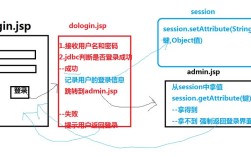
Lifecycle Management: It manages the entire lifecycle of a servlet. When a request comes in for a specific servlet, the container:
- Loads the servlet class (if not already loaded).
- Creates an instance of the servlet.
- Calls its
init()method (only once, when it's first loaded). - For each request, it calls the servlet's
service()method (which then callsdoGet(),doPost(), etc.). - When the server shuts down or the application is undeployed, it calls the servlet's
destroy()method.
-
Request Handling: It receives the raw HTTP request from a client (a web browser), parses it, and creates request and response objects (
HttpServletRequestandHttpServletResponse). It then passes these objects to the appropriate servlet'sservice()method. (图片来源网络,侵删)
 -
Multithreading: The container is responsible for handling multiple concurrent requests. It typically creates a new thread for each request (or uses a thread pool) and delegates the request to a servlet instance. Crucially, by default, a single servlet instance is used to handle all requests. This is why your servlet code must be thread-safe.
-
Networking: It handles all the low-level socket communication, listening on a specific port (e.g., 8080), accepting connections, and sending back the HTTP response.
-
Supporting APIs: It provides implementations for other Java EE (now Jakarta EE) APIs like JavaServer Pages (JSP), JavaServer Faces (JSF), WebSocket, and more.
In short, the servlet container provides the platform and the runtime environment for your Java web code to execute.
Types of Java Web Servers
Java web servers can be broadly categorized into two types:
A. Standalone (or Traditional) Servers
These are full-fledged, independent server applications that you install, configure, and run as a separate service on your operating system.
- Examples: Apache Tomcat, Jetty, WildFly (formerly JBoss AS), IBM WebSphere.
- How they work: You build your web application as a
.war(Web Application Archive) file and then "deploy" it to the server by copying it into a specific directory (webappsin Tomcat). The server then automatically detects and loads your application. - Pros:
- Mature, feature-rich, and battle-tested.
- Often come with management consoles and web-based interfaces.
- Strong community and commercial support.
- Cons:
- Can be heavier and have a longer startup time.
- The deployment process can feel a bit detached from your development workflow.
B. Embedded Servers
This is a modern approach where the web server is not a separate process. Instead, the server library is bundled directly inside your application's JAR file. Your application code then starts the server programmatically.
- Examples: Spring Boot's default embedded server is Tomcat. Other popular embedded servers include Jetty and Undertow.
- How they work: You add a dependency (e.g.,
spring-boot-starter-web) to your project. When you run your main application class, Spring Boot automatically starts an embedded Tomcat server and deploys your application to it. - Pros:
- Simplicity: No need to install or configure a separate server. You just run your Java application.
- Portability: Your application is self-contained. You can run it anywhere you have a JVM installed.
- Fast Startup: Much quicker to start than a standalone server, which is great for development and microservices.
- Easy Testing: You can write integration tests that start the server, make HTTP requests, and verify responses, all within your test framework.
- Cons:
- Can be less flexible for advanced server-level configuration compared to a standalone server.
- You are tied to the version of the server that comes with your framework (though this is usually a recent, stable version).
Popular Java Web Servers
| Server | Type | Key Characteristics | Best For |
|---|---|---|---|
| Apache Tomcat | Standalone & Embedded | The most popular and widely used. Implements the Servlet and JSP specifications. Lightweight, fast, and stable. It's the reference implementation. | The default choice. Everything from simple web apps to large-scale enterprise applications. The de-facto standard. |
| Eclipse Jetty | Standalone & Embedded | Extremely lightweight and highly embeddable. Known for its asynchronous, non-blocking I/O capabilities, making it great for high-concurrency applications. | Microservices, embedded systems, and applications requiring high performance and low latency. |
| WildFly | Standalone | A full-fledged Application Server, not just a web server. It implements the full Jakarta EE (formerly Java EE) platform, including EJBs, JMS, Transactions, etc. | Complex, large-scale enterprise applications that need the full power of Jakarta EE. |
| Undertow | Embedded (Primarily) | A flexible, performant, and lightweight non-blocking web server written in Java. It's the default embedded server in some newer frameworks (like Quarkus). | Modern microservices architectures where performance and resource efficiency are critical. |
| IBM WebSphere | Standalone | A powerful, high-end, commercial application server. Offers top-tier performance, scalability, and advanced features like advanced clustering and management. | Large financial institutions and enterprises requiring mission-critical support and high availability. |
A Simple "Hello World" Example (Using Embedded Tomcat with Maven)
This example shows how incredibly easy it is to create a web server with an embedded container.
Step 1: Project Setup (pom.xml)
Create a new Maven project and add the tomcat-embed-core dependency.
<project xmlns="http://maven.apache.org/POM/4.0.0"
         xmlns:xsi="http://www.w3.org/2001/XMLSchema-instance"
         xsi:schemaLocation="http://maven.apache.org/POM/4.0.0 http://maven.apache.org/xsd/maven-4.0.0.xsd">
    <modelVersion>4.0.0</modelVersion>
    <groupId>com.example</groupId>
    <artifactId>java-web-server-demo</artifactId>
    <version>1.0-SNAPSHOT</version>
    <properties>
        <maven.compiler.source>11</maven.compiler.source>
        <maven.compiler.target>11</maven.compiler.target>
        <project.build.sourceEncoding>UTF-8</project.build.sourceEncoding>
    </properties>
    <dependencies>
        <!-- Embedded Apache Tomcat -->
        <dependency>
            <groupId>org.apache.tomcat.embed</groupId>
            <artifactId>tomcat-embed-core</artifactId>
            <version>10.1.15</version> <!-- Use a recent version -->
        </dependency>
    </dependencies>
</project>
Step 2: Create the Servlet
Create a simple Java class that extends HttpServlet.
// src/main/java/com/example/HelloWorldServlet.java
package com.example;
import jakarta.servlet.annotation.WebServlet;
import jakarta.servlet.http.HttpServlet;
import jakarta.servlet.http.HttpServletRequest;
import jakarta.servlet.http.HttpServletResponse;
import java.io.IOException;
@WebServlet("/hello") // This annotation maps the servlet to the URL "/hello"
public class HelloWorldServlet extends HttpServlet {
    @Override
    protected void doGet(HttpServletRequest req, HttpServletResponse resp) throws IOException {
        resp.setContentType("text/plain");
        resp.getWriter().write("Hello, World from a Java Web Server!");
    }
}
Note: jakarta.servlet is the package name for modern Java EE / Jakarta EE. If you're using an older version, it would be javax.servlet.
Step 3: Create the Main Application to Start the Server
// src/main/java/com/example/ServerApp.java
package com.example;
import org.apache.catalina.WebResourceRoot;
import org.apache.catalina.core.StandardContext;
import org.apache.catalina.startup.Tomcat;
import org.apache.catalina.webresources.DirResourceSet;
import org.apache.catalina.webresources.StandardRoot;
import java.io.File;
public class ServerApp {
    public static void main(String[] args) throws Exception {
        // Create a Tomcat instance
        Tomcat tomcat = new Tomcat();
        // The port to listen on
        tomcat.setPort(8080);
        // Define a web application (a "context")
        StandardContext ctx = (StandardContext) tomcat.addWebapp(
                "", // The context path (empty means root)
                new File("src/main/webapp").getAbsolutePath()); // The base directory for the web app
        // Add the classes directory to the classpath for the context
        File additionWebInfClasses = new File("target/classes");
        WebResourceRoot resources = new StandardRoot(ctx);
        resources.addPreResources(new DirResourceSet(resources, "/WEB-INF/classes",
                additionWebInfClasses.getAbsolutePath(), "/"));
        ctx.setResources(resources);
        // Start the server
        tomcat.start();
        System.out.println("Server started on http://localhost:8080/hello");
        tomcat.getServer().await(); // Keep the server running
    }
}
Note: For a real project, you'd use a framework like Spring Boot, which hides all this complexity. This example shows what the framework does for you.
Step 4: Run It
- Compile the project:
mvn clean compile - Run the main class:
mvn exec:java -Dexec.mainClass="com.example.ServerApp" - Open your web browser and navigate to http://localhost:8080/hello.
You should see the text: Hello, World from a Java Web Server!
Choosing the Right Server
- For Beginners / Simple Projects / Learning: Use Apache Tomcat. It's the standard, has the most documentation, and is straightforward.
- For Modern Microservices / Development Speed: Use an embedded server. Spring Boot with its embedded Tomcat is the industry standard here. It simplifies development immensely.
- For High-Performance / High-Concurrency: Consider Jetty or Undertow as your embedded server. Their non-blocking I/O models can outperform traditional Tomcat in specific scenarios.
- For Full-Featured Enterprise Applications: If you need services like EJBs, JMS, and complex transaction management, you need a full Application Server like WildFly or IBM WebSphere. For most new projects, however, a lightweight server like Tomcat combined with a framework like Spring is sufficient and more flexible.