Of course! Here is a comprehensive guide to Java decompilers, covering what they are, why you'd use them, the best options available, and how to use them.
What is a Java Decompiler?
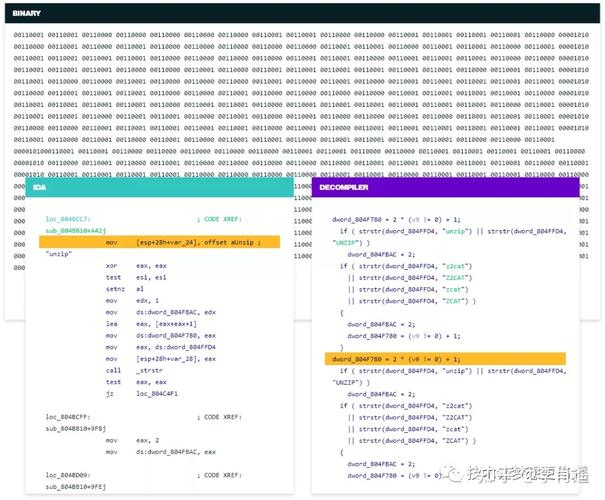
A Java decompiler is a tool that reverses the process of Java compilation. It takes compiled Java bytecode (usually in .class files or a .jar archive) and translates it back into human-readable Java source code.
Analogy: Think of it like translating a book from a language you don't understand (compiled bytecode) back into its original language (Java source code).
How Does it Work?
- Input: You provide a
.classfile or a.jarfile. - Parsing: The decompiler reads the low-level bytecode instructions. These instructions are not like high-level code; they are a set of commands for the Java Virtual Machine (JVM).
- Analysis & Reconstruction: The decompiler's core job is to analyze these instructions and infer the original high-level Java constructs like:
- Classes, interfaces, and enums
- Methods and constructors
- Control flow (
if-else,for,while,switch) - Variables and data types
- Exception handling (
try-catchblocks) - Object-oriented structures (inheritance, method calls)
- Output: It generates a
.javasource file that, when compiled, would produce the original bytecode.
Important Caveat: The output is reconstructed code, not the original source code. Comments, variable names (if they were simple and not preserved), and certain high-level logic might be lost or guessed incorrectly. However, modern decompilers are incredibly good at producing code that is very close to the original.
Why Use a Java Decompiler?
Decompilers are powerful tools for a variety of legitimate and essential purposes:
- Legacy Code Analysis: When you lose the source code for an old application but need to understand how it works, maintain it, or fix a bug.
- Learning: To see how a library or framework you're using is implemented under the hood. It's a fantastic way to learn advanced Java techniques and design patterns.
- Debugging: When you encounter a bug in a third-party library and want to understand its internal behavior without having to attach a debugger to its complex code.
- Security Auditing: Analyzing potentially malicious Java applications (like
.jarfiles from untrusted sources) to understand what they do. - Interoperability: Integrating with a system that only provides a
.jarfile without documentation. - Recovering Your Own Code: Accidentally deleting source code but still having the compiled
.jaror.classfiles.
Best Java Decompilers (2025)
Here are the most popular and effective decompilers, categorized by their primary use case.
Procyon (Recommended for Command-Line & Batch Processing)
Procyon is a modern, open-source decompiler known for its high-quality output and excellent support for modern Java features (up to Java 14+).
- Pros:
- Excellent Code Quality: Produces very clean, readable, and well-formatted Java code.
- Modern Java Support: Handles lambdas, streams, and other recent language features very well.
- Fast and Reliable: Generally considered one of the most accurate decompilers.
- Command-Line Focused: Perfect for automation and batch processing.
- Cons:
No graphical user interface (GUI). You use it from the command line.
- Best For: Developers who need high-quality decompiled code for analysis or who need to integrate decompilation into a build or CI/CD pipeline.
How to Use (Command Line):
Download the procyon-decompiler.jar and run it from your terminal.
# To decompile a single .class file
java -jar procyon-decompiler.jar MyClass.class
# To decompile an entire .jar file into a directory
java -jar procyon-decompiler.jar my-library.jar -o output_directory
CFR (Recommended for GUI & Quick Checks)
CFR is another top-tier, open-source decompiler that is incredibly fast and produces great code. It's often considered a direct competitor to Procyon.
- Pros:
- Very Fast: Decompilation is usually very quick.
- High-Quality Output: Like Procyon, it produces clean and readable code.
- Excellent GUI: The CFR plugin for IntelliJ IDEA is one of the best ways to decompile code directly inside your IDE.
- Cons:
The standalone command-line tool can be slightly less intuitive than Procyon's for some options.
- Best For: Quick decompilation tasks and for developers who work primarily within IntelliJ IDEA.
How to Use (Command Line):
Download the cfr-<version>.jar file.
# To decompile a .jar file
java -jar cfr-0.152.jar my-library.jar --outputdir output_directory
JD-GUI (The Classic GUI Tool)
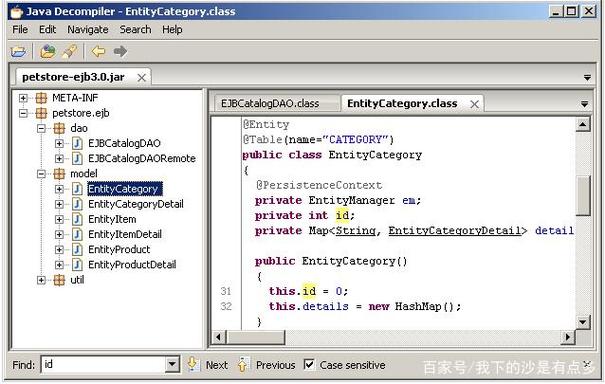
JD-GUI is the most famous and widely used decompiler, known for its simple, graphical interface. It's been around for a long time and is a staple for many developers.
- Pros:
- Extremely Easy to Use: Just drag and drop a
.jaror.classfile. - Fast: Starts up quickly and decompiles code almost instantly.
- Widely Adopted: Most developers have used it at least once.
- Extremely Easy to Use: Just drag and drop a
- Cons:
- Outdated: Development has stalled, and it doesn't support the latest Java features (e.g., records, sealed classes) as well as Procyon or CFR.
- The code quality, while good, can sometimes be less "perfect" than Procyon's.
- Best For: Quick, casual inspection of Java code, especially for older projects or when you just need to peek inside a
.jarfile without any fuss.
How to Use (GUI):
- Download and run the
jd-guiexecutable for your OS. - Go to
File -> Open...and select your.jaror.classfile. - The decompiled source code will appear in the main window.
IntelliJ IDEA (Built-in Decompiler)
Modern IDEs like IntelliJ IDEA (and Eclipse, to a lesser extent) have built-in decompilers. This is often the most convenient way to work.
- Pros:
- Seamless Integration: No need to download external tools. Just open any class file from a library, and IntelliJ shows you the decompiled code.
- Powerful Navigation: You can navigate from the decompiled code to other classes, search for usages, and even debug the decompiled bytecode.
- Uses Modern Engines: IntelliJ uses CFR under the hood by default, so you get high-quality decompilation.
- Cons:
Tied to the IDE.
- Best For: Day-to-day development when you need to understand the internals of a library you are using.
How to Use (IntelliJ IDEA):
- Open any project in IntelliJ.
- Find a class from a library in your Project view (e.g., in the
External Librariessection). - Double-click the
.classfile. IntelliJ will open a tab showing the decompiled source code.
Comparison Table
| Feature | Procyon | CFR | JD-GUI | IntelliJ IDEA (Built-in) |
|---|---|---|---|---|
| Type | Command-Line | Command-Line / GUI (Plugin) | GUI | IDE Integration |
| Code Quality | Excellent | Excellent | Good | Excellent (uses CFR) |
| Java Support | Modern (Java 14+) | Modern (Java 17+) | Older (Java 8-ish) | Modern (depends on version) |
| Ease of Use | Medium (CLI knowledge needed) | Medium (CLI) / High (GUI) | Very High | Very High |
| Best For | Batch processing, automation | Quick checks, IntelliJ users | Quick, casual inspection | Everyday development |
Ethical and Legal Considerations
Using a decompiler is a powerful technical skill, but it comes with significant ethical and legal responsibilities.
- Copyright Law: Decompiling software without permission is often a violation of the software's End-User License Agreement (EULA) and copyright law. You should only decompile code that you own, or when you have explicit permission from the copyright holder.
- Reverse Engineering for Interoperability: In some jurisdictions (like the US under the DMCA), reverse engineering for the purpose of creating interoperable software is permitted. However, this is a complex legal area.
- Malware Analysis: Decompiling malware is a critical security activity. This is a legitimate use case, but it should be done in a secure, isolated environment (like a virtual machine) to prevent infection.
Golden Rule: Use decompilers ethically and responsibly. Treat decompiled source code as confidential intellectual property. It's a tool for understanding, not for stealing.