Of course! Here is a comprehensive guide to using TCP sockets in Java, covering the core concepts, client-server communication, a complete code example, and best practices.
Core Concepts: TCP vs. UDP
Before diving into the code, it's crucial to understand what TCP is.
-
TCP (Transmission Control Protocol):
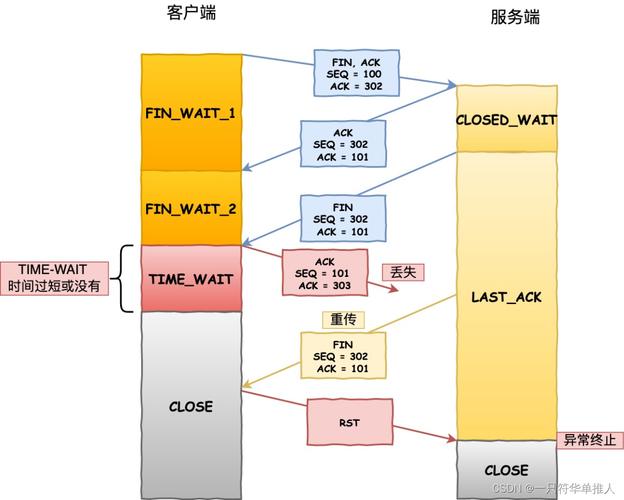
- Connection-Oriented: A reliable connection must be established between the client and server before any data is sent. This is done via a "three-way handshake."
- Reliable: TCP guarantees that data sent will arrive in the correct order without errors. It uses acknowledgments, retransmissions, and checksums to ensure this.
- Stream-based: Data is treated as a continuous stream of bytes. The boundaries between messages are not preserved; it's up to your application to define them (e.g., using a delimiter or by sending the message length first).
- Example Use Cases: Web browsing (HTTP/HTTPS), File Transfer (FTP), Email (SMTP).
-
UDP (User Datagram Protocol):
- Connectionless: No handshake is needed. You just send a packet (datagram) to a destination address.
- Unreliable: There is no guarantee of delivery, order, or that data isn't corrupted.
- Datagram-based: Data is sent in discrete packets with clear boundaries.
- Example Use Cases: Video streaming, online gaming, DNS lookups.
For this guide, we will focus on TCP.
Key Java Classes for TCP Sockets
Java's networking API is primarily in the java.net package.
| Class | Description | Key Method(s) |
|---|---|---|
Socket |
Represents the client's endpoint for a connection. It's used to connect to a server. | connect(), getInputStream(), getOutputStream(), close() |
ServerSocket |
Listens for incoming client connections on a specific port. | accept(), close() |
InputStream |
A generic class for reading bytes. We'll use its subclasses. | read() |
OutputStream |
A generic class for writing bytes. We'll use its subclasses. | write() |
BufferedReader |
Wraps an InputStreamReader to read text from a stream efficiently line by line. |
readLine() |
PrintWriter |
Wraps an OutputStream to write text to a stream with convenient methods like println(). |
println(), print() |
The Communication Flow (Client-Server Model)
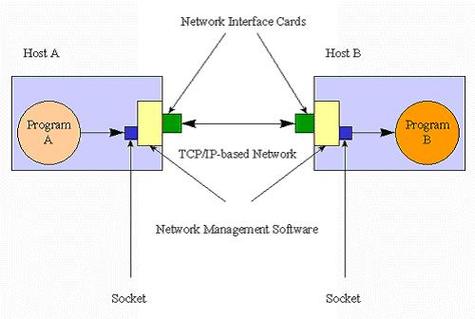
The process is always a two-step dance:
Server-Side:
- Create a
ServerSocketand bind it to a specific port. This server will "listen" on this port. - Call
serverSocket.accept(). This method blocks (waits) until a client tries to connect. - When a client connects,
accept()returns a newSocketobject representing the connection to that specific client. - Get the
InputStreamandOutputStreamfrom the newSocketto read from and write to the client. - Handle the communication (e.g., read a request, send a response).
- Close the client's
Socketwhen done. - (Optionally) Go back to step 3 to wait for another client.
Client-Side:
- Create a
Socket, specifying the server's IP address (or hostname) and port. - The
Socketconstructor blocks until the connection to the server is successfully established. - Get the
InputStreamandOutputStreamfrom theSocket. - Send a request to the server using the
OutputStream. - Read the response from the server using the
InputStream. - Close the
Socketwhen done.
Complete Code Example: Echo Server
This is a classic example. The client sends a message to the server, and the server sends the exact same message back.
Project Structure
socket-demo/
├── src/
│   ├── EchoServer.java
│   └── EchoClient.java
EchoServer.java
import java.io.BufferedReader;
import java.io.IOException;
import java.io.InputStreamReader;
import java.io.PrintWriter;
import java.net.ServerSocket;
import java.net.Socket;
public class EchoServer {
    public static void main(String[] args) {
        int port = 6789; // Port number to listen on
        try (ServerSocket serverSocket = new ServerSocket(port)) {
            System.out.println("Server is listening on port " + port);
            // The accept() method blocks until a client connects
            Socket clientSocket = serverSocket.accept();
            System.out.println("Client connected: " + clientSocket.getInetAddress().getHostAddress());
            // Set up streams for communication
            // PrintWriter for sending messages to the client
            PrintWriter out = new PrintWriter(clientSocket.getOutputStream(), true);
            // BufferedReader for reading messages from the client
            BufferedReader in = new BufferedReader(new InputStreamReader(clientSocket.getInputStream()));
            String inputLine;
            // Read from the client until "exit" is sent
            while ((inputLine = in.readLine()) != null) {
                System.out.println("Received from client: " + inputLine);
                if ("exit".equalsIgnoreCase(inputLine)) {
                    System.out.println("Client requested to exit. Closing connection.");
                    break;
                }
                // Echo the message back to the client
                out.println("Server: " + inputLine);
            }
        } catch (IOException e) {
            System.out.println("Server exception: " + e.getMessage());
            e.printStackTrace();
        }
    }
}
EchoClient.java
import java.io.BufferedReader;
import java.io.IOException;
import java.io.InputStreamReader;
import java.io.PrintWriter;
import java.net.Socket;
import java.net.UnknownHostException;
public class EchoClient {
    public static void main(String[] args) {
        String hostname = "localhost"; // or "127.0.0.1"
        int port = 6789;
        try (
            // Create a socket to connect to the server
            Socket socket = new Socket(hostname, port);
            // PrintWriter to send messages to the server
            PrintWriter out = new PrintWriter(socket.getOutputStream(), true);
            // BufferedReader to read server responses
            BufferedReader in = new BufferedReader(new InputStreamReader(socket.getInputStream()));
            // BufferedReader to read user input from the console
            BufferedReader stdIn = new BufferedReader(new InputStreamReader(System.in))
        ) {
            System.out.println("Connected to the echo server. Type 'exit' to quit.");
            String userInput;
            // Read user input from the console
            while ((userInput = stdIn.readLine()) != null) {
                // Send the user's input to the server
                out.println(userInput);
                // Read the server's response
                String response = in.readLine();
                System.out.println("Server response: " + response);
                if ("exit".equalsIgnoreCase(userInput)) {
                    break;
                }
            }
        } catch (UnknownHostException e) {
            System.err.println("Don't know about host " + hostname);
            System.exit(1);
        } catch (IOException e) {
            System.err.println("Couldn't get I/O for the connection to " +
                hostname);
            System.exit(1);
        }
    }
}
How to Run the Example
-
Compile the code:
javac src/EchoServer.java src/EchoClient.java
-
Run the server first (in one terminal):
java src.EchoServer
You will see:
Server is listening on port 6789 -
Run the client (in a second terminal):
java src.EchoClient
You will see:
Connected to the echo server. Type 'exit' to quit. -
Interact:
- In the client terminal, type a message and press Enter.
- The server will receive it and echo it back.
- You'll see the messages in both the server and client terminals.
- Type
exitin the client terminal to shut down the connection.
Best Practices and Important Considerations
-
Resource Management (Try-with-Resources):
- Always close sockets, input streams, and output streams.
- The
try-with-resourcesstatement is the modern, recommended way to do this. It automatically closes the resources when thetryblock is exited, even if an exception occurs. Notice how all the examples use it.
-
Blocking Nature:
serverSocket.accept()andsocketInputStream.read()are blocking. They pause the thread's execution until an event occurs (a connection or data arrival).- For a simple server, this is fine. For a high-performance server that needs to handle many clients simultaneously, this approach is inefficient. In such cases, you would use:
- Multi-threading: Create a new
Threadfor each client accepted byaccept(). ExecutorService: Use a thread pool to manage client threads more efficiently.- NIO (New I/O): A more advanced, non-blocking API for scalable network applications.
- Multi-threading: Create a new
-
Character Encoding:
- When using
InputStreamReaderandPrintWriter, it's good practice to specify the character encoding (e.g.,StandardCharsets.UTF_8) to avoid platform-dependent issues. - Example:
new InputStreamReader(socket.getInputStream(), StandardCharsets.UTF_8)
- When using
-
Defining Message Boundaries:
- Since TCP is a stream, how do you know when one message ends and the next begins?
- Using
readLine(): Simple for text-based protocols, but your messages cannot contain newline characters. - Prefixing with Length: A more robust method. Send the length of the message as an integer (or a fixed-size string) before the actual message content. The client reads the length first, then reads exactly that many bytes.
- Using a Delimiter: A special character (or sequence) that marks the end of a message (e.g.,
\0or\r\n\r\n). This is common in protocols like HTTP.