下面我将为你提供一个详细的指南,包括:
(图片来源网络,侵删)
- 同步下载(最简单直接的方式)
- 异步下载(更高效,不阻塞主线程)
- 带有进度显示的下载(用户体验更好)
- 使用 Apache HttpClient 4.x/5.x(如果你仍在使用或更偏爱它)
核心步骤(通用)
无论使用哪种方式,下载文件的基本步骤都类似:
- 创建
HttpClient实例:这是发送请求的客户端。 - 创建
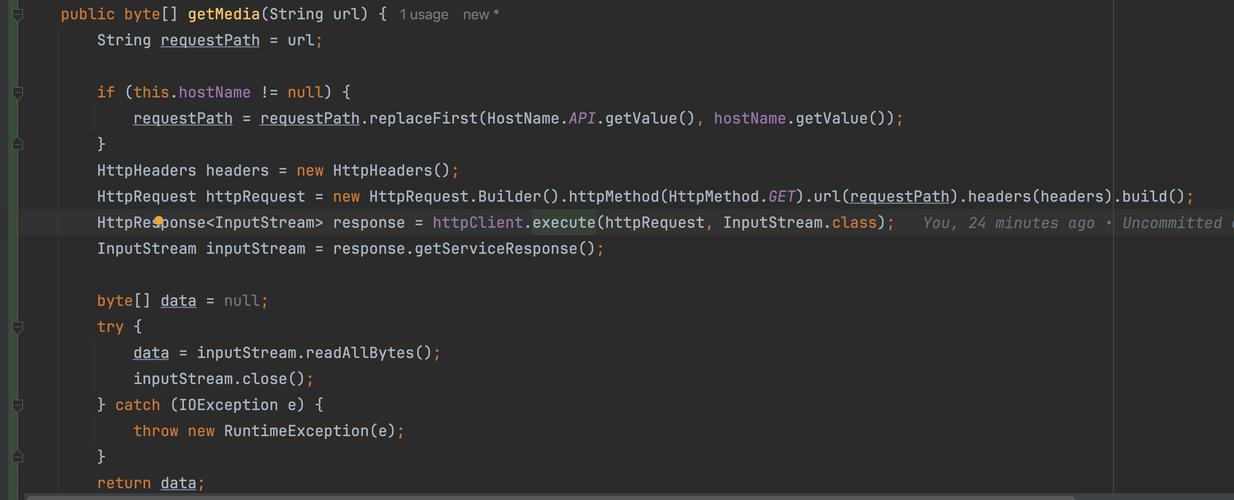
HttpRequest实例:指定要下载的 URL、HTTP 方法(通常是GET)等。 - 发送请求并获取
HttpResponse:客户端执行请求,服务器返回响应。 - 检查响应状态码:确保请求成功(通常是
200 OK)。 - 获取响应体(
BodyHandlers):将响应流式地传输到一个文件或字节数组。 - 处理流和资源:非常重要,确保在操作完成后关闭输入流和输出流,以避免资源泄漏。
同步下载 (Java 11+)
这是最简单的方式,代码直观,适合简单的脚本或不需要高并发的场景。
示例代码
import java.io.IOException;
import java.net.URI;
import java.net.http.HttpClient;
import java.net.http.HttpRequest;
import java.net.http.HttpResponse;
import java.net.http.HttpResponse.BodyHandlers;
import java.nio.file.Files;
import java.nio.file.Path;
import java.nio.file.Paths;
public class SyncDownloader {
    public static void main(String[] args) {
        String fileUrl = "https://www.w3.org/WAI/ER/tests/xhtml/testfiles/resources/pdf/dummy.pdf";
        String destinationPath = "dummy.pdf";
        // 1. 创建 HttpClient
        HttpClient httpClient = HttpClient.newHttpClient();
        // 2. 创建 HttpRequest
        HttpRequest request = HttpRequest.newBuilder()
                .uri(URI.create(fileUrl))
                .build();
        try {
            // 3. 发送请求并获取响应,BodyHandlers.ofFile 会自动处理流和文件写入
            Path destination = Paths.get(destinationPath);
            HttpResponse<Path> response = httpClient.send(request, BodyHandlers.ofFile(destination));
            // 4. 检查响应状态码
            if (response.statusCode() == 200) {
                System.out.println("文件下载成功!");
                System.out.println("文件已保存到: " + destination.toAbsolutePath());
            } else {
                System.err.println("下载失败,状态码: " + response.statusCode());
            }
        } catch (IOException | InterruptedException e) {
            System.err.println("下载过程中发生错误: " + e.getMessage());
            // 如果是中断异常,恢复中断状态
            if (e instanceof InterruptedException) {
                Thread.currentThread().interrupt();
            }
        }
    }
}
代码解析:
HttpClient.newHttpClient(): 创建一个默认配置的HttpClient。HttpRequest.newBuilder().uri(...).build(): 构建一个GET请求。httpClient.send(...): 发送请求并阻塞,直到收到响应。BodyHandlers.ofFile(Path): 这是一个非常方便的处理器,它会自动将响应体(输入流)的内容写入到指定的文件路径中,并自动处理流的关闭,大大简化了代码。
异步下载 (Java 11+)
异步下载不会阻塞调用线程,非常适合在 GUI 应用或需要处理多个网络请求的服务端环境中使用,它返回一个 CompletableFuture。
(图片来源网络,侵删)
示例代码
import java.io.IOException;
import java.net.URI;
import java.net.http.HttpClient;
import java.net.http.HttpRequest;
import java.net.http.HttpResponse;
import java.net.http.HttpResponse.BodyHandlers;
import java.nio.file.Files;
import java.nio.file.Path;
import java.nio.file.Paths;
import java.util.concurrent.CompletableFuture;
import java.util.concurrent.ExecutionException;
public class AsyncDownloader {
    public static void main(String[] args) {
        String fileUrl = "https://www.w3.org/WAI/ER/tests/xhtml/testfiles/resources/pdf/dummy.pdf";
        String destinationPath = "dummy_async.pdf";
        HttpClient httpClient = HttpClient.newHttpClient();
        HttpRequest request = HttpRequest.newBuilder()
                .uri(URI.create(fileUrl))
                .build();
        Path destination = Paths.get(destinationPath);
        // 异步发送请求
        CompletableFuture<HttpResponse<Path>> futureResponse = httpClient.sendAsync(request, BodyHandlers.ofFile(destination));
        // 使用 thenAccept 来处理成功完成的情况
        futureResponse.thenAccept(response -> {
            if (response.statusCode() == 200) {
                System.out.println("文件异步下载成功!");
                System.out.println("文件已保存到: " + destination.toAbsolutePath());
            } else {
                System.err.println("异步下载失败,状态码: " + response.statusCode());
            }
        });
        // 使用 exceptionally 来处理异常
        futureResponse.exceptionally(e -> {
            System.err.println("异步下载过程中发生错误: " + e.getMessage());
            return null;
        });
        System.out.println("请求已发送,主线程继续执行其他任务...");
        // 为了让主线程等待异步任务完成(仅用于演示)
        try {
            futureResponse.get(); // 阻塞,直到 future 完成
        } catch (InterruptedException | ExecutionException e) {
            e.printStackTrace();
        }
    }
}
代码解析:
httpClient.sendAsync(...): 发送异步请求,立即返回一个CompletableFuture。futureResponse.thenAccept(...): 当CompletableFuture成功完成时,执行这个回调函数。futureResponse.exceptionally(...): 当CompletableFuture发生异常时,执行这个回调函数。futureResponse.get(): 在主线程中调用此方法可以等待异步任务完成,在实际应用中,你可能不需要它,你的应用可能会一直运行或由其他事件驱动。
带有进度显示的下载
要显示下载进度,我们需要更精细地控制流,我们不能直接使用 BodyHandlers.ofFile(),而是需要自己处理输入流和输出流,并在写入数据时计算字节数。
示例代码
import java.io.IOException;
import java.net.URI;
import java.net.http.HttpClient;
import java.net.http.HttpRequest;
import java.net.http.HttpResponse;
import java.net.http.HttpResponse.BodyHandlers;
import java.nio.file.Files;
import java.nio.file.Path;
import java.nio.file.Paths;
import java.nio.file.StandardOpenOption;
public class ProgressDownloader {
    public static void main(String[] args) {
        String fileUrl = "https://www.w3.org/WAI/ER/tests/xhtml/testfiles/resources/pdf/dummy.pdf";
        String destinationPath = "dummy_progress.pdf";
        HttpClient httpClient = HttpClient.newHttpClient();
        HttpRequest request = HttpRequest.newBuilder()
                .uri(URI.create(fileUrl))
                .build();
        Path destination = Paths.get(destinationPath);
        try {
            // 发送请求,但使用 BodyHandlers.ofInputStream() 来获取原始输入流
            HttpResponse<InputStream> response = httpClient.send(request, BodyHandlers.ofInputStream());
            if (response.statusCode() != 200) {
                System.err.println("下载失败,状态码: " + response.statusCode());
                return;
            }
            // 获取输入流
            InputStream inputStream = response.body();
            // 获取输出流
            OutputStream outputStream = Files.newOutputStream(destination, StandardOpenOption.CREATE, StandardOpenOption.TRUNCATE_EXISTING);
            byte[] buffer = new byte[8192]; // 8KB 缓冲区
            int bytesRead;
            long totalBytesRead = 0;
            // 从响应头中获取文件总大小(可选)
            long contentLength = response.headers().firstValueAsLong("Content-Length").orElse(-1);
            System.out.println("开始下载...");
            // 循环读取并写入
            while ((bytesRead = inputStream.read(buffer)) != -1) {
                outputStream.write(buffer, 0, bytesRead);
                totalBytesRead += bytesRead;
                // 计算并打印进度
                if (contentLength > 0) {
                    double percent = (double) totalBytesRead / contentLength * 100;
                    System.out.printf("下载进度: %.2f%%%n", percent);
                } else {
                    System.out.println("已下载: " + totalBytesRead + " bytes");
                }
            }
            // 确保所有流都被关闭
            inputStream.close();
            outputStream.close();
            System.out.println("文件下载完成!");
        } catch (IOException | InterruptedException e) {
            System.err.println("下载过程中发生错误: " + e.getMessage());
            if (e instanceof InterruptedException) {
                Thread.currentThread().interrupt();
            }
        }
    }
}
代码解析:
BodyHandlers.ofInputStream(): 获取一个InputStream,让我们可以手动读取数据。Files.newOutputStream(...): 创建一个文件输出流。- 我们使用一个循环和缓冲区来从输入流读取数据,并写入到输出流中。
- 通过检查
Content-Length响应头,我们可以计算出下载的百分比。 - 手动关闭流:在这种模式下,我们必须手动
close()输入流和输出流,通常建议使用try-with-resources语句来自动管理。
使用 Apache HttpClient 4.x/5.x
虽然 Java 11+ 的 HttpClient 已经很强大,但很多历史项目仍在使用 Apache HttpClient,它的 API 更加丰富和灵活。
(图片来源网络,侵删)
Maven 依赖 (Apache HttpClient 5.x)
<dependency>
    <groupId>org.apache.httpcomponents.client5</groupId>
    <artifactId>httpclient5</artifactId>
    <version>5.3.1</version> <!-- 请使用最新版本 -->
</dependency>
示例代码 (Apache HttpClient 5.x)
import org.apache.hc.client5.http.classic.methods.HttpGet;
import org.apache.hc.client5.http.impl.classic.CloseableHttpClient;
import org.apache.hc.client5.http.impl.classic.CloseableHttpResponse;
import org.apache.hc.client5.http.impl.classic.HttpClients;
import org.apache.hc.core5.http.io.entity.EntityUtils;
import org.apache.hc.core5.http.io.entity.FileEntity;
import org.apache.hc.core5.http.io.entity.InputStreamEntity;
import org.apache.hc.core5.http.io.entity.StreamEntity;
import java.io.File;
import java.io.FileOutputStream;
import java.io.IOException;
import java.io.InputStream;
public class ApacheHttpClientDownloader {
    public static void main(String[] args) {
        String fileUrl = "https://www.w3.org/WAI/ER/tests/xhtml/testfiles/resources/pdf/dummy.pdf";
        String destinationPath = "dummy_apache.pdf";
        // 1. 创建 HttpClient
        try (CloseableHttpClient httpClient = HttpClients.createDefault()) {
            // 2. 创建 HttpRequest (HttpGet)
            HttpGet httpGet = new HttpGet(fileUrl);
            // 3. 执行请求
            try (CloseableHttpResponse response = httpClient.execute(httpGet)) {
                // 4. 检查响应状态码
                if (response.getCode() == 200) {
                    // 5. 获取响应实体
                    // EntityUtils.toByteArray 会将整个实体读入内存,对于大文件不推荐
                    // byte[] bytes = EntityUtils.toByteArray(response.getEntity());
                    // 推荐方式:流式传输
                    File destinationFile = new File(destinationPath);
                    try (InputStream in = response.getEntity().getContent();
                         FileOutputStream out = new FileOutputStream(destinationFile)) {
                        byte[] buffer = new byte[8192];
                        int bytesRead;
                        while ((bytesRead = in.read(buffer)) != -1) {
                            out.write(buffer, 0, bytesRead);
                        }
                    }
                    System.out.println("文件下载成功!保存到: " + destinationFile.getAbsolutePath());
                } else {
                    System.err.println("下载失败,状态码: " + response.getCode());
                }
            }
        } catch (IOException e) {
            System.err.println("下载过程中发生错误: " + e.getMessage());
        }
    }
}
代码解析:
HttpClients.createDefault(): 创建一个默认配置的CloseableHttpClient。new HttpGet(url): 创建一个GET请求对象。httpClient.execute(httpGet): 执行请求,返回CloseableHttpResponse。response.getEntity().getContent(): 获取响应体的输入流。try-with-resources:CloseableHttpClient和CloseableHttpResponse都实现了AutoCloseable,使用try-with-resources可以确保它们在使用后被自动关闭,防止资源泄漏。
总结与对比
| 特性 | Java 11+ HttpClient | Apache HttpClient 5.x |
|---|---|---|
| 依赖 | 无需外部依赖 (JDK 内置) | 需要 httpclient5 等库 |
| API 风格 | 现代,函数式 (CompletableFuture) |
经典,面向对象 |
| 同步/异步 | 原生支持 (send vs sendAsync) |
主要依赖外部库 (如 CompletableFuture) 或回调 |
| 简洁性 | BodyHandlers.ofFile() 非常简洁 |
需要手动管理流和资源 |
| 灵活性 | 非常灵活,尤其是异步处理 | 非常灵活,插件化程度高 |
| 推荐场景 | 新项目首选,尤其是基于 Java 11+ 的项目 | 遗留系统维护,或需要 Apache HttpClient 特定功能的项目 |
对于新项目,强烈推荐使用 Java 11+ 内置的 HttpClient,因为它更现代、更简洁,并且与平台深度集成。