Of course! The Python json library is a built-in module for working with JSON (JavaScript Object Notation) data. It's a fundamental tool for any Python developer, as JSON is the de-facto standard for data interchange on the web.

Here’s a comprehensive guide covering everything from the basics to more advanced use cases.
What is JSON?
JSON is a lightweight, text-based data format that is easy for humans to read and write, and easy for machines to parse and generate. It's a subset of JavaScript but is language-agnostic.
A JSON object looks like a Python dictionary:
{
  "name": "John Doe",
  "age": 30,
  "isStudent": false,
  "courses": [
    { "title": "History", "credits": 3 },
    { "title": "Math", "credits": 4 }
  ],
  "address": null
}
Core Functions of the json Library
The library provides four main functions for serialization (converting Python to JSON) and deserialization (converting JSON to Python).

| Function | Purpose | Python -> JSON | JSON -> Python |
|---|---|---|---|
json.dump() |
Write JSON to a file (file object) | Serialization | N/A |
json.dumps() |
Dump to a string (in memory) | Serialization | N/A |
json.load() |
Read JSON from a file (file object) | N/A | Deserialization |
json.loads() |
Load from a string (in memory) | N/A | Deserialization |
Mnemonic:
dumps (with an 's') goes to a string.loads (with an 's') comes from a string. The functions without the 's' (dump,load) work with files.
Serialization: Python to JSON
This is the process of converting a Python object into a JSON formatted string.
json.dumps() (Dump to String)
This is the most common starting point. It takes a Python object and returns a JSON string.
import json
# A Python dictionary
python_data = {
    "name": "Jane Doe",
    "age": 28,
    "skills": ["Python", "SQL", "Machine Learning"],
    "active": True
}
# Convert the Python dictionary to a JSON string
json_string = json.dumps(python_data)
print(json_string)
# Output: {"name": "Jane Doe", "age": 28, "skills": ["Python", "SQL", "Machine Learning"], "active": true}
Common dumps() Arguments:

indent: Pretty-prints the JSON with a specified number of spaces. Makes it human-readable.sort_keys: Sorts the keys of dictionaries alphabetically.
# Pretty-printing with indentation
pretty_json_string = json.dumps(python_data, indent=4, sort_keys=True)
print(pretty_json_string)
Output:
{
    "active": true,
    "age": 28,
    "name": "Jane Doe",
    "skills": [
        "Python",
        "SQL",
        "Machine Learning"
    ]
}
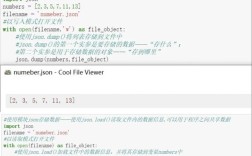
json.dump() (Dump to File)
This function writes the JSON directly to a file object. It's more memory-efficient for large data because it doesn't create an intermediate string in memory.
import json
python_data = {
    "name": "Jane Doe",
    "age": 28,
    "skills": ["Python", "SQL", "Machine Learning"]
}
# Use 'with' for safe file handling
with open('data.json', 'w') as f:
    # Write the data to the file, pretty-printed
    json.dump(python_data, f, indent=4)
print("File 'data.json' created successfully.")
Content of data.json:
{
    "name": "Jane Doe",
    "age": 28,
    "skills": [
        "Python",
        "SQL",
        "Machine Learning"
    ]
}
Deserialization: JSON to Python
This is the process of parsing a JSON string or file and converting it into a Python object (usually a dictionary or a list).
json.loads() (Load from String)
This function takes a JSON string and returns a corresponding Python object.
import json
# A JSON string
json_string = '{"name": "John Doe", "age": 30, "isStudent": false}'
# Convert the JSON string to a Python dictionary
python_dict = json.loads(json_string)
print(python_dict)
# Output: {'name': 'John Doe', 'age': 30, 'isStudent': False}
# Now you can use it like a normal Python dictionary
print(python_dict['name'])
# Output: John Doe
print(type(python_dict['isStudent']))
# Output: <class 'bool'>
json.load() (Load from File)
This function reads JSON data from a file object and returns a Python object.
import json
# The 'data.json' file was created in the previous example
with open('data.json', 'r') as f:
    # Load the data from the file into a Python dictionary
    python_dict_from_file = json.load(f)
print(python_dict_from_file)
# Output: {'name': 'Jane Doe', 'age': 28, 'skills': ['Python', 'SQL', 'Machine Learning']}
print(python_dict_from_file['skills'][0])
# Output: Python
Data Type Mapping
It's crucial to understand how JSON types map to Python types and vice versa.
| JSON Type | Python Type |
|---|---|
| object | dict |
| array | list |
| string | str |
| number (int) | int |
| number (real) | float |
true |
True |
false |
False |
null |
None |
Advanced: Custom Serialization (Handling Custom Classes)
What if you have a custom Python class that you want to serialize to JSON? By default, json.dumps() will fail with a TypeError.
You can solve this by providing a custom "encoder" function.
import json
class User:
    def __init__(self, name, email, is_active):
        self.name = name
        self.email = email
        self.is_active = is_active
# Create an instance of our custom class
user = User("Alice", "alice@example.com", True)
# This will raise a TypeError!
# json.dumps(user) -> TypeError: Object of type User is not JSON serializable
# --- SOLUTION: Create a custom encoder ---
def user_encoder(obj):
    """Check if the object is a User instance and return a dict."""
    if isinstance(obj, User):
        return {
            'name': obj.name,
            'email': obj.email,
            'is_active': obj.is_active
        }
    # Let the base default encoder handle other types
    raise TypeError(f"Object of type {type(obj)} is not JSON serializable")
# Now, use the 'default' argument of dumps
json_string = json.dumps(user, default=user_encoder, indent=4)
print(json_string)
Output:
{
    "name": "Alice",
    "email": "alice@example.com",
    "is_active": true
}
Security: Beware of json.load()
Never use json.load() on data from an untrusted source. The json library can parse more than just simple data structures; it can also parse Python objects, which can be a security risk.
The Safe Way: Always use json.load() with object_hook to validate and sanitize the data.
import json
# Malicious JSON that tries to execute code
malicious_json_string = '{"name": "Bob", "command": "__import__('os').system('echo pwned')"}'
# Unsafe: This would execute the command if it were in a real context
# json.loads(malicious_json_string) # DANGEROUS
# --- SAFE WAY: Use object_hook to validate keys ---
def safe_object_hook(obj):
    """An object_hook that only allows known keys."""
    allowed_keys = {'name', 'age', 'email'} # Define your allowed keys
    new_obj = {}
    for key, value in obj.items():
        if key in allowed_keys:
            new_obj[key] = value
        else:
            # Ignore or log unknown keys
            print(f"Warning: Ignoring unknown key '{key}'")
    return new_obj
# This will safely load the JSON, ignoring the dangerous 'command' key
safe_data = json.loads(malicious_json_string, object_hook=safe_object_hook)
print(safe_data)
# Output: {'name': 'Bob'}
# And a warning message: Warning: Ignoring unknown key 'command'
Summary
| Task | Function | Example |
|---|---|---|
| Serialize to String | json.dumps() |
s = json.dumps(my_dict) |
| Serialize to File | json.dump() |
json.dump(my_dict, file_obj) |
| Deserialize from String | json.loads() |
d = json.loads(my_string) |
| Deserialize from File | json.load() |
d = json.load(file_obj) |
| Pretty-Print | indent argument |
json.dumps(d, indent=4) |
| Handle Custom Objects | default argument |
json.dumps(obj, default=my_encoder) |
| Secure Loading | object_hook argument |
json.loads(s, object_hook=my_validator) |