Of course! Here is a comprehensive guide to implementing and using binary search in Java, covering the standard library method, manual implementation, and key concepts.
What is Binary Search?
Binary search is a highly efficient searching algorithm that finds the position of a target value within a sorted array.
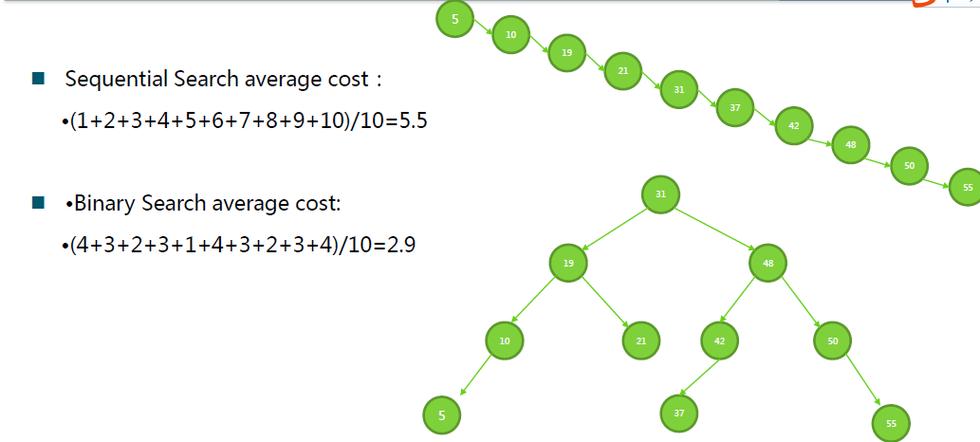
The core idea is to repeatedly divide the search interval in half. If the value of the search key is less than the item in the middle of the interval, narrow the interval to the lower half. Otherwise, narrow it to the upper half. You continue this process until the value is found or the interval is empty.
Analogy: Think of looking for a word in a dictionary. You don't start at 'A' and go one by one. You open the book to the middle. If your word comes before the words on that page, you know it's in the first half of the book. If it comes after, it's in the second half. You repeat this process, cutting the search area in half each time.
Key Requirement: The Array Must Be Sorted!
This is the most important prerequisite for binary search. If the array is not sorted, the algorithm will not work correctly.
The Easy Way: Using Java's Built-in Method
For most practical purposes, you should use the highly optimized, built-in Arrays.binarySearch() method from the java.util package.
Syntax
import java.util.Arrays;
public class BinarySearchExample {
    public static void main(String[] args) {
        int[] numbers = {2, 5, 8, 12, 16, 23, 38, 56, 72, 91};
        int target = 23;
        // The array MUST be sorted before using binarySearch
        Arrays.sort(numbers); // Good practice to ensure it's sorted
        // Perform the search
        int index = Arrays.binarySearch(numbers, target);
        if (index >= 0) {
            System.out.println("Element " + target + " found at index: " + index);
        } else {
            // The return value is (-(insertion point) - 1)
            // The insertion point is the index where the element would be inserted.
            System.out.println("Element " + target + " not found.");
            System.out.println("It would be inserted at index: " + (-index - 1));
        }
    }
}
Output
Element 23 found at index: 5Handling the Return Value
The Arrays.binarySearch() method returns:
- The index (>= 0) of the element if it is found.
- A negative value if the element is not found. This value is
(-(insertion point) - 1). The "insertion point" is the index at which the key would be inserted into the array to maintain the sorted order.
The Manual Implementation: From Scratch
Understanding how to implement binary search manually is a classic and very useful programming exercise. It's also common in technical interviews.
There are two common ways to write it: using a loop or using recursion.
Method A: Iterative Approach (Using a Loop)
This is generally preferred in production code because it's more memory-efficient (it doesn't use the call stack).
public class IterativeBinarySearch {
    public static int binarySearch(int[] arr, int target) {
        // Define the search boundaries
        int left = 0;
        int right = arr.length - 1;
        // Loop as long as the search space is valid
        while (left <= right) {
            // Calculate the middle index.
            // Using (left + right) / 2 can cause overflow for very large arrays.
            // This is a safer way.
            int mid = left + (right - left) / 2;
            // Case 1: The target is found at the middle
            if (arr[mid] == target) {
                return mid;
            }
            // Case 2: The target is in the right half
            if (target > arr[mid]) {
                left = mid + 1; // Narrow the search to the right half
            }
            // Case 3: The target is in the left half
            else {
                right = mid - 1; // Narrow the search to the left half
            }
        }
        // If the loop finishes, the element was not found
        return -1;
    }
    public static void main(String[] args) {
        int[] sortedArray = {1, 3, 5, 7, 9, 11, 13, 15};
        int targetToFind = 7;
        int targetToMiss = 8;
        int index1 = binarySearch(sortedArray, targetToFind);
        if (index1 != -1) {
            System.out.println("Element " + targetToFind + " found at index: " + index1);
        } else {
            System.out.println("Element " + targetToFind + " not found.");
        }
        int index2 = binarySearch(sortedArray, targetToMiss);
        if (index2 != -1) {
            System.out.println("Element " + targetToMiss + " found at index: " + index2);
        } else {
            System.out.println("Element " + targetToMiss + " not found.");
        }
    }
}
Output
Element 7 found at index: 3
Element 8 not found.
Method B: Recursive Approach
This approach is elegant and mirrors the "divide and conquer" logic more directly.
public class RecursiveBinarySearch {
    // A helper method to start the recursion
    public static int binarySearch(int[] arr, int target) {
        return binarySearchRecursive(arr, target, 0, arr.length - 1);
    }
    // The recursive method
    private static int binarySearchRecursive(int[] arr, int target, int left, int right) {
        // Base case: If the search space is invalid, the element is not present
        if (left > right) {
            return -1;
        }
        int mid = left + (right - left) / 2;
        // Case 1: Found the target
        if (arr[mid] == target) {
            return mid;
        }
        // Case 2: Target is in the right half
        if (target > arr[mid]) {
            return binarySearchRecursive(arr, target, mid + 1, right);
        }
        // Case 3: Target is in the left half
        else {
            return binarySearchRecursive(arr, target, left, mid - 1);
        }
    }
    public static void main(String[] args) {
        int[] sortedArray = {2, 5, 8, 12, 16, 23, 38, 56, 72, 91};
        int target = 23;
        int index = binarySearch(sortedArray, target);
        if (index != -1) {
            System.out.println("Element " + target + " found at index: " + index);
        } else {
            System.out.println("Element " + target + " not found.");
        }
    }
}
Output
Element 23 found at index: 5Complexity Analysis
-
Time Complexity: O(log n)
This is the main advantage of binary search. With each comparison, the search space is halved. For an array of 1 million elements, it takes at most 20 comparisons to find an element (since 2^20 ≈ 1 million). This is vastly faster than the O(n) linear search.
-
Space Complexity:
- Iterative Approach: O(1). It uses a constant amount of extra space for the
left,right, andmidvariables, regardless of the array size. - Recursive Approach: O(log n). Each recursive call adds a new frame to the call stack. Since the maximum depth of the recursion is
log n, the space complexity is proportional tolog n.
- Iterative Approach: O(1). It uses a constant amount of extra space for the
Summary: Which One to Use?
| Method | When to Use | Pros | Cons |
|---|---|---|---|
Arrays.binarySearch() |
Almost always. This is the standard, production-ready way. | - Highly optimized and tested. - Simple to use. |
- Less control over the implementation. - Requires an array. |
| Manual Iterative | In interviews or when you need custom logic. | - Very efficient (O(1) space). - Good demonstration of understanding. |
- More code to write and maintain. |
| Manual Recursive | In interviews or for "divide and conquer" problems. | - Elegant and mirrors the algorithm's logic. | - Uses O(log n) stack space, which can lead to a StackOverflowError for extremely large arrays. |