
Of course! The urllib error in Python is a common issue, and understanding it is key to writing robust network applications. The error almost always comes from Python's built-in urllib.request module when it fails to handle a web request.
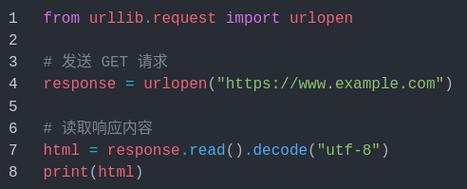
Let's break down the most common errors, why they happen, and how to fix them.
The Golden Rule: Always Use a try...except Block
Before diving into specific errors, remember this: any network operation can fail. You should always wrap your urllib.request calls in a try...except block to handle potential errors gracefully.
import urllib.request
import urllib.error
url = "http://example.com/non-existent-page"
try:
    with urllib.request.urlopen(url) as response:
        print(f"Successfully fetched the page. Status: {response.status}")
        data = response.read()
        print(f"Read {len(data)} bytes.")
except urllib.error.URLError as e:
    # This is the base class for almost all urllib errors
    print(f"An error occurred: {e.reason}")
    print(f"Error type: {type(e)}")
# You can also catch more specific errors
except urllib.error.HTTPError as e:
    print(f"HTTP Error! Status code: {e.code}")
    print(f"Error reason: {e.reason}")
    print(f"Headers: {e.headers}")
except Exception as e:
    # Catch any other unexpected errors
    print(f"An unexpected error occurred: {e}")
Common urllib.error Types and Their Meanings
The urllib.error module defines several exception classes. Here are the most important ones, from most to least common.
urllib.error.URLError
This is the base class for all errors raised by urllib.request. You will almost always catch this first. The e.reason attribute contains the underlying cause, which is often a more specific error.
Common reasons for a URLError:
-
<urlopen error [Errno -2] Name or service not known>or<urlopen error [Errno 11001] getaddrinfo failed>- Meaning: DNS resolution failed. The domain name you provided (e.g.,
my-broken-domain.com) doesn't exist or can't be found by your DNS server. - Fix:
- Double-check the URL for typos.
- Check your internet connection.
- Ensure the domain is valid and registered.
- Meaning: DNS resolution failed. The domain name you provided (e.g.,
-
<urlopen error [Errno 11001] getaddrinfo failed>- Meaning: Same as above. A general DNS failure.
-
<urlopen error timed out> (图片来源网络,侵删)
- Meaning: The server took too long to respond. Your request timed out.
- Fix:
- Check your internet connection speed.
- The server might be slow or overloaded. Try again later.
- You can increase the timeout (see solution below).
-
<urlopen error [Errno 61] Connection refused>- Meaning: The server actively rejected the connection. This is different from a timeout. It means the server is up, but there's no service listening on the port you're trying to connect to (e.g., port 80 for HTTP, 443 for HTTPS).
- Fix:
- You might be trying to access a non-HTTP port (e.g.,
http://example.com:22for SSH). - The server's web service might be down.
- A firewall might be blocking the connection.
- You might be trying to access a non-HTTP port (e.g.,
urllib.error.HTTPError
This is a subclass of URLError. It's raised for specific HTTP error codes (like 404, 500, etc.). When you get an HTTPError, the response object from the server is available in the exception object itself, which is very useful.
Common HTTP Status Codes:
-
404 Not Found- Meaning: The resource you requested (e.g., a page or file) does not exist on the server.
- Fix:
- Double-check the path in the URL (e.g.,
/about-usvs/about). - The link might be old or broken.
- Double-check the path in the URL (e.g.,
-
403 Forbidden- Meaning: You don't have permission to access the resource. The server understood your request but refuses to fulfill it.
- Fix:
- The resource might be behind a login or paywall.
- Your IP address might be blocked.
- You might be sending incorrect authentication headers.
-
500 Internal Server Error- Meaning: The server encountered an unexpected condition that prevented it from fulfilling the request. This is a server-side problem.
- Fix: You can't fix this. The server administrator needs to check their server logs and fix the application error.
Practical Solutions and Best Practices
Solution 1: Handling Timeouts
A very common issue is a script hanging indefinitely. You can specify a timeout in seconds.
import urllib.request
import urllib.error
url = "http://httpbin.org/delay/10" # This page waits for 10 seconds
try:
    # Set a 5-second timeout
    with urllib.request.urlopen(url, timeout=5) as response:
        print("Success!")
except urllib.error.URLError as e:
    if isinstance(e.reason, TimeoutError):
        print("The request timed out!")
    else:
        print(f"An error occurred: {e.reason}")
Solution 2: Handling Different HTTP Status Codes
It's good practice to check for successful status codes (like 200 OK) and handle errors appropriately.
import urllib.request
import urllib.error
url = "http://httpbin.org/status/404" # A URL that returns a 404
try:
    response = urllib.request.urlopen(url)
    # If we get here, there was no HTTPError (status code 4xx or 5xx)
    print(f"Success! Status: {response.status}")
    print(response.read().decode('utf-8'))
except urllib.error.HTTPError as e:
    print(f"HTTP Error {e.code}: {e.reason}")
    # You can even read the error page content
    error_content = e.read().decode('utf-8')
    # print(f"Error page content: {error_content}")
except urllib.error.URLError as e:
    print(f"URL Error: {e.reason}")
Solution 3: Adding Headers (User-Agent)
Some websites block default Python urllib user agents because they are often used by scrapers. Adding a common browser-like User-Agent header can fix this.
import urllib.request
import urllib.error
url = "https://www.google.com" # Google blocks default user agents
# Create an opener with a custom User-Agent
headers = {'User-Agent': 'Mozilla/5.0 (Windows NT 10.0; Win64; x64) AppleWebKit/537.36 (KHTML, like Gecko) Chrome/91.0.4472.124 Safari/537.36'}
req = urllib.request.Request(url, headers=headers)
try:
    with urllib.request.urlopen(req) as response:
        print(f"Success! Status: {response.status}")
        data = response.read()
        print(f"Read {len(data)} bytes.")
except urllib.error.HTTPError as e:
    print(f"HTTP Error {e.code}: {e.reason}")
except urllib.error.URLError as e:
    print(f"URL Error: {e.reason}")
When to Use urllib vs. requests
While urllib is built-in, the requests library is far more popular and user-friendly for most tasks.
| Feature | urllib (built-in) |
requests (third-party) |
|---|---|---|
| Ease of Use | Verbose, requires manual handling of headers, data, etc. | Very simple, intuitive API. |
| JSON Handling | Requires manual decoding (json.loads()) |
Automatic JSON decoding with .json() method. |
| Sessions | Cumbersome to implement. | Built-in Session object for cookies and persistence. |
| Authentication | Complex, requires manual header creation. | Simple auth= parameter. |
| Installation | None, it's in the standard library. | pip install requests |
Recommendation: For simple scripts, urllib is fine. For anything more complex, or if you value clean code, use the requests library. It will save you a lot of time and headache.






