Of course! This is a very common task in Windows environments, especially for scripting and automation. Here’s a comprehensive guide covering the built-in Python libraries for XML on Windows, from basic parsing to creating and modifying XML files.
The Key Python Libraries for XML
Python's standard library has two main modules for handling XML, plus a more modern third-party library that is highly recommended.
xml.etree.ElementTree(Built-in): The standard, "batteries-included" way to parse and create XML data. It's efficient and has a simple, Pythonic API. This is the best place to start.lxml(Third-Party): A much more powerful and feature-rich library. It's faster thanElementTree, supports XPath 1.0 much better, has schema validation, and can parse broken HTML. It's the industry standard for serious XML processing.minidom(Built-in): A simpler, more lightweight interface to thexml.dommodule. It's useful for small tasks but can be clunky for complex documents. We'll focus onElementTreeas it's generally preferred.
Using the Built-in xml.etree.ElementTree
This module is perfect for reading, parsing, modifying, and writing XML files.
Step 1: Create a Sample XML File
First, let's create a sample XML file named books.xml that we'll use for our examples. You can create this in a text editor like Notepad or VS Code and save it in your Python project folder.
books.xml
<?xml version="1.0" encoding="UTF-8"?>
<catalog>
   <book id="bk101">
      <author>Gambardella, Matthew</author>
      <title>XML Developer's Guide</title>
      <genre>Computer</genre>
      <price>44.95</price>
      <publish_date>2000-10-01</publish_date>
      <description>An in-depth look at creating applications with XML.</description>
   </book>
   <book id="bk102">
      <author>Ralls, Kim</author>
      <title>Midnight Rain</title>
      <genre>Fantasy</genre>
      <price>5.95</price>
      <publish_date>2000-12-16</publish_date>
      <description>A former architect battles corporate zombies.</description>
   </book>
   <book id="bk103">
      <author>Corets, Eva</author>
      <title>Maeve Ascendant</title>
      <genre>Fantasy</genre>
      <price>5.95</price>
      <publish_date>2000-11-17</publish_date>
      <description>After the collapse of a nanotechnology society, a young woman searches for truth and love.</description>
   </book>
</catalog>
Step 2: Parsing and Reading XML Data
Here’s how to read data from books.xml.
import xml.etree.ElementTree as ET
try:
    # Parse the XML file
    tree = ET.parse('books.xml')
    root = tree.getroot()
    # --- Basic Information ---
    print(f"Root element: {root.tag}")
    print(f"Root attributes: {root.attrib}") # The root <catalog> has no attributes in this file
    print("-" * 20)
    # --- Iterating over all 'book' elements ---
    print("All book titles and authors:")
    for book in root.findall('book'): # findall finds direct children
        author = book.find('author').text
        title = book.find('title').text
        print(f"Title: {title}, Author: {author}")
    print("-" * 20)
    # --- Accessing attributes and nested data ---
    print("Details for the first book:")
    first_book = root.find('book') # find gets the first match
    book_id = first_book.get('id') # Use .get() to access attributes
    price = first_book.find('price').text
    genre = first_book.find('genre').text
    print(f"Book ID: {book_id}")
    print(f"Genre: {genre}")
    print(f"Price: ${price}")
    print("-" * 20)
    # --- Using XPath-like expressions ---
    # Find all 'genre' elements in the entire tree
    print("All genres using XPath:")
    for genre in root.findall('.//genre'): # .// means search anywhere in the tree
        print(f"- {genre.text}")
except FileNotFoundError:
    print("Error: books.xml not found. Make sure the file is in the same directory.")
except ET.ParseError:
    print("Error: Could not parse the XML file. Check for syntax errors.")
Step 3: Modifying XML Data
You can easily modify the parsed XML tree.
import xml.etree.ElementTree as ET
# Parse the existing file
tree = ET.parse('books.xml')
root = tree.getroot()
# --- Modifying an existing element ---
# Change the price of the first book
first_book = root.find('book')
price_element = first_book.find('price')
price_element.text = '39.95' # Update the text content
# --- Adding a new element ---
# Add a new book to the catalog
new_book = ET.SubElement(root, 'book', id='bk999') # Create a new <book> element with an attribute
ET.SubElement(new_book, 'author').text = 'Doe, John'
ET.SubElement(new_book, 'title').text = 'Python for Windows Automation'
ET.SubElement(new_book, 'genre').text = 'Programming'
ET.SubElement(new_book, 'price').text = '29.99'
ET.SubElement(new_book, 'publish_date').text = '2025-10-27'
# --- Removing an element ---
# Remove the second book (bk102)
book_to_remove = root.find("book[@id='bk102']") # XPath to find by attribute
if book_to_remove is not None:
    root.remove(book_to_remove)
# --- Writing the changes back to a file ---
# We'll write to a new file to preserve the original
tree.write('modified_books.xml', encoding='utf-8', xml_declaration=True)
print("XML file modified successfully. Saved as 'modified_books.xml'")
Step 4: Creating XML from Scratch
You don't always have a file to start with. Here's how to build an XML document in memory.
import xml.etree.ElementTree as ET
# Create the root element
root = ET.Element('users')
# Create a user element
user1 = ET.SubElement(root, 'user', id='u001')
ET.SubElement(user1, 'name').text = 'Alice'
ET.SubElement(user1, 'email').text = 'alice@example.com'
# Create another user element
user2 = ET.SubElement(root, 'user', id='u002')
ET.SubElement(user2, 'name').text = 'Bob'
ET.SubElement(user2, 'email').text = 'bob@example.com'
# Create an ElementTree object and write it to a file
tree = ET.ElementTree(root)
tree.write('users.xml', encoding='utf-8', xml_declaration=True)
print("New XML file 'users.xml' created successfully.")
Using the Powerful lxml Library (Recommended)
lxml is faster and has more advanced features, especially for XPath. You need to install it first.
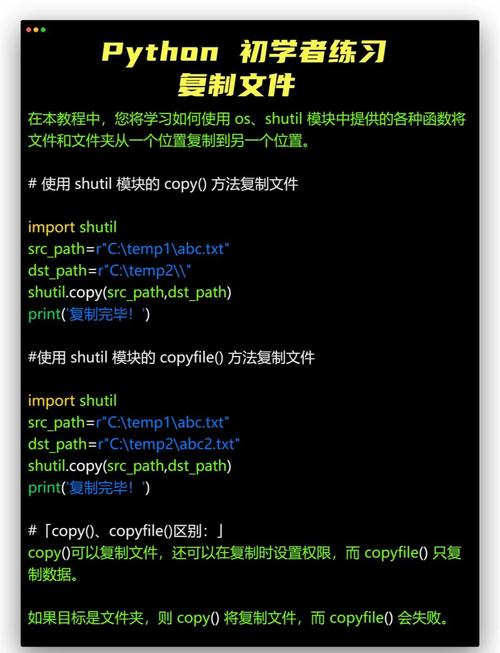
Installation on Windows
Open Command Prompt or PowerShell and run:
pip install lxml
Example: Parsing with lxml
The API is very similar to ElementTree, but often more powerful.
from lxml import etree as ET
# Parse the file
tree = ET.parse('books.xml')
root = tree.getroot()
# --- More powerful XPath queries ---
# Find all book titles where the genre is 'Fantasy'
print("Fantasy book titles using lxml's XPath:")
fantasy_books = root.xpath("//book[genre='Fantasy']/title")element in fantasy_books:
    print(f"- {title_element.text}")
# Get the price of the book with id 'bk101'
price_xpath = root.xpath("//book[@id='bk101']/price/text()")
if price_xpath:
    print(f"\nPrice of book bk101: {price_xpath[0]}")
# --- Using lxml's pretty_print feature ---
# The built-in ElementTree doesn't have a simple pretty-print option.
# lxml makes it easy.
print("\nWriting a nicely formatted XML file with lxml:")
tree.write('pretty_books.xml', pretty_print=True, encoding='utf-8', xml_declaration=True)
print("Saved as 'pretty_books.xml'")
Handling XML on Windows: Special Considerations
- File Paths: Use raw strings (
r'C:\path\to\file.xml') or forward slashes ('C:/path/to/file.xml') to avoid issues with backslashes (\) being interpreted as escape characters.# Good tree = ET.parse(r'C:\Users\YourUser\Documents\data.xml') # Also Good tree = ET.parse('C:/Users/YourUser/Documents/data.xml') # Bad (might cause an error) # tree = ET.parse('C:\Users\YourUser\Documents\data.xml') - Encoding: Always specify
encoding='utf-8'when writing files. This is the standard and avoids many character-set problems, especially on Windows. - Permissions: If your script fails to write a file, check file permissions. You might need to run your script as an administrator or save the file to a location where your user has write access (e.g., your Documents folder instead of
C:\Windows).
Summary: Which one should I use?
| Scenario | Recommended Library | Why? |
|---|---|---|
| Simple scripts, quick tasks, or when you can't install packages. | xml.etree.ElementTree |
It's built-in, easy to use, and sufficient for most common XML parsing and generation tasks. |
| Large files, complex XPath queries, performance-critical applications, or need schema validation. | lxml |
It's significantly faster, has a much more powerful and compliant XPath implementation, and offers features like validation and HTML parsing that ElementTree lacks. |
| Simple, read-only access to small XML files. | xml.dom.minidom |
Can be simpler for just reading, but becomes very verbose for any real manipulation. Not recommended for general use. |