Of course! Let's dive into "Flex Socket" in Java.

The term "Flex Socket" isn't a standard, built-in Java API class like java.net.Socket. Instead, it's a conceptual name or a design pattern used to describe a socket implementation that is highly configurable, adaptable, and often non-blocking.
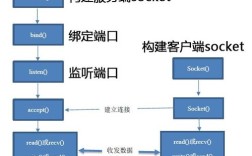
The core idea is to create a socket whose behavior can be "flexibly" changed without needing to create a new socket instance. This is typically achieved by using Java NIO (New I/O), which provides a more powerful and flexible way to handle network I/O compared to the traditional blocking I/O model.
Let's break down what a "Flex Socket" is, why you'd want it, and how to build one using Java NIO.
The Problem with Traditional (Blocking) Sockets
First, let's understand the limitations of the traditional java.net.Socket:

// Traditional Blocking Socket Example
try (ServerSocket serverSocket = new ServerSocket(8080);
     Socket clientSocket = serverSocket.accept(); // BLOCKS until a connection arrives
     BufferedReader in = new BufferedReader(
         new InputStreamReader(clientSocket.getInputStream()))) {
    System.out.println("Client connected: " + clientSocket.getInetAddress());
    String line;
    while ((line = in.readLine()) != null) { // BLOCKS waiting for data
        System.out.println("Received: " + line);
        // ... process data ...
    }
} catch (IOException e) {
    e.printStackTrace();
}
Key Issues:
- Blocking I/O: The
accept()andread()methods block the entire thread. If you want to handle multiple clients, you need one thread per client. This doesn't scale well and leads to high resource consumption (memory and CPU). - Inflexible Configuration: You configure the socket once during creation (
new Socket(host, port)). Changing its behavior (e.g., making it non-blocking, setting a new timeout) often requires creating a new socket. - No I/O Multiplexing: You can't efficiently wait for multiple sockets to become ready for I/O (e.g., "wait until socket A is ready to write OR socket B is ready to read") without resorting to complex, multi-threaded code.
The Solution: Java NIO and the "Flex Socket" Concept
Java NIO, introduced in Java 1.4, solves these problems with three core components:
- Buffers: A data container that can be written to and read from. It's more flexible than traditional streams.
- Channels: A bi-directional connection to a I/O source (like a file or a network socket). Unlike streams, channels can be used for both reading and writing.
- Selectors: The magic ingredient. A
Selectorallows a single thread to monitor multipleChannelsfor events like "connection ready," "data ready to be read," or "socket ready to be written."
A "Flex Socket" is essentially a SocketChannel managed by a Selector within a non-blocking loop.
Building a "Flex Socket" Server (The NIO Way)
Here is a complete, well-commented example of a simple NIO server that acts as a "Flex Socket" server. It can handle multiple clients on a single thread.
import java.io.IOException;
import java.net.InetSocketAddress;
import java.nio.ByteBuffer;
import java.nio.channels.*;
import java.util.Iterator;
import java.util.Set;
public class FlexSocketServer {
    private Selector selector;
    private ServerSocketChannel serverChannel;
    private final int port;
    public FlexSocketServer(int port) {
        this.port = port;
    }
    public void start() throws IOException {
        // 1. Create a Selector and a ServerSocketChannel
        selector = Selector.open();
        serverChannel = ServerSocketChannel.open();
        serverChannel.bind(new InetSocketAddress(port));
        // 2. Configure the server channel to be non-blocking
        serverChannel.configureBlocking(false);
        // 3. Register the server channel with the selector for 'accept' events
        serverChannel.register(selector, SelectionKey.OP_ACCEPT);
        System.out.println("Flex Socket Server started on port " + port);
        // 4. The main event loop - this is the heart of the "flex" design
        while (true) {
            // Wait for events on one of the registered channels
            // This is a blocking call, but it's efficient
            selector.select();
            // Get the set of keys that have events
            Set<SelectionKey> selectedKeys = selector.selectedKeys();
            Iterator<SelectionKey> iter = selectedKeys.iterator();
            while (iter.hasNext()) {
                SelectionKey key = iter.next();
                // IMPORTANT: Remove the key from the set to avoid processing it again
                iter.remove();
                try {
                    if (key.isAcceptable()) {
                        handleAccept(key);
                    }
                    if (key.isReadable()) {
                        handleRead(key);
                    }
                } catch (IOException e) {
                    // If an error occurs, close the channel and cancel the key
                    key.cancel();
                    if (key.channel() != null) {
                        key.channel().close();
                    }
                    System.err.println("Client disconnected due to an error.");
                }
            }
        }
    }
    private void handleAccept(SelectionKey key) throws IOException {
        ServerSocketChannel serverSocketChannel = (ServerSocketChannel) key.channel();
        // Accept the new connection
        SocketChannel clientChannel = serverSocketChannel.accept();
        System.out.println("Accepted new connection from: " + clientChannel.getRemoteAddress());
        // Configure the new client channel to be non-blocking
        clientChannel.configureBlocking(false);
        // Register the new channel with the selector for 'read' events
        clientChannel.register(selector, SelectionKey.OP_READ);
    }
    private void handleRead(SelectionKey key) throws IOException {
        SocketChannel clientChannel = (SocketChannel) key.channel();
        ByteBuffer buffer = ByteBuffer.allocate(1024);
        int bytesRead = clientChannel.read(buffer);
        if (bytesRead == -1) {
            // The connection is closed
            System.out.println("Client disconnected: " + clientChannel.getRemoteAddress());
            key.cancel();
            clientChannel.close();
            return;
        }
        // Prepare the buffer for reading
        buffer.flip();
        byte[] data = new byte[buffer.limit()];
        buffer.get(data);
        String message = new String(data);
        System.out.println("Received from " + clientChannel.getRemoteAddress() + ": " + message.trim());
        // Echo the message back to the client (flexible: you could do anything here)
        String response = "Server Echo: " + message;
        ByteBuffer responseBuffer = ByteBuffer.wrap(response.getBytes());
        clientChannel.write(responseBuffer);
    }
    public static void main(String[] args) throws IOException {
        new FlexSocketServer(8080).start();
    }
}
Key Features of this "Flex Socket" Design
-
Single-Threaded Scalability: The
while(true)loop withselector.select()allows one thread to manage hundreds or thousands of client connections. This is a massive improvement over the one-thread-per-client model. -
Non-Blocking Operations: By calling
configureBlocking(false), we ensure thataccept()andread()never block the thread. If no operation is ready, the thread simply waits inselector.select(). -
Event-Driven: The entire model is based on events. The
Selectortells us which channel is ready for which operation (accept, read, write). This is highly efficient as the thread only works when there's actual work to do. -
Flexibility and Reusability:
- Adding Write Logic: To make a socket "flexible" for writing, you would change its interest set. For example, after reading a message that requires a response, you could do
key.interestOps(SelectionKey.OP_WRITE). In your main loop, you would add anif (key.isWritable())handler. - Dynamic Configuration: You can change the
ByteBuffersize, set timeouts, or attach custom data objects to theSelectionKeyitself (key.attach(myCustomObject)) to manage per-connection state. - Protocol Handling: This model is perfect for implementing custom network protocols, as you have fine-grained control over the data flow.
- Adding Write Logic: To make a socket "flexible" for writing, you would change its interest set. For example, after reading a message that requires a response, you could do
Modern Alternatives: Netty and Project Loom
While building an NIO server from scratch is a great learning exercise, in modern development, you almost always use a high-level framework.
Netty
Netty is the de-facto standard for building high-performance network applications in Java. It's essentially a supercharged, production-ready "Flex Socket" framework.
- Why use Netty?
- Event Loop Model: It provides a robust and easy-to-use event loop model similar to the one we built.
- Rich Feature Set: Includes a pipeline for handling protocol encoding/decoding (e.g., HTTP, WebSocket), SSL/TLS support, and advanced traffic shaping.
- Simplicity: You focus on your business logic (handling messages) rather than the low-level NIO boilerplate.
- Performance: Highly optimized and battle-tested in countless large-scale systems (e.g., Cassandra, Elasticsearch, Kafka).
Project Loom (Virtual Threads)
Java's upcoming Project Loom aims to bring lightweight, user-space threads (called "virtual threads") to the JVM.
- How it changes things: With virtual threads, the traditional blocking I/O model (
new Socket,serverSocket.accept()) becomes viable again. You can write simple, sequential-looking code that scales to millions of connections because the JVM will efficiently map these blocking calls to a small pool of platform threads. - Impact on "Flex Socket": Project Loom might make the explicit complexity of NIO and "Flex Socket" designs less necessary for many use cases, as the simple blocking model becomes scalable. However, the event-driven, non-blocking paradigm will still be critical for the absolute highest-throughput, lowest-latency systems.
Summary
| Feature | Traditional java.net.Socket (Blocking) |
"Flex Socket" (Java NIO) | Framework like Netty |
|---|---|---|---|
| I/O Model | Blocking | Non-Blocking | Non-Blocking |
| Threading | One thread per client | Single thread or small pool manages many connections | Event Loop model |
| Scalability | Poor (high resource usage) | Excellent | Excellent |
| Complexity | Simple to write, hard to scale | Complex boilerplate code | High-level, abstracts complexity |
| Use Case | Simple tools, low-concurrency apps | Custom protocols, high-performance servers | Most network applications today |
In short, a "Flex Socket" in Java is a design pattern for building scalable, non-blocking network applications using Java NIO's Selector, Channel, and Buffer components. While you can build it yourself, frameworks like Netty provide a much more practical and powerful way to achieve this in production.