Of course! The java.lang.Thread.interrupted() method is a fundamental part of Java's concurrency API for handling thread interruption. It's often confused with Thread.isInterrupted(), so understanding the difference is key.
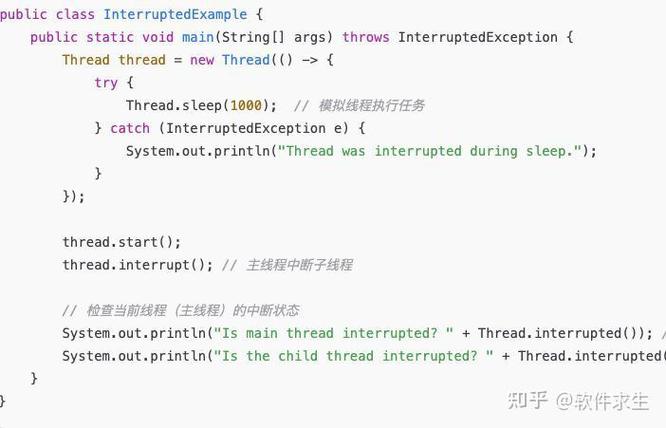
Let's break it down.
What is Thread Interruption?
In Java, "interrupting" a thread is not about forcibly stopping it. It's a cooperative mechanism. One thread can send a signal (an "interrupt") to another thread. The interrupted thread is then responsible for checking this signal at appropriate points and deciding how to respond (e.g., stop its current work, clean up, and exit).
This cooperative approach is safer than abruptly killing a thread, which could leave resources (like files or network connections) in an inconsistent state.
Thread.interrupted() vs. Thread.isInterrupted()
This is the most important distinction to make. They both deal with the interrupt status, but they behave very differently.
| Method | Description | Behavior | Static? |
|---|---|---|---|
interrupted() |
Clears the interrupt status of the current thread and returns it. | It's a one-time check. After you call it, the interrupt status is reset to false. |
Yes (Thread.interrupted()) |
isInterrupted() |
Does not clear the interrupt status of the thread it's called on. It just returns the current status. | You can call it multiple times, and it will consistently return true as long as the thread hasn't handled the interrupt. |
No (myThread.isInterrupted()) |
In-Depth Look at Thread.interrupted()
Method Signature
public static boolean interrupted()
- It's a static method. You don't call it on a specific thread instance (like
myThread.interrupted()). You call it on theThreadclass itself:Thread.interrupted(). - It operates on the currently executing thread (the thread that runs this line of code).
- It returns
trueif the current thread was interrupted. Otherwise, it returnsfalse.
The Crucial Side Effect: Clearing the Status
The most important feature of interrupted() is that it clears the interrupt flag.
Think of it like a light switch:
isInterrupted()asks, "Is the light on right now?" It doesn't change the switch's position.interrupted()asks, "Is the light on right now?" and then immediately turns the switch off.
This is why interrupted() is typically used inside a loop to check for an interruption signal and then clear it, allowing the loop to continue or exit based on the new state.
Code Examples
Let's see this in practice.
Example 1: Using isInterrupted()
This method is useful when you want to check the interrupt status of another thread without changing its state.
public class IsInterruptedExample {
    public static void main(String[] args) throws InterruptedException {
        Thread myThread = new Thread(() -> {
            System.out.println("Worker thread running...");
            try {
                // Simulate a long task
                Thread.sleep(5000);
            } catch (InterruptedException e) {
                // This catch block will be executed if the thread is interrupted
                // while it's sleeping.
                System.out.println("Worker thread: Sleep was interrupted!");
            }
            System.out.println("Worker thread finished.");
        });
        myThread.start();
        System.out.println("Main thread: Waiting for a bit...");
        Thread.sleep(1000);
        // Interrupt the worker thread from the main thread
        System.out.println("Main thread: Interrupting the worker thread.");
        myThread.interrupt();
        // Check the status of the worker thread
        System.out.println("Main thread: Is worker thread interrupted? " + myThread.isInterrupted());
        // The output will be true because isInterrupted() doesn't clear the status.
        // Wait for the thread to complete its work
        myThread.join();
        System.out.println("Main thread: Worker thread has terminated.");
    }
}
Example 2: Using interrupted() (The Common Pattern)
This is the typical use case for interrupted() inside a loop. The thread checks for an interrupt, does some work, and then checks again.
public class InterruptedExample {
    public static void main(String[] args) throws InterruptedException {
        Thread myThread = new Thread(() -> {
            System.out.println("Worker thread: Starting work loop.");
            // This is a common pattern for long-running tasks
            while (!Thread.interrupted()) {
                System.out.println("Worker thread: Doing some work...");
                try {
                    Thread.sleep(1000); // Simulate work
                } catch (InterruptedException e) {
                    // IMPORTANT: When a blocking method (like sleep) is interrupted,
                    // it throws an InterruptedException and **clears** the interrupt flag.
                    // We can re-interrupt to restore the flag if needed.
                    Thread.currentThread().interrupt();
                    System.out.println("Worker thread: Blocking call was interrupted. Exiting loop.");
                    break; // Exit the loop
                }
            }
            System.out.println("Worker thread: Work loop finished.");
        });
        myThread.start();
        // Let it run for 3 seconds
        Thread.sleep(3000);
        // Interrupt the worker thread
        System.out.println("Main thread: Interrupting the worker thread.");
        myThread.interrupt();
        myThread.join();
        System.out.println("Main thread: Worker thread has terminated.");
    }
}
Let's trace the interrupted() example:
myThreadstarts and enters thewhile (!Thread.interrupted())loop.- The first time
Thread.interrupted()is called, the thread has not been interrupted yet. It returnsfalse. The makes ittrue, so the loop continues. - The thread sleeps for 1 second. This happens twice.
- After 3 seconds, the
mainthread callsmyThread.interrupt(). This sets the interrupt flag onmyThreadtotrue. - The
myThreadwakes up from its sleep and the loop continues. The condition!Thread.interrupted()is checked again. Thread.interrupted()is called. It sees the flag istrue, so it returnstrue. Because of the , the condition becomesfalse, and the loop terminates.- Crucially,
Thread.interrupted()also cleared the interrupt flag tofalseas a side effect. If the code were to checkThread.interrupted()again immediately, it would returnfalse.
How to Handle Interruptions Properly?
A thread should be designed to handle interruption gracefully. Here are the best practices:
-
In Loops: Always check the interrupt status using
Thread.interrupted()orisInterrupted()in long-running loops.while (!Thread.currentThread().isInterrupted()) { // do work } -
In Blocking Methods: If your thread calls a blocking method like
Thread.sleep(),wait(), orjoin(), it must be prepared to catchInterruptedException. When this exception is thrown, the interrupt flag is already cleared. You can either:- Exit the method: This is the most common approach.
try { Thread.sleep(1000); } catch (InterruptedException e) { // The flag is already cleared. Just exit. return; } - Restore the flag: If you catch the exception but want the interruption to be noticed by higher-level code, you can re-interrupt the thread.
try {
    Thread.sleep(1000);
} catch (InterruptedException e) {
    // Restore the interrupted status
    Thread.currentThread().interrupt();
    // Now, if someone checks the status, they'll see it's interrupted.
    throw new RuntimeException("Thread was interrupted, but I'm propagating it.", e);
}
- Exit the method: This is the most common approach.
-
In Non-Blocking Code: If your code isn't calling blocking methods, you can check the flag periodically and exit cleanly if it's set.
Summary
| Feature | Thread.interrupted() |
myThread.isInterrupted() |
|---|---|---|
| Purpose | Check if the current thread is interrupted. | Check if a specific thread is interrupted. |
| Static? | Yes | No |
| Clears Flag? | Yes, it clears the flag after checking. | No, it leaves the flag unchanged. |
| Primary Use Case | Inside a loop in the thread itself to check for an interrupt and then clear it. | Checking the interrupt status of another thread from a different thread. |
Understanding interrupted() and isInterrupted() is essential for writing robust, responsive, and well-behaved concurrent applications in Java.