Of course! Here's a comprehensive guide to handling HTTP cookies in Java, covering the classic HttpURLConnection approach and the more modern and recommended HttpClient (Java 11+).
What are HTTP Cookies?
Cookies are small pieces of data stored on the client's browser (or client application) that are sent back to the server with every subsequent request. They are used for:
- Session Management: To keep users logged in (e.g., storing a session ID).
- Personalization: Remembering user preferences (e.g., language, theme).
- Tracking: Analyzing user behavior across pages.
Handling Cookies with HttpURLConnection (Classic Java, pre-Java 11)
This approach is verbose and requires manual management of the Cookie header. It's common in older Java applications or environments where you can't use the newer HttpClient.
Key Concepts:
CookieManager: The central class for managing the cookie store. It can store, retrieve, and send cookies.CookieHandler: The abstract class thatCookieManagerimplements. It's the pluggable mechanism for handling cookies.HttpURLConnection: The class for making HTTP requests.
Example: Setting and Getting Cookies with HttpURLConnection
This example demonstrates a common pattern: logging in to a server to get a session cookie, and then using that cookie to access a protected resource.
import java.io.BufferedReader;
import java.io.IOException;
import java.io.InputStreamReader;
import java.net.CookieManager;
import java.net.CookieHandler;
import java.net.HttpCookie;
import java.net.HttpURLConnection;
import java.net.URI;
import java.net.URL;
import java.util.List;
public class HttpURLConnectionCookieExample {
    public static void main(String[] args) throws IOException {
        // 1. Enable Cookie Management
        // A CookieManager is needed to automatically store and send cookies.
        CookieManager cookieManager = new CookieManager();
        CookieHandler.setDefault(cookieManager);
        // 2. First Request: Login to get a session cookie
        String loginUrl = "https://httpbin.org/post"; // Using httpbin for a test endpoint
        String loginData = "username=myuser&password=mypassword";
        HttpURLConnection loginConnection = (HttpURLConnection) new URL(loginUrl).openConnection();
        loginConnection.setRequestMethod("POST");
        loginConnection.setDoOutput(true);
        loginConnection.setRequestProperty("Content-Type", "application/x-www-form-urlencoded");
        // Send login data
        loginConnection.getOutputStream().write(loginData.getBytes());
        int loginResponseCode = loginConnection.getResponseCode();
        System.out.println("Login Response Code: " + loginResponseCode);
        // 3. Check if cookies were received
        // The CookieManager automatically stores cookies from the "Set-Cookie" header.
        List<HttpCookie> cookies = cookieManager.getCookieStore().get(URI.create(loginUrl));
        if (!cookies.isEmpty()) {
            System.out.println("\nCookies received after login:");
            for (HttpCookie cookie : cookies) {
                System.out.println("- " + cookie.getName() + "=" + cookie.getValue());
            }
        } else {
            System.out.println("\nNo cookies received after login.");
        }
        // 4. Second Request: Access a protected resource
        // The CookieManager will automatically add the "Cookie" header from its store.
        String protectedUrl = "https://httpbin.org/cookies";
        HttpURLConnection protectedConnection = (HttpURLConnection) new URL(protectedUrl).openConnection();
        protectedConnection.setRequestMethod("GET");
        System.out.println("\nAccessing protected resource: " + protectedUrl);
        System.out.println("Request Headers (should include Cookie):");
        protectedConnection.getRequestProperties().forEach((key, values) -> {
            if ("Cookie".equalsIgnoreCase(key)) {
                System.out.println(key + ": " + String.join(", ", values));
            }
        });
        // Read the response from the protected resource
        if (protectedConnection.getResponseCode() == 200) {
            try (BufferedReader in = new BufferedReader(new InputStreamReader(protectedConnection.getInputStream()))) {
                String inputLine;
                StringBuilder response = new StringBuilder();
                while ((inputLine = in.readLine()) != null) {
                    response.append(inputLine);
                }
                System.out.println("\nResponse from protected resource:");
                System.out.println(response.toString());
            }
        } else {
            System.out.println("Failed to access protected resource. Code: " + protectedConnection.getResponseCode());
        }
        // 5. (Optional) Clear cookies
        cookieManager.getCookieStore().removeAll();
    }
}
Handling Cookies with HttpClient (Modern Java 11+)
The HttpClient introduced in Java 11 is a modern, fluent, and much more powerful API. It handles cookies automatically and seamlessly.
Key Concepts:
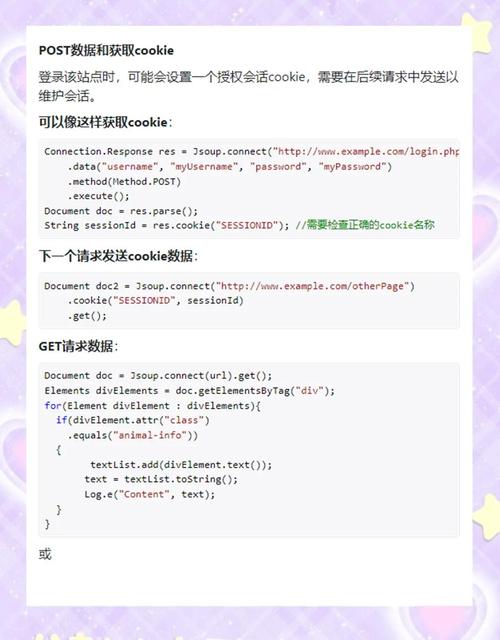
HttpClient: The main entry point for sending requests.CookieHandler: Just like in the old version,HttpClientuses a pluggableCookieHandlerto manage cookies. By default, it uses ajava.net.CookieManager.HttpRequest/HttpResponse: The interfaces for building and handling requests and responses.HttpClient.Redirect.NORMAL: Often needed to follow redirects, which is where cookies are frequently set.
Example: Setting and Getting Cookies with HttpClient
This example achieves the same goal as the one above but with much cleaner and more readable code.
import java.io.IOException;
import java.net.URI;
import java.net.http.HttpClient;
import java.net.http.HttpRequest;
import java.net.http.HttpResponse;
import java.net.http.HttpRequest.BodyPublishers;
import java.net.http.HttpResponse.BodyHandlers;
import java.time.Duration;
public class HttpClientCookieExample {
    public static void main(String[] args) throws IOException, InterruptedException {
        // 1. Create an HttpClient
        // By default, HttpClient uses a CookieManager, so no setup is needed for basic cookie handling.
        HttpClient client = HttpClient.newBuilder()
                .version(HttpClient.Version.HTTP_2)
                .connectTimeout(Duration.ofSeconds(10))
                .followRedirects(HttpClient.Redirect.NORMAL) // Important for handling redirects where cookies are often set
                .build();
        // 2. First Request: Login to get a session cookie
        String loginUrl = "https://httpbin.org/post";
        String loginData = "username=myuser&password=mypassword";
        HttpRequest loginRequest = HttpRequest.newBuilder()
                .uri(URI.create(loginUrl))
                .header("Content-Type", "application/x-www-form-urlencoded")
                .POST(BodyPublishers.ofString(loginData))
                .build();
        System.out.println("Sending login request to: " + loginUrl);
        HttpResponse<String> loginResponse = client.send(loginRequest, BodyHandlers.ofString());
        System.out.println("Login Response Code: " + loginResponse.statusCode());
        System.out.println("Login Response Headers (Set-Cookie):");
        loginResponse.headers().map().get("set-cookie").forEach(System.out::println);
        // 3. Second Request: Access a protected resource
        // The HttpClient automatically adds the "Cookie" header from its store.
        String protectedUrl = "https://httpbin.org/cookies";
        HttpRequest protectedRequest = HttpRequest.newBuilder()
                .uri(URI.create(protectedUrl))
                .GET()
                .build();
        System.out.println("\n\nAccessing protected resource: " + protectedUrl);
        System.out.println("HttpClient automatically handles the Cookie header.");
        HttpResponse<String> protectedResponse = client.send(protectedRequest, BodyHandlers.ofString());
        System.out.println("\nResponse from protected resource:");
        System.out.println(protectedResponse.body());
        // 4. (Optional) Inspect the cookie store
        // You can access the underlying CookieManager if needed
        java.net.CookieManager cookieManager = (java.net.CookieManager) client.cookieHandler().orElseThrow();
        System.out.println("\nCookies in the store:");
        cookieManager.getCookieStore().getCookies().forEach(System.out::println);
    }
}
Key Differences & Summary
| Feature | HttpURLConnection |
HttpClient (Java 11+) |
|---|---|---|
| Ease of Use | Verbose, manual setup. | Modern, fluent API. |
| Cookie Handling | Requires explicit CookieHandler.setDefault(). |
Automatic by default. |
| Redirects | Manual configuration. | Easy with HttpClient.Redirect. |
| Asynchronous | Possible but complex with ExecutorService. |
Built-in, first-class support (sendAsync). |
| Recommendation | For legacy code only. | Recommended for all new Java applications. |
Best Practices
- Use
HttpClientfor new projects. It's the standard, modern, and far superior API. - Be Security Conscious:
- Secure Flag: Always use cookies with the
Secureflag when dealing with HTTPS to prevent them from being sent over unencrypted channels. - HttpOnly Flag: Use the
HttpOnlyflag to prevent client-side scripts (like JavaScript) from accessing the cookie, which helps mitigate Cross-Site Scripting (XSS) attacks. - SameSite Attribute: Use the
SameSiteattribute (Strict,Lax,None) to control when cookies are sent across different sites, which helps prevent Cross-Site Request Forgery (CSRF) attacks.
- Secure Flag: Always use cookies with the
- Manage Cookie Expiry: Cookies have an expiration date. The
CookieManagerwill automatically discard expired cookies. When creating cookies on the server-side (not covered here), always set a reasonable expiry time. - Consider Third-Party Libraries: For very complex scenarios or if you need to parse non-standard cookie formats, libraries like Apache HttpClient offer even more advanced features and flexibility, but for standard use cases, the built-in
HttpClientis perfect.