Of course! The term "Java Servlet XML" can refer to two main, but now largely historical, XML configuration files for Java web applications. Let's break them down.

The Web Application Deployment Descriptor (web.xml)
This is the most common meaning. The web.xml file is the deployment descriptor for a Java web application (a WAR file). It's the "heart" of the old way of configuring Servlets, Filters, Listeners, and other web components.
Even though modern annotation-based configuration is the standard, understanding web.xml is crucial for maintaining legacy applications and for understanding the foundational concepts of Java web development.
What is web.xml?
It's an XML file located in the WEB-INF/ directory of your web application. The container (like Tomcat, Jetty, or WildFly) reads this file at deployment time to understand how to configure and run your application.
Key Elements in web.xml
Here are the most important elements you'll find in a web.xml file:
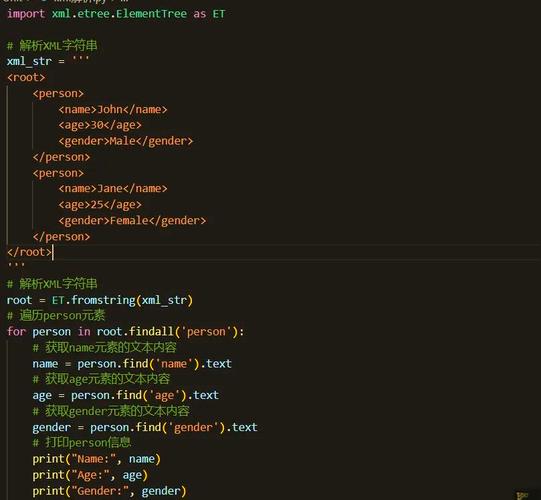
a. Servlet Definition (<servlet> and <servlet-mapping>)
This is the core of Servlet configuration. You define a Servlet class and then map it to a URL pattern.
<servlet>: Declares a Servlet.<servlet-name>: A unique name for the Servlet.<servlet-class>: The fully qualified class name of your Servlet.
<servlet-mapping>: Maps a<servlet-name>to one or more URL patterns.<servlet-name>: Must match the name from a<servlet>block.<url-pattern>: The URL path that will trigger this Servlet. It can be an exact path (/login) or a pattern (*.do,/api/*).
Example:
<?xml version="1.0" encoding="UTF-8"?>
<web-app xmlns="http://xmlns.jcp.org/xml/ns/javaee"
         xmlns:xsi="http://www.w3.org/2001/XMLSchema-instance"
         xsi:schemaLocation="http://xmlns.jcp.org/xml/ns/javaee
                             http://xmlns.jcp.org/xml/ns/javaee/web-app_4_0.xsd"
         version="4.0">
    <!-- 1. Define the Servlet -->
    <servlet>
        <servlet-name>GreetingServlet</servlet-name>
        <servlet-name>com.example.web.GreetingServlet</servlet-name>
    </servlet>
    <!-- 2. Map the Servlet to a URL -->
    <servlet-mapping>
        <servlet-name>GreetingServlet</servlet-name>
        <url-pattern>/hello</url-pattern>
        <url-pattern>/greet</url-pattern> <!-- A servlet can have multiple mappings -->
    </servlet-mapping>
</web-app>
In this example, any request to http://yourapp.com/hello or http://yourapp.com/greet will be handled by the com.example.web.GreetingServlet class.
b. Context Parameters (<context-param>)
These are global key-value pairs available to the entire web application. You can access them in any Servlet, JSP, or Listener.
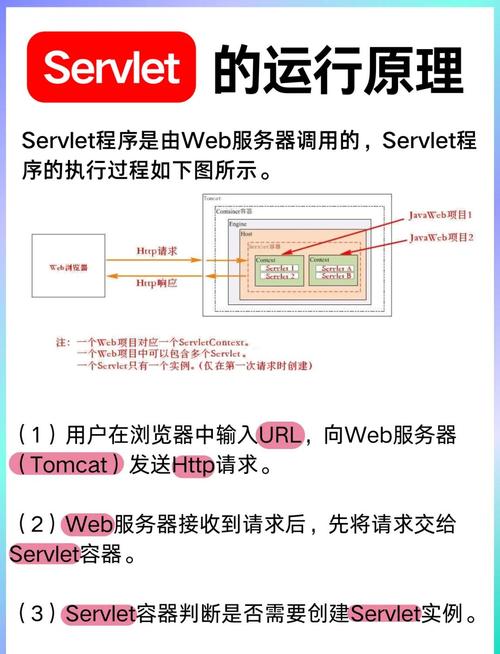
<param-name>: The name of the parameter.<param-value>: The value of the parameter.
Example:
<context-param>
    <param-name>databaseDriver</param-name>
    <param-value>com.mysql.cj.jdbc.Driver</param-value>
</context-param>
<context-param>
    <param-name>databaseUrl</param-name>
    <param-value>jdbc:mysql://localhost:3306/mydb</param-value>
</context-param>
c. Filters (<filter> and <filter-mapping>)
Filters are components that can intercept requests and responses before and after they are handled by a Servlet. They are used for tasks like authentication, logging, data compression, and encryption.
<filter>: Declares a Filter.<filter-name>: A unique name.<filter-class>: The fully qualified class name of your Filter.
<filter-mapping>: Maps a<filter-name>to a URL pattern or a specific Servlet.
Example:
<filter>
    <filter-name>LoggingFilter</filter-name>
    <filter-class>com.example.filter.LoggingFilter</filter-class>
</filter>
<filter-mapping>
    <filter-name>LoggingFilter</filter-name>
    <url-pattern>/*</url-pattern> <!-- Apply to all requests -->
</filter-mapping>
d. Listeners (<listener>)
Listeners are components that listen for specific events in the web application's lifecycle (e.g., application start/stop, session creation/destruction). They are used for initialization and cleanup tasks.
<listener-class>: The fully qualified class name of your Listener.
Example:
<listener>
    <listener-class>com.example.listener.AppStartupListener</listener-class>
</listener>
e. Session Configuration (<session-config>)
This element allows you to configure session management.
<session-timeout>: Specifies the default session timeout in minutes.
Example:
<session-config>
    <session-timeout>30</session-timeout>
</session-config>
The Servlet Configuration (servlet.xml)
This is a different, more specific XML file used with the Spring Framework, particularly in older versions of Spring MVC.
What is servlet.xml?
In a Spring application, the web.xml file is used to define a single DispatcherServlet. This DispatcherServlet is a front-controller that delegates requests to Spring's components. The actual Spring configuration (like defining beans, view resolvers, etc.) is done in a separate XML file, typically named servlet-name-servlet.xml.
For example, if your DispatcherServlet is named app, the configuration file would be app-servlet.xml.
How it relates to web.xml:
web.xmldefines theDispatcherServletand tells the container to load it.servlet-name-servlet.xml(e.g.,app-servlet.xml) contains the Spring-specific configuration for that servlet.
Example web.xml for Spring:
<servlet>
    <servlet-name>app</servlet-name>
    <servlet-class>org.springframework.web.servlet.DispatcherServlet</servlet-class>
    <init-param>
        <param-name>contextConfigLocation</param-name>
        <param-value>/WEB-INF/app-servlet.xml</param-value>
    </init-param>
    <load-on-startup>1</load-on-startup>
</servlet>
<servlet-mapping>
    <servlet-name>app</servlet-name>
    <url-pattern>/</url-pattern>
</servlet-mapping>
In this case, the Spring container will load /WEB-INF/app-servlet.xml to configure its beans and controllers.
The Modern Way: Annotations
Since Servlet 3.0 (and the rise of frameworks like Spring Boot), explicit XML configuration has become largely optional. Developers now use annotations to configure their web components directly in the Java code.
Here’s how you would achieve the same results as the web.xml examples above using annotations.
Annotated Servlet
import javax.servlet.*;
import javax.servlet.annotation.WebServlet;
import javax.servlet.http.*;
import java.io.IOException;
@WebServlet(
    name = "GreetingServlet",
    urlPatterns = {"/hello", "/greet"} // Directly map URL patterns here
)
public class GreetingServlet extends HttpServlet {
    @Override
    protected void doGet(HttpServletRequest req, HttpServletResponse resp) throws ServletException, IOException {
        resp.getWriter().write("Hello from the annotated Servlet!");
    }
}
Annotated Filter
import javax.servlet.*;
import javax.servlet.annotation.WebFilter;
import java.io.IOException;
@WebFilter("/*") // Apply to all requests
public class LoggingFilter implements Filter {
    @Override
    public void doFilter(ServletRequest request, ServletResponse response, FilterChain chain)
            throws IOException, ServletException {
        System.out.println("Request intercepted by LoggingFilter");
        chain.doFilter(request, response); // Pass the request along the chain
    }
    // ... init and destroy methods
}
Annotated Listener
import javax.servlet.ServletContextEvent;
import javax.servlet.ServletContextListener;
import javax.servlet.annotation.WebListener;
@WebListener
public class AppStartupListener implements ServletContextListener {
    @Override
    public void contextInitialized(ServletContextEvent sce) {
        System.out.println("Application is starting up...");
        // Initialize database connections, load properties, etc.
    }
}
Summary
| Feature | web.xml (Deployment Descriptor) |
servlet.xml (Spring Context) |
Annotations (Modern) |
|---|---|---|---|
| Purpose | Standard configuration for any Java web application. | Spring-specific configuration for DispatcherServlet. |
Configure components directly in Java code. |
| Location | /WEB-INF/web.xml |
/WEB-INF/servlet-name-servlet.xml |
Within the Java source file (@WebServlet, etc.). |
| Scope | Entire web application. | Specific to a DispatcherServlet. |
Individual component (Servlet, Filter, etc.). |
| Usage | Legacy applications, complex configurations, or when annotations are disabled. | Older Spring MVC applications. | Standard for new applications (Servlet 3+, Spring Boot). |
While you can still use web.xml, it's highly recommended to use annotations for any new development. They make the code more self-contained, easier to read, and reduce boilerplate configuration files.