Of course! Converting XML to HTML in Java is a common task, often done for web publishing, documentation generation, or data presentation. There are several ways to achieve this, ranging from using standard Java libraries to dedicated XML transformation frameworks.
Here’s a comprehensive guide covering the most popular and effective methods.
The Core Concept: XSLT
The most standard and powerful way to convert XML to HTML in Java is using XSLT (eXtensible Stylesheet Language Transformations).
Think of it this way:
- XML: Your raw data, like a structured database.
- XSLT: A set of rules or a "template" that describes how to transform the XML data.
- HTML: The final, presentable output for a web browser.
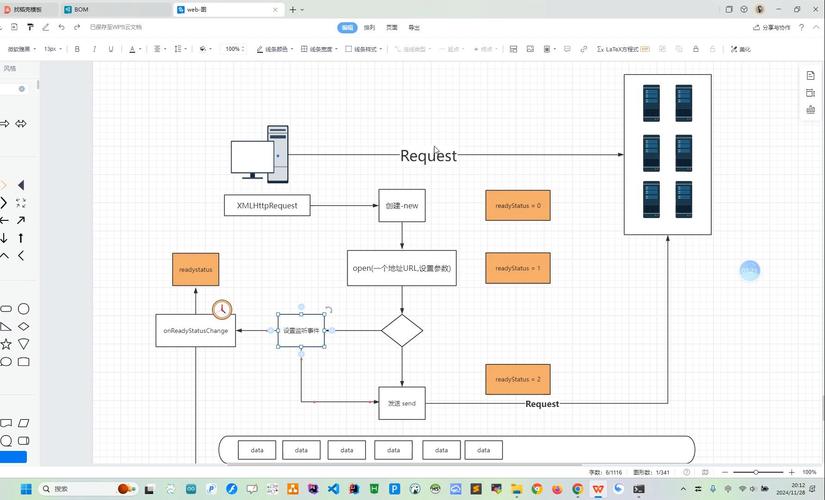
The Java platform has built-in support for XSLT through the javax.xml.transform package.
Method 1: Using Standard Java javax.xml.transform (XSLT)
This is the most common and recommended approach. It's built into the Java Development Kit (JDK), so you don't need any external libraries.
Step 1: Create Your XML File
Let's say you have an XML file named books.xml:
books.xml
<?xml version="1.0" encoding="UTF-8"?>
<catalog>
    <book id="bk101">
        <author>Gambardella, Matthew</author>
        <title>XML Developer's Guide</title>
        <genre>Computer</genre>
        <price>44.95</price>
        <publish_date>2000-10-01</publish_date>
    </book>
    <book id="bk102">
        <author>Ralls, Kim</author>
        <title>Midnight Rain</title>
        <genre>Fantasy</genre>
        <price>5.95</price>
        <publish_date>2000-12-16</publish_date>
    </book>
</catalog>
Step 2: Create Your XSLT Stylesheet
This is the crucial step. The XSLT file contains the logic to transform the XML tags into HTML tags. It uses XPath to navigate the XML document.
books.xslt
<?xml version="1.0" encoding="UTF-8"?>
<xsl:stylesheet version="1.0" xmlns:xsl="http://www.w3.org/1999/XSL/Transform">
    <!-- This is the output method we want -->
    <xsl:output method="html" indent="yes"/>
    <!-- This is a template that matches the root element 'catalog' -->
    <xsl:template match="/catalog">
        <html>
            <head>
                <title>My Book List</title>
                <style>
                    body { font-family: sans-serif; }
                    table { border-collapse: collapse; width: 100%; }
                    th, td { border: 1px solid #dddddd; text-align: left; padding: 8px; }
                    th { background-color: #f2f2f2; }
                </style>
            </head>
            <body>
                <h1>Book Catalog</h1>
                <table>
                    <thead>
                        <tr>
                            <th>Title</th>
                            <th>Author</th>
                            <th>Genre</th>
                            <th>Price</th>
                        </tr>
                    </thead>
                    <tbody>
                        <!--
                            For each 'book' element found within 'catalog',
                            apply the following template.
                        -->
                        <xsl:for-each select="book">
                            <tr>
                                <td><xsl:value-of select="title"/></td>
                                <td><xsl:value-of select="author"/></td>
                                <td><xsl:value-of select="genre"/></td>
                                <td><xsl:value-of select="price"/></td>
                            </tr>
                        </xsl:for-each>
                    </tbody>
                </table>
            </body>
        </html>
    </xsl:template>
</xsl:stylesheet>
Step 3: Write the Java Code to Perform the Transformation
Now, let's create a Java class that uses the XSLT processor to read books.xml and books.xslt and produce an HTML file.
XmlToHtmlConverter.java
import javax.xml.transform.*;
import javax.xml.transform.stream.StreamResult;
import javax.xml.transform.stream.StreamSource;
import java.io.File;
public class XmlToHtmlConverter {
    public static void main(String[] args) {
        // 1. Define the source XML file
        File xmlFile = new File("books.xml");
        // 2. Define the XSLT stylesheet file
        File xsltFile = new File("books.xslt");
        // 3. Define the output HTML file
        File htmlFile = new File("books.html");
        try {
            // 4. Instantiate a TransformerFactory
            TransformerFactory factory = TransformerFactory.newInstance();
            // 5. Create a Transformer by compiling the XSLT stylesheet
            Transformer transformer = factory.newTransformer(new StreamSource(xsltFile));
            // You can also set output properties if needed
            // transformer.setOutputProperty(OutputKeys.INDENT, "yes");
            // 6. Perform the transformation from the XML source to the HTML result
            transformer.transform(new StreamSource(xmlFile), new StreamResult(htmlFile));
            System.out.println("Successfully created HTML file: " + htmlFile.getAbsolutePath());
        } catch (TransformerException e) {
            System.err.println("An error occurred during transformation.");
            e.printStackTrace();
        }
    }
}
How to Run It:
- Save the three files (
books.xml,books.xslt,XmlToHtmlConverter.java) in the same directory. - Compile the Java file:
javac XmlToHtmlConverter.java - Run the compiled class:
java XmlToHtmlConverter
The Generated HTML (books.html):
<html>
   <head>
      <meta http-equiv="Content-Type" content="text/html; charset=UTF-8">
      <title>My Book List</title>
      <style>
body { font-family: sans-serif; }
table { border-collapse: collapse; width: 100%; }
th, td { border: 1px solid #dddddd; text-align: left; padding: 8px; }
th { background-color: #f2f2f2; }
</style>
   </head>
   <body>
      <h1>Book Catalog</h1>
      <table>
         <thead>
            <tr>
               <th>Title</th>
               <th>Author</th>
               <th>Genre</th>
               <th>Price</th>
            </tr>
         </thead>
         <tbody>
            <tr>
               <td>XML Developer's Guide</td>
               <td>Gambardella, Matthew</td>
               <td>Computer</td>
               <td>44.95</td>
            </tr>
            <tr>
               <td>Midnight Rain</td>
               <td>Ralls, Kim</td>
               <td>Fantasy</td>
               <td>5.95</td>
            </tr>
         </tbody>
      </table>
   </body>
</html>
Method 2: Using a Library (e.g., Simple XML)
Sometimes, you might want more direct, programmatic control instead of declarative XSLT. A library like Simple can make parsing XML and writing HTML much simpler.
Step 1: Add the Dependency
If you're using Maven, add this to your pom.xml:
<dependency>
    <groupId>org.simpleframework</groupId>
    <artifactId>simple-xml</artifactId>
    <version>2.7.1</version>
</dependency>
Step 2: Create Java Model Classes
Create Java classes that mirror the structure of your XML. The @Root, @Element, and @Attribute annotations from Simple XML map the XML to the Java objects.
Book.java
import org.simpleframework.xml.Attribute;
import org.simpleframework.xml.Element;
import org.simpleframework.xml.Root;
@Root(name = "book")
public class Book {
    @Attribute
    private String id;
    @Element
    private String author;
    @Element
    private String title;
    @Element
    private String genre;
    @Element
    private double price; // Can parse directly to double
    @Element(name = "publish_date")
    private String publishDate;
    // Getters and Setters (Simple XML needs them)
    public String getId() { return id; }
    public void setId(String id) { this.id = id; }
    public String getAuthor() { return author; }
    public void setAuthor(String author) { this.author = author; }
    // ... and so on for all fields
}
Catalog.java
import org.simpleframework.xml.ElementList;
import org.simpleframework.xml.Root;
import java.util.List;
@Root(name = "catalog")
public class Catalog {
    @ElementList(inline = true, entry = "book")
    private List<Book> books;
    public List<Book> getBooks() { return books; }
    public void setBooks(List<Book> books) { this.books = books; }
}
Step 3: Write the Java Code to Parse and Generate HTML
This code reads the XML, deserializes it into Java objects, and then manually builds the HTML string.
SimpleXmlConverter.java
import org.simpleframework.xml.Serializer;
import org.simpleframework.xml.core.Persister;
import java.io.File;
import java.io.FileWriter;
import java.io.IOException;
import java.util.List;
public class SimpleXmlConverter {
    public static void main(String[] args) {
        try {
            // 1. Create a Serializer instance
            Serializer serializer = new Persister();
            // 2. Read the XML file and deserialize it into the Catalog object
            File source = new File("books.xml");
            Catalog catalog = serializer.read(Catalog.class, source);
            // 3. Start building the HTML string
            StringBuilder htmlBuilder = new StringBuilder();
            htmlBuilder.append("<html><head><title>My Book List (Simple)</title>")
                       .append("<style>body { font-family: sans-serif; } table { width: 100%; border-collapse: collapse; } ")
                       .append("th, td { border: 1px solid #ccc; padding: 8px; text-align: left; } ")
                       .append("th { background-color: #f2f2f2; }</style></head><body>")
                       .append("<h1>Book Catalog (Simple)</h1><table><thead><tr>")
                       .append("<th>Title</th><th>Author</th><th>Genre</th><th>Price</th>")
                       .append("</tr></thead><tbody>");
            // 4. Iterate through the list of books
            List<Book> books = catalog.getBooks();
            for (Book book : books) {
                htmlBuilder.append("<tr>")
                           .append("<td>").append(book.getTitle()).append("</td>")
                           .append("<td>").append(book.getAuthor()).append("</td>")
                           .append("<td>").append(book.getGenre()).append("</td>")
                           .append("<td>").append(book.getPrice()).append("</td>")
                           .append("</tr>");
            }
            // 5. Close the HTML tags
            htmlBuilder.append("</tbody></table></body></html>");
            // 6. Write the HTML string to a file
            File htmlFile = new File("books_simple.html");
            try (FileWriter writer = new FileWriter(htmlFile)) {
                writer.write(htmlBuilder.toString());
            }
            System.out.println("Successfully created HTML file: " + htmlFile.getAbsolutePath());
        } catch (Exception e) {
            System.err.println("An error occurred.");
            e.printStackTrace();
        }
    }
}
Comparison: XSLT vs. Library (e.g., Simple XML)
| Feature | XSLT (Standard Java) | Library (e.g., Simple XML) |
|---|---|---|
| Approach | Declarative: You describe what the output should look like. | Imperative: You write how to build the output step-by-step. |
| Separation of Concerns | Excellent: The transformation logic (XSLT) is completely separate from the data (XML). A designer can work on the XSLT without touching the Java code. | Poor: The transformation logic is embedded directly within the Java application. |
| Performance | Generally very good, as XSLT processors are highly optimized. | Can be slower for complex transformations due to object creation and string manipulation in Java. |
| Learning Curve | Requires learning XSLT and XPath, which are specialized languages. | Easier if you already know Java, but requires learning the library's API. |
| Flexibility | Very flexible for complex document restructuring. | More flexible for integrating with other Java logic during the transformation. |
| Best For | - Web publishing - Document generation - Separating content from presentation - Complex transformations |
- Simple, one-off conversions - When transformation logic needs to be dynamic and controlled by Java code - When you already have the XML parsed into Java objects for other reasons. |
Conclusion
For most use cases, using the standard Java javax.xml.transform API with XSLT is the best practice. It's robust, standardized, and provides an excellent separation between your data and your presentation logic.
Choose a library-based approach like Simple XML only if your transformation is very simple and you need tight integration with your Java application's logic.