- 旧版 API (
java.util.Calendar):在 Java 8 之前广泛使用,但设计上存在诸多问题,现已不推荐使用。 - 新版 API (
java.time):自 Java 8 引入,是现代化、线程安全且易于使用的日期时间 API,是当前和未来的标准。
下面我将分别详细介绍这两个部分,并提供核心的代码示例。
(图片来源网络,侵删)
旧版 API:java.util.Calendar (已过时)
Calendar 是 Date 类的替代品,因为它解决了 Date 类的一些问题(Date 是可变的且时区处理不直观),但它本身也有不少缺点。
核心概念
Calendar是一个抽象类:不能直接实例化,必须通过getInstance()方法获取其实例。- 时区敏感:
getInstance()会获取当前系统的默认时区。 - 字段操作:通过设置和获取特定的字段(如
YEAR,MONTH,DAY_OF_MONTH)来操作日期。
常用方法示例
import java.util.Calendar;
import java.util.Date;
public class CalendarExample {
    public static void main(String[] args) {
        // 1. 获取一个 Calendar 实例(默认为当前时间和默认时区)
        Calendar calendar = Calendar.getInstance();
        // 2. 获取日期的各个部分
        int year = calendar.get(Calendar.YEAR);
        int month = calendar.get(Calendar.MONTH); // 月份是从 0 开始的 (0=一月, 11=十二月)
        int day = calendar.get(Calendar.DAY_OF_MONTH);
        int hour = calendar.get(Calendar.HOUR_OF_DAY); // 24小时制
        int minute = calendar.get(Calendar.MINUTE);
        int second = calendar.get(Calendar.SECOND);
        System.out.println("当前日期和时间: " + year + "-" + (month + 1) + "-" + day + " " + hour + ":" + minute + ":" + second);
        // 3. 设置日期
        // 清除所有字段,避免干扰
        calendar.clear();
        // 设置一个特定日期 (注意:月份是 0-based)
        calendar.set(2025, Calendar.OCTOBER, 26, 10, 30, 0);
        System.out.println("设置的日期: " + calendar.getTime());
        // 4. 日期计算(加减)
        calendar.add(Calendar.DAY_OF_MONTH, 5); // 增加5天
        System.out.println("增加5天后的日期: " + calendar.getTime());
        calendar.add(Calendar.MONTH, -2); // 减少2个月
        System.out.println("减少2个月后的日期: " + calendar.getTime());
        // 5. 获取 Date 对象
        Date date = calendar.getTime();
        System.out.println("转换为 java.util.Date: " + date);
        // 6. 从 Date 创建 Calendar
        Calendar fromDate = Calendar.getInstance();
        fromDate.setTime(new Date()); // 使用当前时间
        System.out.println("从 Date 创建的 Calendar: " + fromDate.getTime());
    }
}
Calendar 的主要缺点
- 月份从0开始:
Calendar.OCTOBER的值是 9,这非常容易出错。 - 可变性:
Calendar对象是可变的,在多线程环境下不安全。 - API 设计不佳:方法命名不直观(如
get和set需要传入常量),设计不一致。 - 性能问题:
Calendar的创建和操作开销相对较大。
除非你维护的是非常古老的 Java 代码(Java 7 或更早),否则强烈建议使用新的
java.timeAPI。
新版 API:java.time (推荐)
Java 8 引入了全新的 java.time 包,它由 JSR-310 标准定义,灵感来自 Joda-Time 库,这个 API 设计精良、不可变、线程安全,并且功能强大。
核心类
LocalDate:表示一个日期(年、月、日),不包含时间信息。LocalTime:表示一个时间(时、分、秒、纳秒),不包含日期信息。LocalDateTime:表示一个日期和时间,但不包含时区信息。ZonedDateTime:表示一个带时区的日期和时间,是处理全球化应用的首选。Instant:表示一个时间戳(自 Unix 纪元 1970-01-01T00:00:00Z 开始的秒和纳秒),通常用于机器时间或系统日志。
LocalDate - 仅处理日期
import java.time.LocalDate;
import java.time.Month;
import java.time.format.DateTimeFormatter;
public class LocalDateExample {
    public static void main(String[] args) {
        // 1. 获取当前日期
        LocalDate today = LocalDate.now();
        System.out.println("今天的日期: " + today);
        // 2. 创建特定日期 (月份使用枚举,非常直观)
        LocalDate specificDate = LocalDate.of(2025, Month.OCTOBER, 26);
        System.out.println("特定日期: " + specificDate);
        // 3. 获取年、月、日
        int year = today.getYear();
        Month month = today.getMonth(); // 返回 Month 枚举
        int dayOfMonth = today.getDayOfMonth();
        System.out.printf("年: %d, 月: %s, 日: %d%n", year, month, dayOfMonth);
        // 4. 日期计算 (plusXxx / minusXxx)
        LocalDate futureDate = today.plusDays(10);
        LocalDate pastDate = today.minusMonths(2);
        System.out.println("10天后的日期: " + futureDate);
        System.out.println("2个月前的日期: " + pastDate);
        // 5. 判断日期先后
        boolean isBefore = specificDate.isBefore(today);
        boolean isAfter = specificDate.isAfter(today);
        System.out.println("特定日期在今天之前吗? " + isBefore);
        System.out.println("特定日期在今天之后吗? " + isAfter);
        // 6. 格式化和解析
        // 自定义格式
        DateTimeFormatter formatter = DateTimeFormatter.ofPattern("yyyy年MM月dd日");
        String formattedDate = today.format(formatter);
        System.out.println("格式化后的日期: " + formattedDate);
        // 从字符串解析
        LocalDate parsedDate = LocalDate.parse("2025-02-28", DateTimeFormatter.ISO_LOCAL_DATE);
        System.out.println("从字符串解析的日期: " + parsedDate);
    }
}
LocalDateTime - 处理日期和时间
import java.time.LocalDateTime;
import java.time.format.DateTimeFormatter;
public class LocalDateTimeExample {
    public static void main(String[] args) {
        // 1. 获取当前日期和时间
        LocalDateTime now = LocalDateTime.now();
        System.out.println("当前的日期和时间: " + now);
        // 2. 创建特定日期和时间
        LocalDateTime specificDateTime = LocalDateTime.of(2025, 10, 26, 15, 30, 45);
        System.out.println("特定的日期和时间: " + specificDateTime);
        // 3. 日期时间计算
        LocalDateTime laterDateTime = now.plusHours(2).plusMinutes(30);
        System.out.println("2小时30分钟后的时间: " + laterDateTime);
        // 4. 格式化
        DateTimeFormatter formatter = DateTimeFormatter.ofPattern("yyyy-MM-dd HH:mm:ss");
        String formattedDateTime = now.format(formatter);
        System.out.println("格式化后的日期时间: " + formattedDateTime);
    }
}
ZonedDateTime - 处理时区
import java.time.ZoneId;
import java.time.ZonedDateTime;
public class ZonedDateTimeExample {
    public static void main(String[] args) {
        // 1. 获取当前系统默认时区的日期时间
        ZonedDateTime nowInDefaultZone = ZonedDateTime.now();
        System.out.println("当前默认时区的时间: " + nowInDefaultZone);
        // 2. 获取特定时区的当前时间
        ZoneId tokyoZone = ZoneId.of("Asia/Tokyo");
        ZonedDateTime nowInTokyo = ZonedDateTime.now(tokyoZone);
        System.out.println("东京时间: " + nowInTokyo);
        ZoneId newYorkZone = ZoneId.of("America/New_York");
        ZonedDateTime nowInNewYork = ZonedDateTime.now(newYorkZone);
        System.out.println("纽约时间: " + nowInNewYork);
        // 3. 时区转换
        // 将东京时间转换为纽约时间
        ZonedDateTime newYorkTimeFromTokyo = nowInTokyo.withZoneSameInstant(newYorkZone);
        System.out.println("东京时间对应的纽约时间: " + newYorkTimeFromTokyo);
    }
}
Instant - 时间戳
import java.time.Instant;
public class InstantExample {
    public static void main(String[] args) {
        // 1. 获取当前时间戳 (UTC)
        Instant now = Instant.now();
        System.out.println("当前时间戳: " + now);
        // 2. Instant 与 LocalDateTime 互转
        // Instant -> LocalDateTime (需要指定时区)
        ZonedDateTime zonedDateTime = now.atZone(ZoneId.systemDefault());
        LocalDateTime localDateTime = zonedDateTime.toLocalDateTime();
        System.out.println("时间戳转本地时间: " + localDateTime);
        // LocalDateTime -> Instant (需要指定时区)
        Instant fromLocalDateTime = localDateTime.atZone(ZoneId.systemDefault()).toInstant();
        System.out.println("本地时间转时间戳: " + fromLocalDateTime);
    }
}
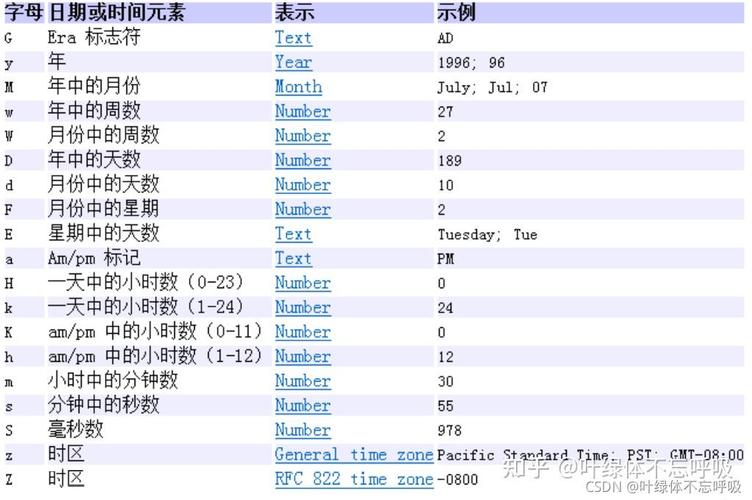
旧版 (java.util.Date) 与新版 (java.time) 的转换
在从旧代码迁移或与某些依赖旧 API 的库交互时,可能需要进行转换。
(图片来源网络,侵删)
import java.time.Instant;
import java.time.LocalDateTime;
import java.time.ZoneId;
import java.util.Date;
public class ConversionExample {
    public static void main(String[] args) {
        // --- java.util.Date -> java.time ---
        Date oldDate = new Date();
        // 1. Date -> Instant (这是最关键的中间步骤)
        Instant instant = oldDate.toInstant();
        // 2. Instant -> LocalDateTime
        LocalDateTime localDateTime = LocalDateTime.ofInstant(instant, ZoneId.systemDefault());
        System.out.println("Date -> LocalDateTime: " + localDateTime);
        // --- java.time -> java.util.Date ---
        // 1. LocalDateTime -> Instant
        Instant newInstant = localDateTime.atZone(ZoneId.systemDefault()).toInstant();
        // 2. Instant -> Date
        Date newDate = Date.from(newInstant);
        System.out.println("LocalDateTime -> Date: " + newDate);
    }
}
总结与最佳实践
| 特性 | java.util.Calendar (旧) |
java.time (新) |
|---|---|---|
| 推荐度 | 不推荐 | 强烈推荐 |
| 线程安全 | 否 (可变) | 是 (不可变) |
| API 设计 | 繁琐、易错 | 直观、流畅 |
| 时区处理 | 复杂、易混淆 | 清晰、强大 |
| 月份表示 | 0-based (0-11) | 1-based (使用枚举 Month) |
| 核心类 | Calendar, Date |
LocalDate, LocalTime, LocalDateTime, ZonedDateTime |
| 主要用途 | 维护旧代码 | 所有新的 Java 项目 |
核心建议:
- 如果只需要日期,使用
LocalDate。 - 如果只需要时间,使用
LocalTime。 - 如果需要日期和时间,但不关心时区,使用
LocalDateTime。 - 如果需要处理全球化、跨时区的日期和时间,使用
ZonedDateTime。 - 如果需要与数据库交互或生成时间戳,使用
Instant。
掌握 java.time API 是现代 Java 开发者的必备技能。
(图片来源网络,侵删)