Of course! Let's dive deep into java.net.Socket.bind(). This is a fundamental concept for network programming in Java.
What is socket.bind()?
In simple terms, socket.bind() is the process of associating a socket with a specific local IP address and a specific port number.
Think of it like this:
- A Socket is like a phone.
- The IP Address is the phone number of the building you're in (e.g., your office building).
- The Port Number is the extension number of the specific desk or room within that building.
When you bind() a socket, you are telling the operating system: "Hey OS, any network traffic that comes to my computer's IP address on this specific port should be directed to this particular socket."
The Core Concept: Client vs. Server Sockets
The need and usage of bind() differ significantly between client-side and server-side sockets.
A. Server Sockets
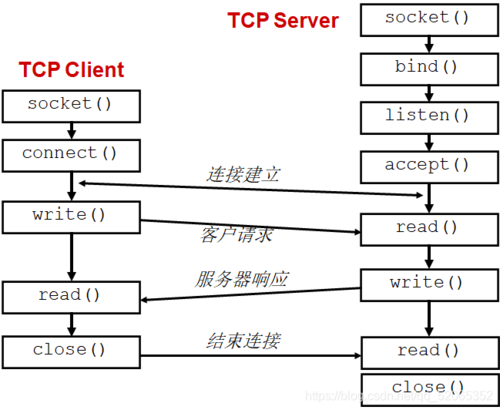
For a server, binding is mandatory and essential.
- Purpose: The server needs to have a well-known, stable address and port so that clients know where to connect to. It's like a business listing its phone number and address in the phone book.
- How it's done: Servers typically use the
java.net.ServerSocketclass. When you create aServerSocketand callserverSocket.accept(), the JVM automatically binds the socket to an available port on all available network interfaces (unless you specify otherwise).
Example: A Simple Echo Server
import java.io.IOException;
import java.io.InputStream;
import java.io.OutputStream;
import java.net.InetSocketAddress;
import java.net.ServerSocket;
import java.net.Socket;
public class SimpleServer {
    public static void main(String[] args) throws IOException {
        // 1. Create a ServerSocket
        // We specify the port we want to listen on.
        // The OS will automatically bind this socket to port 12345.
        try (ServerSocket serverSocket = new ServerSocket(12345)) {
            System.out.println("Server is listening on port 12345...");
            // 2. The accept() method blocks until a client connects.
            // When a client connects, a new Socket is created for communication.
            Socket clientSocket = serverSocket.accept();
            System.out.println("Client connected: " + clientSocket.getInetAddress());
            // 3. Communication streams
            InputStream input = clientSocket.getInputStream();
            OutputStream output = clientSocket.getOutputStream();
            // 4. Echo back what the client sends
            byte[] buffer = new byte[1024];
            int bytesRead;
            while ((bytesRead = input.read(buffer)) != -1) {
                String receivedMessage = new String(buffer, 0, bytesRead);
                System.out.println("Received from client: " + receivedMessage);
                output.write(buffer, 0, bytesRead); // Echo back
            }
        } catch (IOException e) {
            System.err.println("Server exception: " + e.getMessage());
            e.printStackTrace();
        }
    }
}
In this example, new ServerSocket(12345) implicitly binds the socket. You can also do it explicitly with serverSocket.bind(new InetSocketAddress(12345)), but it's redundant if you're passing the port to the constructor.
B. Client Sockets
For a client, binding is optional and usually automatic.
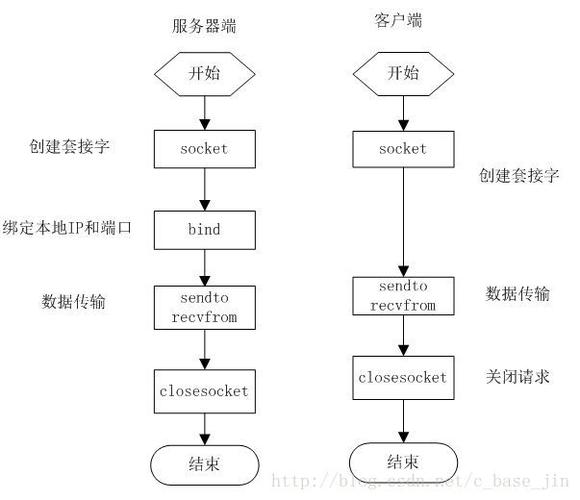
- Purpose: A client typically doesn't care which local port it uses. It just needs to connect to the server's well-known address and port. The OS will automatically assign an ephemeral (temporary) port from a predefined range for the client socket.
- When to use
bind()explicitly: You only need to callclientSocket.bind()if you have a specific reason, such as:- Multi-homed systems: Your computer has multiple network cards (e.g., one for Wi-Fi, one for a wired LAN). You might want to force the client socket to use a specific IP address to ensure the traffic goes out a particular network interface.
- Firewall/NAT rules: You might need to ensure the client uses a specific port that is allowed by a firewall.
- Testing: To simulate a specific scenario.
Example: A Simple Echo Client (Automatic Binding)
import java.io.IOException;
import java.io.InputStream;
import java.io.OutputStream;
import java.net.InetSocketAddress;
import java.net.Socket;
public class SimpleClient {
    public static void main(String[] args) throws IOException {
        // 1. Create an unbound Socket
        Socket socket = new Socket();
        // At this point, the socket is NOT bound.
        // System.out.println("Local port before connect: " + socket.getLocalPort()); // Throws!
        // 2. Connect to the server
        // The connect() method will automatically bind the socket to an
        // available ephemeral port on the local machine.
        socket.connect(new InetSocketAddress("localhost", 12345));
        System.out.println("Connected to server.");
        System.out.println("Client is using local port: " + socket.getLocalPort());
        // 3. Communication streams
        OutputStream output = socket.getOutputStream();
        InputStream input = socket.getInputStream();
        // 4. Send a message
        String message = "Hello from client!";
        output.write(message.getBytes());
        // 5. Read the echo
        byte[] buffer = new byte[1024];
        int bytesRead = input.read(buffer);
        String echoedMessage = new String(buffer, 0, bytesRead);
        System.out.println("Received from server: " + echoedMessage);
        socket.close();
    }
}
Explicit Binding for a Client
Let's modify the client to explicitly bind to a specific local IP and port.
// ... inside main method ...
Socket socket = new Socket();
// Explicitly bind to a specific local address and port
// For example, bind to localhost on port 54321
InetSocketAddress localAddress = new InetSocketAddress("localhost", 54321);
socket.bind(localAddress);
System.out.println("Socket explicitly bound to local port: " + socket.getLocalPort());
// Now connect to the server
socket.connect(new InetSocketAddress("localhost", 12345));
System.out.println("Connected to server.");
System.out.println("Client is using local port: " + socket.getLocalPort()); // Will be 54321
Key Methods and Related Classes
Socket.bind(SocketAddress endpoint): The method to explicitly bind a client socket.SocketAddress: An abstract class. You'll almost always use its subclass,InetSocketAddress.
InetSocketAddress(String hostname, int port): Creates a socket address from a hostname and port number.Socket.getLocalAddress(): Returns the address to which the socket is bound.Socket.getLocalPort(): Returns the port to which the socket is bound.ServerSocket(int port): The constructor for a server socket that implicitly binds to the specified port.ServerSocket.bind(SocketAddress endpoint): The method to explicitly bind a server socket.
Common Exceptions and Best Practices
BindException
This is the most common exception you'll encounter. It means the bind operation failed.
Cause: The requested address is already in use.
Why this happens:
- Port Already in Use: Another application is already bound to the same IP address and port. You can check this on Linux/macOS with
netstat -tuln | grep :12345or on Windows withnetstat -ano | findstr :12345. - Permission Denied: On Unix-like systems, ports below 1024 (well-known ports) are privileged. You need root/administrator access to bind to them. It's a best practice for applications to use ports above 1024.
- Address Already in Use: You try to bind to an IP address that doesn't exist on your machine or is not configured.
Solution:
- Choose a different port.
- Ensure the previous application using the port has stopped.
- If you must use a low port, run your application with elevated privileges (not recommended for general apps).
Best Practices
- Use
try-with-resources: Always wrap your sockets and streams intry-with-resourcesblocks to ensure they are closed automatically, preventing resource leaks. - Handle Exceptions Gracefully: Network operations are unreliable. Always wrap your socket code in
try-catchblocks to handleIOException,BindException, etc. - Reuse ServerSockets: It's inefficient to create a new
ServerSocketfor every client connection. A singleServerSocketshould be created once, and itsaccept()method should be called in a loop to handle multiple clients. - Don't Bind Unless You Need To: For clients, rely on the OS to assign an ephemeral port. Explicit binding is a special case.