Of course! Here is a comprehensive guide to the Java Servlet API, covering its core concepts, lifecycle, key classes, and modern usage.
What is the Java Servlet API?
The Java Servlet API is a core part of the Java Enterprise Edition (Java EE), now known as Jakarta EE. It defines a standard for creating web applications that run on a web server (or application server) and generate dynamic content.
Think of a Servlet as a small Java program that extends the capabilities of a web server. While a traditional web server (like Apache) serves static files (HTML, CSS, images), a Servlet server (like Tomcat, Jetty, or WildFly) can execute Java code to generate dynamic responses, such as fetching data from a database and rendering it as HTML.
Key Idea: Servlets handle HTTP requests and produce HTTP responses.
The Core Problem Servlets Solve
Before Servlets, creating dynamic web content was complex and often involved technologies like CGI (Common Gateway Interface). Servlets provided a more efficient, platform-independent, and robust solution by running within the Java Virtual Machine (JVM).
How it Works: The Request-Response Cycle
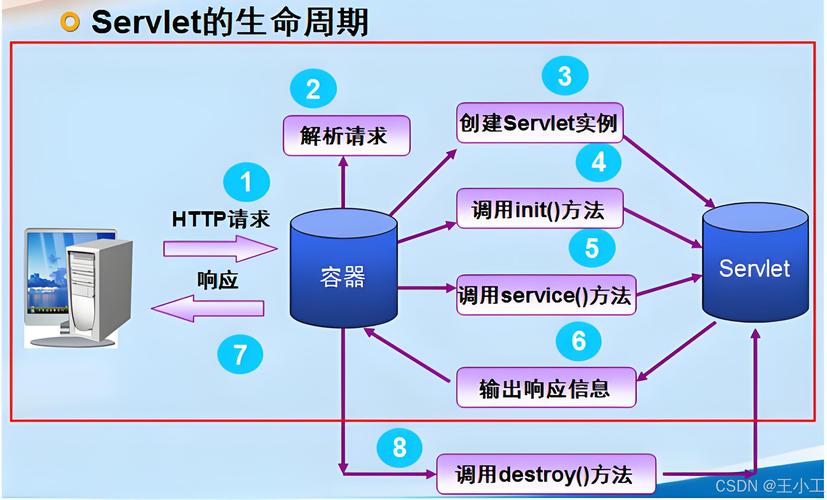
The entire lifecycle of a Servlet is built around a simple cycle:
- Client Request: A user's browser sends an HTTP request (e.g.,
GET /products). - Server Routing: The web server (like Tomcat) receives the request and forwards it to the appropriate Servlet based on the URL mapping defined in the application's
web.xmlfile or via annotations. - Servlet Processing: The Servlet's service method is invoked. The Servlet reads the request (headers, parameters, cookies), performs business logic (e.g., queries a database), and prepares the response.
- Servlet Response: The Servlet generates an HTTP response, writing the dynamic content (like HTML) back to the client's browser.
The Servlet Lifecycle
A Servlet has a well-defined, managed lifecycle handled by the web container (e.g., Tomcat). This is a key advantage over CGI, where a new process is created for every request.
The lifecycle consists of three main stages:
Initialization (init(ServletConfig config))
- When: The container loads the Servlet class and creates a single instance of it. This happens only once for the lifetime of the application (or the Servlet's definition in
web.xml). - Purpose: To perform one-time setup tasks. This is the perfect place to:
- Load database connection pools.
- Read configuration files.
- Initialize expensive resources.
- Note: The
initmethod is guaranteed to complete before any requests are handled by theservicemethod.
Handling Requests (service(ServletRequest req, ServletResponse res))
- When: For every HTTP request that is mapped to this Servlet.
- Purpose: This is the core workhorse method. By default, the
servicemethod inspects the incoming request's HTTP method (GET,POST,PUT,DELETE, etc.) and dispatches the call to a more specific method likedoGet(),doPost(), etc. - Best Practice: You should rarely override the
servicemethod. Instead, you overridedoGet(),doPost(), etc., to handle specific types of requests.
Destruction (destroy())
- When: The application is being shut down or undeployed. The container calls this method only once.
- Purpose: To clean up resources and perform shutdown tasks. This is the place to:
- Close database connections.
- Write logs.
- Release any other resources held by the Servlet.
Lifecycle Summary:
load -> init -> service (for many requests) -> destroy -> unload
Key Classes and Interfaces in the Servlet API
Here are the most important components you'll work with:
| Interface/Class | Description |
|---|---|
javax.servlet.Servlet |
The central interface. All Servlets must implement this. It defines the init(), service(), and destroy() lifecycle methods. |
javax.servlet.http.HttpServlet |
An abstract class that extends GenericServlet. It's the most common base class for creating HTTP-based Servlets. It provides the convenience methods doGet(), doPost(), etc. |
javax.servlet.http.HttpServletRequest |
Represents the client's HTTP request. It provides methods to get request headers, parameters, cookies, session information, and the request URI. |
javax.servlet.http.HttpServletResponse |
Represents the Servlet's response to the client. It provides methods to set the status code (e.g., 200, 404), headers, and to write the response body (e.g., HTML, JSON). |
javax.servlet.ServletConfig |
The container provides this object to the Servlet during initialization. It contains the Servlet's configuration parameters, defined in web.xml. |
javax.servlet.ServletContext |
Represents the web application itself. It's a shared space for all Servlets in the same application. You can use it to get application-wide initialization parameters, share resources (like a database connection pool), and log messages. |
javax.servlet.http.HttpSession |
Represents a user's session. It allows you to store user-specific data across multiple requests (e.g., a shopping cart, user login status). Data is stored on the server and identified by a unique session ID sent to the client (usually in a cookie). |
A Simple "Hello World" Servlet Example
This example demonstrates a basic Servlet that responds to a GET request.
The Servlet Class
import java.io.IOException;
import java.io.PrintWriter;
import javax.servlet.ServletException;
import javax.servlet.annotation.WebServlet;
import javax.servlet.http.HttpServlet;
import javax.servlet.http.HttpServletRequest;
import javax.servlet.http.HttpServletResponse;
// @WebServlet maps this Servlet to the URL "/hello"
@WebServlet("/hello")
public class HelloServlet extends HttpServlet {
    // This method handles GET requests
    @Override
    protected void doGet(HttpServletRequest request, HttpServletResponse response)
            throws ServletException, IOException {
        // Set the content type of the response
        response.setContentType("text/html;charset=UTF-8");
        // Get a PrintWriter to write the response
        try (PrintWriter out = response.getWriter()) {
            // Write the HTML response
            out.println("<!DOCTYPE html>");
            out.println("<html>");
            out.println("<head>");
            out.println("<title>Servlet HelloServlet</title>");
            out.println("</head>");
            out.println("<body>");
            out.println("<h1>Hello from a Java Servlet!</h1>");
            out.println("<p>This is a dynamically generated response.</p>");
            out.println("</body>");
            out.println("</html>");
        }
    }
}
Deployment (Modern Way)
In modern Servlet development (Servlet 3.0+), you don't need a web.xml file for simple mappings. The @WebServlet annotation is all you need. Just package this class in a WAR (Web Application Archive) file and deploy it to a server like Apache Tomcat.
When you access http://localhost:8080/your-app-context/hello in your browser, Tomcat will find the HelloServlet class, instantiate it, and call its doGet method, which will then return the HTML.
Modern Servlet Development: Beyond the Basics
While the "Hello World" example is classic, modern web development has evolved. Here's how Servlets fit into the current landscape:
Front Controller Pattern
Instead of having many small Servlets, applications often use a single Front Controller Servlet. This Servlet acts as the central entry point for all requests. It determines which part of the application should handle the request (e.g., by looking at the URL path) and then forwards the request to the appropriate component. This pattern is heavily used in frameworks like Spring MVC.
MVC (Model-View-Controller) with Servlets
You can implement the MVC pattern directly with Servlets:
- Model: Your business logic and data (e.g., JavaBeans, database access code).
- View: The presentation layer (e.g., JSP, Thymeleaf, or even HTML templates).
- Controller: The Servlet. It receives the request, interacts with the Model to get data, and then forwards the data to the View to be rendered.
The Rise of Frameworks
While powerful, raw Servlets can be verbose. Frameworks like Spring Boot and Jakarta EE (formerly Java EE) provide abstractions that simplify development:
- Dependency Injection: Frameworks manage object creation and lifecycle, making your code cleaner and more testable.
- Simplified Configuration: Annotations reduce or eliminate the need for
web.xml. - Rich Ecosystem: Frameworks come with built-in support for security, data access, REST APIs, and more.
A modern REST API endpoint in a framework like Spring looks like this:
@RestController // A framework annotation that combines @Controller and @ResponseBody
@RequestMapping("/api/users")
public class UserController {
    @GetMapping("/{id}") // Maps GET requests to /api/users/{id}
    public User getUser(@PathVariable Long id) {
        // Framework automatically serializes the User object to JSON
        return userService.findById(id);
    }
}
Summary: When to Use Servlets Today
- Learning: Understanding Servlets is fundamental to understanding how Java web applications work under the hood. It's a core concept in computer science curricula.
- Simple Applications: For very simple, lightweight web services or internal tools where adding a full framework is overkill.
- Legacy Systems: Maintaining and extending existing applications built on the Servlet API.
- Foundation: As the foundation upon which major frameworks like Spring are built. Knowing Servlets helps you understand what the framework is doing for you.