Of course! Here is a comprehensive guide to using the MongoDB Java API, covering everything from setting up your project to performing advanced operations.
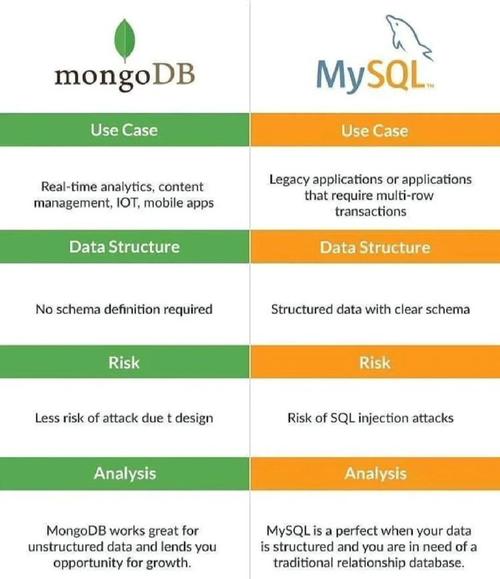
Overview
The official MongoDB Java driver is a powerful and modern API for interacting with MongoDB. The current major version is x, which uses a reactive, asynchronous, and non-blocking architecture. While there is a 3.x driver (blocking/synchronous), all new development should target the 4.x driver.
This guide will focus on the x driver.
Prerequisites
- Java Development Kit (JDK): Version 8 or higher is required.
- MongoDB Instance: A running MongoDB server (local or cloud). You can get one for free from MongoDB Atlas.
Setting Up Your Project (Maven)
The easiest way to manage dependencies is with a build tool like Maven or Gradle. Here’s how to add the MongoDB Java driver to a Maven pom.xml file.
<dependencies>
    <!-- MongoDB Driver Dependency -->
    <dependency>
        <groupId>org.mongodb</groupId>
        <artifactId>mongodb-driver-sync</artifactId>
        <version>4.11.1</version> <!-- Check for the latest version -->
    </dependency>
    <!-- Optional: For logging (the driver uses SLF4J) -->
    <dependency>
        <groupId>org.slf4j</groupId>
        <artifactId>slf4j-simple</artifactId>
        <version>2.0.7</version>
    </dependency>
</dependencies>
mongodb-driver-sync: This is the core, blocking driver. It's the most common choice for traditional Java applications.mongodb-driver-reactivestreams: A reactive driver for integration with projects like Project Reactor or RxJava.mongodb-driver-scala: Official Scala driver.
Connecting to MongoDB
The first step is to create a MongoClient and get a handle to a database.

A MongoClient is designed to be long-lived and shared across your application. You should typically create only one instance.
import com.mongodb.client.MongoClient;
import com.mongodb.client.MongoClients;
import com.mongodb.client.MongoDatabase;
import org.bson.Document;
public class MongoConnectionExample {
    public static void main(String[] args) {
        // The standard connection URI format is:
        // mongodb://[username:password@]host1[:port1][,host2[:port2],...[,hostN[:portN]]][/[defaultauthdb][?options]]
        String uri = "mongodb://localhost:27017";
        // Create a MongoClient
        try (MongoClient mongoClient = MongoClients.create(uri)) {
            // Get a database. If it doesn't exist, MongoDB will create it on the first use.
            MongoDatabase database = mongoClient.getDatabase("myDatabase");
            System.out.println("Successfully connected to database: " + database.getName());
            // You can get a collection from the database
            // If the collection doesn't exist, it will be created on the first insert.
            // com.mongodb.client.MongoCollection<Document> collection = database.getCollection("myCollection");
        } catch (Exception e) {
            System.err.println("Connection failed: " + e.getMessage());
            e.printStackTrace();
        }
    }
}
Core CRUD Operations (Create, Read, Update, Delete)
All CRUD operations are performed on a MongoCollection object. We use the Document class, which is a core class in the driver for representing BSON (Binary JSON) documents.
1. Create (Insert)
There are several methods for inserting documents:
insertOne(): Inserts a single document.insertMany(): Inserts a list of documents.
import com.mongodb.client.MongoClient;
import com.mongodb.client.MongoClients;
import com.mongodb.client.MongoCollection;
import com.mongodb.client.MongoDatabase;
import org.bson.Document;
import java.util.Arrays;
public class CreateExample {
    public static void main(String[] args) {
        String uri = "mongodb://localhost:27017";
        try (MongoClient mongoClient = MongoClients.create(uri)) {
            MongoDatabase database = mongoClient.getDatabase("myDatabase");
            MongoCollection<Document> collection = database.getCollection("users");
            // --- Insert One Document ---
            Document user1 = new Document("name", "Alice")
                                 .append("age", 30)
                                 .append("city", "New York")
                                 .append("interests", Arrays.asList("reading", "hiking"));
            collection.insertOne(user1);
            System.out.println("Inserted one document: " + user1.toJson());
            // --- Insert Many Documents ---
            Document user2 = new Document("name", "Bob")
                                 .append("age", 25)
                                 .append("city", "London");
            Document user3 = new Document("name", "Charlie")
                                 .append("age", 35)
                                 .append("city", "Paris");
            collection.insertMany(Arrays.asList(user2, user3));
            System.out.println("Inserted two more documents.");
        }
    }
}
2. Read (Find)
Finding documents is done using the find() method, which returns a FindIterable. You can chain methods to this iterable to build your query.
find(): Finds all documents in the collection.find(Filters): Finds documents that match a specific filter query.
import com.mongodb.client.*;
import com.mongodb.client.model.Filters;
import org.bson.Document;
public class ReadExample {
    public static void main(String[] args) {
        String uri = "mongodb://localhost:27017";
        try (MongoClient mongoClient = MongoClients.create(uri)) {
            MongoDatabase database = mongoClient.getDatabase("myDatabase");
            MongoCollection<Document> collection = database.getCollection("users");
            System.out.println("--- Finding all users ---");
            // Find all documents and print them
            try (MongoCursor<Document> cursor = collection.find().iterator()) {
                while (cursor.hasNext()) {
                    System.out.println(cursor.next().toJson());
                }
            }
            System.out.println("\n--- Finding user named 'Alice' ---");
            // Find a document with a specific name
            Document alice = collection.find(Filters.eq("name", "Alice")).first();
            if (alice != null) {
                System.out.println("Found Alice: " + alice.toJson());
            } else {
                System.out.println("No user found with the name 'Alice'");
            }
            System.out.println("\n--- Finding users older than 28 ---");
            // Find documents using a filter (age > 28)
            try (MongoCursor<Document> cursor = collection.find(Filters.gt("age", 28)).iterator()) {
                while (cursor.hasNext()) {
                    System.out.println(cursor.next().toJson());
                }
            }
        }
    }
}
3. Update
Updating documents is a two-step process:
- Define the filter to select which document(s) to update.
- Define the update operation (what changes to make).
updateOne(): Updates the first document that matches the filter.updateMany(): Updates all documents that match the filter.
import com.mongodb.client.*;
import com.mongodb.client.model.Filters;
import com.mongodb.client.model.Updates;
import org.bson.Document;
public class UpdateExample {
    public static void main(String[] args) {
        String uri = "mongodb://localhost:27017";
        try (MongoClient mongoClient = MongoClients.create(uri)) {
            MongoDatabase database = mongoClient.getDatabase("myDatabase");
            MongoCollection<Document> collection = database.getCollection("users");
            // Update Alice's age to 31
            collection.updateOne(
                Filters.eq("name", "Alice"), // Filter
                Updates.set("age", 31)       // Update operation
            );
            System.out.println("Updated Alice's age.");
            // Add a new field to all users in London
            collection.updateMany(
                Filters.eq("city", "London"), // Filter
                Updates.set("country", "UK")  // Update operation
            );
            System.out.println("Added country field to users in London.");
            // Print all users to see the changes
            System.out.println("\n--- Updated Users ---");
            try (MongoCursor<Document> cursor = collection.find().iterator()) {
                while (cursor.hasNext()) {
                    System.out.println(cursor.next().toJson());
                }
            }
        }
    }
}
4. Delete
Deleting documents is similar to updating:
Define the filter to select which document(s) to delete.
deleteOne(): Deletes the first document that matches the filter.deleteMany(): Deletes all documents that match the filter.
import com.mongodb.client.*;
import com.mongodb.client.model.Filters;
import org.bson.Document;
public class DeleteExample {
    public static void main(String[] args) {
        String uri = "mongodb://localhost:27017";
        try (MongoClient mongoClient = MongoClients.create(uri)) {
            MongoDatabase database = mongoClient.getDatabase("myDatabase");
            MongoCollection<Document> collection = database.getCollection("users");
            // Delete the user named 'Bob'
            collection.deleteOne(Filters.eq("name", "Bob"));
            System.out.println("Deleted user named 'Bob'.");
            // Delete all users older than 30
            collection.deleteMany(Filters.gt("age", 30));
            System.out.println("Deleted all users older than 30.");
            // Print remaining users
            System.out.println("\n--- Remaining Users ---");
            try (MongoCursor<Document> cursor = collection.find().iterator()) {
                while (cursor.hasNext()) {
                    System.out.println(cursor.next().toJson());
                }
            }
        }
    }
}
Projections and Sorting
You don't always need to retrieve the entire document. You can specify which fields to include or exclude using Projections.
Projections.include("field1", "field2"): Only return the specified fields.Projections.exclude("field1", "field2"): Return all fields except the specified ones.Projections.sort("field", SortOrder.ASCENDING/DESCENDING)`: Sort the results.
import com.mongodb.client.*;
import com.mongodb.client.model.Projections;
import com.mongodb.client.model.Sorts;
import org.bson.Document;
public class ProjectionAndSortExample {
    public static void main(String[] args) {
        String uri = "mongodb://localhost:27017";
        try (MongoClient mongoClient = MongoClients.create(uri)) {
            MongoDatabase database = mongoClient.getDatabase("myDatabase");
            MongoCollection<Document> collection = database.getCollection("users");
            // Find all users, but only return their name and city, sorted by name ascending
            FindIterable<Document> results = collection.find()
                .projection(Projections.include("name", "city"))
                .sort(Sorts.ascending("name"));
            System.out.println("--- Users (name and city only, sorted) ---");
            try (MongoCursor<Document> cursor = results.iterator()) {
                while (cursor.hasNext()) {
                    System.out.println(cursor.next().toJson());
                }
            }
        }
    }
}
Indexes
Indexes are crucial for query performance. You can create them using the createIndex() method.
import com.mongodb.client.*;
import com.mongodb.client.model.Indexes;
import org.bson.Document;
public class IndexExample {
    public static void main(String[] args) {
        String uri = "mongodb://localhost:27017";
        try (MongoClient mongoClient = MongoClients.create(uri)) {
            MongoDatabase database = mongoClient.getDatabase("myDatabase");
            MongoCollection<Document> collection = database.getCollection("users");
            // Create an index on the "name" field
            collection.createIndex(Indexes.ascending("name"));
            System.out.println("Created an index on the 'name' field.");
            // Create a compound index on "city" and "age"
            collection.createIndex(Indexes.compoundIndex(Indexes.ascending("city"), Indexes.descending("age")));
            System.out.println("Created a compound index on 'city' (asc) and 'age' (desc).");
        }
    }
}
Best Practices
- Connection Management: Create a single
MongoClientinstance per application and reuse it. The driver handles connection pooling internally. - Resource Management: Always use
try-with-resourcesblocks forMongoClient,MongoCursor, and other resources that implementAutoCloseable. This ensures they are properly closed and resources are released. - Exception Handling: Wrap your MongoDB operations in
try-catchblocks. The driver can throwMongoExceptionor its subclasses for various issues (network, server errors, etc.). - Asynchronous Operations: For high-throughput applications, consider using the reactive (
mongodb-driver-reactivestreams) or asynchronous (mongodb-driver-async) drivers to avoid blocking threads. The 4.x sync driver is still highly performant due to its internal use of an async engine. - POJO Support: While
Documentis convenient, for long-term applications, it's better to use Plain Old Java Objects (POJOs). The driver has excellent support for mapping BSON to Java objects using annotations (@BsonProperty,@BsonId) or theCodecAPI. This provides type safety and makes your code cleaner.