Of course! Here is a comprehensive guide to using the Java API for MongoDB, covering the official mongodb-driver, setup, core concepts, and practical examples.
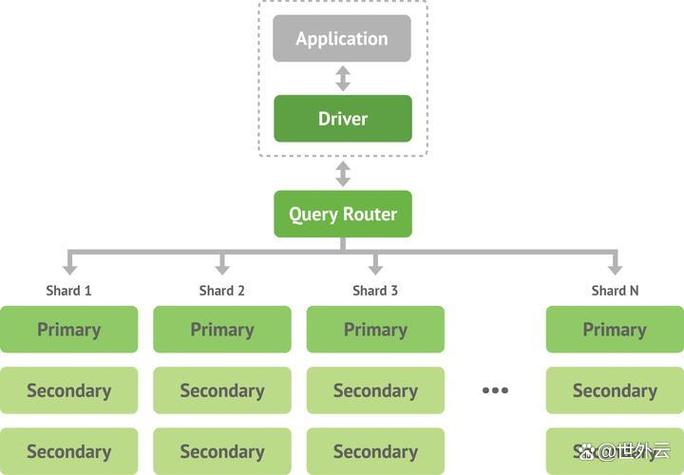
We'll focus on the official MongoDB Java Driver, which is the modern, recommended way to interact with MongoDB from Java.
Overview
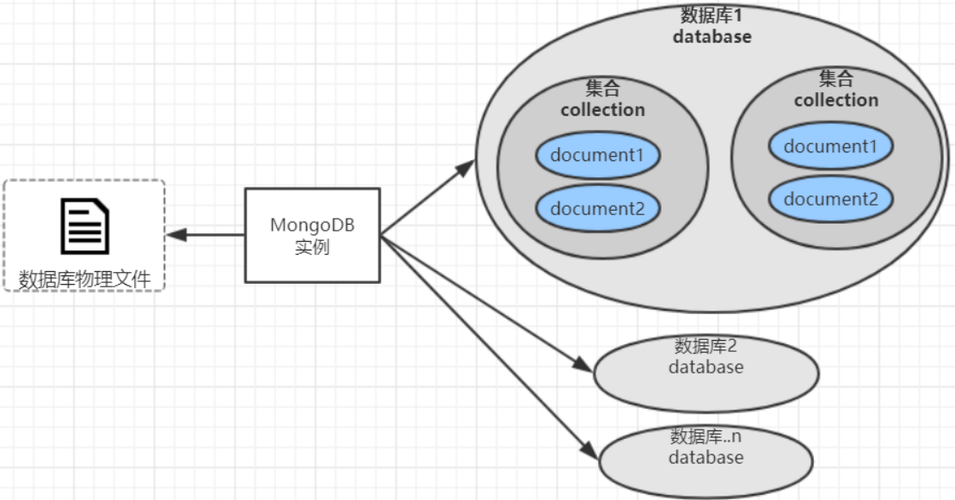
The MongoDB Java Driver is a rich, feature library that allows you to connect to MongoDB and perform all standard database operations (CRUD - Create, Read, Update, Delete). It provides a clean, idiomatic Java API that maps closely to MongoDB's query language.
Setup and Dependencies
You can add the MongoDB Java Driver to your project using your favorite build tool.
Using Maven (pom.xml)
Add the following dependency to your pom.xml file. It's best to check the MongoDB Driver documentation for the latest stable version.
<dependencies>
    <!-- MongoDB Java Driver -->
    <dependency>
        <groupId>org.mongodb</groupId>
        <artifactId>mongodb-driver-sync</artifactId>
        <version>4.11.1</version> <!-- Check for the latest version -->
    </dependency>
</dependencies>
Using Gradle (build.gradle)
Add the following line to your build.gradle file's dependencies block.
dependencies {
    // MongoDB Java Driver
    implementation 'org.mongodb:mongodb-driver-sync:4.11.1' // Check for the latest version
}
Core Concepts and Classes
Before writing code, it's essential to understand the key classes and their roles:
| Class/Interface | Description |
|---|---|
MongoClient |
The entry point to the MongoDB driver. It manages the connection(s) to your MongoDB server(s). You typically create only one instance of this for your entire application. |
MongoDatabase |
Represents a specific database in MongoDB. You get a MongoDatabase instance from the MongoClient. |
MongoCollection |
Represents a specific collection within a database. This is where you perform most of your CRUD operations. |
Document |
A class that represents a BSON document (MongoDB's version of JSON). It's a Map-like structure that you can use to store data. Think of it as a JSON object in Java. |
Filters |
A helper class with static factory methods for building query filters (e.g., eq(), gt(), lt(), and(), or()). |
Projections |
A helper class for specifying which fields to include or exclude in your query results. |
Sorts |
A helper class for specifying the sort order for your query results. |
Updates |
A helper class with static factory methods for building update operations (e.g., set(), inc(), push()). |
Connecting to MongoDB
First, you need to establish a connection. The MongoClient is the central object for this.
import com.mongodb.client.MongoClient;
import com.mongodb.client.MongoClients;
import com.mongodb.client.MongoDatabase;
public class MongoConnectionExample {
    public static void main(String[] args) {
        // The standard connection URI format:
        // mongodb://[username:password@]host1[:port1][,...hostN[:portN]][/[defaultauthdb][?options]]
        String uri = "mongodb://localhost:27017";
        // Create a client and connect to the server
        try (MongoClient mongoClient = MongoClients.create(uri)) {
            // Get a database. If it doesn't exist, MongoDB will create it on the first write operation.
            MongoDatabase database = mongoClient.getDatabase("myDatabase");
            System.out.println("Successfully connected to the database: " + database.getName());
            // You can also get a specific collection
            // MongoCollection<Document> collection = database.getCollection("users");
        } catch (Exception e) {
            System.err.println("Connection failed: " + e.getMessage());
        }
    }
}
CRUD Operations (Create, Read, Update, Delete)
Let's assume we have a collection named users in the myDatabase database.
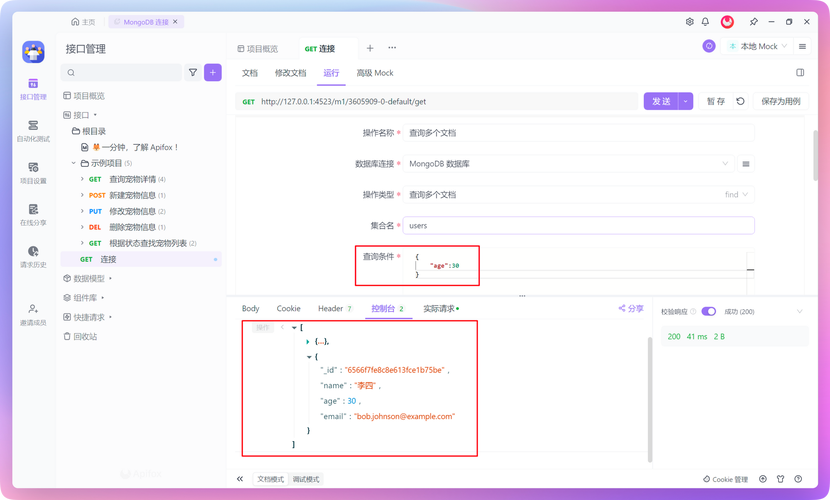
A. Create (Insert Documents)
There are two main ways to insert: insertOne() for a single document and insertMany() for multiple.
import com.mongodb.client.MongoCollection;
import com.mongodb.client.MongoDatabase;
import com.mongodb.client.MongoClients;
import org.bson.Document;
// ... (inside a method after getting the database)
MongoCollection<Document> collection = database.getCollection("users");
// 1. Insert a single document
Document user1 = new Document("name", "Alice")
        .append("age", 30)
        .append("city", "New York")
        .append("interests", Arrays.asList("reading", "hiking"));
collection.insertOne(user1);
System.out.println("Inserted one document: " + user1.getObjectId("_id"));
// 2. Insert multiple documents
List<Document> users = Arrays.asList(
    new Document("name", "Bob").append("age", 25).append("city", "London"),
    new Document("name", "Charlie").append("age", 35).append("city", "Paris")
);
collection.insertMany(users);
System.out.println("Inserted multiple documents.");
B. Read (Find Documents)
Finding documents is done with the find() method, which returns a FindIterable<Document>.
import com.mongodb.client.FindIterable;
import com.mongodb.client.MongoCursor;
import static com.mongodb.client.model.Filters.*;
// ... (inside a method after getting the collection)
// 1. Find all documents in the collection
System.out.println("--- All Users ---");
FindIterable<Document> allUsers = collection.find();
for (Document doc : allUsers) {
    System.out.println(doc.toJson());
}
// 2. Find documents with a filter (equivalent to WHERE name = 'Alice')
System.out.println("\n--- User named Alice ---");
Document alice = collection.find(eq("name", "Alice")).first(); // .first() gets one result
System.out.println(alice.toJson());
// 3. Find documents with complex filters (equivalent to WHERE age > 28 AND city = 'New York')
System.out.println("\n--- Users older than 28 in New York ---");
FindIterable<Document> filteredUsers = collection.find(and(gt("age", 28), eq("city", "New York")));
try (MongoCursor<Document> cursor = filteredUsers.iterator()) {
    while (cursor.hasNext()) {
        System.out.println(cursor.next().toJson());
    }
}
C. Update Documents
Updating is a two-step process: first, you specify which document(s) to update (the filter), and second, you specify the changes to make (the update).
import static com.mongodb.client.model.Updates.*;
// ... (inside a method after getting the collection)
// 1. Update a single document
// Set Alice's age to 31
collection.updateOne(eq("name", "Alice"), set("age", 31));
System.out.println("\nUpdated Alice's age.");
// 2. Update multiple documents
// Increment the age of all users in London by 1
UpdateResult updateResult = collection.updateMany(
    eq("city", "London"),
    inc("age", 1)
);
System.out.println("Updated " + updateResult.getModifiedCount() + " documents in London.");
D. Delete Documents
Deleting is similar to updating: you specify a filter to find the document(s) to delete.
// ... (inside a method after getting the collection)
// 1. Delete a single document
// Delete the user named Charlie
DeleteResult deleteResult = collection.deleteOne(eq("name", "Charlie"));
System.out.println("\nDeleted " + deleteResult.getDeletedCount() + " user named Charlie.");
// 2. Delete multiple documents
// Delete all users older than 40
DeleteResult manyDeleteResult = collection.deleteMany(gt("age", 40));
System.out.println("Deleted " + manyDeleteResult.getDeletedCount() + " users older than 40.");
Complete Example
Here is a full, runnable example that puts everything together.
import com.mongodb.client.*;
import com.mongodb.client.model.*;
import org.bson.Document;
import static com.mongodb.client.model.Filters.*;
import static com.mongodb.client.model.Updates.*;
import java.util.Arrays;
public class MongoCrudExample {
    public static void main(String[] args) {
        // Connection URI
        String uri = "mongodb://localhost:27017";
        // Use try-with-resources to ensure the client is closed
        try (MongoClient mongoClient = MongoClients.create(uri)) {
            // Get database and collection
            MongoDatabase database = mongoClient.getDatabase("testDB");
            MongoCollection<Document> collection = database.getCollection("employees");
            // --- CREATE ---
            System.out.println("--- CREATE ---");
            Document emp1 = new Document("name", "John Doe")
                    .append("position", "Software Engineer")
                    .append("department", "Engineering")
                    .append("salary", 90000);
            collection.insertOne(emp1);
            System.out.println("Inserted employee: " + emp1.getObjectId("_id"));
            Document emp2 = new Document("name", "Jane Smith")
                    .append("position", "Project Manager")
                    .append("department", "Management")
                    .append("salary", 110000);
            collection.insertOne(emp2);
            System.out.println("Inserted employee: " + emp2.getObjectId("_id"));
            // --- READ ---
            System.out.println("\n--- READ ---");
            // Find all
            System.out.println("All Employees:");
            collection.find().forEach(doc -> System.out.println(doc.toJson()));
            // Find one with a filter
            System.out.println("\nEmployee named John Doe:");
            Document john = collection.find(eq("name", "John Doe")).first();
            System.out.println(john.toJson());
            // --- UPDATE ---
            System.out.println("\n--- UPDATE ---");
            // Give John a 10% raise
            collection.updateOne(
                eq("name", "John Doe"),
                combine(set("salary", 99000), set("position", "Senior Software Engineer"))
            );
            System.out.println("Updated John Doe's salary and position.");
            System.out.println("Updated Employee: " + collection.find(eq("name", "John Doe")).first().toJson());
            // --- DELETE ---
            System.out.println("\n--- DELETE ---");
            // Delete Jane Smith
            DeleteResult deleteResult = collection.deleteOne(eq("name", "Jane Smith"));
            System.out.println("Deleted " + deleteResult.getDeletedCount() + " employee.");
            System.out.println("\nRemaining Employees:");
            collection.find().forEach(doc -> System.out.println(doc.toJson()));
        }
    }
}
Advanced Topics
Indexes
Indexes can dramatically improve query performance. You can create them using the createIndex() method.
// Create an index on the "name" field
collection.createIndex(Indexes.descending("name"));
System.out.println("Created an index on the 'name' field.");
Aggregation
Aggregation allows you to process data through a multi-stage pipeline to transform and compute results.
// Example: Calculate the average salary per department
System.out.println("\n--- Aggregation: Average Salary by Department ---");
List<Document> pipeline = Arrays.asList(
    new Document("$group", new Document("_id", "$department")
            .append("averageSalary", new Document("$avg", "$salary")))
);
collection.aggregate(pipeline).forEach(doc -> System.out.println(doc.toJson()));
Asynchronous Driver
For high-performance, non-blocking applications, MongoDB also provides an asynchronous driver (mongodb-driver-reactivestreams or mongodb-driver-async). It uses reactive programming paradigms (e.g., Project Reactor or RxJava). The API is similar but returns Publisher or Mono/Flux objects instead of blocking for results.
Best Practices
- Connection Management: Create a single
MongoClientinstance per application and reuse it. Do not create a new client for every operation. - Resource Management: Always use
try-with-resourcesforMongoClientandMongoCursorto ensure they are closed properly. - Error Handling: Wrap your database operations in
try-catchblocks to handle potentialMongoExceptions or network issues. - Use Projections: When you only need a few fields from a document, use projections to avoid transferring unnecessary data over the network.
- BSON Types: Be mindful of BSON types. For example, use
new Document("date", new java.util.Date())to store aDateobject, which will be correctly serialized to BSON.