Of course! This is a fantastic question that gets to the heart of modern web development with Java. Let's break down the relationship between the Java API, Servlets, and how they work together.
The Big Picture: A Simple Analogy
Imagine you want to open a restaurant.
- The Java API (Application Programming Interface): This is like the building code, health regulations, and utility infrastructure (water, electricity). It's a massive set of pre-built rules, tools, and services provided by the city (Oracle/the Java community) that you must follow to build a safe and functional restaurant. You don't invent plumbing; you use the standard pipes and fittings provided by the city.
- The Servlet: This is like the restaurant's manager and kitchen staff. Its specific job is to receive orders (HTTP requests) from customers (web browsers), process them (talk to the kitchen/database), and serve the food (HTTP responses) back to the customer.
- A Web Server (like Tomcat): This is the restaurant building itself. It provides the space, hosts the manager (Servlet), and handles the incoming customers (network traffic) by directing them to the right staff member.
What is the Java API?
The Java API is a colossal collection of pre-written classes and methods that come with the Java Development Kit (JDK). It's the standard library of Java.
- Purpose: It provides ready-to-use functionality for common programming tasks, saving you from having to "reinvent the wheel."
- Key Components for Web Development:
java.io: For reading and writing data (e.g., reading the request body, writing the response HTML).java.net: For networking (e.g., handling URLs, making connections).java.util: For data structures likeMap,List,Date, etc. (e.g., storing session data).java.lang: The core language classes (e.g.,String,Integer). These are automatically imported.
In short: The Java API is the foundational toolkit. You use it to build everything in Java, including Servlets.
What is a Servlet?
A Servlet is a Java class that follows the Java Servlet API, which is part of the larger Java EE (now Jakarta EE) specification.
- Core Purpose: To extend the capabilities of a web server to handle dynamic web content generation. It's the backbone of Java web applications.
- How it Works: A Servlet runs inside a web container (also called a servlet engine), such as Apache Tomcat, Jetty, or WildFly. The container manages the Servlet's lifecycle.
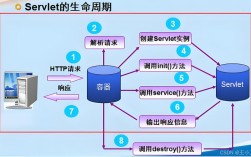
- The Lifecycle of a Servlet:
- Loading and Instantiation: The container loads the Servlet class and creates an instance of it when the application starts or when the first request arrives.
- Initialization (
initmethod): The container calls theinit()method once. This is used for one-time setup, like loading a database connection pool. The Servlet is now in the "ready" state. - Request Handling (
servicemethod): For every client request, the container calls theservice()method. This method, by default, dispatches to the appropriatedoGet(),doPost(),doPut(), ordoDelete()method based on the HTTP request type. - Destruction (
destroymethod): When the application is shut down or undeployed, the container calls thedestroy()method. This is for cleanup, like closing database connections.
How They Work Together: A Step-by-Step Example
Let's create a simple "Hello, World!" Servlet to see the Java API and Servlet API in action.
Step 1: The Project Setup
You need a few things:
- JDK: To compile Java code.
- A Servlet Container: We'll use Apache Tomcat.
- A Build Tool (Maven or Gradle): To manage dependencies and build the project. Maven is very common.
In your pom.xml (for Maven), you'll need the Servlet API dependency:
<dependencies>
    <!-- Jakarta Servlet API (for modern Java web apps) -->
    <dependency>
        <groupId>jakarta.platform</groupId>
        <artifactId>jakarta.jakartaee-api</artifactId>
        <version>10.0.0</version>
        <scope>provided</scope> <!-- The server (Tomcat) will provide this at runtime -->
    </dependency>
</dependencies>
Note: If you're using an older project with Java EE, it would be javax.servlet:javax.servlet-api. The move to `jakarta.` is important for newer versions.*
Step 2: Write the Servlet Code
This class uses both the Servlet API (jakarta.servlet.*) and the Java API (java.io.*, java.lang.*).
src/main/java/com/example/HelloServlet.java
package com.example;
// Import parts of the Servlet API
import jakarta.servlet.ServletException;
import jakarta.servlet.annotation.WebServlet; // For easy mapping
import jakarta.servlet.http.HttpServlet;
import jakarta.servlet.http.HttpServletRequest;
import jakarta.servlet.http.HttpServletResponse;
// Import parts of the Java API
import java.io.IOException;
import java.io.PrintWriter;
/**
 * A simple Servlet that responds to HTTP GET requests.
 */
// This annotation maps this servlet to the URL "/hello"
@WebServlet("/hello")
public class HelloServlet extends HttpServlet {
    // The doGet method is called by the container for every GET request to "/hello"
    @Override
    protected void doGet(HttpServletRequest request, HttpServletResponse response)
            throws ServletException, IOException {
        // 1. Use the Java API to create a formatted string
        String message = String.format("Hello, Servlet World! The time is: %s", new java.util.Date());
        // 2. Use the Servlet API to set the response content type
        response.setContentType("text/html"); // Tell the browser to expect HTML
        // 3. Use the Java API (PrintWriter from java.io) to write the response
        PrintWriter out = response.getWriter();
        out.println("<html><body>");
        out.println("<h1>" + message + "</h1>");
        out.println("<p>This page was generated dynamically by a Java Servlet.</p>");
        out.println("</body></html>");
    }
}
Step 3: Deploy and Run
- Place your compiled Servlet class inside the
WEB-INF/classesdirectory of a web application in your Tomcat server. - Start the Tomcat server.
- Open a web browser and navigate to
http://localhost:8080/your-app-name/hello.
What Happens Behind the Scenes:
- The browser sends an HTTP GET request to
/hello. - The Tomcat container receives the request.
- It looks at its configuration and sees that the URL
/hellois mapped tocom.example.HelloServlet. - It creates or reuses an instance of
HelloServletand calls itsservice()method. - The
service()method sees it's a GET request and calls thedoGet()method we wrote. - Inside
doGet():- We use
java.util.Dateandjava.lang.String(Java API) to create our message. - We use
response.setContentType()(Servlet API) to configure the HTTP response header. - We use
response.getWriter()(Servlet API) to get ajava.io.PrintWriter(Java API) object. - We use the
PrintWriter'sprintln()methods (Java API) to write the HTML content to the response body.
- We use
- The container sends the complete HTTP response (headers + body) back to the browser.
- The browser renders the HTML.
Modern Evolution: Servlets vs. Frameworks
While Servlets are fundamental, directly writing them for complex applications is tedious. This led to the rise of web frameworks.
- Servlets: The "plumbing." You handle everything manually.
- Frameworks (like Spring MVC, Jakarta Faces, Play): Built on top of Servlets. They provide:
- A cleaner way to map URLs to code (e.g.,
@Controllerand@RequestMappingin Spring). - Simplified data binding (getting form parameters into Java objects).
- Powerful templating engines (like Thymeleaf, JSP).
- Integrated security, validation, and more.
- A cleaner way to map URLs to code (e.g.,
Even with frameworks, the underlying principle is the same: The framework receives an HTTP request, processes it (often by calling a method in your controller class), and generates an HTTP response. Under the hood, the framework is still using the Servlet API to talk to the web container.
Summary Table
| Concept | Role | Analogy | Key APIs |
|---|---|---|---|
| Java API | The foundational toolkit and rules for the Java language. | The city's building code and utilities. | java.lang, java.io, java.util, java.net |
| Servlet | A specific Java component for handling web requests/responses. | The restaurant manager and kitchen staff. | jakarta.servlet.HttpServlet, jakarta.servlet.http.HttpServletRequest |
| Web Container | The environment that runs and manages Servlets. | The restaurant building. | (e.g., Apache Tomcat, Jetty) |