Of course! Let's dive into implementing an MVC (Model-View-Controller) architecture using Python's Tornado web framework.
Why MVC with Tornado?
Tornado is an asynchronous, non-blocking web framework. While it's often praised for its performance and simplicity for building APIs, its request-handling structure is a perfect fit for the MVC pattern.
Here's a breakdown of how MVC maps to Tornado:
- Model (M): Represents your data and business logic. In Python, this is typically a set of classes that interact with your database (e.g., using an ORM like SQLAlchemy or Peewee). It has no knowledge of Tornado or the web.
- View (V): Represents the presentation layer. In Tornado, this is the template (
.htmlfiles). Tornado's template engine is powerful, allowing you to embed Python-like logic to render dynamic data. - Controller (C): The "traffic cop." This is the part of Tornado that receives user input (from an HTTP request), interacts with the Model to get or manipulate data, and then passes that data to a View to be rendered and sent back to the user. In Tornado,
RequestHandlersubclasses are your Controllers.
Project Structure
A good MVC project separates concerns into distinct directories. Here's a common and effective structure:
my_tornado_app/
├── app.py              # Main application file (runs the server)
├── handlers/           # Controller layer
│   ├── __init__.py
│   └── main.py         # RequestHandler classes (e.g., HomeHandler, UserHandler)
├── models/             # Model layer
│   ├── __init__.py
│   └── user.py         # User data model and business logic
├── templates/          # View layer
│   ├── base.html       # Base template with common elements (header, footer)
│   └── index.html      # Homepage template
└── settings.py         # Configuration settings (like database connection)
Step-by-Step Implementation
Let's build a simple "User Manager" application that can list users and add new ones.
Step 1: Setup and Dependencies
First, you'll need to install Tornado and an ORM. We'll use SQLAlchemy for this example.
pip install tornado sqlalchemy
Step 2: The Model (models/user.py)
This file defines our data structure and how to interact with the database.
# models/user.py
from sqlalchemy import create_engine, Column, Integer, String
from sqlalchemy.ext.declarative import declarative_base
from sqlalchemy.orm import sessionmaker
# --- Database Setup ---
# This would typically come from settings.py
DATABASE_URL = "sqlite:///./app.db"
engine = create_engine(DATABASE_URL, echo=True)
SessionLocal = sessionmaker(autocommit=False, autoflush=False, bind=engine)
# --- Base Class for Models ---
Base = declarative_base()
# --- The User Model ---
class User(Base):
    __tablename__ = "users"
    id = Column(Integer, primary_key=True, index=True)
    name = Column(String, index=True)
    email = Column(String, unique=True, index=True)
    def __repr__(self):
        return f"<User(name='{self.name}', email='{self.email}')>"
# --- Function to get a database session ---
# This will be used by the controllers
def get_db():
    db = SessionLocal()
    try:
        yield db
    finally:
        db.close()
# --- Create the database tables ---
# In a real app, you'd run this once separately or use a migration tool.
Base.metadata.create_all(bind=engine)
Step 3: The View (templates/base.html and templates/index.html)
These files define the HTML structure. Tornado's template syntax uses for variables and for logic.
templates/base.html (A common base template):
<!DOCTYPE html>
<html lang="en">
<head>
    <meta charset="UTF-8">Tornado MVC App</title>
    <style>
        body { font-family: sans-serif; margin: 2em; }
        nav { margin-bottom: 2em; }
        .user-list { list-style: none; padding: 0; }
        .user-list li { background: #f4f4f4; margin-bottom: 0.5em; padding: 1em; border-radius: 5px; }
        form { margin-top: 2em; padding: 1em; background: #e9e9e9; border-radius: 5px; }
    </style>
</head>
<body>
    <nav><a href="/">Home</a></nav>
    {% block content %}{% end %}
</body>
</html>
templates/index.html (The homepage):
<!-- templates/index.html -->
{% extends "base.html" %}
{% block content %}
    <h1>User List</h1>
    <ul class="user-list">
        {% for user in users %}
            <li>{{ user.name }} ({{ user.email }})</li>
        {% end %}
    </ul>
    <h2>Add a New User</h2>
    <form action="/add_user" method="post">
        <div>
            <label for="name">Name:</label>
            <input type="text" id="name" name="name" required>
        </div>
        <div>
            <label for="email">Email:</label>
            <input type="email" id="email" name="email" required>
        </div>
        <button type="submit">Add User</button>
    </form>
{% end %}
Step 4: The Controller (handlers/main.py)
This is where the core logic lives. The RequestHandler classes act as controllers, interacting with the Model and rendering the View.
# handlers/main.py
from tornado.web import RequestHandler
from tornado.escape import json_encode
from models.user import User, get_db
class HomeHandler(RequestHandler):
    """Controller for the homepage. Handles GET and POST requests."""
    def get(self):
        """Handles GET requests to display the user list form."""
        # 1. (Controller) Get the database session
        db = next(get_db())
        try:
            # 2. (Controller -> Model) Fetch all users from the database
            users = db.query(User).all()
            # 3. (Controller -> View) Render the template, passing the users data
            self.render("index.html", users=users)
        finally:
            # Ensure the session is closed
            db.close()
    def post(self):
        """Handles POST requests to add a new user."""
        # 1. (Controller) Get form data from the request
        name = self.get_argument("name")
        email = self.get_argument("email")
        # 2. (Controller -> Model) Create a new user object
        new_user = User(name=name, email=email)
        # 3. (Controller -> Model) Save the new user to the database
        db = next(get_db())
        try:
            db.add(new_user)
            db.commit()
            # 4. (Controller) Redirect to the homepage to display the updated list
            # This is a standard practice (Post/Redirect/Get) to prevent form resubmission.
            self.redirect("/")
        except Exception as e:
            # Handle potential errors (e.g., duplicate email)
            self.write(f"Error adding user: {e}")
        finally:
            db.close()
Step 5: Configuration (settings.py)
This file keeps your configuration separate from your application logic.
# settings.py
# In a larger app, this could contain secret keys, database credentials, etc.
# For now, it's just a placeholder.
DEBUG = True
Step 6: The Application Entry Point (app.py)
This file ties everything together. It imports the models, handlers, and settings, and then creates and runs the Tornado application.
# app.py
import tornado.ioloop
import tornado.web
import tornado.options
# Import our MVC components
from handlers.main import HomeHandler
import settings
# Define the routing table
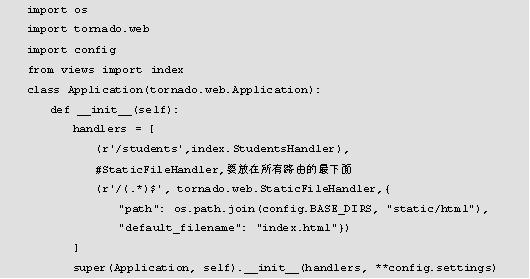
# This maps URL patterns to our Controller (RequestHandler) classes
application = tornado.web.Application([
    (r"/", HomeHandler),
    (r"/add_user", HomeHandler), # We'll handle this in the controller's post method
],
template_path="templates", # Tell Tornado where to find templates
debug=settings.DEBUG      # Enable debug mode for auto-reloading
)
if __name__ == "__main__":
    # Set a port option
    tornado.options.define("port", default=8888, help="run on the given port", type=int)
    # Parse command-line arguments
    tornado.options.parse_command_line()
    print(f"Server running on http://localhost:{tornado.options.options.port}")
    application.listen(tornado.options.options.port)
    # Start the I/O loop
    tornado.ioloop.IOLoop.current().start()
How to Run the Application
- Save all the files in the directory structure shown above.
- Open your terminal in the
my_tornado_appdirectory. - Run the main application file:
python app.py
- Open your web browser and navigate to
http://localhost:8888.
You should see the user list (initially empty) and a form to add a new user. After adding a user, the page will redirect to the homepage, showing the updated list.
Advanced Considerations
-
Separation of Concerns (Refactoring):
- Fat Models, Skinny Controllers: The best practice is to move business logic into the Model. For example, instead of
db.add(new_user)in the controller, you could create aUser.create()method in themodels/user.pyfile. - Dependency Injection: Instead of calling
next(get_db())in every handler, you can create a baseBaseHandlerthat automatically provides aself.dbsession to all its subclasses.
- Fat Models, Skinny Controllers: The best practice is to move business logic into the Model. For example, instead of
-
APIs with MVC:
- The MVC pattern works perfectly for APIs as well. The "View" is simply the JSON response.
- Your
RequestHandler'sget()orpost()method would fetch data from the Model, then useself.write(json_encode(data))orself.set_header("Content-Type", "application/json")before writing the data. The template rendering step is skipped.
-
Asynchronous Operations:
- Tornado's strength is its async nature. If your Model needs to perform a slow, non-blocking operation (like calling another web service), you should use
async/await. - Your ORM (SQLAlchemy) needs to be compatible with async (e.g.,
asyncpgfor PostgreSQL, oraiosqlitefor SQLite). Libraries likeSQLAlchemy 2.0+andTortoise ORMare designed for this. - Example:
async def get(self): db = await get_async_db(); users = await db.query(User).all()
- Tornado's strength is its async nature. If your Model needs to perform a slow, non-blocking operation (like calling another web service), you should use
This MVC structure provides a scalable, maintainable, and organized way to build applications with Tornado, allowing you to manage complexity as your project grows.