Of course! Here’s a comprehensive guide on how to perform a POST request using Python's built-in socket module.
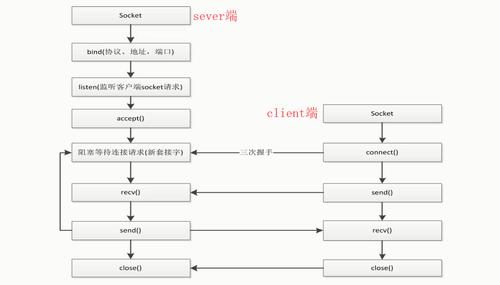
While the modern and highly recommended way to do this is with the requests library, understanding how to do it with socket is a fantastic learning experience. It gives you a deep understanding of the underlying HTTP protocol.
The Short Answer (Using the requests Library)
For almost all practical purposes, you should use the requests library. It's simpler, more robust, and handles all the low-level details for you.
First, install it:
pip install requests
Then, the code is incredibly simple:
import requests
url = 'https://httpbin.org/post'
data = {'key1': 'value1', 'key2': 'value2'}
# The 'requests' library automatically encodes the data and sets the headers
response = requests.post(url, data=data)
print(f"Status Code: {response.status_code}")
print(f"Response Body:\n{response.text}")
The Detailed Answer (Using the socket Module)
Using socket requires you to manually construct the entire HTTP request. An HTTP POST request consists of three main parts:
- The Request Line:
POST /path/to/resource HTTP/1.1 - The Headers: Metadata like
Host,Content-Type, andContent-Length. - The Body: The actual data you want to send.
Step 1: Construct the HTTP POST Request
Let's build the request string. We'll post to https://httpbin.org/post, a service that echoes back the request it receives.
Important: For HTTPS, you cannot use a standard socket. You must use ssl.wrap_socket() to create a secure connection. For this example, we'll use httpbin.org on port 80 (HTTP) to keep it simple. I'll show how to do HTTPS in the complete example below.
Here's how the raw HTTP request looks:
POST /post HTTP/1.1
Host: httpbin.org
Content-Type: application/x-www-form-urlencoded
Content-Length: 25
key1=value1&key2=value2
- Request Line:
POST /post HTTP/1.1 - Headers:
Host: httpbin.org: Required for HTTP/1.1. Tells the server which website we're talking to.Content-Type: application/x-www-form-urlencoded: Tells the server how the data in the body is formatted. This is the standard for form data.Content-Length: 25: Crucial! Tells the server exactly how many bytes to expect in the body. Without this, the server won't know when the request ends. The length iskey1=value1&key2=value2which is 25 characters.
- Body:
key1=value1&key2=value2. This is the actual data.
Notice the blank line between the headers and the body. This is required by the HTTP protocol.
Step 2: Python Code with socket
Here is the complete Python script that sends this request and reads the response.
import socket
import json
# --- 1. Configuration ---
# We use httpbin.org on port 80 for a standard HTTP connection
HOST = 'httpbin.org'
PORT = 80
# The data we want to send
data_to_send = {
    'username': 'test_user',
    'password': 'secure_password_123'
}
# --- 2. Prepare the Request ---
# a. Encode the data into a format suitable for the HTTP body
#    We use application/x-www-form-urlencoded format
body = urllib.parse.urlencode(data_to_send)
# body will look like: 'username=test_user&password=secure_password_123'
# b. Calculate the content length
content_length = len(body.encode('utf-8'))
# c. Construct the full HTTP request as a string
#    Note the \r\n for line breaks and the blank line \r\n\r\n
request = (
    f"POST /post HTTP/1.1\r\n"
    f"Host: {HOST}\r\n"
    f"Content-Type: application/x-www-form-urlencoded\r\n"
    f"Content-Length: {content_length}\r\n"
    f"Connection: close\r\n"  # Tell the server to close the connection after sending
    f"\r\n"  # This blank line is crucial, it separates headers from the body
    f"{body}"
)
# --- 3. Create and Use the Socket ---
# a. Create a socket object
#    AF_INET for IPv4, SOCK_STREAM for TCP
with socket.socket(socket.AF_INET, socket.SOCK_STREAM) as s:
    print(f"Connecting to {HOST}:{PORT}...")
    # b. Connect to the server
    s.connect((HOST, PORT))
    # c. Send the request. Must be encoded to bytes.
    print("Sending request...")
    s.sendall(request.encode('utf-8'))
    # d. Receive the response in chunks
    print("Receiving response...")
    response = b''
    while True:
        chunk = s.recv(4096) # Receive up to 4096 bytes at a time
        if not chunk:
            break
        response += chunk
# --- 4. Process the Response ---
# a. Decode the response from bytes to a string
response_str = response.decode('utf-8')
# b. Split the response into headers and body
#    The body is separated from the headers by a blank line (\r\n\r\n)
headers, body = response_str.split('\r\n\r\n', 1)
print("-" * 40)
print("RESPONSE HEADERS:")
print(headers)
print("-" * 40)
print("RESPONSE BODY:")
# The body is JSON, so we can parse it for nice printing
try:
    parsed_json = json.loads(body)
    print(json.dumps(parsed_json, indent=2))
except json.JSONDecodeError:
    print(body)
print("-" * 40)
Key Takeaways and Important Considerations
-
Manual Construction: You are responsible for building every part of the HTTP request string correctly, including line endings (
\r\n) and the blank line between headers and body. -
Encoding: You must encode your string request into bytes (
request.encode('utf-8')) before sending it over the socket. -
Content-Length is Critical: This header is not optional for POST requests. The server uses it to know how much data to read from the socket. If it's wrong, the request will fail.
-
HTTP vs. HTTPS: The example above uses a standard HTTP connection (
port 80). For HTTPS (which you should almost always use), you need to wrap your socket in an SSL context. Here's how you'd modify the connection part:import ssl # ... (code to create the 'request' string is the same) ... # Create a standard TCP socket with socket.socket(socket.AF_INET, socket.SOCK_STREAM) as s: # Wrap the socket with SSL for a secure connection context = ssl.create_default_context() with context.wrap_socket(s, server_hostname=HOST) as secure_socket: print(f"Connecting securely to {HOST}:{443}...") secure_socket.connect((HOST, 443)) # HTTPS uses port 443 print("Sending request...") secure_socket.sendall(request.encode('utf-8')) # ... (receiving the response is the same) ... response = b'' while True: chunk = secure_socket.recv(4096) if not chunk: break response += chunkNotice we use
port 443andssl.wrap_socket().
Summary: socket vs. requests
| Feature | socket Module |
requests Library |
|---|---|---|
| Ease of Use | Very Low. Manual construction of HTTP. | Very High. Simple, intuitive API. |
| HTTP/HTTPS | Manual setup required, especially for SSL. | Automatic. Just use http:// or https://. |
| Features | Barebones. Only what you code. | Rich: Sessions, authentication, cookies, streaming, JSON handling, etc. |
| Error Handling | Manual. You get raw bytes. | Excellent. Raises exceptions for bad status codes (4xx, 5xx). |
| Use Case | Learning, low-level networking, building a custom HTTP client. | 99% of all use cases. Web scraping, APIs, automation. |
Conclusion: Use the requests library for your projects. Use the socket method when you need to understand the fundamentals of how HTTP works or when you are in an environment where you cannot install external libraries.