Of course! In Python, the term "series" can refer to a few different things depending on the context. Here’s a comprehensive guide covering the most common meanings, from the built-in range object to the powerful pandas.Series.

The Built-in range Object: The Foundation of Sequences
For basic, purely numerical sequences, Python's built-in range object is the most fundamental tool. It represents an immutable sequence of numbers.
Key Characteristics:
- Lazy Evaluation: It doesn't generate all the numbers at once. Instead, it generates them on-the-fly as you iterate, which is very memory-efficient, especially for large ranges.
- Immutable: You cannot change the elements of a
rangeobject after it's created. - Common Use Case: Perfect for
forloops.
Creating a range:
You can create a range in three ways:
# 1. A range from 0 up to (but not including) a stop value
range1 = range(10)
print(f"range(10): {list(range1)}") # Output: [0, 1, 2, 3, 4, 5, 6, 7, 8, 9]
# 2. A range from a start value up to (but not including) a stop value
range2 = range(5, 15)
print(f"range(5, 15): {list(range2)}") # Output: [5, 6, 7, 8, 9, 10, 11, 12, 13, 14]
# 3. A range from a start value to a stop value, with a specific step
range3 = range(0, 20, 3)
print(f"range(0, 20, 3): {list(range3)}") # Output: [0, 3, 6, 9, 12, 15, 18]
# 4. A range with a negative step (counting down)
range4 = range(10, 0, -2)
print(f"range(10, 0, -2): {list(range4)}") # Output: [10, 8, 6, 4, 2]
Python Lists: The Most Flexible "Series"
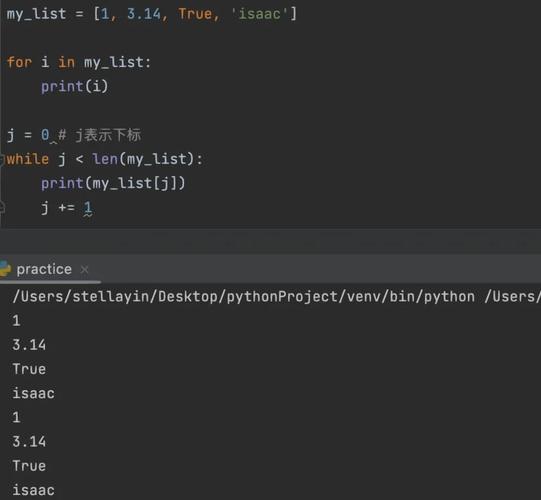
A list is the most common and flexible data structure in Python for storing an ordered collection of items. It can hold any type of data (numbers, strings, objects, even other lists).
Key Characteristics:
- Mutable: You can add, remove, or change items after the list is created.
- Heterogeneous: Can contain items of different data types.
- Indexed: Accessible via zero-based indexing.
Creating a List:
# A list of integers
numbers = [10, 20, 30, 40, 50]
print(f"Numbers: {numbers}")
# A list of strings
fruits = ["apple", "banana", "cherry"]
print(f"Fruits: {fruits}")
# A heterogeneous list
mixed_data = [1, "hello", 3.14, True, [5, 6]]
print(f"Mixed Data: {mixed_data}")
Common Operations:
# Accessing elements
print(f"First fruit: {fruits[0]}") # Output: apple
# Slicing (getting a sublist)
print(f"First three numbers: {numbers[:3]}") # Output: [10, 20, 30]
# Appending an item
fruits.append("date")
print(f"Appended fruit: {fruits}") # Output: ['apple', 'banana', 'cherry', 'date']
# Removing an item
fruits.remove("banana")
print(f"Removed fruit: {fruits}") # Output: ['apple', 'cherry', 'date']
# Finding the length
print(f"Number of fruits: {len(fruits)}") # Output: 3
The array Module: Homogeneous Numeric Lists
If you need a list that is restricted to a single data type (especially numbers) for performance or memory reasons, you can use the array module.
Key Characteristics:
- Homogeneous: All elements must be of the same type.
- More Efficient: Uses less memory and is faster for numerical operations than a standard list.
Creating an Array:
import array
# 'i' denotes an integer array
arr_int = array.array('i', [1, 2, 3, 4, 5])
print(f"Integer array: {arr_int}")
# 'd' denotes a double-precision float array
arr_float = array.array('d', [1.1, 2.2, 3.3])
print(f"Float array: {arr_float}")
The NumPy Array: The Standard for Numerical Computing
For any serious numerical, scientific, or data analysis work, the NumPy library is the standard. Its ndarray (N-dimensional array) object is a powerful, high-performance version of a Python list.
Key Characteristics:
- Extremely Fast & Memory-Efficient: Operations are performed in optimized C code.
- Vectorization: Allows you to perform operations on an entire array without slow Python loops.
- Multi-dimensional: Can easily represent 1D series, 2D matrices, or higher-dimensional tensors.
- Broadcasting: Can perform operations on arrays of different shapes.
Creating a NumPy Array:
First, you need to install NumPy: pip install numpy
import numpy as np
# Creating an array from a Python list
np_array = np.array([10, 20, 30, 40, 50])
print(f"NumPy array: {np_array}")
print(f"Data type: {np_array.dtype}") # e.g., int64
# Creating a sequence with np.arange (similar to range, but returns an array)
np_seq = np.arange(0, 10, 2)
print(f"NumPy sequence: {np_seq}") # Output: [0 2 4 6 8]
# Vectorized operation (much faster than a loop)
numbers = np.array([1, 2, 3, 4, 5])
squared = numbers ** 2
print(f"Squared numbers: {squared}") # Output: [ 1  4  9 16 25]
The pandas.Series: The Labeled 1D Data Structure
This is what people often mean when they talk about a "Series" in a data analysis context. A pandas.Series is a one-dimensional labeled array capable of holding any data type (integers, strings, floating-point numbers, Python objects, etc.). It's essentially a column in a spreadsheet or a database table.
Key Characteristics:
- Labeled Data: Each element has a unique index (like a row label), not just a position.
- Handles Missing Data: Has a built-in system for handling missing values (
NaN). - Rich Functionality: Comes with hundreds of methods for statistical analysis, filtering, and manipulation.
- Foundation of
pandas.DataFrame: A DataFrame is essentially a collection of Series.
Creating a pandas Series:
First, you need to install pandas: pip install pandas

import pandas as pd
import numpy as np
# Creating a Series from a list
data = [10, 20, 30, 40, 50]
series_from_list = pd.Series(data)
print("--- Series from List ---")
print(series_from_list)
# Notice the default integer index (0, 1, 2, ...) on the left.
# Creating a Series with a custom index
labels = ['a', 'b', 'c', 'd', 'e']
custom_series = pd.Series(data, index=labels)
print("\n--- Series with Custom Index ---")
print(custom_series)
# Now the index is 'a', 'b', 'c', etc.
# Creating a Series from a dictionary
dict_data = {'New York': 8.4, 'Los Angeles': 4.0, 'Chicago': 2.7}
city_pop_series = pd.Series(dict_data)
print("\n--- Series from Dictionary ---")
print(city_pop_series)
# The dictionary keys become the Series index.
# Creating a Series with missing data
data_with_nan = [1, 2, np.nan, 4]
nan_series = pd.Series(data_with_nan)
print("\n--- Series with NaN ---")
print(nan_series)
# Accessing data by label
print(f"\nPopulation of Los Angeles: {city_pop_series['Los Angeles']}")
# Performing operations
print(f"\nSeries doubled:\n{custom_series * 2}")
Summary Table: Which One Should I Use?
| Data Structure | Key Use Case | Mutable? | Homogeneous? | Requires Import? |
|---|---|---|---|---|
range |
Generating numbers for loops. | No | Yes (numbers) | No (Built-in) |
list |
General-purpose, ordered collection. | Yes | No | No (Built-in) |
array |
Memory-efficient, homogeneous numeric lists. | Yes | Yes | Yes (array) |
NumPy Array |
High-performance numerical computing & math. | Yes | Yes (usually) | Yes (numpy) |
pandas.Series |
Labeled 1D data, data analysis, time series. | Yes | No | Yes (pandas) |
Quick Guide:
- Just need a sequence for a loop? Use
range. - Need a simple, flexible container? Use a
list. - Doing heavy math or science? Use a
NumPy array. - Working with tabular data, statistics, or labeled data? Use a
pandas.Series.