Of course! Here is a comprehensive guide to using Modbus TCP in Java, covering the concepts, popular libraries, and complete code examples.
What is Modbus TCP?
Modbus is a serial communication protocol developed in 1979 by Modicon (now Schneider Electric). It's one of the most widely used protocols in industrial automation for connecting electronic devices.
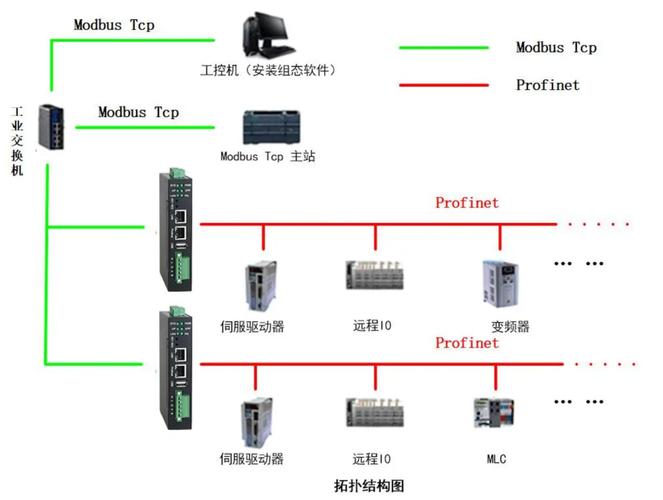
Modbus TCP is simply the adaptation of the Modbus protocol to run on top of TCP/IP, the standard of the modern internet and local networks. This allows you to use standard networking hardware (like Ethernet switches and routers) and simplifies integration with modern IT systems.
Key characteristics:
- Client/Server Architecture: One device acts as the Master (Client), which requests data. Other devices act as Slaves (Servers), which respond to requests.
- Simple and Robust: It's a very simple protocol, making it easy to implement and reliable in noisy industrial environments.
- Open Standard: It's royalty-free, which has contributed to its widespread adoption.
Key Concepts for Modbus TCP in Java
Before diving into code, let's understand the fundamental concepts you'll be working with.
-
Modbus Function Codes: These are the "verbs" of the Modbus protocol. They define the action the client wants the server to perform.
0x01(Read Coils): Read discrete outputs (on/off).0x02(Read Discrete Inputs): Read discrete inputs (on/off).0x03(Read Holding Registers): Read analog output values (16-bit integers).0x04(Read Input Registers): Read analog input values (16-bit integers).0x05(Write Single Coil): Set a single discrete output on/off.0x06(Write Single Register): Set a single analog output value.0x0F(Write Multiple Coils): Write multiple discrete outputs at once.0x10(Write Multiple Registers): Write multiple analog output values at once.
-
Data Types in Modbus:
- Coils (Discrete Outputs): Single bits, representing on/off states. They are writable.
- Discrete Inputs: Single bits, representing on/off states. They are typically read-only.
- Holding Registers (Analog Outputs): 16-bit (2-byte) registers. They are writable and used to store analog values or configuration data.
- Input Registers (Analog Inputs): 16-bit (2-byte) registers. They are typically read-only and store data from sensors.
-
Java Data Types: Modbus registers are 16-bit, so they map to Java's
shortorinttypes.- A single register is a
short(16 bits). - To handle 32-bit values (like floats or longs), you need to read two consecutive registers and then swap the bytes (endianness). This is called a "word swap".
- A single register is a
Popular Java Libraries for Modbus TCP
You don't need to implement the Modbus TCP protocol from scratch. Several excellent libraries are available.

- Jamod (Java Modbus Library): One of the original and most well-known libraries. It's stable and widely used but has a slightly older API style.
- Modbus4J: A very popular, modern, and feature-rich library. It's actively maintained and considered by many to be the best choice for new projects. It has a clean API and good documentation.
- MB-Utils: A lightweight and simple library, good for basic tasks.
- Apache VFS (Virtual File System): While not a dedicated Modbus library, it can access Modbus devices as if they were files, which is a very interesting approach for simple read operations.
Recommendation: For most new projects, Modbus4J is the recommended choice due to its modern design and active community.
Step-by-Step Example with Modbus4J
Let's build a simple application using Modbus4J. We'll create both a Server (Slave) and a Client (Master).
Step 1: Add the Dependency
If you're using Maven, add this to your pom.xml:
<dependency>
    <groupId>com.ghgande</groupId>
    <artifactId>j2mod</artifactId>
    <version>3.2.2</version> <!-- Check for the latest version -->
</dependency>
Note: The original modbus4j project seems to have been forked or integrated into j2mod. The j2mod library is the continuation and is what you should use today.
Step 2: Create a Modbus TCP Server (Slave)
This server will listen for requests on a specific port (e.g., 502) and respond with data from its internal registers.
import com.ghgande.j2mod.modbus.Modbus;
import com.ghgande.j2mod.modbus.io.ModbusTCPTransaction;
import com.ghgande.j2mod.modbus.msg.ReadCoilsRequest;
import com.ghgande.j2mod.modbus.msg.ReadHoldingRegistersRequest;
import com.ghgande.j2mod.modbus.msg.WriteSingleRegisterRequest;
import com.ghgande.j2mod.modbus.net.TCPMasterConnection;
import com.ghgande.j2mod.modbus.slave.ModbusSlave;
import com.ghgande.j2mod.modbus.slave.ModbusSlaveFactory;
import com.ghgande.j2mod.modbus.slave.ModbusSlaveImplementation;
import java.net.InetAddress;
public class ModbusTCPServer {
    public static void main(String[] args) throws Exception {
        // 1. Create a Modbus Slave (Server)
        // Listen on port 502 (the standard Modbus port)
        ModbusSlave slave = ModbusSlaveFactory.createTCPSlave(Modbus.DEFAULT_PORT);
        // 2. Get the implementation to handle requests
        ModbusSlaveImplementation impl = slave.getImplementation();
        // 3. Set up the data for the coils (discrete outputs)
        // We'll have 8 coils (like 8 LEDs)
        impl.addCoilRange(0, 8, new boolean[]{false, false, false, false, false, false, false, false});
        // 4. Set up the data for the holding registers (analog outputs)
        // We'll have 10 registers
        int[] initialRegisters = {100, 200, 300, 400, 500, 600, 700, 800, 900, 1000};
        impl.addRegisterRange(0, 10, initialRegisters);
        System.out.println("Modbus TCP Slave is listening on port " + Modbus.DEFAULT_PORT);
        // 5. Start the slave
        slave.open();
        // Keep the server running
        while (true) {
            Thread.sleep(1000);
            // Optional: Change a register value dynamically for demonstration
            // For example, toggle the first coil every 5 seconds
            if (System.currentTimeMillis() % 5000 < 1000) {
                impl.setCoil(0, true);
            } else {
                impl.setCoil(0, false);
            }
        }
    }
}
Step 3: Create a Modbus TCP Client (Master)
This client will connect to the server and read/write data.
import com.ghgande.j2mod.modbus.Modbus;
import com.ghgande.j2mod.modbus.io.ModbusTCPTransaction;
import com.ghgande.j2mod.modbus.msg.ReadCoilsRequest;
import com.ghgande.j2mod.modbus.msg.ReadHoldingRegistersRequest;
import com.ghgande.j2mod.modbus.msg.WriteSingleRegisterRequest;
import com.ghgande.j2mod.modbus.net.TCPMasterConnection;
import java.net.InetAddress;
public class ModbusTCPClient {
    public static void main(String[] args) throws Exception {
        // 1. Define the server's IP address and port
        InetAddress addr = InetAddress.getByName("127.0.0.1"); // Localhost
        int port = Modbus.DEFAULT_PORT;
        // 2. Create a TCP Master connection
        TCPMasterConnection con = new TCPMasterConnection(addr);
        con.setPort(port);
        con.connect(); // Connect to the slave
        System.out.println("Connected to Modbus TCP Slave at " + addr.getHostAddress());
        // 3. Create a transaction to handle the request/response
        ModbusTCPTransaction trans = new ModbusTCPTransaction(con);
        // --- Example 1: Read Holding Registers (Function Code 0x03) ---
        // Read 5 registers starting from address 0
        ReadHoldingRegistersRequest reqHolding = new ReadHoldingRegistersRequest(0, 5);
        trans.setRequest(reqHolding);
        trans.execute();
        System.out.println("\n--- Reading Holding Registers ---");
        System.out.println("Request: " + reqHolding.getMessage());
        System.out.println("Response: " + trans.getResponse().getMessage());
        // The response contains the data as an array of shorts
        short[] holdingData = ((ReadHoldingRegistersRequest) trans.getResponse()).getRegisterValues();
        for (int i = 0; i < holdingData.length; i++) {
            System.out.println("Register at address " + i + ": " + holdingData[i]);
        }
        // --- Example 2: Read Coils (Function Code 0x01) ---
        // Read 8 coils starting from address 0
        ReadCoilsRequest reqCoils = new ReadCoilsRequest(0, 8);
        trans.setRequest(reqCoils);
        trans.execute();
        System.out.println("\n--- Reading Coils ---");
        System.out.println("Request: " + reqCoils.getMessage());
        System.out.println("Response: " + trans.getResponse().getMessage());
        boolean[] coilData = ((ReadCoilsRequest) trans.getResponse()).getCoilStatus();
        for (int i = 0; i < coilData.length; i++) {
            System.out.println("Coil at address " + i + ": " + (coilData[i] ? "ON" : "OFF"));
        }
        // --- Example 3: Write a Single Register (Function Code 0x06) ---
        // Write the value 1234 to register address 5
        WriteSingleRegisterRequest reqWrite = new WriteSingleRegisterRequest(5, 1234);
        trans.setRequest(reqWrite);
        trans.execute();
        System.out.println("\n--- Writing a Single Register ---");
        System.out.println("Wrote value 1234 to register address 5.");
        System.out.println("Request: " + reqWrite.getMessage());
        System.out.println("Response: " + trans.getResponse().getMessage());
        // --- Verify the write ---
        reqHolding = new ReadHoldingRegistersRequest(5, 1); // Read just the one we wrote
        trans.setRequest(reqHolding);
        trans.execute();
        short writtenValue = ((ReadHoldingRegistersRequest) trans.getResponse()).getRegisterValues()[0];
        System.out.println("Verification: Value at register 5 is now: " + writtenValue);
        // 4. Close the connection
        con.close();
        System.out.println("\nConnection closed.");
    }
}
How to Run the Example
- Create a new Java project in your favorite IDE (IntelliJ, Eclipse, etc.).
- Add the
j2moddependency to yourpom.xmlas shown in Step 1. - Create two Java files:
ModbusTCPServer.javaandModbusTCPClient.javaand paste the code from above. - Run the Server first: Right-click on
ModbusTCPServer.javaand select "Run". - Run the Client next: Right-click on
ModbusTCPClient.javaand select "Run".
You will see the client connect to the server, perform read and write operations, and print the results to the console.
Advanced Topics
Reading and Writing 32-bit Floats
Modbus only handles 16-bit values. To work with 32-bit floats, you must read two consecutive registers and then perform a word swap and byte reordering.
Important: You must know the endianness of the device. Most devices use Big-Endian (most significant byte first).
import com.ghgande.j2mod.modbus.msg.ReadHoldingRegistersRequest;
import java.nio.ByteBuffer;
import java.nio.ByteOrder;
// ... inside your client code ...
// Read two consecutive registers to get a 32-bit float
ReadHoldingRegistersRequest reqFloat = new ReadHoldingRegistersRequest(2, 2); // Read from address 2
trans.setRequest(reqFloat);
trans.execute();
short[] registerValues = ((ReadHoldingRegistersRequest) trans.getResponse()).getRegisterValues();
// The registers come in the order [low, high] for a Big-Endian float
// We need to swap them to [high, low] and then convert to bytes
byte[] bytes = new byte[4];
bytes[0] = (byte) (registerValues[1] >> 8); // High byte of high register
bytes[1] = (byte) (registerValues[1]);      // Low byte of high register
bytes[2] = (byte) (registerValues[0] >> 8); // High byte of low register
bytes[3] = (byte) (registerValues[0]);      // Low byte of low register
// Convert the byte array to a float
float floatValue = ByteBuffer.wrap(bytes).order(ByteOrder.BIG_ENDIAN).getFloat();
System.out.println("\n--- Reading a 32-bit Float ---");
System.out.println("Float value read from registers 2 & 3: " + floatValue);
Error Handling
Always check the response for errors. A successful response will have a function code that is the same as the request. An error response will have the function code with the most significant bit set (e.g., 0x83 for an error in response to a 0x03 request).
trans.execute();
if (trans.getResponse().isException()) {
    System.err.println("Error: " + trans.getResponse().getExceptionCode());
} else {
    // Process successful response
    System.out.println("Success: " + trans.getResponse().getMessage());
}