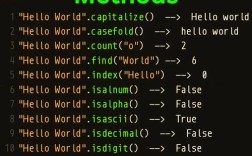
Of course! In Python, the most common and idiomatic way to find a substring within a string is by using the .find() method. There's also the .index() method, which is very similar, and the in keyword, which is used for checking existence.
Here’s a complete guide covering all the ways to "find" a string in Python.
The .find() Method
This is the go-to method for getting the starting index of a substring. It's simple and flexible.
Syntax
string.find(substring, start, end)
substring: The string you are searching for (required).start: The index where the search begins (optional). Defaults to0.end: The index where the search ends (optional). Defaults to the end of the string.
Return Value
- If the substring is found, it returns the starting index of the first occurrence.
- If the substring is not found, it returns
-1. This is a key feature, as it doesn't raise an error.
Examples
Basic Usage:
text = "Hello, welcome to the world of Python."
substring = "world"
# Find the index of "world"
index = text.find(substring)
print(f"The index of '{substring}' is: {index}")
# Output: The index of 'world' is: 21
Substring Not Found:
text = "Hello, world!"
substring = "goodbye"
index = text.find(substring)
print(f"The index of '{substring}' is: {index}")
# Output: The index of 'goodbye' is: -1
Using start and end (Slicing the Search):
You can limit the search to a specific portion of the string.
text = "this is a test string, this is only a test."
substring = "this"
# Find the first occurrence starting from index 0 (default)
first_index = text.find(substring)
print(f"First occurrence: {first_index}") # Output: 0
# Find the second occurrence by starting the search after the first one
second_index = text.find(substring, first_index + 1)
print(f"Second occurrence: {second_index}") # Output: 25
The .index() Method
This method works almost identically to .find(), but with one critical difference.
Syntax
string.index(substring, start, end)
The parameters are the same as .find().
Return Value
- If the substring is found, it returns the starting index (same as
.find()). - If the substring is not found, it raises a
ValueError.
Examples
Basic Usage:
text = "Hello, world!"
substring = "world"
index = text.index(substring)
print(f"The index of '{substring}' is: {index}")
# Output: The index of 'world' is: 7
Substring Not Found (Error):
text = "Hello, world!"
substring = "goodbye"
try:
    index = text.index(substring)
    print(f"The index of '{substring}' is: {index}")
except ValueError:
    print(f"Error: The substring '{substring}' was not found.")
# Output: Error: The substring 'goodbye' was not found.
When to use which?
- Use
.find()when you just need to know if the substring exists and get its position. You don't want your program to crash if it's not there. The-1return value is easy to check with anifstatement. - Use
.index()when the substring must be present in the string. If it's not, it's a critical error, and your program should stop. This is useful for validating input or data that you expect to be in a certain format.
The in Keyword
This is not a method, but an operator. It's the simplest way to check for the existence of a substring. It returns a boolean value (True or False).
Syntax
substring in string
Return Value
Trueif the substring is found.Falseif the substring is not found.
Example
text = "The quick brown fox jumps over the lazy dog."
# Check if a substring exists
if "fox" in text:
    print("Yes, 'fox' is in the text.")
else:
    print("No, 'fox' is not in the text.")
# Output: Yes, 'fox' is in the text.
if "cat" in text:
    print("Yes, 'cat' is in the text.")
else:
    print("No, 'cat' is not in the text.")
# Output: No, 'cat' is not in the text.
Finding All Occurrences
Neither .find() nor .index() can find all occurrences by themselves. To do this, you need to loop and use the start parameter.
Example: Find All Indices of a Substring
text = "abracadabra"
substring = "a"
indices = []
start = 0
while True:
    # Find the next occurrence starting from the 'start' index
    index = text.find(substring, start)
    # If find() returns -1, the substring is no longer found
    if index == -1:
        break
    # Add the found index to our list
    indices.append(index)
    # Move the start index to the position right after the one we just found
    start = index + 1
print(f"All indices of '{substring}': {indices}")
# Output: All indices of 'a': [0, 3, 5, 7, 10]
Other Useful String Methods
-
.count(): Counts the number of non-overlapping occurrences of a substring.text = "abracadabra" count = text.count("a") print(f"The character 'a' appears {count} times.") # Output: The character 'a' appears 5 times. -
.startswith(): Checks if a string starts with a specific substring.filename = "report_2025.pdf" if filename.startswith("report_"): print("This is a report file.") # Output: This is a report file. -
.endswith(): Checks if a string ends with a specific substring.filename = "report_2025.pdf" if filename.endswith(".pdf"): print("This is a PDF file.") # Output: This is a PDF file.
Summary Table
| Method/Operator | What it Does | Return Value | Raises Error if Not Found? |
|---|---|---|---|
.find() |
Finds the first index of a substring. | Index (int) or -1 |
No |
.index() |
Finds the first index of a substring. | Index (int) |
Yes (ValueError) |
in |
Checks if a substring exists. | True or False |
No |
.count() |
Counts occurrences of a substring. | Number of times (int) |
No |
.startswith() |
Checks if a string starts with a substring. | True or False |
No |
.endswith() |
Checks if a string ends with a substring. | True or False |
No |