Of course! The lambda function in Python is a small, anonymous function that can take any number of arguments but can only have one expression. It's incredibly useful, especially when you need a short, one-time function for tasks like sorting.
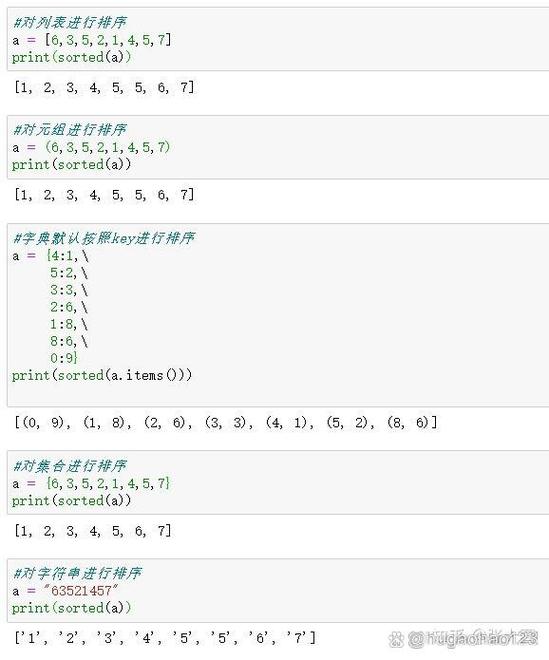
Let's break down how to use lambda with Python's sorting functions.
The Key Players
-
lambda: Creates a small, anonymous function.- Syntax:
lambda arguments: expression - It evaluates the
expressionand returns the result.
- Syntax:
-
list.sort(): A method of a list object that sorts the list in-place.- It modifies the original list and returns
None. - Syntax:
list.sort(key=..., reverse=...)
- It modifies the original list and returns
-
sorted(): A built-in function that returns a new sorted list from the items in an iterable.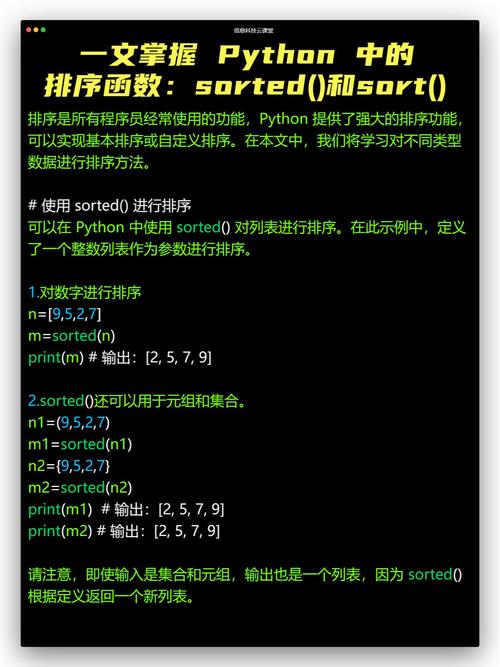 (图片来源网络,侵删)
- The original iterable is not changed.
- Syntax:
sorted(iterable, key=..., reverse=...)
The key argument is where lambda shines. The key function is called on each element of the list before making comparisons. The sort then uses the return value of this key function for ordering.
Sorting a List of Tuples
This is the most common and easiest use case to understand. By default, Python sorts tuples element by element.
Let's say we have a list of students with their scores:
students = [
    ('Alice', 85),
    ('Bob', 95),
    ('Charlie', 75),
    ('David', 90)
]
Goal: Sort by the score (the second element of each tuple).
We use a lambda function that tells the sort method: "For each item x in the list, use x[1] (the score) as the key for sorting."

# Sort by the second element (the score) in ascending order
students.sort(key=lambda x: x[1])
print(students)
# Output: [('Charlie', 75), ('Alice', 85), ('David', 90), ('Bob', 95)]
To sort in descending order:
Just add the reverse=True argument.
students.sort(key=lambda x: x[1], reverse=True)
print(students)
# Output: [('Bob', 95), ('David', 90), ('Alice', 85), ('Charlie', 75)]
Sorting a List of Dictionaries
When you have dictionaries, you often want to sort based on a specific value within each dictionary.
products = [
    {'name': 'Laptop', 'price': 1200},
    {'name': 'Mouse', 'price': 25},
    {'name': 'Keyboard', 'price': 75},
    {'name': 'Monitor', 'price': 300}
]
Goal: Sort by the 'price' value.
The lambda function tells the sort method: "For each dictionary item in the list, use item['price'] as the key."
# Sort by price in ascending order
sorted_products = sorted(products, key=lambda item: item['price'])
import json
print(json.dumps(sorted_products, indent=2))
Output:
[
  {
    "name": "Mouse",
    "price": 25
  },
  {
    "name": "Keyboard",
    "price": 75
  },
  {
    "name": "Monitor",
    "price": 300
  },
  {
    "name": "Laptop",
    "price": 1200
  }
]
Sorting a List of Objects (Custom Classes)
You can also sort a list of custom objects. The lambda function will extract the attribute you want to use for comparison.
class Employee:
    def __init__(self, name, salary):
        self.name = name
        self.salary = salary
    def __repr__(self): # Helps print the object nicely
        return f"Employee({self.name}, {self.salary})"
employees = [
    Employee('Zoe', 95000),
    Employee('Alice', 80000),
    Employee('Bob', 105000)
]
Goal: Sort by the salary attribute.
The lambda function tells the sort method: "For each emp object in the list, use emp.salary as the key."
# Sort by salary in ascending order
employees.sort(key=lambda emp: emp.salary)
print(employees)
# Output: [Employee(Alice, 80000), Employee(Zoe, 95000), Employee(Bob, 105000)]
Sorting Based on Multiple Criteria
This is a powerful technique. If you provide a key that returns a tuple, Python will sort by the first element of the tuple, then use the second element to break ties, and so on.
Let's go back to our student list, but this time with a first and last name.
students = [
    ('Alice', 'Smith', 85),
    ('Bob', 'Jones', 95),
    ('Charlie', 'Smith', 75),
    ('David', 'Brown', 90)
]
Goal: Sort by last name, then by first name if last names are the same.
The lambda function returns a tuple: (last_name, first_name).
# Sort by last name (index 1), then by first name (index 0)
students.sort(key=lambda x: (x[1], x[0]))
print(students)
# Output: [('David', 'Brown', 90), ('Bob', 'Jones', 95), ('Alice', 'Smith', 85), ('Charlie', 'Smith', 75)]
Notice how 'Alice Smith' and 'Charlie Smith' are now ordered by their first names.
Sorting with a Complex Key
You can perform calculations inside the lambda function to create a sort key.
Let's say you have a list of products, and you want to sort them by their price per unit.
products = [
    {'name': 'Apple', 'price': 1.20, 'unit': 'lb'},
    {'name': 'Milk', 'price': 3.50, 'unit': 'gal'},
    {'name': 'Bread', 'price': 2.50, 'unit': 'loaf'},
    {'name': 'Rice', 'price': 5.00, 'unit': 'lb'}
]
Let's assume for this example that we want to sort by price per pound, so we'll just use the price as a proxy for simplicity.
Goal: Sort by price per unit.
# Sort by price per unit (ascending)
sorted_by_unit_price = sorted(products, key=lambda p: p['price'])
print(json.dumps(sorted_by_unit_price, indent=2))
Output:
[
  {
    "name": "Apple",
    "price": 1.2,
    "unit": "lb"
  },
  {
    "name": "Bread",
    "price": 2.5,
    "unit": "loaf"
  },
  {
    "name": "Milk",
    "price": 3.5,
    "unit": "gal"
  },
  {
    "name": "Rice",
    "price": 5,
    "unit": "lb"
  }
]
list.sort() vs. sorted() with lambda
| Feature | list.sort() |
sorted() |
|---|---|---|
| Type | Method of a list | Built-in function |
| Original List | Modified (sorted in-place) | Not modified |
| Return Value | None |
A new sorted list |
| When to Use | When you don't need to keep the original order and want to save memory. | When you need to preserve the original list or sort different iterables (like tuples, sets). |
Example:
data = [3, 1, 4, 1, 5, 9]
# Using sorted() - original list is unchanged
new_sorted_data = sorted(data)
print(f"Original data: {data}")
print(f"New sorted data: {new_sorted_data}")
# Using list.sort() - original list is changed
data.sort()
print(f"Original data after .sort(): {data}")
Output:
Original data: [3, 1, 4, 1, 5, 9]
New sorted data: [1, 1, 3, 4, 5, 9]
Original data after .sort(): [1, 1, 3, 4, 5, 9]