Of course! Finding a string (or a substring) within another string is a very common task in Python. There are several ways to do it, each with its own purpose.
Here’s a comprehensive guide, starting with the most common methods and moving to more specialized ones.
The in Operator (Check for Existence)
This is the simplest and most Pythonic way to check if a substring exists within a string. It returns True if the substring is found and False if it is not.
Use Case: When you only need to know if a string contains another string, and you don't need its position.
main_string = "Hello, welcome to the world of Python!"
substring = "world"
# Check if substring is in main_string
if substring in main_string:
    print(f"Yes, '{substring}' is in the main string.")
else:
    print(f"No, '{substring}' is not in the main string.")
# --- Output ---
# Yes, 'world' is in the main string.
# Another example
substring_not_found = "Java"
if substring_not_found in main_string:
    print(f"Yes, '{substring_not_found}' is in the main string.")
else:
    print(f"No, '{substring_not_found}' is not in the main string.")
# --- Output ---
# No, 'Java' is not in the main string.
The .find() Method (Get the Index)
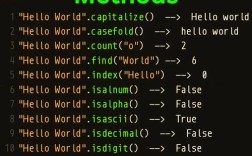
The .find() method returns the lowest index (the starting position) of the substring if it is found. If the substring is not found, it returns -1.

Use Case: When you need to know where a substring is located in a string.
main_string = "Hello, welcome to the world of Python!"
substring = "world"
# Find the index of the first occurrence
index = main_string.find(substring)
if index != -1:
    print(f"Found '{substring}' at index: {index}")
else:
    print(f"Could not find '{substring}'")
# --- Output ---
# Found 'world' at index: 18
# Example with a substring that is not found
index_not_found = main_string.find("Java")
print(f"Index of 'Java': {index_not_found}")
# --- Output ---
# Index of 'Java': -1
Key Feature: You can also specify a start and end position to search within a slice of the string.
main_string = "one two one three one"
# Find the second occurrence of "one"
# Start searching from index 4 onwards
index = main_string.find("one", 4)
print(f"Found 'one' at index: {index}") # Output: Found 'one' at index: 8
The .index() Method (Get the Index, but with an Error)
This method is very similar to .find(). It also returns the lowest index of the substring. However, if the substring is not found, it raises a ValueError instead of returning -1.
Use Case: When you need the index of a substring and you expect it to be there. Using .index() can make your code cleaner because you don't have to check for -1.
main_string = "Hello, welcome to the world of Python!"
substring = "world"
# Get the index
index = main_string.index(substring)
print(f"Found '{substring}' at index: {index}")
# --- Output ---
# Found 'world' at index: 18
# Example with a substring that is not found (this will cause an error)
try:
    index_not_found = main_string.index("Java")
    print(f"Index of 'Java': {index_not_found}")
except ValueError:
    print("Error: 'Java' was not found in the string.")
# --- Output ---
# Error: 'Java' was not found in the string.
The .count() Method (Count Occurrences)
If you need to know how many times a substring appears in a string, you can use the .count() method.
Use Case: When you need to count the number of occurrences of a substring.
main_string = "one two one three one"
substring = "one"
# Count the number of occurrences
count = main_string.count(substring)
print(f"The substring '{substring}' appears {count} times.")
# --- Output ---
# The substring 'one' appears 3 times.
# You can also limit the search to a part of the string
count_in_first_half = main_string.count("one", 0, 10) # Search from index 0 to 10
print(f"The substring 'one' appears {count_in_first_half} times in the first half.")
# --- Output ---
# The substring 'one' appears 2 times in the first half.
Regular Expressions (re module) (Advanced Pattern Matching)
For more complex search patterns (e.g., finding email addresses, phone numbers, or words that start with a capital letter), Python's built-in re module is the most powerful tool.
Use Case: When you need to find patterns, not just fixed strings.
import re
text = "My email is test.user@example.com. My other one is support@my-company.org."
# Find all email addresses in the text
# The pattern r'[\w\.-]+@[\w\.-]+' is a simple regex for email-like strings
emails = re.findall(r'[\w\.-]+@[\w\.-]+', text)
print(f"Found emails: {emails}")
# --- Output ---
# Found emails: ['test.user@example.com', 'support@my-company.org']
# Search for the first occurrence of a pattern and get its position and content
match = re.search(r'[\w\.-]+@[\w\.-]+', text)
if match:
    print(f"Found email: {match.group()}") # The actual matched string
    print(f"Starts at index: {match.start()}") # Starting index
    print(f"Ends at index: {match.end()}") # Ending index
else:
    print("No email found.")
# --- Output ---
# Found email: test.user@example.com
# Starts at index: 12
# Ends at index: 33
Summary Table
| Method | What it Does | Return Value | When to Use |
|---|---|---|---|
in |
Checks for existence. | True or False |
Quick check to see if a substring exists. |
.find() |
Finds the first index of a substring. | Index (int) or -1 (if not found). |
When you need the position and want to handle "not found" gracefully. |
.index() |
Finds the first index of a substring. | Index (int) or raises ValueError. |
When you expect the substring to be there and want an error if it's not. |
.count() |
Counts occurrences of a substring. | Number of times (int). |
When you need to know how many times a substring appears. |
re.findall() |
Finds all matches for a pattern. | List of all matched strings. | When you need to find all occurrences of a complex pattern. |
re.search() |
Finds the first match for a pattern. | A match object (or None). |
When you need the first occurrence and its position/length. |