Of course! Using char with Python's ctypes library is a fundamental task, especially when interacting with C libraries. The key is understanding how Python's str and bytes types map to C's char.
Here’s a complete guide, from the basics to practical examples.
The Fundamental Mapping: c_char
In ctypes, the C char data type is represented by the class ctypes.c_char.
| C Type | ctypes Class |
Python Representation |
|---|---|---|
char |
ctypes.c_char |
A single character, represented as a bytes-like object of length 1. |
This is the most important concept: a c_char instance is not a Python str. It's a bytes object.
from ctypes import c_char
# Create a c_char instance
# You must provide a bytes object (b'...'), not a string ('...')
c = c_char(b'A')
print(f"Value: {c}")
print(f"Type of value: {type(c.value)}")
print(f"Python representation: {repr(c.value)}")
Output:
Value: A
Type of value: <class 'bytes'>
Python representation: b'A'
Key Operations and Properties
c_char.value
This property gets or sets the value of the c_char. As shown above, it's a bytes object.
from ctypes import c_char
# Create an uninitialized c_char
# Its value will be whatever is in memory
c = c_char()
print(f"Initial value: {repr(c.value)}") # e.g., b'\x00'
# Set the value using a bytes object
c.value = b'X'
print(f"Set value: {repr(c.value)}")      # b'X'
# You cannot set it with a regular Python string
try:
    c.value = 'Y' # This will raise a TypeError
except TypeError as e:
    print(f"\nError as expected: {e}")
c_char(): Default Value
When you create a c_char without an initializer, its value is not b'0' or b''. It's whatever byte happens to be in that memory location, often b'\x00' (the null byte).
from ctypes import c_char
c = c_char()
print(repr(c.value)) # Often prints b'\x00'
Passing char to C Functions
This is where ctypes really shines. Let's use the standard C library strlen function, which calculates the length of a null-terminated string. The function signature is:
size_t strlen(const char *str);
In ctypes, this translates to:
size_t strlen(c_char_p)
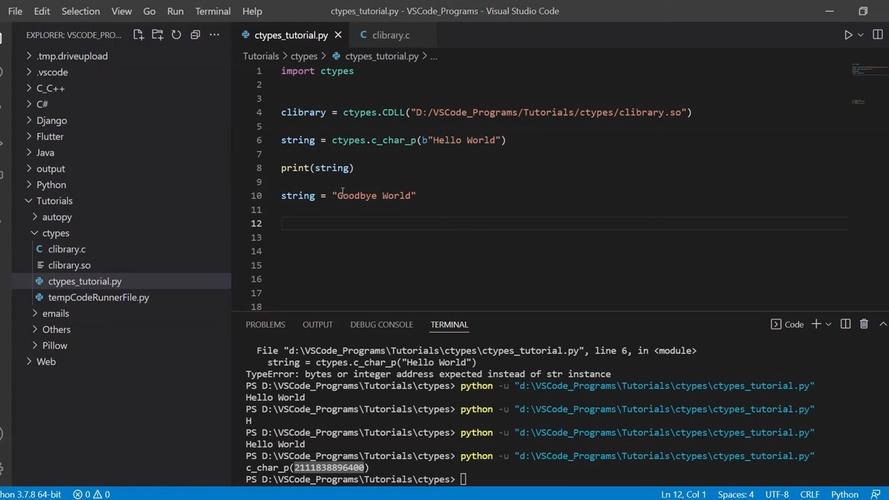
Notice the parameter type is c_char_p, not c_char. c_char_p is a special class for C-style strings (pointers to a char array that ends with a null byte, b'\x00').
When you pass a Python bytes object to a function expecting c_char_p, ctypes is smart enough to handle it.
Example: Calling strlen
from ctypes import CDLL, c_char_p
# Load the C standard library
# On Linux/macOS, it's 'c'. On Windows, it's 'msvcrt'.
libc = CDLL('c')
# Get the strlen function from the library
# It expects a pointer to a char (c_char_p)
strlen = libc.strlen
strlen.argtypes = [c_char_p] # Set argument type for clarity
strlen.restype = c_size_t    # Set return type (size_t)
# Create a Python bytes object
my_string = b"Hello, C world!"
# Pass it directly to the C function
length = strlen(my_string)
print(f"Python bytes object: {my_string}")
print(f"Length returned by C strlen: {length}")
Output:
Python bytes object: b'Hello, C world!'
Length returned by C strlen: 14
Receiving char from C Functions
C functions often return a single char to indicate a status or a character value.
Let's use toupper from the C library, which converts a character to uppercase:
int toupper(int c);
We'll call it with a lowercase letter and check the return value.
Example: Calling toupper
from ctypes import CDLL, c_int
libc = CDLL('c')
toupper = libc.toupper
toupper.argtypes = [c_int] # toupper takes an int, but we can pass a char
toupper.restype = c_int   # It returns an int
# We want to pass the character 'a'. In C, 'a' is an integer (97).
# ctypes handles this conversion for us.
input_char = ord('a') # Get the ASCII value of 'a'
# Alternatively, you can just pass the character itself, ctypes will convert it
# input_char = 'a'
# Call the C function
uppercase_value = toupper(input_char)
# The result is an integer. We need to convert it back to a character.
output_char = chr(uppercase_value)
print(f"Input to C toupper: {input_char} (which is '{chr(input_char)}')")
print(f"Integer value returned from C: {uppercase_value}")
print(f"Converted back to a Python char: '{output_char}'")
Output:
Input to C toupper: 97 (which is 'a')
Integer value returned from C: 65
Converted back to a Python char: 'A'
Common Pitfalls and Best Practices
Pitfall 1: Confusing c_char with c_char_p
This is the most common mistake.
c_char: Represents a single character. Its.valueis abytesobject of length 1 (e.g.,b'A').c_char_p: Represents a C-style string (a pointer tochar). It's a pointer and is null-terminated. You can initialize it with a Pythonbytesobject (e.g.,c_char_p(b"hello")).
Pitfall 2: Using Python str Instead of bytes
C functions don't understand Python's Unicode strings. You must use bytes.
Incorrect:
# WRONG: This will raise a TypeError
my_c_char = c_char('A')
Correct:
# RIGHT: Use a bytes literal with a 'b' prefix
my_c_char = c_char(b'A')
Best Practice: Explicitly Define Function Signatures
When calling C functions, always use the .argtypes and .restype attributes. This makes your code safer, faster, and much easier to debug.
# Good
libc = CDLL('c')
my_function = libc.my_c_func
my_function.argtypes = [c_int, c_char_p] # Define what arguments are expected
my_function.restype = c_int              # Define what is returned
# Bad (can lead to crashes or wrong results)
libc = CDLL('c')
my_function = libc.my_c_func
# No type information, ctypes makes assumptions
Summary Table
| Task | C Code | ctypes Python Code |
|---|---|---|
| Declare single char | char c; |
from ctypes import c_charc = c_char() |
| Initialize single char | char c = 'A'; |
c = c_char(b'A') |
| Get char value | // c is already a value |
val = c.value (val is b'A') |
| Set char value | c = 'B'; |
c.value = b'B' |
| Pass char to function | func('x'); |
func(b'x') (or func(ord('x'))) |
| Receive char from function | char c = func(); |
c = func() (result is an int, use chr() to convert to a Python str) |