Of course! Let's dive deep into Python's http.client module.
What is http.client?
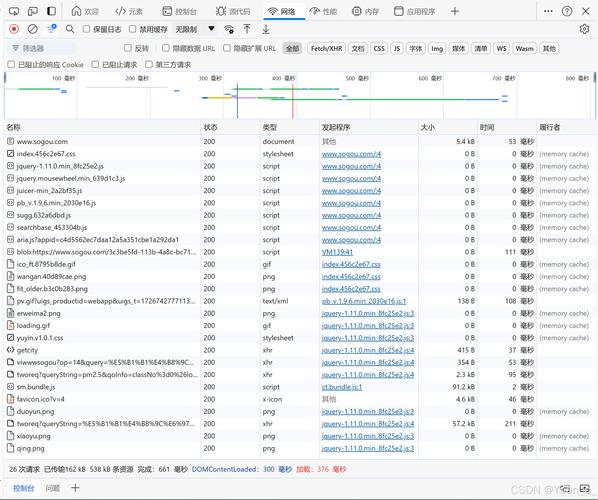
http.client is a low-level, built-in Python library that allows you to make HTTP requests programmatically. It's the foundational library that many higher-level HTTP libraries (including the popular requests library) are built upon.
Think of it as the engine of your car. You can use it to make the car go, but you have to control the spark plugs, fuel injection, and steering wheel directly. It's powerful but requires more manual control.
Key Characteristics
- Low-Level: You interact directly with the HTTP protocol. You create connections, send raw HTTP commands (like
GET,POST), and read raw HTTP response data (headers and body). - Built-in: No need to install it with
pip. It's part of the Python Standard Library. - HTTP/1.1 focused: It primarily supports the HTTP/1.1 protocol. For modern applications needing HTTP/2, other libraries like
httpxoraiohttpare often better choices. - Synchronous: It performs network operations in a blocking way. Your program will wait until the network request is complete before moving to the next line of code.
The Two Main Classes: HTTPConnection and HTTPSConnection
The most important classes in http.client are:
http.client.HTTPConnection: For making requests to an insecurehttp://server.http.client.HTTPSConnection: For making requests to a securehttps://server. This is what you'll use 99% of the time.
A Practical Example: Making a GET Request
Let's start with the most common task: fetching data from a public API.
Goal: Get information about a specific user from the JSONPlaceholder test API.
import http.client
import json # Used to parse the JSON response
# The host and the path for the API endpoint
host = 'jsonplaceholder.typicode.com'
path = '/posts/1'
# 1. Create a connection object
# We use HTTPSConnection because the URL is https://
conn = http.client.HTTPSConnection(host)
try:
    # 2. Send the GET request
    # The request method takes the path and a dictionary of headers.
    conn.request("GET", path)
    # 3. Get the response from the server
    response = conn.getresponse()
    # 4. Check the status code
    print(f"Status Code: {response.status}")
    print(f"Reason: {response.reason}")
    # 5. Read the response body
    # It's important to read the data, otherwise the connection might not be closed properly.
    data = response.read()
    # 6. Decode the data from bytes to a string and parse the JSON
    # The data is received as bytes, so we decode it to a UTF-8 string.
    json_data = json.loads(data.decode('utf-8'))
    print("\n--- Parsed JSON Data ---")
    print(json_data)
    print(f"\nUser ID: {json_data['userId']}")
    print(f"Title: {json_data['title']}")
except http.client.HTTPException as e:
    print(f"An HTTP error occurred: {e}")
finally:
    # 7. Close the connection
    # This is crucial to free up system resources.
    conn.close()
Breakdown of the Example:
import http.client: Imports the necessary module.conn = http.client.HTTPSConnection(host): Creates a connection object. We're not connecting yet; we're just setting up the target.conn.request("GET", path): This is the core of the request. It sends theGETcommand for the specified path to the host.response = conn.getresponse(): After sending the request, we get the server's response object. This object contains the status code, headers, and the body.response.status/response.reason:statusis the HTTP status code (e.g., 200 for OK, 404 for Not Found).reasonis the human-readable message (e.g., "OK", "Not Found").response.read(): Reads the entire response body. This is a blocking operation. The body is returned asbytes.json.loads(...): Since the API returns JSON, we parse the byte string into a Python dictionary.conn.close(): Closes the underlying socket connection. Using atry...finallyblock ensures the connection is always closed, even if an error occurs.
A Practical Example: Making a POST Request
Now, let's send data to the server.
Goal: Create a new "post" on the JSONPlaceholder API.
import http.client
import json
host = 'jsonplaceholder.typicode.com'
path = '/posts'
# The data we want to send
new_post_data = {: 'A new post from http.client',
    'body': 'This is the content of my new post.',
    'userId': 10
}
# We need to send this data as JSON, so we convert it to a string
# and then encode it to bytes.
json_payload = json.dumps(new_post_data).encode('utf-8')
headers = {
    'Content-Type': 'application/json', # Tell the server we're sending JSON
    'Content-Length': str(len(json_payload)) # The server needs to know how much data to expect
}
conn = http.client.HTTPSConnection(host)
try:
    # The request method now includes the body (the payload)
    conn.request("POST", path, body=json_payload, headers=headers)
    response = conn.getresponse()
    print(f"Status Code: {response.status}")
    print(f"Reason: {response.reason}")
    # Read the response, which will contain the newly created resource
    data = response.read()
    created_post = json.loads(data.decode('utf-8'))
    print("\n--- Created Post ---")
    print(created_post)
except http.client.HTTPException as e:
    print(f"An HTTP error occurred: {e}")
finally:
    conn.close()
Key Differences for POST:
body=json_payload: Therequest()method'sbodyargument is used to send the data.headers: We must set theContent-Typeheader toapplication/jsonso the server knows how to interpret our data. We also setContent-Lengthso the server knows how many bytes to read.
Common Pitfalls and Best Practices
- Forgetting to
close()the connection: This is a common mistake that can lead to resource leaks. Always usetry...finallyor a context manager (see below). - Not handling errors: Network requests can fail for many reasons (DNS lookup failure, connection refused, timeout). Always wrap your code in a
try...exceptblock. - Ignoring the response body: If you don't call
response.read(), the connection might remain in an unusable state. - Using
httpfor sensitive data: Never useHTTPConnectionfor anything that requires security (like passwords or tokens). Always useHTTPSConnection.
Using a Context Manager (Recommended)
To avoid forgetting to close the connection, you can use the with statement, which acts as a context manager. The connection will be automatically closed when the block is exited.
import http.client
import json
host = 'jsonplaceholder.typicode.com'
path = '/posts/1'
with http.client.HTTPSConnection(host) as conn:
    conn.request("GET", path)
    response = conn.getresponse()
    data = response.read()
    print(json.loads(data.decode('utf-8')))
# The connection is automatically closed here
When to Use http.client vs. requests
| Feature | http.client |
requests |
|---|---|---|
| Level | Low-level (Direct HTTP control) | High-level (User-friendly API) |
| Dependencies | Built-in (None needed) | External (pip install requests) |
| Ease of Use | Complex (Manual headers, body, parsing) | Simple (response = requests.get(url)) |
| Features | Basic HTTP/1.1 | Sessions, Cookies, Auth, JSON parsing, Streaming, Retries, async support |
| Best For | Learning HTTP, embedded systems, or when you need fine-grained control and cannot add dependencies. | Almost all general-purpose scripting and web scraping. |
Conclusion:
Use http.client when you need a lightweight, dependency-free solution or when you need to interact with the HTTP protocol in a very specific, low-level way. For almost every other use case, the requests library is the superior choice due to its simplicity, power, and rich feature set.