- 准备工作:了解所需工具和核心思想。
- 项目结构:创建合理的 Java 包结构。
- 核心类设计:设计游戏所需的关键类(方块、游戏面板、主控制器)。
- 分步实现:一步步编写代码,从基础显示到游戏逻辑。
- 完整代码:提供所有核心类的最终代码,方便你整合和测试。
- 扩展与优化:提出可以进一步改进的方向。
准备工作
1 开发环境
- JDK (Java Development Kit): 确保你的电脑上已安装 JDK 8 或更高版本。
- IDE (Integrated Development Environment): 推荐使用 IntelliJ IDEA 或 Eclipse,IDEA 对 Java Swing 的支持更好。
2 核心思想
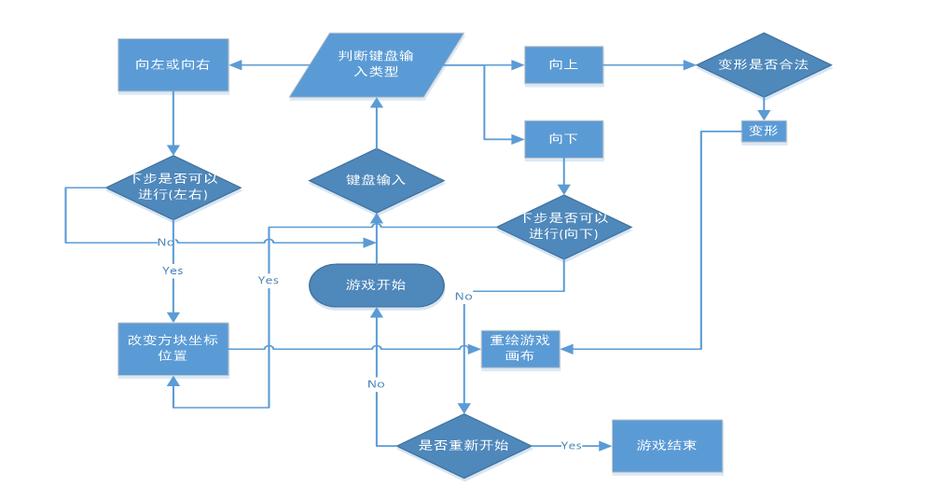
- 游戏循环: 游戏的核心是一个循环,不断执行“更新状态 -> 重绘画面”的操作。
- 数据结构:
- 游戏面板: 一个二维数组(
int[][]),用来表示游戏区域,每个格子可以是空的(0)或有颜色的方块(用不同数字代表不同颜色)。 - 方块: 一个小的二维数组(
int[][]),代表一个方块的形状,每个方块由4个小方块组成。 - 方块类型: 定义所有可能的方块形状(I, O, T, S, Z, J, L)和它们的旋转状态。
- 游戏面板: 一个二维数组(
- 事件处理: 监听键盘事件,实现方块的移动(左、右、下)、旋转和快速下落。
项目结构
在 IDE 中创建一个新的 Java 项目,并创建如下包结构:
(图片来源网络,侵删)
src/
└── com/
    └── tetris/
        ├── Main.java          // 程序入口
        ├── model/
        │   ├── Tetromino.java     // 方块类
        │   └── Board.java         // 游戏面板类
        ├── view/
        │   └── GamePanel.java     // 绘制游戏界面的面板
        └── controller/
            └── TetrisController.java // 游戏逻辑控制器
核心类设计
1 model.Tetromino.java (方块类)
这个类代表一个正在下落的方块,它需要知道自己的形状、颜色、位置(x, y 坐标)以及如何旋转。
2 model.Board.java (游戏面板类)
这个类是游戏状态的“大脑”,它包含:
- 一个二维数组,表示整个游戏区域的状态。
- 当前方块和下一个方块的对象。
- 游戏逻辑:消除行、检查碰撞、生成新方块等。
3 view.GamePanel.java (游戏视图)
这个类继承自 javax.swing.JPanel,负责在屏幕上绘制所有内容:
- 绘制游戏面板(已固定的方块)。
- 绘制当前正在下落的方块。
- 绘制下一个方块的预览。
- 绘制分数、等级等信息。
4 controller.TetrisController.java (游戏控制器)
这个类是连接模型和视图的桥梁,它:
(图片来源网络,侵删)
- 创建
Board和GamePanel实例。 - 启动游戏循环(使用
javax.swing.Timer)。 - 处理键盘输入,并调用
Board中的方法来更新游戏状态。 - 在游戏状态改变时,通知
GamePanel重绘。
5 Main.java (主类)
程序的入口,它创建一个主窗口(JFrame),将 GamePanel 放入其中,并设置窗口属性。
分步实现
第1步:创建 Tetromino.java (方块类)
这个类定义了方块的形状、颜色和基本操作。
package com.tetris.model;
import java.awt.Color;
import java.util.Random;
public class Tetromino {
    // 定义7种方块的形状,每个形状有4种旋转状态
    public static final int[][][] SHAPES = {
        // I
        {
            {0, 0, 0, 0},
            {1, 1, 1, 1},
            {0, 0, 0, 0},
            {0, 0, 0, 0}
        },
        // J
        {
            {2, 0, 0},
            {2, 2, 2},
            {0, 0, 0}
        },
        // L
        {
            {0, 0, 3},
            {3, 3, 3},
            {0, 0, 0}
        },
        // O
        {
            {4, 4},
            {4, 4}
        },
        // S
        {
            {0, 5, 5},
            {5, 5, 0},
            {0, 0, 0}
        },
        // T
        {
            {0, 6, 0},
            {6, 6, 6},
            {0, 0, 0}
        },
        // Z
        {
            {7, 7, 0},
            {0, 7, 7},
            {0, 0, 0}
        }
    };
    // 定义每种方块对应的颜色
    public static final Color[] COLORS = {
        new Color(0, 240, 240), // I - 青色
        new Color(0, 0, 240),   // J - 蓝色
        new Color(240, 160, 0), // L - 橙色
        new Color(240, 240, 0), // O - 黄色
        new Color(0, 240, 0),   // S - 绿色
        new Color(160, 0, 240), // T - 紫色
        new Color(240, 0, 0)    // Z - 红色
    };
    private int[][] shape;
    private final Color color;
    private int x, y;
    public Tetromino() {
        Random random = new Random();
        int typeId = random.nextInt(SHAPES.length);
        this.shape = SHAPES[typeId];
        this.color = COLORS[typeId];
        this.x = Board.COL / 2 - shape[0].length / 2;
        this.y = 0;
    }
    // 复制构造函数,用于创建下一个方块的预览
    public Tetromino(int[][] shape, Color color) {
        this.shape = shape;
        this.color = color;
        this.x = 0;
        this.y = 0;
    }
    public int[][] getShape() {
        return shape;
    }
    public Color getColor() {
        return color;
    }
    public int getX() {
        return x;
    }
    public int getY() {
        return y;
    }
    public void moveDown() {
        y++;
    }
    public void moveLeft() {
        x--;
    }
    public void moveRight() {
        x++;
    }
    public void rotate() {
        // 顺时针旋转90度
        int n = shape.length;
        int m = shape[0].length;
        int[][] rotated = new int[m][n];
        for (int i = 0; i < n; i++) {
            for (int j = 0; j < m; j++) {
                rotated[j][n - 1 - i] = shape[i][j];
            }
        }
        this.shape = rotated;
    }
}
第2步:创建 Board.java (游戏面板类)
这是游戏逻辑的核心。
package com.tetris.model;
public class Board {
    public static final int ROW = 20;
    public static final int COL = 10;
    private final int[][] board;
    private Tetromino currentPiece;
    private Tetromino nextPiece;
    private boolean isGameOver;
    private int score;
    private int level;
    private int clearedLines;
    public Board() {
        board = new int[ROW][COL];
        currentPiece = new Tetromino();
        nextPiece = new Tetromino();
        isGameOver = false;
        score = 0;
        level = 1;
        clearedLines = 0;
    }
    public Tetromino getCurrentPiece() {
        return currentPiece;
    }
    public Tetromino getNextPiece() {
        return nextPiece;
    }
    public int[][] getBoard() {
        return board;
    }
    public boolean isGameOver() {
        return isGameOver;
    }
    public int getScore() {
        return score;
    }
    public int getLevel() {
        return level;
    }
    // 检查碰撞
    private boolean checkCollision(Tetromino piece, int boardX, int boardY) {
        int[][] shape = piece.getShape();
        for (int i = 0; i < shape.length; i++) {
            for (int j = 0; j < shape[i].length; j++) {
                if (shape[i][j] != 0) {
                    int newX = boardX + j;
                    int newY = boardY + i;
                    if (newX < 0 || newX >= COL || newY >= ROW) {
                        return true;
                    }
                    if (newY >= 0 && board[newY][newX] != 0) {
                        return true;
                    }
                }
            }
        }
        return false;
    }
    // 固定方块到游戏板
    public void lockPiece() {
        int[][] shape = currentPiece.getShape();
        for (int i = 0; i < shape.length; i++) {
            for (int j = 0; j < shape[i].length; j++) {
                if (shape[i][j] != 0) {
                    int boardY = currentPiece.getY() + i;
                    int boardX = currentPiece.getX() + j;
                    if (boardY >= 0) {
                        // 将形状索引+1作为颜色标识,避免和0(空)混淆
                        board[boardY][boardX] = shape[i][j];
                    }
                }
            }
        }
        clearLines();
        spawnNewPiece();
    }
    // 消除完整的行
    private void clearLines() {
        int linesCleared = 0;
        for (int i = ROW - 1; i >= 0; i--) {
            boolean isLineFull = true;
            for (int j = 0; j < COL; j++) {
                if (board[i][j] == 0) {
                    isLineFull = false;
                    break;
                }
            }
            if (isLineFull) {
                // 将上面的行下移
                for (int k = i; k > 0; k--) {
                    System.arraycopy(board[k - 1], 0, board[k], 0, COL);
                }
                // 最顶行清空
                for (int j = 0; j < COL; j++) {
                    board[0][j] = 0;
                }
                linesCleared++;
                i++; // 重新检查当前行,因为上面的行已经下移
            }
        }
        if (linesCleared > 0) {
            clearedLines += linesCleared;
            // 计分规则
            score += linesCleared * linesCleared * 100 * level;
            // 每10行升一级
            level = 1 + clearedLines / 10;
        }
    }
    // 生成新方块
    private void spawnNewPiece() {
        currentPiece = nextPiece;
        nextPiece = new Tetromino();
        // 检查游戏是否结束
        if (checkCollision(currentPiece, currentPiece.getX(), currentPiece.getY())) {
            isGameOver = true;
        }
    }
    // 游戏主逻辑
    public void update() {
        if (!isGameOver) {
            if (!checkCollision(currentPiece, currentPiece.getX(), currentPiece.getY() + 1)) {
                currentPiece.moveDown();
            } else {
                lockPiece();
            }
        }
    }
    // 玩家操作
    public void moveDown() {
        if (!checkCollision(currentPiece, currentPiece.getX(), currentPiece.getY() + 1)) {
            currentPiece.moveDown();
        }
    }
    public void moveLeft() {
        if (!checkCollision(currentPiece, currentPiece.getX() - 1, currentPiece.getY())) {
            currentPiece.moveLeft();
        }
    }
    public void moveRight() {
        if (!checkCollision(currentPiece, currentPiece.getX() + 1, currentPiece.getY())) {
            currentPiece.moveRight();
        }
    }
    public void rotatePiece() {
        Tetromino tempPiece = new Tetromino(currentPiece.getShape(), currentPiece.getColor());
        tempPiece.rotate();
        if (!checkCollision(tempPiece, tempPiece.getX(), tempPiece.getY())) {
            currentPiece.rotate();
        }
    }
}
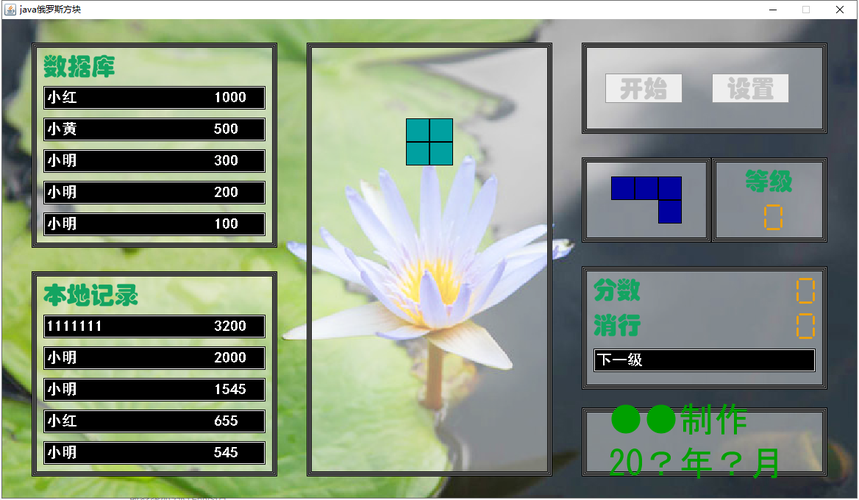
第3步:创建 GamePanel.java (游戏视图)
这个类负责将 Board 的数据绘制到屏幕上。
(图片来源网络,侵删)
package com.tetris.view;
import com.tetris.model.Board;
import com.tetris.model.Tetromino;
import javax.swing.*;
import java.awt.*;
import java.awt.event.KeyAdapter;
import java.awt.event.KeyEvent;
public class GamePanel extends JPanel {
    private final Board board;
    private final int blockSize = 30;
    private final int panelWidth = Board.COL * blockSize;
    private final int panelHeight = Board.ROW * blockSize;
    public GamePanel(Board board) {
        this.board = board;
        this.setPreferredSize(new Dimension(panelWidth, panelHeight));
        this.setBackground(Color.BLACK);
        this.setFocusable(true); // 使面板可以接收键盘事件
    }
    @Override
    protected void paintComponent(Graphics g) {
        super.paintComponent(g);
        drawBoard(g);
        drawCurrentPiece(g);
        drawGhostPiece(g);
        drawGameOver(g);
    }
    private void drawBoard(Graphics g) {
        int[][] boardData = board.getBoard();
        for (int i = 0; i < Board.ROW; i++) {
            for (int j = 0; j < Board.COL; j++) {
                if (boardData[i][j] != 0) {
                    drawBlock(g, j, i, Tetromino.COLORS[boardData[i][j] - 1]);
                }
            }
        }
    }
    private void drawCurrentPiece(Graphics g) {
        Tetromino piece = board.getCurrentPiece();
        int[][] shape = piece.getShape();
        for (int i = 0; i < shape.length; i++) {
            for (int j = 0; j < shape[i].length; j++) {
                if (shape[i][j] != 0) {
                    drawBlock(g, piece.getX() + j, piece.getY() + i, piece.getColor());
                }
            }
        }
    }
    // 绘制“幽灵方块”(即方块将要落下的位置)
    private void drawGhostPiece(Graphics g) {
        Tetromino piece = board.getCurrentPiece();
        int ghostY = piece.getY();
        while (!board.isGameOver()) {
            Tetromino tempPiece = new Tetromino(piece.getShape(), piece.getColor());
            tempPiece.x = piece.getX();
            tempPiece.y = ghostY + 1;
            if (board.checkCollision(tempPiece, tempPiece.getX(), tempPiece.getY())) {
                break;
            }
            ghostY++;
        }
        int[][] shape = piece.getShape();
        g.setColor(new Color(piece.getColor().getRed(), piece.getColor().getGreen(), piece.getColor().getBlue(), 50));
        for (int i = 0; i < shape.length; i++) {
            for (int j = 0; j < shape[i].length; j++) {
                if (shape[i][j] != 0) {
                    drawBlock(g, piece.getX() + j, ghostY + i, piece.getColor());
                }
            }
        }
    }
    private void drawBlock(Graphics g, int x, int y, Color color) {
        g.setColor(color);
        g.fillRect(x * blockSize, y * blockSize, blockSize, blockSize);
        g.setColor(Color.GRAY);
        g.drawRect(x * blockSize, y * blockSize, blockSize, blockSize);
    }
    private void drawGameOver(Graphics g) {
        if (board.isGameOver()) {
            g.setColor(Color.WHITE);
            g.setFont(new Font("Arial", Font.BOLD, 40));
            String text = "GAME OVER";
            int x = (panelWidth - g.getFontMetrics().stringWidth(text)) / 2;
            int y = panelHeight / 2;
            g.drawString(text, x, y);
        }
    }
}
第4步:创建 TetrisController.java (游戏控制器)
这个类将所有部分粘合在一起。
package com.tetris.controller;
import com.tetris.model.Board;
import com.tetris.view.GamePanel;
import javax.swing.*;
import java.awt.*;
import java.awt.event.ActionEvent;
import java.awt.event.ActionListener;
import java.awt.event.KeyAdapter;
import java.awt.event.KeyEvent;
public class TetrisController {
    private final JFrame frame;
    private final Board board;
    private final GamePanel gamePanel;
    private final JLabel scoreLabel;
    private final JLabel levelLabel;
    private final JLabel nextPieceLabel;
    private final JPanel nextPiecePanel;
    public TetrisController() {
        this.board = new Board();
        this.gamePanel = new GamePanel(board);
        this.frame = new JFrame("Java Tetris");
        this.scoreLabel = new JLabel("Score: 0");
        this.levelLabel = new JLabel("Level: 1");
        this.nextPieceLabel = new JLabel("Next:");
        this.nextPiecePanel = new JPanel();
        this.nextPiecePanel.setPreferredSize(new Dimension(120, 120));
        this.nextPiecePanel.setBackground(Color.DARK_GRAY);
        setupUI();
        setupKeyBindings();
        startGameLoop();
    }
    private void setupUI() {
        frame.setDefaultCloseOperation(JFrame.EXIT_ON_CLOSE);
        frame.setResizable(false);
        // 创建右侧信息面板
        JPanel infoPanel = new JPanel();
        infoPanel.setLayout(new BoxLayout(infoPanel, BoxLayout.Y_AXIS));
        infoPanel.setBackground(Color.LIGHT_GRAY);
        infoPanel.add(scoreLabel);
        infoPanel.add(Box.createRigidArea(new Dimension(0, 20)));
        infoPanel.add(levelLabel);
        infoPanel.add(Box.createRigidArea(new Dimension(0, 20)));
        infoPanel.add(nextPieceLabel);
        infoPanel.add(nextPiecePanel);
        // 主游戏面板
        JPanel mainPanel = new JPanel();
        mainPanel.setLayout(new BorderLayout());
        mainPanel.add(gamePanel, BorderLayout.CENTER);
        mainPanel.add(infoPanel, BorderLayout.EAST);
        frame.add(mainPanel);
        frame.pack();
        frame.setLocationRelativeTo(null); // 居中显示
        frame.setVisible(true);
    }
    private void setupKeyBindings() {
        gamePanel.addKeyListener(new KeyAdapter() {
            @Override
            public void keyPressed(KeyEvent e) {
                if (board.isGameOver()) {
                    if (e.getKeyCode() == KeyEvent.VK_SPACE) {
                        restartGame();
                    }
                    return;
                }
                switch (e.getKeyCode()) {
                    case KeyEvent.VK_LEFT:
                        board.moveLeft();
                        break;
                    case KeyEvent.VK_RIGHT:
                        board.moveRight();
                        break;
                    case KeyEvent.VK_DOWN:
                        board.moveDown();
                        break;
                    case KeyEvent.VK_UP:
                        board.rotatePiece();
                        break;
                    case KeyEvent.VK_SPACE:
                        // 瞬间落下
                        while (!board.isGameOver() && !checkCollisionDown()) {
                            board.moveDown();
                        }
                        break;
                }
            }
        });
        gamePanel.requestFocusInWindow(); // 确保面板获得焦点
    }
    private boolean checkCollisionDown() {
        Tetromino p = board.getCurrentPiece();
        return board.checkCollision(p, p.getX(), p.getY() + 1);
    }
    private void restartGame() {
        board.update(); // 简单的重新初始化方式,实际中应重构Board类提供reset方法
        // 更准确的重启方式是创建一个新的Board实例
        // Board newBoard = new Board();
        // gamePanel.setBoard(newBoard);
        // this.board = newBoard;
        // scoreLabel.setText("Score: 0");
        // levelLabel.setText("Level: 1");
        // gamePanel.repaint();
    }
    private void updateUI() {
        scoreLabel.setText("Score: " + board.getScore());
        levelLabel.setText("Level: " + board.getLevel());
        drawNextPiece();
    }
    private void drawNextPiece() {
        Graphics g = nextPiecePanel.getGraphics();
        g.clearRect(0, 0, nextPiecePanel.getWidth(), nextPiecePanel.getHeight());
        Tetromino next = board.getNextPiece();
        int blockSize = 25;
        int offsetX = (nextPiecePanel.getWidth() - next.getShape()[0].length * blockSize) / 2;
        int offsetY = (nextPiecePanel.getHeight() - next.getShape().length * blockSize) / 2;
        for (int i = 0; i < next.getShape().length; i++) {
            for (int j = 0; j < next.getShape()[i].length; j++) {
                if (next.getShape()[i][j] != 0) {
                    g.setColor(next.getColor());
                    g.fillRect(offsetX + j * blockSize, offsetY + i * blockSize, blockSize, blockSize);
                    g.setColor(Color.GRAY);
                    g.drawRect(offsetX + j * blockSize, offsetY + i * blockSize, blockSize, blockSize);
                }
            }
        }
    }
    private void startGameLoop() {
        // 使用Swing Timer,它会在EDT (Event Dispatch Thread) 上执行,适合更新UI
        int initialSpeed = 1000; // 初始速度1秒
        Timer timer = new Timer(initialSpeed, new ActionListener() {
            @Override
            public void actionPerformed(ActionEvent e) {
                if (!board.isGameOver()) {
                    board.update();
                    gamePanel.repaint();
                    updateUI();
                    // 根据等级调整速度
                    int newSpeed = Math.max(100, 1000 - (board.getLevel() - 1) * 100);
                    if (timer.getDelay() != newSpeed) {
                        timer.setDelay(newSpeed);
                    }
                }
            }
        });
        timer.start();
    }
}
第5步:创建 Main.java (主类)
创建主类来启动游戏。
package com.tetris;
import com.tetris.controller.TetrisController;
public class Main {
    public static void main(String[] args) {
        // 在EDT中创建和显示GUI,确保线程安全
        SwingUtilities.invokeLater(() -> {
            new TetrisController();
        });
    }
}
完整代码整合
将以上所有代码文件放入你创建的包结构中,确保包名和类名完全一致,然后运行 Main.java,你应该能看到一个可以玩的俄罗斯方块游戏。
扩展与优化
这个版本已经具备了俄罗斯方块的核心玩法,但你还可以从以下几个方面进行扩展:
- 音效和背景音乐: 使用
javax.sound.sampled库来添加方块移动、旋转、消除行和游戏结束的音效。 - 更精确的控制: 实现“软降”(Soft Drop,按住下键加速下落并计分)和“硬降”(Hard Drop,瞬间下落到底)。
- “Hold”功能: 添加一个“Hold”区域,允许玩家暂时保存当前方块,并在之后使用。
- “Ghost Piece”优化: 让幽灵方块更清晰地显示方块的最终落点。
- 主菜单和暂停功能: 添加一个开始菜单,以及游戏中按
P键暂停的功能。 - 代码重构: 将
TetrisController中的 UI 更新逻辑和游戏逻辑进一步分离,使代码更清晰、更易于维护,将Board类中的颜色索引(int)直接替换为Color对象。 - MVC模式: 更严格地遵循 Model-View-Controller 设计模式,将
Board作为 Model,GamePanel作为 View,TetrisController作为 Controller,它们之间通过事件或观察者模式通信,而不是直接持有对方的引用。
希望这份详细的教程能帮助你成功用 Java 实现俄罗斯方块!祝你编码愉快!