Of course! Working with JSON in Java is a very common task. This guide will cover the most popular and practical ways to handle JSON, focusing on the modern, standard approach using the built-in java.json package (Jakarta EE or Java SE 11+) and the extremely popular Jackson library.
Here’s a complete breakdown:
What is JSON?
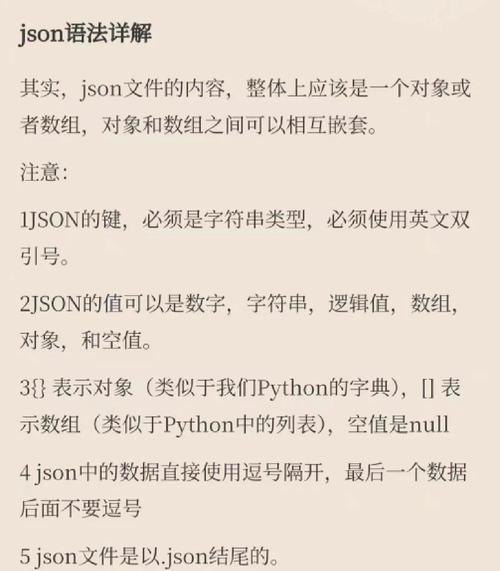
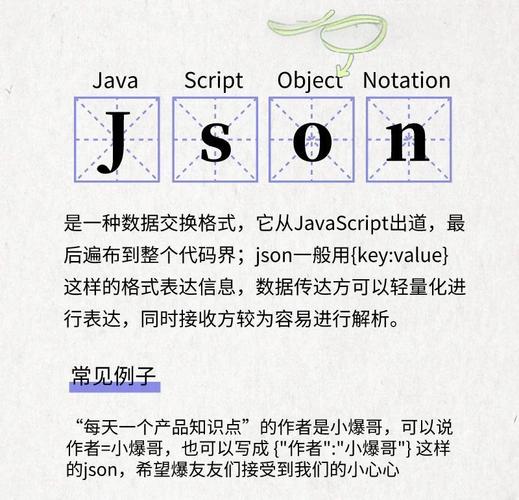
JSON (JavaScript Object Notation) is a lightweight, text-based data-interchange format. It's easy for humans to read and write, and easy for machines to parse and generate. It's the de-facto standard for web APIs.
A simple JSON object looks like this:
{
  "name": "John Doe",
  "age": 30,
  "isStudent": false,
  "courses": [
    { "title": "History", "credits": 3 },
    { "title": "Math", "credits": 4 }
  ],
  "address": null
}
Core Java: java.json (Built-in, no libraries needed)
Since Java 8, a standard API for processing JSON has been available as part of the Java EE specification (now Jakarta EE). If you are using Java 11 or newer, this API is included in the standard library (java.json module). For Java 8/9/10, you might need to add a dependency.
This API consists of three main packages:
javax.json: The core API for parsing and building JSON.javax.json.stream: For streaming parsing (good for large files).javax.json.spi: Service Provider Interface (SPI).
Example: Parsing a JSON String into a JsonObject
Let's say you have a JSON string and you want to read its values.
import javax.json.Json;
import javax.json.JsonObject;
import javax.json.JsonReader;
import java.io.StringReader;
public class JsonParseExample {
    public static void main(String[] args) {
        // Our JSON data as a String
        String jsonString = """
            {
              "name": "John Doe",
              "age": 30,
              "isStudent": false,
              "courses": [
                { "title": "History", "credits": 3 },
                { "title": "Math", "credits": 4 }
              ],
              "address": null
            }
            """;
        // Use a try-with-resources block to automatically close the reader
        try (JsonReader reader = Json.createReader(new StringReader(jsonString))) {
            // The entire JSON object is parsed into a JsonObject
            JsonObject jsonObject = reader.readObject();
            // Get values by key
            String name = jsonObject.getString("name");
            int age = jsonObject.getInt("age");
            boolean isStudent = jsonObject.getBoolean("isStudent");
            String address = jsonObject.getString("address", "N/A"); // With default value
            System.out.println("Name: " + name);
            System.out.println("Age: " + age);
            System.out.println("Is Student: " + isStudent);
            System.out.println("Address: " + address);
            // Get a nested JSON array
            System.out.println("\nCourses:");
            jsonObject.getJsonArray("courses").forEach(course -> {
                JsonObject courseObj = (JsonObject) course;
                String title = courseObj.getString("title");
                int credits = courseObj.getInt("credits");
                System.out.println("  - " + title + " (" + credits + " credits)");
            });
        } catch (Exception e) {
            e.printStackTrace();
        }
    }
}
Example: Creating a JSON String from a JsonObject
You can also build JSON from scratch.
import javax.json.Json;
import javax.json.JsonObject;
import javax.json.JsonObjectBuilder;
import javax.json.JsonArrayBuilder;
import java.util.ArrayList;
import java.util.List;
public class JsonBuildExample {
    public static void main(String[] args) {
        // Create a list of courses
        List<JsonObject> courses = new ArrayList<>();
        courses.add(Json.createObjectBuilder()
            .add("title", "History")
            .add("credits", 3)
            .build());
        courses.add(Json.createObjectBuilder()
            .add("title", "Math")
            .add("credits", 4)
            .build());
        // Build the main JSON object
        JsonObjectBuilder builder = Json.createObjectBuilder();
        builder.add("name", "Jane Doe");
        builder.add("age", 28);
        builder.add("isStudent", true);
        builder.add("courses", Json.createArrayBuilder(courses)); // Add the array
        builder.add("address", JsonValue.NULL); // Explicitly add a null value
        JsonObject jsonObject = builder.build();
        // Convert the JsonObject to a String
        String jsonString = jsonObject.toString();
        System.out.println(jsonString);
    }
}
The Most Popular Approach: Jackson Library
While the built-in API is great, the Jackson library is the de-facto standard in the Java world. It's incredibly powerful, fast, and flexible. It's used by massive frameworks like Spring.
Key advantage: Jackson can directly convert between JSON and Plain Old Java Objects (POJOs) using annotations, which is much cleaner than manually parsing JsonObjects.
Step 1: Add Jackson Dependency
You need to add Jackson to your project. If you're using Maven, add this to your pom.xml:
<dependency>
    <groupId>com.fasterxml.jackson.core</groupId>
    <artifactId>jackson-databind</artifactId>
    <version>2.15.2</version> <!-- Use the latest version -->
</dependency>
Step 2: Create a Java Class (POJO)
Create a Java class that mirrors the structure of your JSON. Use Jackson annotations to control the mapping.
import com.fasterxml.jackson.annotation.JsonIgnoreProperties;
import com.fasterxml.jackson.annotation.JsonProperty;
import java.util.List;
// @JsonIgnoreProperties(ignoreUnknown = true) tells Jackson to ignore any JSON properties
// that don't exist in this Java class.
@JsonIgnoreProperties(ignoreUnknown = true)
public class User {
    // @JsonProperty("name") maps the JSON "name" key to this Java field.
    @JsonProperty("name")
    private String fullName;
    private int age;
    private boolean isStudent;
    private List<Course> courses;
    private String address;
    // Inner class for the nested "course" objects
    public static class Course {
        private String title;
        private int credits;
        // Getters and Setters are required for Jackson
        public String getTitle() { return title; }
        public void setTitle(String title) { this.title = title; }
        public int getCredits() { return credits; }
        public void setCredits(int credits) { this.credits = credits; }
    }
    // Getters and Setters are required for Jackson
    public String getFullName() { return fullName; }
    public void setFullName(String fullName) { this.fullName = fullName; }
    public int getAge() { return age; }
    public void setAge(int age) { this.age = age; }
    public boolean isStudent() { return isStudent; }
    public void setStudent(boolean student) { isStudent = student; }
    public List<Course> getCourses() { return courses; }
    public void setCourses(List<Course> courses) { this.courses = courses; }
    public String getAddress() { return address; }
    public void setAddress(String address) { this.address = address; }
    @Override
    public String toString() {
        return "User{" +
                "fullName='" + fullName + '\'' +
                ", age=" + age +
                ", isStudent=" + isStudent +
                ", courses=" + courses +
                ", address='" + address + '\'' +
                '}';
    }
}
Example: Parsing JSON into a User Object
This is where Jackson shines.
import com.fasterxml.jackson.core.JsonProcessingException;
import com.fasterxml.jackson.databind.ObjectMapper;
public class JacksonParseExample {
    public static void main(String[] args) {
        String jsonString = """
            {
              "name": "John Doe",
              "age": 30,
              "isStudent": false,
              "courses": [
                { "title": "History", "credits": 3 },
                { "title": "Math", "credits": 4 }
              ],
              "address": null
            }
            """;
        // Create an ObjectMapper instance
        ObjectMapper objectMapper = new ObjectMapper();
        try {
            // The magic line! Maps JSON string to a User object.
            User user = objectMapper.readValue(jsonString, User.class);
            // Now you have a fully typed Java object
            System.out.println(user);
            System.out.println("User's first course: " + user.getCourses().get(0).getTitle());
        } catch (JsonProcessingException e) {
            System.err.println("Failed to parse JSON: " + e.getMessage());
            e.printStackTrace();
        }
    }
}
Example: Converting a User Object to JSON
Just as easily, you can write a Java object back to a JSON string.
import com.fasterxml.jackson.core.JsonProcessingException;
import com.fasterxml.jackson.databind.ObjectMapper;
import java.util.Arrays;
import java.util.List;
public class JacksonSerializeExample {
    public static void main(String[] args) {
        // 1. Create a Java object
        User user = new User();
        user.setFullName("Jane Doe");
        user.setAge(28);
        user.setStudent(true);
        List<User.Course> courses = Arrays.asList(
            new User.Course("History", 3),
            new User.Course("Math", 4)
        );
        user.setCourses(courses);
        // 2. Create an ObjectMapper
        ObjectMapper objectMapper = new ObjectMapper();
        try {
            // 3. The magic line! Converts the User object to a JSON string.
            //    The 'true' argument makes the output pretty-printed.
            String jsonString = objectMapper.writerWithDefaultPrettyPrinter().writeValueAsString(user);
            System.out.println(jsonString);
        } catch (JsonProcessingException e) {
            e.printStackTrace();
        }
    }
}
Summary: Which One Should I Use?
| Feature | java.json (Built-in) |
Jackson Library |
|---|---|---|
| Ease of Use | Good for simple parsing/building. Verbose for complex objects. | Excellent. POJO mapping is clean and intuitive. |
| Dependencies | None (for Java 11+). Very lightweight. | Requires adding a library (e.g., Jackson Databind). |
| Performance | Good for most cases. | Excellent. One of the fastest JSON libraries for Java. |
| Flexibility | Standard, but less powerful. | Extremely flexible. Handles complex scenarios, custom serializers, etc. |
| Best For | - Simple scripts where you don't want external dependencies. - Quick and dirty JSON manipulation. |
- Most applications, especially web services and APIs. - Projects using Spring Boot. - When you need to map JSON to/from complex Java objects. |
Recommendation:
- For quick tasks, interviews, or environments where you cannot add external libraries, the built-in
java.jsonAPI is perfectly fine. - For any real-world project, especially web development, use Jackson. It will save you time, is more robust, and is the industry standard.