Of course! This is an excellent question that gets to the heart of Android development. The relationship between C, C++, and Java is fundamental to understanding how Android works, from the apps you write to the operating system itself.
Let's break it down from a high level to a practical level.
The Big Picture: Why All Three?
Think of it like building a car:
- Java (and now Kotlin): This is the design blueprint and the driver's interface. It's what you, the car manufacturer (app developer), use to design the car's features (the app's UI and logic). It's high-level, easy to work with, and defines what the user sees and interacts with.
- C / C++: This is the engine and the transmission. It's the raw, powerful, and efficient core that does the heavy lifting. It's responsible for performance-critical tasks like accelerating, braking, and handling (in Android, this is graphics, audio, physics, and hardware communication).
Android uses a layered architecture. The top layer is for app developers (Java/Kotlin), and the lower layers are built with C/C++ for performance and hardware access.
Java (and its modern successor, Kotlin)
For the vast majority of Android developers, this is your primary language.
What is it used for?
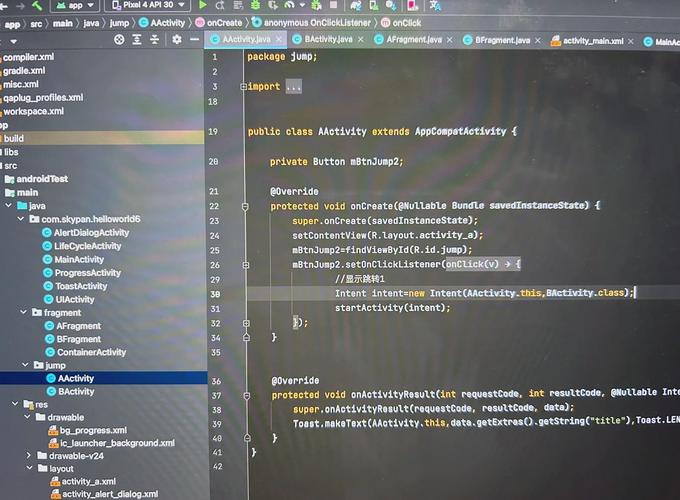
- App Logic: Writing the code that makes your app function (e.g., handling button clicks, fetching data from the internet, processing user input).
- User Interface (UI): Defining the layout and components of your app's screens (buttons, text fields, images) using XML or programmatically in Java/Kotlin code.
- App Structure: Creating Activities (screens), Services (background tasks), Broadcast Receivers (system event listeners), and Content Providers (data sharing).
Why was it chosen for Android?
- Portability: Java code runs on the Java Virtual Machine (JVM). Android doesn't use a standard JVM; it uses a custom, optimized VM called ART (Android Runtime). This allows the same Java code to run on any Android device, regardless of its underlying hardware (CPU, GPU).
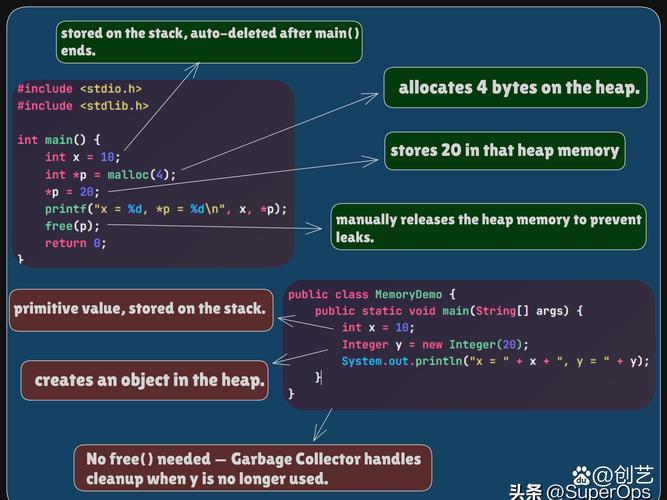
- Memory Management (Garbage Collection): Java automatically manages memory, which prevents common errors like memory leaks that are common in C/C++. This makes development faster and safer for most applications.
- Rich Ecosystem: A massive amount of open-source libraries, tools, and documentation is available for Java.
Modern Note: Google now officially recommends Kotlin as the preferred language for Android development. Kotlin is 100% interoperable with Java, is more concise and safer (e.g., null safety), but it still compiles down to the same bytecode that runs on the ART. For all practical purposes, you can think of Kotlin as a modern, improved version of Java for Android.
C and C++
This is where things get more interesting. You don't write most of your app in C/C++, but your Java/Kotlin code constantly relies on it.
What is it used for?
C and C++ are used for performance-critical, low-level tasks where Java's overhead is unacceptable. This is primarily within the Android Native Development Kit (NDK).
- Game Engines: High-performance 2D/3D graphics and physics engines (like Unity or Unreal Engine) are written in C++.
- AR (Augmented Reality): Computer vision tasks that need to process camera frames in real-time.
- Audio/Video Processing: Decoding and encoding media files.
- CPU-Intensive Tasks: Complex calculations, simulations, or data processing that need to squeeze every bit of performance out of the CPU.
- Hardware Interaction: Accessing device sensors or hardware features that don't have a Java API.
How do they interact with Java?
This is the magic of Android. There are two main bridges:
A. The Java Native Interface (JNI)
This is a programming framework that allows Java code running in the JVM to call and be called by native applications (programs) written in languages like C and C++.
-
How it works:
- You write a Java method with the
nativekeyword. This tells the JVM that the implementation of this method is not in Java, but in a native library. - You use a tool (
javacandjavah) to generate a C/C++ header file (.h). This header file contains a C-style function signature that matches your Java method. - You write the C/C++ code that implements this function.
- You compile your C/C++ code into a shared library (e.g.,
.sofile on Linux/Android). - At runtime, your Java app loads this library and can call your native C/C++ function as if it were a regular Java method.
- You write a Java method with the
-
Analogy: JNI is like a bilingual interpreter. The Java side speaks "Java," the C/C++ side speaks "C/C++," and the JNI interpreter translates between them.
B. The Android Runtime (ART)
This is the modern runtime environment for Android apps. It's a successor to the older Dalvik VM. ART is written in C/C++.
- What it does: ART is the virtual machine that executes your compiled app code (the
.dexfiles, which are Java/Kotlin bytecode). It manages memory, handles garbage collection, and optimizes app performance. - Its Importance: When you write an app in Java/Kotlin, you are writing for ART. ART itself is the C/C++ "engine" that runs your high-level "blueprint."
Summary Table
| Feature | Java / Kotlin | C / C++ |
|---|---|---|
| Primary Role | App Logic, UI, High-level structure | Performance, Low-level tasks, Hardware access |
| Where it Runs | Android Runtime (ART) | Directly on the CPU (compiled to native machine code) |
| Performance | Slower (due to VM overhead and GC) | Much Faster (near-metal performance) |
| Memory Management | Automatic Garbage Collection | Manual (Prone to memory leaks, segmentation faults) |
| Development Speed | Faster, safer, easier for most apps | Slower, more complex, requires careful management |
| Android Tool | Android SDK | Android NDK (Native Development Kit) |
| Interaction | Uses JNI to call C/C++ code | Called by Java/Kotlin via JNI |
| Example Use | A login screen, a list of products | A 3D game renderer, an image filter |
A Practical Workflow Example: An Image Filter App
- UI & Logic (Java/Kotlin): You create an
Activitywith a button ("Apply Filter") and anImageView. The button click listener triggers the filter process. - The "Heavy Lifting" (C++): The complex algorithm for applying a blur or sepia tone is written in C++ for performance. This code is compiled into a native library (e.g.,
libimagefilter.so). - The Bridge (JNI): In your Java/Kotlin code, you call a
nativemethod, for example:nativeBitmap applyFilter(Bitmap originalBitmap);. This call is passed through the JNI to your C++ function. - Execution: The C++ code receives the bitmap data, performs the fast pixel manipulation, and returns the new filtered bitmap data.
- Display (Java/Kotlin): The Java/Kotlin code receives the new bitmap from the C++ function and displays it in the
ImageView.
Conclusion
- For most Android developers: You will live primarily in the Java/Kotlin world. You will rarely, if ever, need to write C/C++ code.
- For specialized developers: If you are working on games, AR, or other high-performance apps, you will use the NDK and C/C++ to create performance-critical modules that you call from your main Java/Kotlin app using the JNI.
- Under the hood: The entire Android platform, from the ART runtime to the system libraries, is built on a massive foundation of C and C++, which is what allows your Java/Kotlin apps to run so efficiently on billions of devices.