Of course! The switch statement in Java is a control flow statement that allows a variable to be tested for equality against a list of values. Each value is called a case, and the variable is checked against each case in turn.
Here’s a comprehensive guide covering the basics, modern Java features, best practices, and common pitfalls.
The Basic switch Statement (Before Java 7)
The traditional switch works with byte, short, char, int, and their wrapper classes (Byte, Short, Character, Integer). It also works with enum types and, since Java 7, the String class.
Syntax
switch (expression) {
    case value1:
        // code to execute if expression == value1
        break; // Exits the switch block
    case value2:
        // code to execute if expression == value2
        break;
    default:
        // code to execute if expression doesn't match any case
        break; // The break is technically optional here, but good practice
}
Key Rules:
- The
breakKeyword: When acaseis matched, the code executes and continues to run into the nextcaseunless abreakstatement is encountered. This is called "fall-through." - The
defaultCase: This is optional but highly recommended. It acts as a catch-all for any value that doesn't match the othercases. It's good practice to put it at the end.
Example: Fall-Through
This example demonstrates what happens when you forget a break.
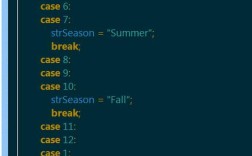
public class SwitchExample {
    public static void main(String[] args) {
        int day = 3;
        String dayName;
        switch (day) {
            case 1:
                dayName = "Monday";
                break;
            case 2:
                dayName = "Tuesday";
                break;
            case 3:
                dayName = "Wednesday";
                break;
            case 4:
                dayName = "Thursday";
                break;
            case 5:
                dayName = "Friday";
                break;
            case 6:
                dayName = "Saturday";
                break;
            case 7:
                dayName = "Sunday";
                break;
            default:
                dayName = "Invalid day";
                break;
        }
        System.out.println("Day " + day + " is " + dayName); // Output: Day 3 is Wednesday
    }
}
Modern switch Expressions (Java 14+)
Java introduced switch expressions, which are a more concise and powerful version of the traditional switch statement. The key differences are:
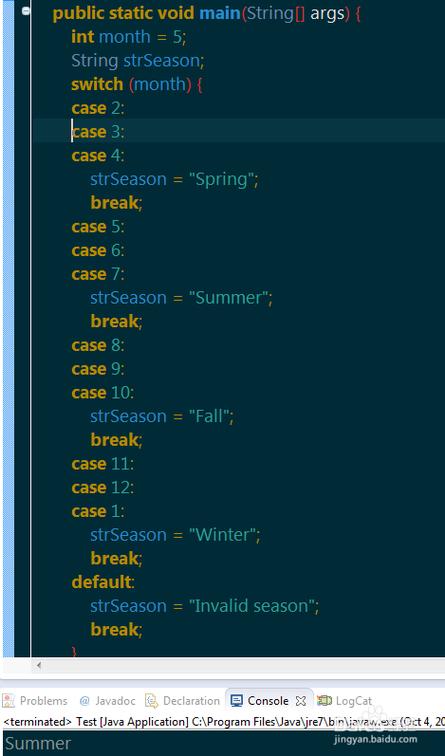
- Not a Statement, an Expression: It returns a value, so it can be used on the right-hand side of an assignment.
- No Fall-Through: You don't need
breakstatements. The->arrow syntax prevents fall-through. yieldKeyword: To return a value from acaseblock, you use theyieldkeyword.defaultCase: Thedefaultcase is now required if all possibleenumconstants orStringvalues are not covered.
Example: switch Expression with -> and yield
This is the modern, preferred way to write switch.
// Using a String
public class ModernSwitch {
    public static void main(String[] args) {
        String day = "MONDAY";
        String dayType;
        // switch expression
        dayType = switch (day) {
            case "MONDAY", "TUESDAY", "WEDNESDAY", "THURSDAY", "FRIDAY" ->
                "Weekday";
            case "SATURDAY", "SUNDAY" ->
                "Weekend";
            default -> {
                // Use yield for complex logic in a case block
                String result = "Invalid day: " + day;
                yield result;
            }
        };
        System.out.println(day + " is a " + dayType); // Output: MONDAY is a Weekday
    }
}
Key improvements in the example above:
- Conciseness: The
caselabels for "Weekday" are combined with a comma. - No
break: The->syntax automatically exits thecase. yield: Thedefaultcase usesyieldto return the result of a multi-line block of code.
switch vs. if-else
| Feature | switch Statement |
if-else Statement |
|---|---|---|
| Readability | Excellent for checking a single variable against many discrete values. | Can become verbose with many else if clauses. |
| Flexibility | Limited to specific types (int, String, enum, etc.). | Can evaluate any boolean expression (x > 5, name.equals("test"), etc.). |
| Performance | Can be slightly more efficient than a long chain of if-else as it uses a "jump table" for some types. |
The JVM is very good at optimizing if-else chains. The difference is often negligible. |
| Fall-Through | Default behavior (can be a pro or a con). | No fall-through; each block is independent. |
| Modern Syntax | Has powerful modern forms (switch expressions). |
The syntax has not changed significantly. |
Rule of Thumb:
- Use a
switchwhen you are testing a single variable against a set of constant values. - Use
if-elsewhen you need to check different conditions or ranges of values.
Advanced: switch with enum
Using switch with enum is a very common and clean pattern.
public enum Day {
    MONDAY, TUESDAY, WEDNESDAY, THURSDAY, FRIDAY, SATURDAY, SUNDAY
}
public class EnumSwitch {
    public static void main(String[] args) {
        Day today = Day.WEDNESDAY;
        switch (today) {
            case MONDAY:
                System.out.println("Start of the work week.");
                break;
            case WEDNESDAY:
                System.out.println("Hump day! Halfway there.");
                break;
            case FRIDAY:
                System.out.println("TGIF!");
                break;
            default:
                System.out.println("Just another day.");
                break;
        }
        // Output: Hump day! Halfway there.
    }
}
Common Pitfalls and Best Practices
- Forgetting the
break(inswitchstatements): This is the most common mistake. It leads to unintended "fall-through" behavior. Modernswitchexpressions solve this. - Missing
defaultCase: Always include adefaultcase to handle unexpected values gracefully. This makes your code more robust. - Using
switchfor Ranges: Don't useswitchto check for ranges (e.g.,case 1 ... 10:). This is not valid syntax in standard Java. Useif-elsefor ranges. - Overcomplicating
caseBlocks: Keep the code inside eachcaseblock simple. If it's complex, consider moving the logic to a separate method. - Using
switchExpressions Correctly: Remember thatswitchexpressions require ayieldto return a value from a block. You cannot usereturninside acaseblock of an expression.
Summary
| Feature | switch Statement (Legacy) |
switch Expression (Modern) |
|---|---|---|
| Purpose | Control flow statement | Expression that returns a value |
| Return Value | No (uses variables) | Yes |
| Syntax | case label: |
case label -> |
| Terminator | break (required) |
No break needed |
| Complex Logic | Can use break or let it fall through |
Must use yield to return a value |
For new Java code (version 14+), prefer switch expressions for their conciseness, safety (no fall-through), and power. Use the traditional switch statement only if you are working on older codebases or need to support older Java versions.