Of course! This is a classic and fundamental technology stack for building Java web applications. Let's break it down, starting from the basics and building up to a complete understanding.
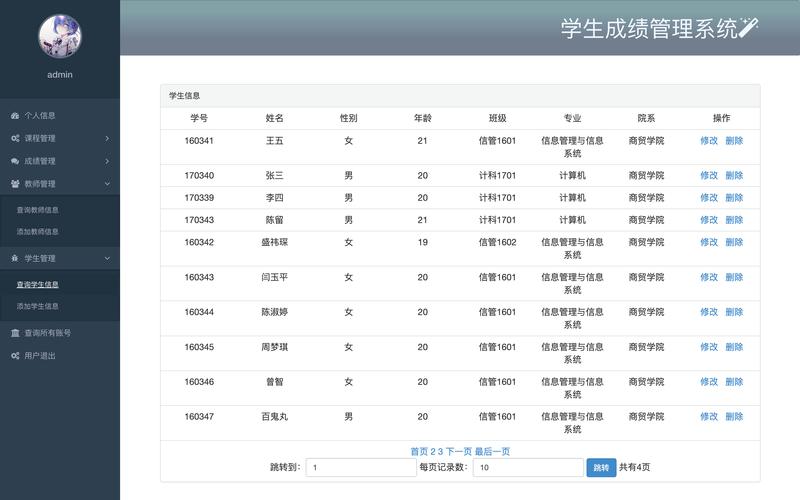
The Big Picture: What is the Servlet/JSP Model?
At its core, the Servlet/JSP model is a design pattern for web applications, often called Model 1 or Model 2 (MVC). It's a way to separate concerns:
- Servlets: Act as the Controller. They receive HTTP requests, handle business logic (interacting with databases, calculations), and then decide which view (JSP) to send back to the user.
- JSPs (JavaServer Pages): Act as the View. They are primarily responsible for generating the HTML response that the user sees in their browser. They allow you to embed Java code directly into HTML.
- Model: This is your application's data and business logic layer. It's typically a set of Plain Old Java Objects (POJOs) and services that interact with a database. The Servlet calls this layer to get or update data.
Servlets: The Controller
A servlet is a Java class that extends the HttpServlet class. Its main job is to respond to web requests.
Key Concepts for Servlets:
-
Lifecycle: A servlet has a well-defined lifecycle managed by the web server (like Tomcat).
init(): Called once when the servlet is first loaded. Used for one-time setup.service(): Called for every request. It determines the type of request (GET, POST, etc.) and calls the appropriatedoGet(),doPost(), etc.destroy(): Called once when the servlet is unloaded. Used for cleanup.
-
doGet()anddoPost(): These are the methods you'll most often override.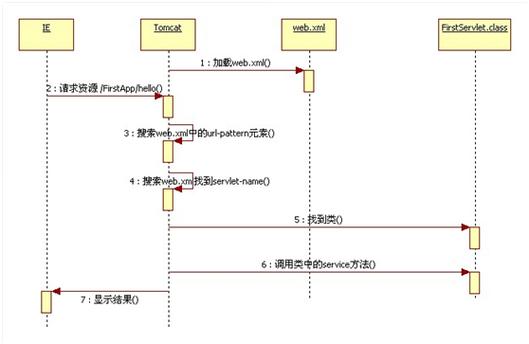 (图片来源网络,侵删)
doGet(): HandlesGETrequests (e.g., clicking a link, typing a URL in the browser).doPost(): HandlesPOSTrequests (e.g., submitting an HTML form).
-
HttpServletRequest: An object that contains all the information about the incoming request, such as headers, parameters, cookies, and session data. You get it as an argument indoGet()/doPost(). -
HttpServletResponse: An object that allows you to build and send the response to the client. You use it to set headers, the status code, and, most importantly, thePrintWriterto write the HTML content.
Simple Servlet Example: HelloServlet.java
import java.io.*;
import javax.servlet.*;
import javax.servlet.http.*;
// 1. Extend HttpServlet
public class HelloServlet extends HttpServlet {
    // 2. Override the doGet method
    @Override
    protected void doGet(HttpServletRequest request, HttpServletResponse response)
            throws ServletException, IOException {
        // 3. Set the content type of the response
        response.setContentType("text/html;charset=UTF-8");
        // 4. Get a writer to write the response
        PrintWriter out = response.getWriter();
        // 5. Write the HTML content
        out.println("<html>");
        out.println("<head><title>Hello Servlet</title></head>");
        out.println("<body>");
        out.println("<h1>Hello from a Servlet!</h1>");
        out.println("</body>");
        out.println("</html>");
    }
}
JSP (JavaServer Pages): The View
A JSP page looks like a regular HTML page, but it contains special tags that allow you to embed Java code and logic. When a JSP is first requested, the web server (like Tomcat) translates it into a servlet and then compiles it. After that, it runs just like a regular servlet.
Key JSP Elements:
- Scriptlets:
<% ... %>: A block of Java code that is executed in theservice()method of the generated servlet. (Avoid overusing these, as it mixes logic and presentation). - Expressions:
<%= ... %>: An expression that is evaluated and printed directly into the HTML output. Equivalent toout.println(...). - Declarations:
<%! ... %>: Used to declare instance variables or methods for the generated servlet. - Actions: XML-like tags that perform specific tasks, like including another file (
<jsp:include>) or forwarding to another page (<jsp:forward>). - Implicit Objects: These are special variables available to you in a JSP without any declaration. The most important ones are:
request: TheHttpServletRequestobject.response: TheHttpServletResponseobject.out: ThePrintWriterobject to write to the response.session: TheHttpSessionobject for user-specific data.application: TheServletContextobject for application-wide data.
Simple JSP Example: hello.jsp
<%@ page contentType="text/html;charset=UTF-8" language="java" %>
<html>
<head>Hello JSP</title>
</head>
<body>
    <h1>Hello from a JSP!</h1>
    <%-- This is a scriptlet --%>
    <%
        String user = "John Doe";
    %>
    <%-- This is an expression --%>
    <p>Welcome, <%= user %>!</p>
    <%-- You can also access request parameters --%>
    <p>The request URI is: <%= request.getRequestURI() %></p>
</body>
</html>
The Servlet/JSP Workflow (Putting it Together)
This is where the magic happens. A typical request flow looks like this:
- User Action: A user clicks a link or submits a form that points to a Servlet (e.g.,
/login). - Servlet Controller: The web server calls the servlet's
doGet()ordoPost()method. - Business Logic: The servlet performs its job. This might involve:
- Reading form data from the
requestobject (request.getParameter("username")). - Calling the Model (e.g., a
UserServiceclass) to validate the user against a database. - Storing data in the
requestorsessionscope to be used by the JSP.
- Reading form data from the
- Forward to View: The servlet doesn't generate HTML itself. Instead, it forwards the request to a JSP.
// In the servlet's doPost method request.setAttribute("user", loggedInUser); // Pass data to the JSP RequestDispatcher dispatcher = request.getRequestDispatcher("/welcome.jsp"); dispatcher.forward(request, response); - JSP View: The JSP receives the request and the data set by the servlet.
- Generate HTML: The JSP uses expressions (
<%= %>) and scriptlets to access the data and generate the final HTML. - Response: The web server sends the generated HTML back to the user's browser.
Modern Context: Servlets, JSPs, and MVC Frameworks
While the Servlet/JSP model is the foundation, it has limitations, especially for large applications (known as "spaghetti code" due to mixing logic and presentation).
This is where modern MVC (Model-View-Controller) frameworks like Spring MVC and Jakarta EE (formerly Java EE) come in.
- How they improve upon Servlet/JSP:
- Better Separation of Concerns: They provide a much stricter and cleaner MVC architecture.
- Dependency Injection: Frameworks like Spring manage the creation and wiring of your objects (beans), making your code more modular and testable.
- Simplified Configuration: Modern frameworks use annotations (e.g.,
@Controller,@RequestMapping,@Autowired) to configure your application, eliminating much of the XML configuration from older days. - Powerful View Technologies: While JSPs are still used, frameworks often integrate with more modern templating engines like Thymeleaf or FreeMarker, which are designed to work with HTML and don't mix Java code directly into the view.
Spring MVC Example (Conceptual)
This is how the same "Hello World" would look in a modern framework:
-
Controller: A plain Java class with annotations.
import org.springframework.stereotype.Controller; import org.springframework.web.bind.annotation.GetMapping; import org.springframework.web.servlet.ModelAndView; @Controller // Marks this as a Spring MVC controller public class GreetingController { @GetMapping("/hello") // Maps GET requests for "/hello" to this method public ModelAndView sayHello() { ModelAndView mav = new ModelAndView("helloView"); // The name of the view (JSP/Thymeleaf template) mav.addObject("message", "Hello from Spring MVC!"); // Data to pass to the view return mav; } } -
View: A Thymeleaf template (
helloView.html). Notice the clean separation.<!DOCTYPE html> <html xmlns:th="http://www.thymeleaf.org"> <head> <title>Hello</title> </head> <body> <h1 th:text="${message}">This text will be replaced</h1> </body> </html>
Summary: When to Use What
| Technology | Role | Pros | Cons | Best For |
|---|---|---|---|---|
| Servlets | Controller / Foundation | Standard, powerful, full control over request/response. | Low-level, can be verbose for HTML generation. | RESTful APIs, core application logic, simple controllers. |
| JSP | View | Familiar to HTML developers, easy to get started. | Mixing logic and presentation (scriptlets), considered dated. | Simple views, legacy applications, rapid prototyping. |
| Spring MVC | Full MVC Framework | Clean architecture, dependency injection, vast ecosystem. | Steeper learning curve than raw Servlet/JSP. | Most new Java web applications. |
| Thymeleaf | View Technology | Natural templating, works with static HTML, highly maintainable. | Not as "native" to the JSP world. | Modern Spring Boot applications, where design is important. |
Conclusion:
You should understand Servlets and JSP because they are the bedrock of Java web development. They teach you the fundamentals of the HTTP request-response cycle and how a web server works. However, for any new project, you should almost certainly use a modern framework like Spring Boot, which uses the principles of Servlets and MVC but provides a much more productive and maintainable way to build applications.