Of course! Here is a comprehensive guide to the switch statement in Java, covering its syntax, evolution, best practices, and common use cases.
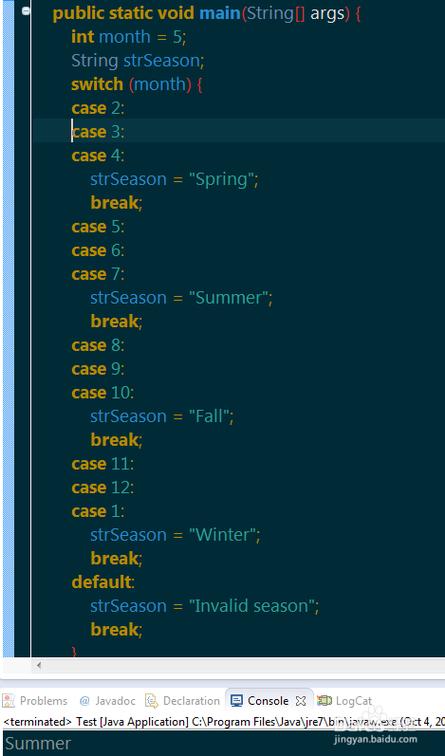
What is a switch Statement?
A switch statement is a control flow statement that allows a variable to be tested for equality against a list of values. Each value is called a case, and the variable being switched on is checked for each case.
It's an alternative to using a long chain of if-else if-else statements, which can make the code cleaner and more readable when you are checking a single variable against multiple discrete values.
Basic Syntax (Pre-Java 14)
This is the classic switch statement syntax that you'll find in older Java codebases.
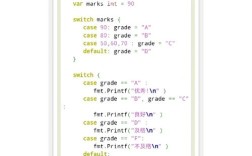
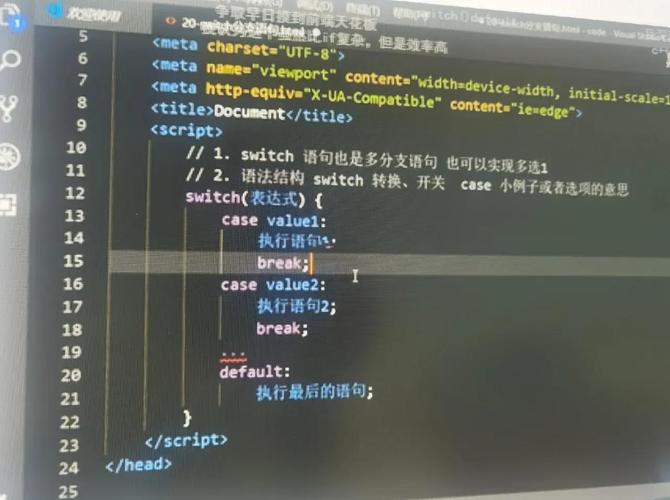
switch (expression) {
    case value1:
        // Code to execute if expression == value1
        break; // Exits the switch block
    case value2:
        // Code to execute if expression == value2
        break;
    case value3:
        // Code to execute if expression == value3
        break;
    default:
        // Code to execute if expression doesn't match any case
        break; // The break is technically optional here, but good practice
}
Key Rules for the Classic switch:
-
Expression: The value in the parentheses must be of a compatible type:
 (图片来源网络,侵删)
byte,short,char,int- Corresponding wrapper classes (
Byte,Short,Character,Integer) enum(since Java 5)String(since Java 7)- It cannot be a
long,float,double, orboolean.
-
caseLabels: Eachcaseis followed by a value and a colon . The value must be a constant or a literal of the same type as the expression. -
breakStatement: This is crucial. Thebreakstatement terminates theswitchblock. Without it, the execution will "fall through" to the nextcase, executing its code as well. This is a common source of bugs. -
defaultCase: This is an optional "catch-all" case. If the expression's value doesn't match any of thecasevalues, the code inside thedefaultblock is executed.
Example: Classic switch (Day of the Week)
Let's print a message based on the day of the week.

public class SwitchExample {
    public static void main(String[] args) {
        int day = 3;
        String dayName;
        switch (day) {
            case 1:
                dayName = "Monday";
                break;
            case 2:
                dayName = "Tuesday";
                break;
            case 3:
                dayName = "Wednesday";
                break;
            case 4:
                dayName = "Thursday";
                break;
            case 5:
                dayName = "Friday";
                break;
            case 6:
                dayName = "Saturday";
                break;
            case 7:
                dayName = "Sunday";
                break;
            default:
                dayName = "Invalid day";
                break;
        }
        System.out.println("The day is: " + dayName); // Output: The day is: Wednesday
    }
}
The Evolution of switch in Modern Java (Java 14+)
Modern Java has significantly improved the switch statement, making it more powerful and concise. These are the key enhancements:
switch Expressions (Java 14)
A switch expression evaluates to a single value, just like a ternary operator or a method call. It does not need break statements.
- Use
->(arrow) instead of forcaselabels. - The entire
switchevaluates to a value, which you assign to a variable. - Each
casemust provide a value oryieldone.
Example:
public class SwitchExpressionExample {
    public static void main(String[] args) {
        int day = 3;
        String dayName;
        // The switch is now an expression that returns a value
        dayName = switch (day) {
            case 1 -> "Monday";
            case 2 -> "Tuesday";
            case 3 -> "Wednesday";
            case 4 -> "Thursday";
            case 5 -> "Friday";
            case 6 -> "Saturday";
            case 7 -> "Sunday";
            default -> "Invalid day";
        };
        System.out.println("The day is: " + dayName); // Output: The day is: Wednesday
    }
}
This is much cleaner and less error-prone.
Multiple case Labels (Java 14+)
You can group multiple case labels together that share the same action. This is very useful for ranges or multiple values that should be treated identically.
Example: Checking for a Weekend Day
public class MultipleCaseExample {
    public static void main(String[] args) {
        int day = 6;
        String dayType;
        dayType = switch (day) {
            case 1, 2, 3, 4, 5 -> "Weekday";
            case 6, 7 -> "Weekend";
            default -> "Invalid day";
        };
        System.out.println(dayType); // Output: Weekend
    }
}
yield for Complex Blocks (Java 14+)
If the code for a case is more than a single expression, you must use the yield keyword to return the value from that block.
Example:
public class YieldExample {
    public static void main(String[] args) {
        int day = 5;
        String dayType;
        dayType = switch (day) {
            case 1, 2, 3, 4, 5 -> {
                // Some complex logic here
                String result = "Weekday";
                System.out.println("It's a work day.");
                yield result; // 'yield' returns the value from the switch expression
            }
            case 6, 7 -> "Weekend";
            default -> "Invalid day";
        };
        System.out.println("Day type is: " + dayType);
    }
}
Note: The yield keyword is specific to switch expressions and cannot be used in a traditional switch statement.
switch with String (Java 7+)
You can use String objects in a switch statement. The switch uses the String.equals() method for comparison, which is case-sensitive.
Example:
public class StringSwitchExample {
    public static void main(String[] args) {
        String fruit = "Mango";
        switch (fruit) {
            case "Apple":
                System.out.println("Selected fruit is Apple.");
                break;
            case "Mango":
                System.out.println("Selected fruit is Mango.");
                break;
            case "Banana":
                System.out.println("Selected fruit is Banana.");
                break;
            default:
                System.out.println("Unknown fruit.");
                break;
        }
        // Output: Selected fruit is Mango.
    }
}
switch Statement vs. if-else if-else
| Feature | switch Statement |
if-else if-else Statement |
|---|---|---|
| Readability | Excellent for checking a single variable against many discrete constants. | Good for complex boolean conditions or ranges. |
| Flexibility | Limited to specific data types. Can check for equality only. | Highly flexible. Can check any boolean condition (>, <, ==, &&, etc.). |
| Fall-through | Possible (a feature, but often a bug source). | Not applicable. Each if block is independent. |
| Modern Java | Can be an expression (returns a value), no break needed. |
Always a statement. Cannot directly return a value in the same way. |
When to use switch:
- You are checking a single variable.
- You are checking for equality against a fixed set of constants.
- You want concise, readable code (especially with modern Java syntax).
When to use if-else if-else:
- You need to check ranges of values (e.g.,
if (x > 10 && x < 20)). - You need to check multiple different variables.
- Your conditions are complex boolean expressions.
Summary
The switch statement in Java has evolved from a simple control-flow tool into a powerful and expressive feature. With the introduction of switch expressions in Java 14, it is now often a cleaner and more modern alternative to complex if-else chains when you are checking a single variable against a set of constant values.