Of course! Let's dive deep into java.io.InputStream. It's one of the most fundamental classes in Java for handling input.
What is an InputStream?
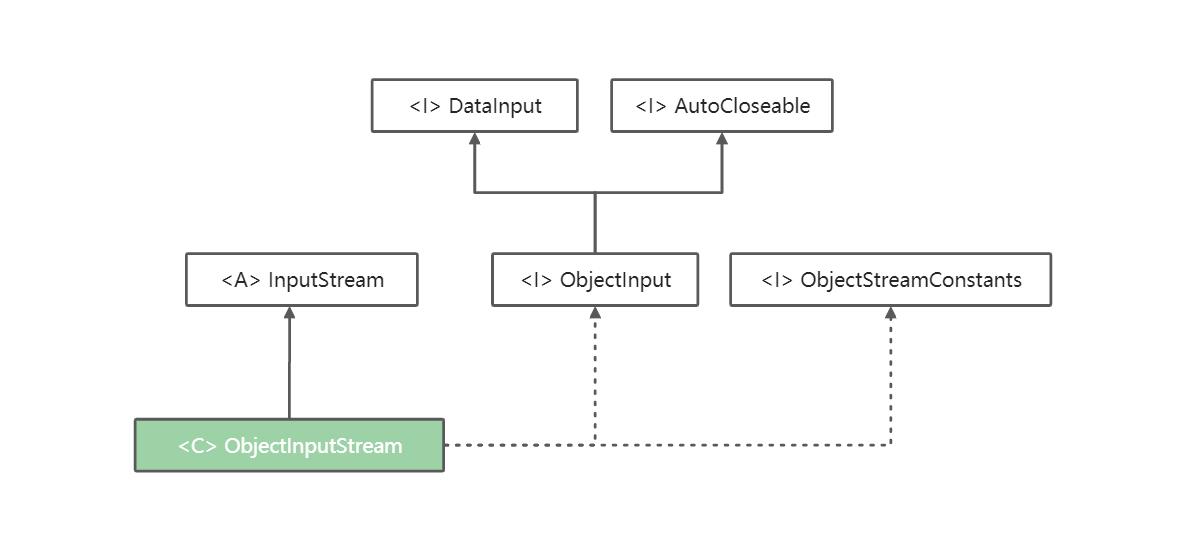
At its core, an InputStream is an abstract class that represents an input stream of bytes. It's the foundation for reading raw binary data from a source.
Think of it like a one-way pipe. You can only pull bytes out of it, you can't push bytes back in (unless you use a special PushbackInputStream). The source of these bytes can be anything:
- A file on your disk (
FileInputStream) - A network connection (
Socket.getInputStream()) - A block of memory in your program (
ByteArrayInputStream) - The system's standard input (usually your keyboard,
System.in) - A string (
StringInputStream- deprecated, butByteArrayInputStreamis the modern equivalent)
Key Characteristics
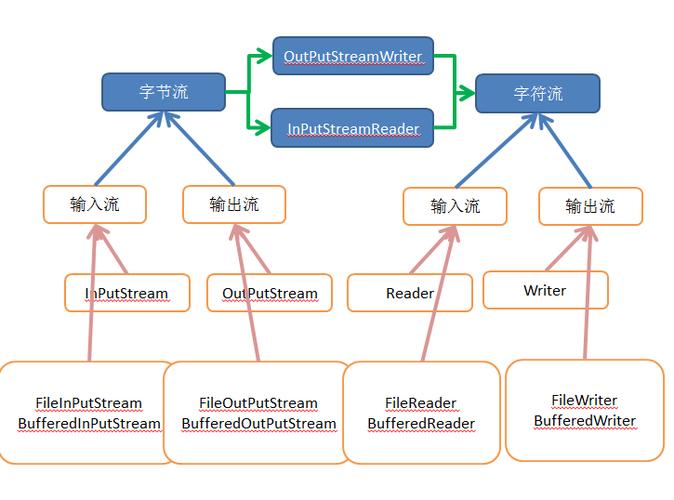
- Stream of Bytes: It reads data byte-by-byte (or in chunks of bytes). It does not understand characters, numbers, or objects directly. If you want to read text, you should use a higher-level class like
Reader(e.g.,InputStreamReader). - Sequential Access: You read data in a sequential, forward-only manner. Once a byte is read, it's gone from the stream.
- Abstract Base Class: You almost never instantiate
InputStreamdirectly. Instead, you use one of its many concrete subclasses that is designed for a specific data source.
Core Methods
These are the most important methods you'll use with any InputStream (or its subclasses).
| Method | Signature | Description |
|---|---|---|
| Read | int read() |
Reads the next byte of data from the input stream and returns it as an integer in the range 0 to 255. If the end of the stream is reached, it returns -1. This is the most basic read method. |
| Read (Buffer) | int read(byte[] b) |
Reads up to b.length bytes of data from the input stream into an array of bytes. It returns the number of bytes actually read, or -1 if the end of the stream is reached. This is far more efficient than reading one byte at a time. |
| Read (Offset & Length) | int read(byte[] b, int off, int len) |
Reads up to len bytes of data into the byte array b, starting at offset off. Returns the number of bytes read or -1 for end-of-stream. This gives you fine-grained control over where in the array the data is placed. |
| Skip | long skip(long n) |
Skips over and discards n bytes of data from the input stream. Returns the actual number of bytes skipped. |
| Available | int available() |
Returns the estimated number of bytes that can be read without blocking. "Blocking" means the current thread will pause until data is available. This is useful for non-blocking I/O. |
| Close | void close() |
Closes the input stream and releases any system resources (like file handles) associated with it. This is crucial! |
| Mark/Reset | void mark(int readlimit)void reset()boolean markSupported() |
These methods allow you to "bookmark" a position in the stream and later return to it. Not all streams support this. markSupported() tells you if they do. |
The Golden Rule: try-with-resources
Before Java 7, you had to manually close streams in a finally block to ensure resources were always released, even if an error occurred.
// Old, error-prone way
InputStream in = null;
try {
    in = new FileInputStream("file.txt");
    // ... read from the stream ...
} catch (IOException e) {
    e.printStackTrace();
} finally {
    // This is essential!
    if (in != null) {
        try {
            in.close();
        } catch (IOException e) {
            e.printStackTrace();
        }
    }
}
Since Java 7, the try-with-resources statement is the standard and recommended way. It automatically closes any resource that implements the AutoCloseable interface (which InputStream does) at the end of the try block.
// Modern, safe way (Java 7+)
try (InputStream in = new FileInputStream("file.txt")) {
    // ... read from the stream ...
    // 'in' is automatically closed here, even if an exception occurs.
} catch (IOException e) {
    e.printStackTrace();
}
Always use try-with-resources with streams!
Common Subclasses of InputStream
Here are the most frequently used concrete implementations:
| Subclass | Purpose | Example Use Case |
|---|---|---|
FileInputStream |
Reads bytes from a file. | Reading an image, a video, or any binary file. |
ByteArrayInputStream |
Reads bytes from a byte array. |
Reading data that is already in memory. |
BufferedInputStream |
A decorator that adds a buffer to another stream, improving performance. | Wrapping around a FileInputStream to make file reading much faster. |
ObjectInputStream |
Reads objects that have been previously written to a stream (Object Serialization). | Deserializing objects from a file or network. |
SequenceInputStream |
Represents a concatenation of multiple input streams. | Reading several files as if they were one continuous file. |
FilterInputStream |
An abstract class that is the superclass for all filtered input streams (like BufferedInputStream). |
The base for creating custom filtering streams. |
Practical Examples
Example 1: Reading a File Byte-by-Byte (Inefficient)
This demonstrates the basic read() method. Avoid this for large files as it's very slow.
import java.io.FileInputStream;
import java.io.IOException;
import java.io.InputStream;
public class ReadByteByByte {
    public static void main(String[] args) {
        // The file to read
        String filePath = "my-file.txt";
        // try-with-resources ensures the stream is closed automatically
        try (InputStream in = new FileInputStream(filePath)) {
            int byteData;
            // read() returns -1 when the end of the stream is reached
            while ((byteData = in.read()) != -1) {
                // Cast the int to a char to display it (assuming it's text)
                // For binary data, you would just work with the integer value.
                System.out.print((char) byteData);
            }
        } catch (IOException e) {
            System.err.println("An error occurred while reading the file: " + e.getMessage());
        }
    }
}
Example 2: Reading a File Efficiently with a Buffer
This is the correct way to read a file. It reads a chunk of data at a time, which is much more efficient.
import java.io.FileInputStream;
import java.io.IOException;
import java.io.InputStream;
public class ReadWithBuffer {
    public static void main(String[] args) {
        String filePath = "my-file.txt";
        // A buffer of 8KB is a common size
        byte[] buffer = new byte[8192];
        try (InputStream in = new FileInputStream(filePath)) {
            int bytesRead;
            // read(buffer) reads data into the buffer and returns the number of bytes read
            while ((bytesRead = in.read(buffer)) != -1) {
                // Process the chunk of data
                // For example, convert to a string and print
                String chunk = new String(buffer, 0, bytesRead);
                System.out.print(chunk);
            }
        } catch (IOException e) {
            System.err.println("An error occurred: " + e.getMessage());
        }
    }
}
Example 3: Chaining Streams with BufferedInputStream
Here we wrap a FileInputStream with a BufferedInputStream. This is a very common pattern to get the best of both worlds: a specific source (FileInputStream) and high performance (BufferedInputStream).
import java.io.BufferedInputStream;
import java.io.FileInputStream;
import java.io.IOException;
import java.io.InputStream;
public class ChainedStreams {
    public static void main(String[] args) {
        String filePath = "my-file.txt";
        // The FileInputStream is the "source"
        // The BufferedInputStream is a "filter" that wraps the source
        try (InputStream in = new BufferedInputStream(new FileInputStream(filePath))) {
            byte[] buffer = new byte[8192];
            int bytesRead;
            while ((bytesRead = in.read(buffer)) != -1) {
                // Process the chunk...
                System.out.write(buffer, 0, bytesRead); // Efficient way to write bytes to console
            }
        } catch (IOException e) {
            System.err.println("An error occurred: " + e.getMessage());
        }
    }
}
InputStream vs. Reader
This is a very important distinction for Java developers.
| Feature | InputStream |
Reader |
|---|---|---|
| Data Type | Bytes (byte[]) |
Characters (char[]) |
| Encoding | Encoding Agnostic. It just moves bytes. | Encoding Aware. Uses a character set (e.g., UTF-8, ISO-8859-1) to convert bytes to characters. |
| Hierarchy | InputStream (abstract) |
Reader (abstract) |
| Common Subclass | FileInputStream |
FileReader |
| Use Case | Images, videos, PDFs, network protocols, any binary data. | Text files, XML, JSON, HTML, CSV, any text-based data. |
When to use which?
- Use
InputStreamwhen you are dealing with binary data or when you don't care about the encoding. - Use
Readerwhen you are dealing with text. If you only have anInputStreambut need to read text, useInputStreamReaderas a bridge:
// The correct way to read a text file
try (InputStream byteStream = new FileInputStream("text.txt");
     Reader charReader = new InputStreamReader(byteStream, "UTF-8");
     BufferedReader bufferedReader = new BufferedReader(charReader)) {
    String line;
    while ((line = bufferedReader.readLine()) != null) {
        System.out.println(line);
    }
} catch (IOException e) {
    e.printStackTrace();
}
Summary
InputStreamis the abstract base class for reading bytes from a source.- It's sequential and forward-only.
- Always use the
try-with-resourcesstatement to ensure it's closed properly. - For performance, prefer
read(byte[] b)overread(). - Use a
BufferedInputStreamto wrap other streams for better performance. - Choose
InputStreamfor binary data andReaderfor text data.