Of course! Here is a comprehensive guide on how to connect a Java application to a MySQL database using JDBC (Java Database Connectivity). This guide is structured for beginners and includes everything from setup to best practices.
What is JDBC?
JDBC (Java Database Connectivity) is an API (Application Programming Interface) that allows Java applications to interact with databases. It provides methods to query and update data in a database, and it works with any database that has a JDBC driver, including MySQL, PostgreSQL, Oracle, and SQL Server.
Think of JDBC as a "translator" that lets your Java code speak the language of a specific database.
Step 1: Prerequisites
-
Java Development Kit (JDK): Ensure you have a JDK installed (version 8 or newer is recommended).
-
MySQL Server: You need a running MySQL server instance.
 (图片来源网络,侵删)
 -
MySQL Database and User: Create a database and a user with privileges on that database.
-- Connect to your MySQL server (e.g., using MySQL Workbench or the command line)
-- Create a new database
CREATE DATABASE my_app_db;
-- Create a new user and grant privileges on the database
CREATE USER 'java_user'@'localhost' IDENTIFIED BY 'your_strong_password';
GRANT ALL PRIVILEGES ON my_app_db.* TO 'java_user'@'localhost';
FLUSH PRIVILEGES;
Step 2: Add the MySQL JDBC Driver Dependency
Your Java application needs the MySQL JDBC driver, which is a JAR (Java Archive) file that implements the JDBC API. There are two primary ways to add it to your project.
Method A: Using Maven (Recommended for most projects)
If you're using a build tool like Maven, add the mysql-connector-java dependency to your pom.xml file. The driver is now hosted under the com.mysql groupId.
<project ...>
    ...
    <dependencies>
        <!-- Add this dependency -->
        <dependency>
            <groupId>com.mysql</groupId>
            <artifactId>mysql-connector-j</artifactId>
            <version>8.0.33</version> <!-- Use the latest version -->
        </dependency>
    </dependencies>
</project>
Maven will automatically download the JAR file and make it available to your project.
Method B: Manual JAR Download
- Go to the MySQL Connector/J downloads page.
- Select the Platform Independent version (ZIP archive).
- Download and extract the ZIP file.
- Copy the
mysql-connector-j-8.0.xx.jarfile (the version number may vary) into your project'slibfolder. - If you are using an IDE like IntelliJ or Eclipse, right-click the JAR file and select "Add as Library" or "Build Path -> Add to Build Path".
Step 3: Writing the Java Code
Let's create a Java class to perform basic database operations: Create, Read, Update, and Delete (CRUD).
A. The DatabaseConnector Class (Handles Connection)
It's good practice to have a class that manages the connection to the database.
import java.sql.Connection;
import java.sql.DriverManager;
import java.sql.SQLException;
public class DatabaseConnector {
    // Database connection details
    private static final String DB_URL = "jdbc:mysql://localhost:3306/my_app_db";
    private static final String USER = "java_user";
    private static final String PASS = "your_strong_password";
    /**
     * Establishes a connection to the MySQL database.
     * @return a Connection object
     * @throws SQLException if a database access error occurs
     */
    public static Connection getConnection() throws SQLException {
        // The try-with-resources statement ensures the connection is closed automatically
        return DriverManager.getConnection(DB_URL, USER, PASS);
    }
}
Explanation:
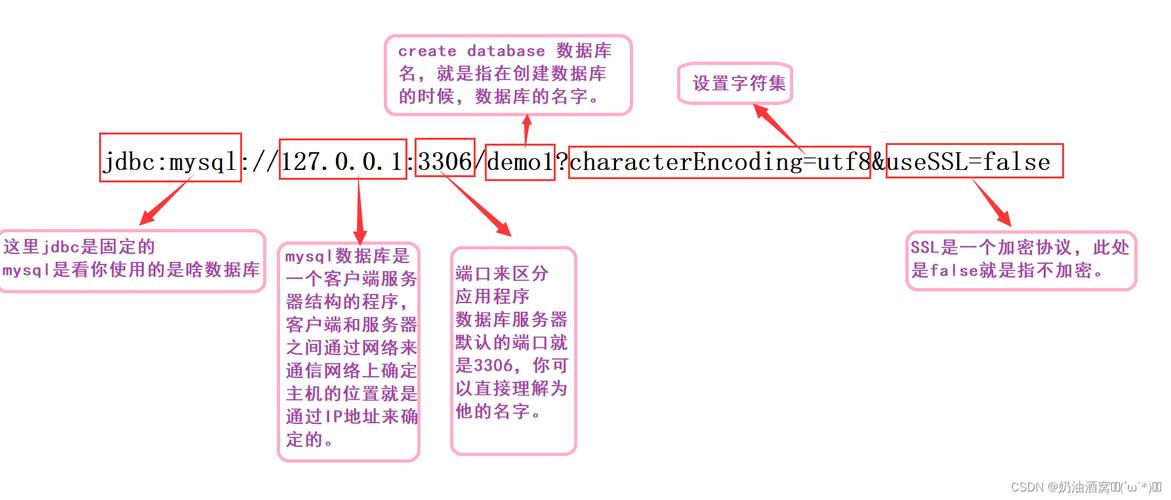
DB_URL: The connection string.jdbc:mysql://: The protocol and subprotocol for MySQL.localhost:3306: The host and port of your MySQL server./my_app_db: The name of the database you want to connect to.
USERandPASS: The credentials for the database user you created.DriverManager.getConnection(): This is the standard JDBC method to establish a connection.try-with-resources: We will use this pattern in our main class to ensure the connection is always closed, preventing resource leaks.
B. The MainApp Class (Performs CRUD Operations)
This class will use the DatabaseConnector to interact with the database.
import java.sql.Connection;
import java.sql.Statement;
import java.sql.ResultSet;
import java.sql.SQLException;
public class MainApp {
    public static void main(String[] args) {
        // --- 1. CREATE Operation ---
        // createRecord();
        // --- 2. READ Operation ---
        readRecords();
        // --- 3. UPDATE Operation ---
        // updateRecord(1, "Updated Name");
        // --- 4. DELETE Operation ---
        // deleteRecord(1);
    }
    /**
     * Creates a new record in the 'users' table.
     */
    public static void createRecord() {
        String sql = "INSERT INTO users (name, email) VALUES ('Alice', 'alice@example.com')";
        // Using try-with-resources for Statement
        try (Connection conn = DatabaseConnector.getConnection();
             Statement stmt = conn.createStatement()) {
            int rowsAffected = stmt.executeUpdate(sql);
            System.out.println(rowsAffected + " record inserted.");
        } catch (SQLException e) {
            e.printStackTrace();
        }
    }
    /**
     * Reads and displays all records from the 'users' table.
     */
    public static void readRecords() {
        String sql = "SELECT id, name, email FROM users";
        // Using try-with-resources for Connection, Statement, and ResultSet
        try (Connection conn = DatabaseConnector.getConnection();
             Statement stmt = conn.createStatement();
             ResultSet rs = stmt.executeQuery(sql)) {
            System.out.println("--- Current Users ---");
            while (rs.next()) {
                // Retrieve by column name for clarity and robustness
                int id = rs.getInt("id");
                String name = rs.getString("name");
                String email = rs.getString("email");
                System.out.println("ID: " + id + ", Name: " + name + ", Email: " + email);
            }
            System.out.println("--------------------");
        } catch (SQLException e) {
            e.printStackTrace();
        }
    }
    /**
     * Updates a record in the 'users' table.
     * @param id The ID of the user to update.
     * @param newName The new name for the user.
     */
    public static void updateRecord(int id, String newName) {
        String sql = "UPDATE users SET name = ? WHERE id = ?";
        // Using try-with-resources for Connection and PreparedStatement
        try (Connection conn = DatabaseConnector.getConnection();
             // PreparedStatement is used to prevent SQL injection
             PreparedStatement pstmt = conn.prepareStatement(sql)) {
            pstmt.setString(1, newName);
            pstmt.setInt(2, id);
            int rowsAffected = pstmt.executeUpdate();
            System.out.println(rowsAffected + " record updated.");
        } catch (SQLException e) {
            e.printStackTrace();
        }
    }
    /**
     * Deletes a record from the 'users' table.
     * @param id The ID of the user to delete.
     */
    public static void deleteRecord(int id) {
        String sql = "DELETE FROM users WHERE id = ?";
        try (Connection conn = DatabaseConnector.getConnection();
             PreparedStatement pstmt = conn.prepareStatement(sql)) {
            pstmt.setInt(1, id);
            int rowsAffected = pstmt.executeUpdate();
            System.out.println(rowsAffected + " record deleted.");
        } catch (SQLException e) {
            e.printStackTrace();
        }
    }
}
Explanation of Key JDBC Concepts:
Connection: Represents the session with the database. You need a connection to execute queries.Statement: Used to execute static SQL queries (no parameters). It's simple but vulnerable to SQL injection.PreparedStatement: Highly Recommended. Used to execute pre-compiled SQL queries with parameters (). It is safer (prevents SQL injection) and more efficient if you execute the same query multiple times.ResultSet: Represents the data returned from aSELECTquery. You use methods likenext()to move through the rows andgetXXX()(e.g.,getString(),getInt()) to retrieve column values.executeUpdate(): Used forINSERT,UPDATE,DELETE, andDDL(Data Definition Language) statements. Returns the number of rows affected.executeQuery(): Used forSELECTstatements. Returns aResultSet.try-with-resources: This Java construct automatically closes any resource that implements theAutoCloseableinterface (likeConnection,Statement,ResultSet) when the block is exited. This is crucial for preventing resource leaks.
Step 4: Create the Table
Before running the code, you need a table in your my_app_db database. Execute the following SQL command:
USE my_app_db;
CREATE TABLE users (
    id INT AUTO_INCREMENT PRIMARY KEY,
    name VARCHAR(100) NOT NULL,
    email VARCHAR(100) NOT NULL UNIQUE
);
Step 5: Run the Application
Now you can run the MainApp.java class. You will see the output from the readRecords() method in your console. To test other operations, uncomment the corresponding method calls in the main method.
Best Practices and Advanced Topics
- Connection Pooling: Creating a new database connection for every request is expensive. Use a connection pool (like HikariCP, the default in Spring Boot) to reuse connections. This dramatically improves performance.
- JDBC with Frameworks: Modern frameworks like Spring Boot and Jakarta EE (JPA) simplify database access significantly. They handle connection pooling, transaction management, and provide a more object-oriented way to interact with the database (e.g., using
JpaRepositoryin Spring Data JPA). - Transactions: For operations that must be atomic (all succeed or all fail), use transactions. A transaction groups multiple SQL statements into a single unit of work.
conn.setAutoCommit(false); // Start transaction try { // Execute multiple SQL statements stmt1.executeUpdate(...); stmt2.executeUpdate(...); conn.commit(); // Commit the transaction if all is well } catch (SQLException e) { conn.rollback(); // Roll back the transaction on error } finally { conn.setAutoCommit(true); // Reset auto-commit mode } - Handling Dates and Times: Use
java.timeclasses (LocalDate,LocalDateTime, etc.) withPreparedStatement.setObject()andResultSet.getObject()for type-safe date handling.