核心方法概览
Java 提供了多种方式来实现这个转换,主要可以分为以下几类:
(图片来源网络,侵删)
- 基本数据类型包装类的静态方法:最推荐、最安全的方式。
Number抽象类的parseXXX()方法:传统方式,需要处理异常。String类的split()方法:用于将包含数字的字符串分割后转换。DecimalFormat类:用于处理格式化的数字字符串(如带千位分隔符、货币符号等)。- 第三方库(如 Apache Commons Lang, Guava):提供了更简洁的工具方法。
转换为 int (最常用)
Integer.parseInt() (推荐)
这是将字符串转换为 int 最直接、最常用的方法,它是一个静态方法,专门用于解析字符串并返回一个基本数据类型 int。
特点:
- 返回基本数据类型
int。 - 如果字符串不是有效的整数格式,会抛出
NumberFormatException异常。 - 优点:性能最好,直接返回基本类型。
- 缺点:需要手动处理异常。
示例代码:
public class StringToInt {
    public static void main(String[] args) {
        String str1 = "123";
        String str2 = "45.67"; // 不能转换为 int
        String str3 = "abc";   // 不能转换为 int
        String str4 = null;    // 空指针异常
        // 成功转换
        int num1 = Integer.parseInt(str1);
        System.out.println("字符串 '" + str1 + "' 转换为 int: " + num1);
        // 处理可能出现的异常 (非常重要)
        try {
            // 会抛出 NumberFormatException
            int num2 = Integer.parseInt(str2);
            System.out.println(num2);
        } catch (NumberFormatException e) {
            System.out.println("错误: 字符串 '" + str2 + "' 不是有效的整数格式。");
        }
        try {
            // 会抛出 NumberFormatException
            int num3 = Integer.parseInt(str3);
            System.out.println(num3);
        } catch (NumberFormatException e) {
            System.out.println("错误: 字符串 '" + str3 + "' 不是有效的整数格式。");
        }
        try {
            // 会抛出 NullPointerException
            int num4 = Integer.parseInt(str4);
            System.out.println(num4);
        } catch (NullPointerException e) {
            System.out.println("错误: 字符串不能为 null。");
        }
    }
}
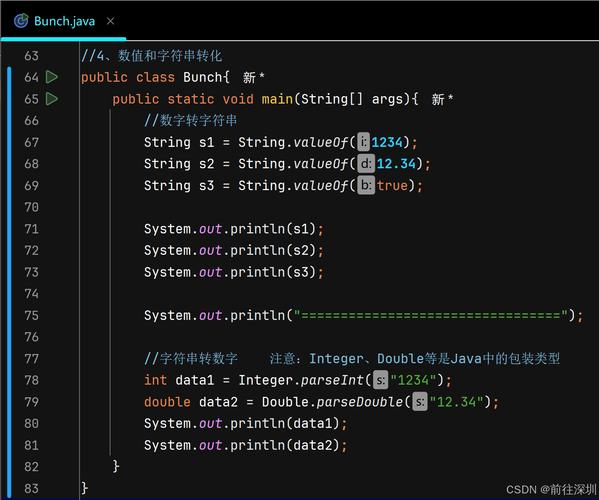
Integer.valueOf() (推荐)
这个方法将字符串转换为 Integer 对象(int 的包装类)。
(图片来源网络,侵删)
特点:
- 返回
Integer对象。 - 同样,如果字符串无效,会抛出
NumberFormatException。 - 优点:返回对象,可以用于需要
Object的场景(如集合)。 - 缺点:性能比
parseInt稍差,因为它涉及到对象的创建,Java 5+ 的自动装箱机制会自动将Integer转为int,所以通常可以和parseInt互换使用。
示例代码:
String str = "100";
Integer numberObject = Integer.valueOf(str); // 返回 Integer 对象
int primitiveNumber = numberObject; // 自动装箱
System.out.println(numberObject);
System.out.println(primitiveNumber);
转换为其他基本数据类型 (long, double, float, short, byte)
转换方法与 int 类似,只需要使用对应的包装类即可。
| 目标类型 | 包装类 | 解析方法 | 值解析方法 |
|---|---|---|---|
int |
Integer |
Integer.parseInt(str) |
Integer.valueOf(str) |
long |
Long |
Long.parseLong(str) |
Long.valueOf(str) |
double |
Double |
Double.parseDouble(str) |
Double.valueOf(str) |
float |
Float |
Float.parseFloat(str) |
Float.valueOf(str) |
short |
Short |
Short.parseShort(str) |
Short.valueOf(str) |
byte |
Byte |
Byte.parseByte(str) |
Byte.valueOf(str) |
示例:转换为 long 和 double
(图片来源网络,侵删)
String longStr = "1234567890123L"; // L 可选
long longNum = Long.parseLong(longStr); // 使用 parseLong
System.out.println("转换为 long: " + longNum);
String doubleStr = "3.14159";
double doubleNum = Double.parseDouble(doubleStr); // 使用 parseDouble
System.out.println("转换为 double: " + doubleNum);
处理特殊格式(如带千位分隔符)
如果字符串中包含千位分隔符(如 "1,000,000"),直接使用 parseXXX 方法会抛出异常,这时需要使用 DecimalFormat 类。
示例代码:
import java.text.DecimalFormat;
import java.text.ParseException;
public class StringToNumberWithFormat {
    public static void main(String[] args) {
        String formattedNumber = "1,234,567.89";
        // 创建 DecimalFormat 模式,指定千位分隔符和小数点
        DecimalFormat df = new DecimalFormat("#,###.##");
        try {
            // 将格式化的字符串解析为 Number 对象
            Number number = df.parse(formattedNumber);
            // 从 Number 对象获取具体的类型
            double doubleValue = number.doubleValue();
            long longValue = number.longValue();
            System.out.println("原始字符串: " + formattedNumber);
            System.out.println("转换为 double: " + doubleValue); // 1234567.89
            System.out.println("转换为 long: " + longValue);     // 1234567
        } catch (ParseException e) {
            System.out.println("解析失败: " + e.getMessage());
        }
    }
}
使用第三方库 (简化代码)
像 Apache Commons Lang 和 Google Guava 这样的库提供了更简洁、更强大的工具方法。
Apache Commons Lang (NumberUtils)
你需要添加依赖:
<!-- Maven -->
<dependency>
    <groupId>org.apache.commons</groupId>
    <artifactId>commons-lang3</artifactId>
    <version>3.12.0</version>
</dependency>
示例代码:
NumberUtils 提供了 toInt 等方法,它们在转换失败时会返回一个默认值,避免了异常处理。
import org.apache.commons.lang3.math.NumberUtils;
public class ApacheCommonsExample {
    public static void main(String[] args) {
        String str1 = "123";
        String str2 = "abc";
        String str3 = null;
        // 转换成功,返回解析后的值
        int num1 = NumberUtils.toInt(str1);
        System.out.println("toInt('" + str1 + "') = " + num1); // 123
        // 转换失败,返回指定的默认值 0
        int num2 = NumberUtils.toInt(str2, 0);
        System.out.println("toInt('" + str2 + "', 0) = " + num2); // 0
        // 字符串为 null,返回指定的默认值 -1
        int num3 = NumberUtils.toInt(str3, -1);
        System.out.println("toInt(null, -1) = " + num3); // -1
    }
}
Google Guava (Ints, Doubles 等)
添加依赖:
<!-- Maven -->
<dependency>
    <groupId>com.google.guava</groupId>
    <artifactId>guava</artifactId>
    <version>32.1.2-jre</version>
</dependency>
示例代码:
Guava 的工具类提供了 tryParse 方法,它返回 Optional 对象,可以更优雅地处理转换失败的情况。
import com.google.common.primitives.Ints;
public class GuavaExample {
    public static void main(String[] args) {
        String str1 = "456";
        String str2 = "xyz";
        // Ints.tryParse 返回一个 Optional<Integer>
        // 如果解析成功,Optional 包含值;否则为空。
        java.util.Optional<Integer> optional1 = Ints.tryParse(str1);
        java.util.Optional<Integer> optional2 = Ints.tryParse(str2);
        // 使用 ifPresent 处理成功的情况
        optional1.ifPresent(value -> System.out.println("tryParse 成功: " + value)); // 456
        // 使用 orElse 处理失败的情况
        int result = optional2.orElse(-1); // 如果解析失败,返回 -1
        System.out.println("tryParse 失败后的默认值: " + result); // -1
    }
}
总结与最佳实践
| 场景 | 推荐方法 | 原因 |
|---|---|---|
| 简单字符串转基本类型 | Integer.parseInt(str) / Long.parseLong(str) 等 |
性能最佳,直接返回基本类型,是 Java 标准做法。 |
| 需要处理异常 | try-catch 块包裹 parseXXX 或 valueOf |
必须处理,否则程序会因异常而崩溃,这是健壮代码的基石。 |
字符串可能为 null |
先进行 null 检查,再调用转换方法 |
避免 NullPointerException。 |
| 需要返回对象 | Integer.valueOf(str) / Long.valueOf(str) 等 |
直接返回 Integer 对象,省去手动装箱的步骤。 |
| 字符串含千位分隔符等格式 | DecimalFormat.parse() |
专门用于处理复杂的数字格式。 |
| 希望转换失败时返回默认值,而非抛出异常 | Apache Commons Lang NumberUtils.toInt(str, defaultValue) |
代码更简洁,减少了 try-catch 块,逻辑更清晰。 |
| 使用现代 Java 风格处理可选值 | Google Guava Ints.tryParse(str) |
返回 Optional,更符合函数式编程思想,能有效避免 NullPointerException。 |
核心建议:
- 优先使用标准库:
Integer.parseInt()和Long.parseLong()是你的首选。 - 永远不要忽略异常:始终用
try-catch包裹可能失败的转换,或者使用能提供默认值/可选值的工具。 - 注意
null值:在调用任何转换方法前,检查字符串是否为null。 - 考虑项目需求:如果项目中已经使用了 Apache Commons 或 Guava,优先使用它们提供的工具,可以大大简化代码并提高可读性。