Of course! Working with random elements in a Python list is a common task. The primary tool for this is Python's built-in random module.
Here’s a comprehensive guide covering the most common operations, from basic to more advanced.
The random Module
First, you need to import the random module. This module contains functions for generating random numbers and making random selections.
import random
Common Operations on Lists
Here are the most frequent things you'll want to do with a random list element.
A. Selecting a Single Random Element
Use random.choice() to pick one random item from a list. This is the most straightforward method.
How it works: It returns a single element from the sequence you provide.
Example:
import random
my_list = ['apple', 'banana', 'cherry', 'date', 'elderberry']
random_element = random.choice(my_list)
print(f"The original list is: {my_list}")
print(f"A random element is: {random_element}")
Possible Output:
The original list is: ['apple', 'banana', 'cherry', 'date', 'elderberry']
A random element is: cherry
B. Selecting Multiple Random Elements (Without Replacement)
Use random.sample() to pick k unique random elements from a list. The original list is not modified.
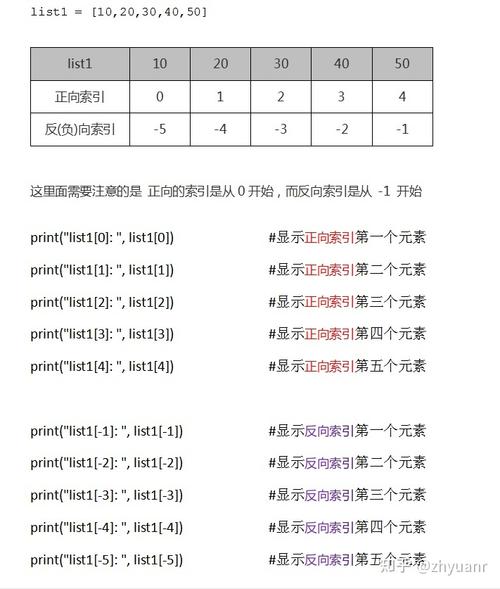
How it works: It returns a new list containing k unique elements chosen from the original sequence.
Example:
import random
my_list = [1, 2, 3, 4, 5, 6, 7, 8, 9, 10]
k = 3  # Number of elements to choose
random_elements = random.sample(my_list, k)
print(f"The original list is: {my_list}")
print(f"{k} random elements are: {random_elements}")
Possible Output:
The original list is: [1, 2, 3, 4, 5, 6, 7, 8, 9, 10]
3 random elements are: [2, 9, 1]
Important: If k is larger than the length of the list, random.sample() will raise a ValueError.
C. Shuffling a List (In-Place)
Use random.shuffle() to randomly reorder the elements of a list. This function modifies the list in-place and returns None.
How it works: It rearranges the elements of the list randomly. It does not return a new list.
Example:
import random
my_list = [1, 2, 3, 4, 5]
print(f"List before shuffling: {my_list}")
# This function modifies the list directly
random.shuffle(my_list)
print(f"List after shuffling:  {my_list}")
Possible Output:
List before shuffling: [1, 2, 3, 4, 5]
List after shuffling:  [4, 1, 5, 2, 3]
Common Mistake: new_list = random.shuffle(my_list) will result in new_list being None, because shuffle() modifies the list in-place and returns nothing.
D. Getting a Random Slice
Use random.choices() to select k elements from a list, but with replacement. This means the same element can be chosen more than once.
How it works: It's useful for things like rolling a die multiple times or picking raffle tickets where a winner can be picked multiple times.
Example:
import random
my_list = [1, 2, 3, 4, 5, 6] # Like a die
k = 10 # Roll the die 10 times
random_slice = random.choices(my_list, k=k)
print(f"The original list is: {my_list}")
print(f"A random slice of {k} elements (with replacement): {random_slice}")
Possible Output:
The original list is: [1, 2, 3, 4, 5, 6]
A random slice of 10 elements (with replacement): [3, 6, 2, 3, 1, 6, 6, 2, 4, 1]
You can also provide weights to make some elements more likely to be chosen than others.
Advanced: Weighted Random Choices
Sometimes you don't want every element to have an equal chance of being selected. For this, you can use the weights parameter in random.choices().
How it works: You provide a list of numbers corresponding to the weights of each element in your original list. Higher weight = higher probability.
Example: Imagine a bag of colored marbles where you are more likely to pick a red one.
import random
marbles = ['red', 'blue', 'green']
# The probability of picking 'red' is 50%, 'blue' is 30%, 'green' is 20%
weights = [50, 30, 20]
# Pick 10 marbles based on the weighted probabilities
selected_marbles = random.choices(marbles, weights=weights, k=10)
print(f"Marbles: {marbles}")
print(f"Weights: {weights}")
print(f"10 weighted random selections: {selected_marbles}")
Possible Output:
Marbles: ['red', 'blue', 'green']
Weights: [50, 30, 20]
10 weighted random selections: ['red', 'red', 'blue', 'red', 'green', 'red', 'red', 'blue', 'red', 'red']
Notice how 'red' appears much more frequently than 'green'.
Security Considerations: secrets Module
If you are generating random values for security-sensitive applications (like creating passwords, security tokens, or for cryptography), you should NOT use the random module. It is designed for modeling and simulation, not security.
Instead, use the secrets module, which is available in Python 3.6+.
The secrets module has similar functions but uses the best source of randomness your operating system can provide.
Example: Securely picking a random password character from a list.
import secrets
import string
# A list of characters to choose from
all_chars = string.ascii_letters + string.digits + string.punctuation
# Securely choose one random character
secure_char = secrets.choice(all_chars)
print(f"A list of characters: {all_chars}")
print(f"A securely chosen character: {secure_char}")
# To generate a random password of 16 characters
password_length = 16
secure_password = ''.join(secrets.choice(all_chars) for i in range(password_length))
print(f"A securely generated password: {secure_password}")
Summary Table
| Function | What It Does | Returns | Modifies Original List? | Use Case |
|---|---|---|---|---|
random.choice(seq) |
Picks one random item. | The single item. | No | Picking a random winner from a list. |
random.sample(pop, k) |
Picks k unique random items. | A new list of items. | No | Selecting a random team of 5 people. |
random.shuffle(lst) |
Randomly reorders the list. | None |
Yes | Shuffling a deck of cards. |
random.choices(pop, k=...) |
Picks k items, with replacement. | A new list of items. | No | Simulating 10 dice rolls. |
secrets.choice(seq) |
Securely picks one random item. | The single item. | No | Generating a secure password character. |